
Introduction
Thank you for purchasing the WOOPKER AK45 Pro HiFi Amplifier. This manual provides detailed instructions for the proper setup, operation, and maintenance of your new audio amplifier. Please read this manual thoroughly before using the product to ensure optimal performance and safety. Keep this manual for future reference.
Safety Instructions
WARNING: To reduce the risk of fire or electric shock, do not expose this appliance to rain or moisture.
- Read all instructions before operating the amplifier.
- Keep the amplifier away from water, moisture, and direct sunlight.
- Do not block any ventilation openings. Install in accordance with the manufacturer's instructions.
- Do not install near any heat sources such as radiators, heat registers, stoves, or other apparatus (including amplifiers) that produce heat.
- Protect the power cord from being walked on or pinched, particularly at plugs, convenience receptacles, and the point where they exit from the amplifier.
- Only use attachments/accessories specified by the manufacturer.
- Unplug this amplifier during lightning storms or when unused for long periods of time.
- Refer all servicing to qualified service personnel. Servicing is required when the amplifier has been damaged in any way, such as power-supply cord or plug is damaged, liquid has been spilled or objects have fallen into the amplifier, the amplifier has been exposed to rain or moisture, does not operate normally, or has been dropped.
Package Contents
Please check the box for the following items:
- WOOPKER AK45 Pro HiFi Amplifier x 1
- EU Power Cable x 1
- IR Remote Control x 1
- FM Antenna x 1
- User Manual x 1

Image: The complete package contents of the AK45 Pro amplifier, showing all included accessories.
Product Overview
Front Panel

Image: Detailed view of the AK45 Pro amplifier's front panel, highlighting each control and input.
- Power Switch: Turns the amplifier on or off.
- USB/SD Slot: For playing audio from USB drives or SD cards.
- LED Display: Shows current mode and track information.
- Mode Button: Switches between input modes (Bluetooth, AUX, FM, USB, SD).
- Previous Track Button: Skips to the previous track.
- Play/Pause Button: Plays or pauses audio playback.
- Next Track Button: Skips to the next track.
- Repeat Button: Repeats the current track or playlist.
- Treble Control: Adjusts the high-frequency audio level.
- Bass Control: Adjusts the low-frequency audio level.
- MIC/VOL Control: Adjusts microphone volume.
- MIC1/MIC2 Inputs: 6.35mm jacks for connecting microphones.
- Master Volume Control: Adjusts the overall output volume.
Rear Panel

Image: Detailed view of the AK45 Pro amplifier's rear panel, showing all connection ports.
- Audio Input Jack (RCA): For connecting external audio devices via RCA cables.
- FM Antenna Jack: For connecting the FM antenna.
- Speaker Output Terminals: For connecting passive speakers.
- DC 12V/5A Power Supply Input: Alternative power input for 12V DC.
- AC 240V Power Supply Input: Main power input for AC 110-240V.
Setup
Speaker Connection
The AK45 Pro amplifier supports passive speakers with 4-16 Ohm impedance.

Image: Visual guide for connecting speaker wires to the amplifier's output terminals.
- Before connecting speakers, identify the positive (+) and negative (-) terminals on your speakers. Typically, the positive terminal is red and the negative is black.
- Press the clamp on the back of the AK45 Pro amplifier and insert the bare speaker wires, ensuring positive matches positive and negative matches negative.
- Avoid inserting or removing USB drives, SD cards, RCA audio cables, or speaker cables while the amplifier is powered on.
Power Connection
Connect the provided power cable to the AC power input on the rear panel of the amplifier and then plug it into a suitable wall outlet (AC 110-240V). Alternatively, you can use a DC 12V/5A power supply (not included) with the DC input.
Connecting Audio Sources
Bluetooth Connection

Image: Illustration of a smartphone wirelessly connected to the AK45 Pro amplifier via Bluetooth.
- Turn on the amplifier.
- Press the 'Mode' button on the front panel or remote control until 'BLUE' appears on the LED display.
- Enable Bluetooth on your mobile device (phone, tablet, etc.).
- Search for 'AK45 Pro' in your device's Bluetooth settings and select it to pair.
- Once connected, you can play audio from your device through the amplifier.
Note: Maintain a distance of less than 10 meters (30 feet) between your device and the amplifier for stable Bluetooth connection. For TV or PC connections, keep the distance within 5 meters (15 feet).
AUX/RCA Connection
Use an RCA audio cable to connect external audio devices such as CD players, DVD players, TVs, or PCs to the 'Audio Input' jacks on the rear panel. Press the 'Mode' button to select the AUX input.
USB/SD Card Playback
Insert a USB drive or SD card into the corresponding slot on the front panel. The amplifier will automatically switch to USB/SD mode and begin playing audio files. Supported formats include MP3.
FM Radio
Connect the provided FM antenna to the 'FM ANT' jack on the rear panel. Press the 'Mode' button to select FM radio mode. The amplifier will automatically scan and store available radio stations.
Microphone Input
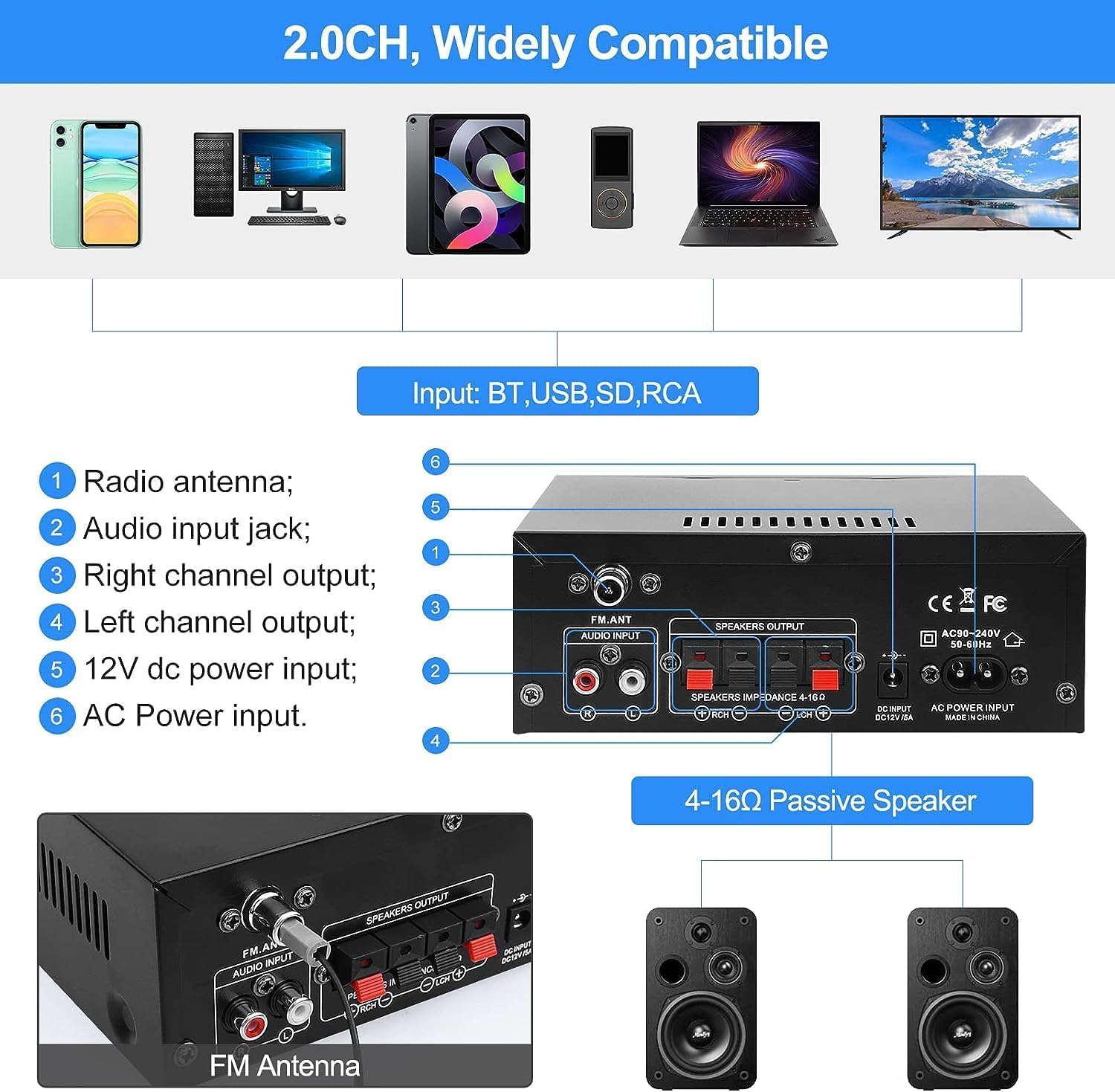
Image: Two individuals enjoying karaoke with microphones connected to the AK45 Pro amplifier.
Connect up to two microphones to the 'MIC1' and 'MIC2' inputs on the front panel. Adjust the microphone volume using the 'MIC/VOL' knob. This feature is ideal for karaoke or public speaking.
Operating Instructions
Power On/Off
Toggle the 'Power' switch on the front panel to turn the amplifier on or off.
Volume Control
Rotate the large 'Volume' knob on the front panel clockwise to increase volume and counter-clockwise to decrease it. You can also adjust the volume using the remote control.
Mode Selection
Press the 'Mode' button on the front panel or remote control to cycle through available input sources: Bluetooth, AUX, FM, USB, and SD.
Treble and Bass Adjustment
Use the 'Treble' and 'Bass' knobs on the front panel to fine-tune the high and low frequencies of the audio output according to your preference.
Remote Control

Image: A hand holding the infrared remote control, used for convenient operation of the amplifier from a distance.
The included IR remote control allows you to conveniently manage power, volume, mode selection, track skipping, and other functions from a distance.
Maintenance
- Cleaning: Use a soft, dry cloth to clean the amplifier's exterior. Do not use liquid cleaners or aerosol sprays.
- Storage: When not in use for extended periods, store the amplifier in a cool, dry place away from direct sunlight and extreme temperatures.
- Ventilation: Ensure proper ventilation around the amplifier to prevent overheating. Do not cover the ventilation openings.
Troubleshooting
| Problem | Possible Cause / Solution |
|---|---|
| No power | Check if the power cable is securely connected. Ensure the power switch is in the 'ON' position. Verify the power outlet is functional. |
| No sound output | Check speaker connections (positive/negative). Ensure the correct input mode is selected. Increase the master volume. Check audio source device volume. |
| Bluetooth not connecting | Ensure the amplifier is in Bluetooth mode. Make sure Bluetooth is enabled on your device. Move your device closer to the amplifier. Disconnect from other Bluetooth devices. |
| USB/SD playback issues | Ensure the USB drive/SD card is inserted correctly. Check if audio files are in a supported format (e.g., MP3). Try a different USB drive/SD card. |
| Poor FM radio reception | Ensure the FM antenna is properly connected and extended. Try repositioning the antenna for better signal. |
| Microphone not working | Ensure microphones are securely plugged in. Adjust the 'MIC/VOL' knob. Check microphone functionality. |
Specifications
| Feature | Detail |
|---|---|
| Model | AK45 Pro |
| Rated Power Output | Up to 50W x 2 |
| Channels | 2.0 Channel Stereo |
| Speaker Impedance | 4-16 Ohm |
| Power Input | AC 110-240V; DC 12V/5A |
| Bluetooth Version | Bluetooth 5.0 |
| Inputs | Bluetooth, AUX (RCA), MIC, SD Card, USB |
| Additional Features | FM Radio, Treble/Bass Adjustment, Remote Control |
| Dimensions (Approx.) | 180mm x 138mm x 65mm (7.09in x 5.44in x 2.56in) |
| Weight (Approx.) | 880 grams |
Warranty and Support
WOOPKER is committed to providing high-quality products and excellent customer service. For any inquiries or support needs, please refer to the following:
- 24 Hours: Quick response within 24 hours for customer queries.
- 30 Day Return: Return within 30 days for an exchange or refund.
- Lifetime Technical Support: Enjoy lifetime technical customer support for your product.

Image: WOOPKER's commitment to customer service, including response times and support duration.


