
1. Important Safety Instructions
Please read all instructions carefully before using the appliance. Keep this manual for future reference.
- Ensure the voltage indicated on the appliance corresponds to your local mains voltage before connecting.
- Do not immerse the appliance, cord, or plug in water or any other liquid.
- Supervise children closely when the appliance is in use.
- Unplug the appliance from the outlet when not in use and before cleaning. Allow it to cool before adding or removing parts.
- Do not operate any appliance with a damaged cord or plug, or after the appliance malfunctions or has been damaged in any manner.
- Do not use accessories not recommended by the appliance manufacturer.
- Do not place the appliance on or near a hot gas or electric burner, or in a heated oven.
- Exercise extreme caution when moving an appliance containing hot oil or other hot liquids.
- Do not use the appliance for anything other than its intended use.
- Ensure the appliance is placed on a stable, level, and heat-resistant surface.
- Always ensure proper ventilation around the airfryer oven during operation.
2. Product Overview
The Tomado TAF1201B is a versatile 12-liter airfryer oven designed for healthier cooking. It features a digital display with touch controls and comes with various accessories to enhance your cooking experience.
Components and Accessories
- Main Airfryer Oven Unit
- Digital Control Panel
- Viewing Window
- Rotisserie Spit: For roasting whole chickens or roasts.
- Oven Rack: For baking, grilling, or dehydrating.
- Drip Tray/Crumb Plate: Collects excess oil and crumbs for easy cleaning.
- Rotisserie Removal Tool (if included, implied by rotisserie)

Image 2.1: The interior of the Tomado TAF1201B Airfryer Oven, showing fries on an upper rack and chicken pieces with vegetables on a lower tray. This illustrates the multi-level cooking capability.
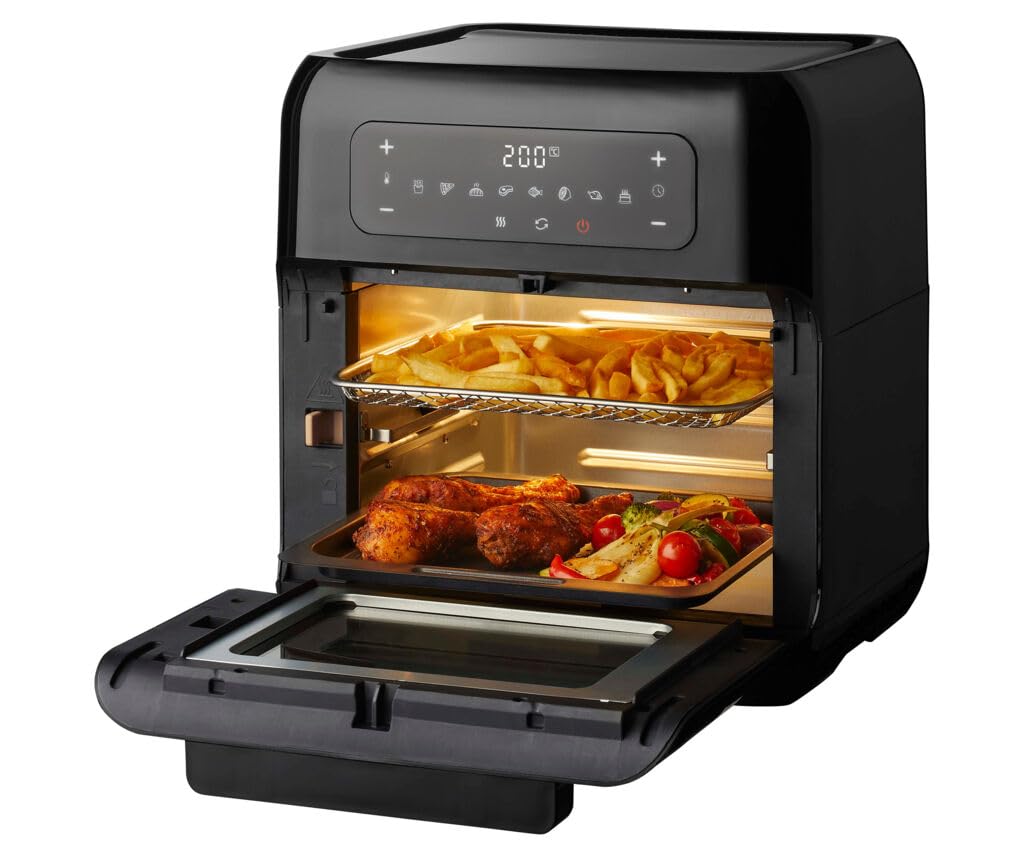
Image 2.2: The Tomado TAF1201B Airfryer Oven in operation, featuring a whole roasted chicken on the rotisserie spit inside, and a bowl of fries next to the unit. This highlights the rotisserie function and typical use.
3. Setup and First Use
Unpacking and Placement
- Remove all packaging materials, stickers, and labels from the appliance.
- Wipe the exterior of the appliance with a damp cloth.
- Wash all removable parts (rotisserie spit, oven rack, drip tray) in warm, soapy water. Rinse thoroughly and dry completely.
- Place the airfryer oven on a stable, level, and heat-resistant surface, ensuring adequate space (at least 10 cm) around the unit for proper ventilation.
Initial Burn-in (Recommended)
Before cooking food, it is recommended to run the appliance empty for about 15 minutes to eliminate any manufacturing odors.
- Plug the appliance into a grounded power outlet.
- Set the temperature to 200°C and the timer to 15 minutes.
- Allow the appliance to run. A slight odor or smoke may be present; this is normal.
- Once complete, unplug the appliance and let it cool down completely.
4. Operating Instructions
Digital Control Panel
The digital display and touch controls allow for easy selection of cooking programs, temperature, and time settings.
- Power Button: Turns the appliance on/off.
- Temperature Controls (+/-): Adjusts temperature from 40°C to 210°C.
- Time Controls (+/-): Adjusts cooking time up to 90 minutes.
- Program Selection: Icons for 8 preset programs (Steak, Poultry, Shrimp, Fish, Pizza, Fries, Bake, Vegetables).
- Rotisserie Function: Activates the rotating spit.
- Light Button: Turns the interior light on/off.
Using Preset Programs
The TAF1201B features 8 automatic programs for common dishes:
- Place food inside the airfryer oven using the appropriate accessory (e.g., oven rack, rotisserie).
- Press the Power button to turn on the appliance.
- Select the desired program by touching the corresponding icon on the digital display. The default time and temperature for that program will appear.
- You can adjust the time and temperature manually using the +/- buttons if needed.
- Press the Start button (often the Power button again or a dedicated start icon) to begin cooking.
Manual Operation
For custom cooking, you can set the temperature and time manually:
- Place food inside the airfryer oven.
- Press the Power button.
- Use the Temperature +/- buttons to set the desired temperature (40°C to 210°C).
- Use the Time +/- buttons to set the desired cooking time (up to 90 minutes).
- Press the Start button to begin cooking.
Using the Rotisserie Function
The rotisserie spit is ideal for roasting whole chickens or larger cuts of meat.
- Secure the food onto the rotisserie spit, ensuring it is balanced and centered.
- Insert the rotisserie spit into the designated slots inside the oven.
- Close the oven door.
- Set the desired temperature and time (or select a poultry preset).
- Press the Rotisserie button to activate the rotation.
- Press Start to begin cooking.
- Once cooking is complete, use the rotisserie removal tool to safely extract the hot spit and food.

Image 4.1: A close-up view of the Tomado TAF1201B Airfryer Oven with a whole chicken rotating on the rotisserie spit inside. This demonstrates the rotisserie feature in action.
5. Maintenance and Cleaning
Regular cleaning ensures optimal performance and extends the lifespan of your airfryer oven. Always unplug the appliance and allow it to cool completely before cleaning.
Cleaning the Interior and Exterior
- Wipe the exterior with a damp cloth and mild detergent. Do not use abrasive cleaners.
- For the interior, wipe down with a damp cloth. For stubborn food residue, use a non-abrasive sponge and mild soap.
- The interior features a PFAS-free non-stick coating, making cleaning easier. Avoid using metal utensils or harsh scrubbing pads that could damage the coating.
- Clean the heating element gently with a soft brush if necessary, ensuring the appliance is unplugged and cool.
Cleaning Accessories
- All removable accessories (rotisserie spit, oven rack, drip tray) can be washed in warm, soapy water.
- Rinse thoroughly and dry completely before storing or re-using.
- Some accessories may be dishwasher safe; refer to specific accessory instructions if available.
6. Troubleshooting
If you encounter issues with your Tomado TAF1201B Airfryer Oven, consult the following table for common problems and solutions.
| Problem | Possible Cause | Solution |
|---|---|---|
| Appliance does not turn on. | Not plugged in; power outlet issue; appliance malfunction. | Ensure the plug is securely in a working outlet. Check your circuit breaker. Contact customer support if the issue persists. |
| Food is not cooked evenly. | Overcrowding; incorrect temperature/time; food not rotated. | Do not overcrowd the basket/rack. Ensure food is in a single layer. Adjust temperature/time. Shake or turn food halfway through cooking. |
| White smoke coming from the appliance. | Grease/oil residue; fatty food cooking. | Clean the drip tray and interior thoroughly. For fatty foods, ensure the drip tray is clean and consider using less oil. |
| Rotisserie spit not rotating. | Spit not correctly installed; rotisserie function not activated. | Ensure the spit is properly seated in its slots. Verify the rotisserie button has been pressed. |
7. Specifications
Technical details for the Tomado TAF1201B Airfryer Oven.
- Model: TAF1201B
- Brand: Tomado
- Capacity: 12 Liters
- Wattage: 1700 Watts
- Temperature Range: 40°C to 210°C
- Timer: Up to 90 minutes
- Control Type: Digital Touchscreen
- Programs: 8 Preset Programs
- Material: Plastic (exterior), PFAS-free non-stick coating (interior)
- Included Components: Rotisserie Spit, Oven Rack, Drip Tray/Crumb Plate
- Item Weight: 8200 Grams
- Power Source: Electric
- GTIN: 08712876501940

Image 7.1: A close-up of the product label, showing model number TAF1201B, power specifications (1500W - 220-240V), and manufacturer details. Note: Official product specifications state 1700W.
8. Warranty and Support
Tomado products are designed for reliability and performance. For warranty information and customer support, please refer to the official Tomado website or contact your retailer.
- Manufacturer: Tomado
- Warranty: Typically 2 years. Please check your purchase documentation for specific warranty terms.
- Support: For technical assistance, spare parts, or service, please visit the official Tomado website or contact their customer service department.
- Website: www.tomado.com