
1. Introduction
The Zunate TXI022 is a robust serial device server designed for seamless bidirectional data transmission between RS232 serial devices and an Ethernet network. This adapter enables remote configuration and management of RS232 devices, making it ideal for various industrial applications, access control systems, and other environments requiring reliable serial-to-network communication.

Figure 1: Zunate TXI022 RJ45 to RS232 Serial Network Adapter
2. Product Features
- Remote Access: Facilitates transparent bidirectional transmission between RS232 and Ethernet, allowing remote configuration and management of RS232 serial devices.
- Supported Data Rates: Supports data transfer rates ranging from 300 bps to 230,400 bps, enabling instant connection of serial devices to an Ethernet network.
- Multiple Control Modes: Features automatic MDI/MDIX and an adaptive 10/100 Mbps RJ45 port. Supports TCP Server, TCP Client, UDP, and VCOM operating modes. Includes CTS/RTS flow control.
- Durable and Reliable Design: Constructed with industrial-grade materials for enhanced anti-interference capabilities and durability, suitable for diverse industrial environments. Internal circuits undergo rigorous testing to ensure stable long-term operation and reduced failure rates.
- Wide Compatibility: Compatible with various operating systems, including XP, WIN7, WIN8, and WIN10. Suitable for applications such as CNC machines, process control equipment, serial printers, access control panels, cameras, and card readers.

Figure 2: Remote access capabilities

Figure 3: Multiple control modes and industrial design
3. Package Contents
Please verify that all items are present in the package:
- 1 x Zunate TXI022 Serial Network Adapter
- 1 x Power Adapter (EU Plug 100-240V)
- 1 x Connection Cable
- 1 x User Manual
4. Setup Instructions
The Zunate TXI022 adapter is designed for plug-and-play operation. Follow these steps to set up your device:
- Connect Power: Plug the provided power adapter into the DC 5V port on the adapter and then into a suitable power outlet (100-240V). The POWER LED indicator should illuminate.
- Connect Ethernet: Connect an Ethernet cable from your network router or switch to the RJ45 Ethernet 10M/100M port on the adapter. The LINK/ACT LED indicator will show network activity.
- Connect RS232 Device: Connect your RS232 serial device (e.g., CNC machine, serial printer, access control panel) to the RS232 port on the adapter using a compatible serial cable.
- Configuration (if required): Depending on your application and network setup, you may need to configure the adapter's network settings (e.g., IP address, operating mode) via a web interface or dedicated software. Refer to the advanced configuration guide for detailed instructions.
- Mounting (Optional): The adapter includes mounting brackets for secure installation. Use appropriate screws to fix the adapter to a desired surface.

Figure 4: Front view with port labels

Figure 5: Ethernet and Power ports
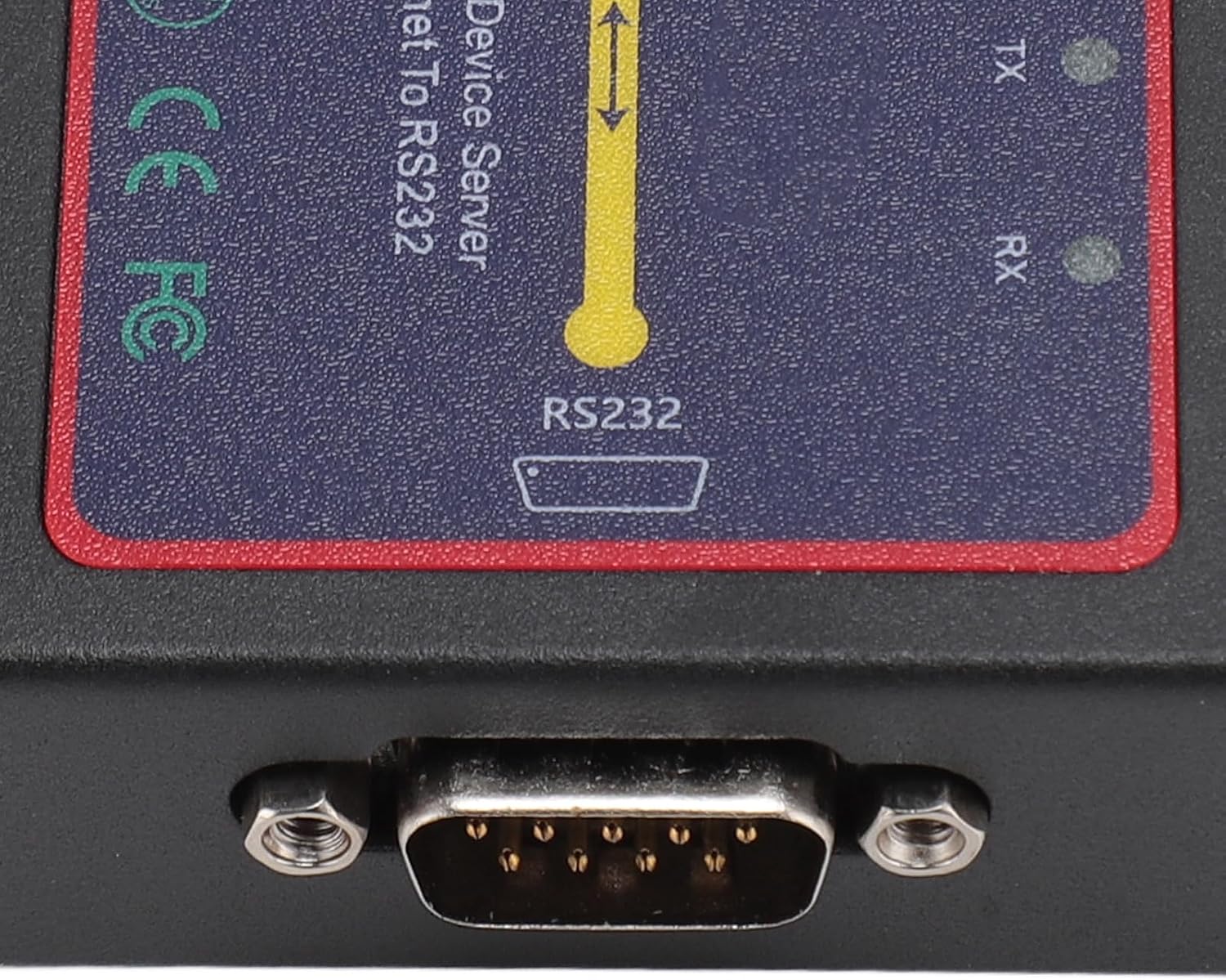
Figure 6: RS232 serial port

Figure 7: Mounting bracket detail
5. Operating Instructions
Once the adapter is properly connected, it will begin functioning according to its configured operating mode. Monitor the LED indicators for status information:
- POWER LED: Indicates that the device is receiving power. Should be steadily lit when powered on.
- LINK/ACT LED: Indicates the status of the Ethernet connection. A steady light typically means a link is established, while blinking indicates data activity.
- TX LED: Indicates data transmission from the adapter to the RS232 device. Blinks when data is being sent.
- RX LED: Indicates data reception by the adapter from the RS232 device. Blinks when data is being received.
The adapter supports various operating modes (TCP Server, TCP Client, UDP, VCOM) which determine how it communicates over the network. These modes are typically configured during the setup phase based on your specific application requirements.
Figure 8: LED indicators for operational status
6. Maintenance
To ensure the longevity and optimal performance of your Zunate TXI022 adapter, follow these maintenance guidelines:
- Cleaning: Keep the device clean and free from dust. Use a soft, dry cloth for cleaning. Avoid liquid cleaners.
- Environment: Operate the adapter within its specified temperature and humidity ranges. Avoid exposing it to extreme temperatures, direct sunlight, or high moisture.
- Ventilation: Ensure proper airflow around the device to prevent overheating. Do not block ventilation openings.
- Cable Connections: Periodically check all cable connections (power, Ethernet, RS232) to ensure they are secure and undamaged.
- Firmware Updates: Check the manufacturer's website for any available firmware updates that may improve performance or add new features.
7. Troubleshooting
If you encounter issues with your Zunate TXI022 adapter, refer to the following troubleshooting steps:
| Problem | Possible Cause | Solution |
|---|---|---|
| No Power LED indication | Power adapter not connected or faulty; power outlet issue. | Ensure power adapter is securely connected to the device and a working power outlet. Test the outlet with another device. Replace power adapter if faulty. |
| No LINK/ACT LED indication | Ethernet cable disconnected or faulty; network device (router/switch) off or faulty. | Check Ethernet cable connection. Try a different Ethernet cable. Ensure your network router/switch is powered on and functioning correctly. |
| No data transmission (TX/RX LEDs not blinking) | Incorrect RS232 cable connection; incorrect serial port settings; network configuration issues; faulty RS232 device. | Verify RS232 cable is correctly connected. Check serial port settings (baud rate, data bits, parity, stop bits, flow control) on both the adapter and the serial device. Review network configuration (IP address, operating mode). Test with a known working RS232 device. |
| Intermittent connection or data errors | Poor cable quality; electromagnetic interference; network congestion. | Use high-quality shielded cables. Ensure the device is not near strong electromagnetic sources. Check network traffic and optimize if necessary. |
If the problem persists after trying these solutions, please contact Zunate customer support for further assistance.
8. Specifications
| Feature | Detail |
|---|---|
| Model Number | TXI022 (Internal: Zunateyhg9wcvt1a-11) |
| Type | RJ45 Ethernet to RS232 Serial Port Adapter |
| Material | Iron |
| Ethernet Interface | 10/100 Mbps Adaptive RJ45, Auto MDI/MDIX |
| Serial Interface | RS232 |
| Data Rates | 300 bps to 230,400 bps |
| Operating Modes | TCP Server, TCP Client, UDP, VCOM |
| Flow Control | CTS/RTS Supported |
| Power Input | DC 5V (via included power adapter) |
| Compatibility | Windows XP, WIN7, WIN8, WIN10 |
| Manufacturer | Zunate |
| Country of Origin | China |
9. Warranty and Support
Specific warranty information for the Zunate TXI022 adapter is not provided in this manual. For details regarding warranty coverage, return policies, or technical support, please refer to the product packaging, the vendor's website, or contact Zunate customer service directly.
When contacting support, please have your product model (TXI022) and any relevant purchase information ready.