
1. Introduction
The artfone A400 is a 4G mobile phone designed for ease of use, particularly for seniors. It features large buttons, a clear 2.4-inch display, and essential functions like an SOS emergency button, time reporting, and a charging dock for convenient power management. This manual provides detailed instructions to help you get the most out of your device.

Figure 1: artfone A400 4G Senior Mobile Phone with Charging Dock.
2. What's in the Box
Please check the contents of your artfone A400 package:
- USB Cable
- Power Adapter
- Battery
- Charging Dock
- Manual (this document)
3. Setup
3.1. Inserting the SIM Card and Battery
To begin using your phone, you need to insert the SIM card and battery.
- Carefully remove the back cover of the phone.
- Insert your Nano SIM card(s) into the designated slot(s). Ensure the gold contacts face downwards and the card is correctly oriented as indicated on the phone.
- Place the battery into the battery compartment, aligning the contacts.
- Replace the back cover, pressing firmly until it clicks into place.

Figure 2: Front and back view of the artfone A400, illustrating the location for SIM and battery insertion.
3.2. Charging the Phone
Before first use, fully charge the phone battery.
- Using the Charging Dock: Connect the power adapter to the charging dock. Place the phone into the dock, ensuring it sits securely and the charging indicator appears on the screen.
- Using USB Type-C Cable: Alternatively, connect the USB Type-C cable directly to the phone's charging port and then to the power adapter.
A full charge typically takes approximately 2-3 hours. The 1800mAh battery provides a super long standby time.
4. Operating Instructions
4.1. Power On/Off
- To Power On: Press and hold the red 'End Call' button (power button) until the screen lights up.
- To Power Off: Press and hold the red 'End Call' button until the power off options appear, then confirm.
4.2. Making and Receiving Calls
- Making a Call: Dial the number using the large keypad buttons and press the green 'Call' button.
- Receiving a Call: When the phone rings, press the green 'Call' button to answer.
- Ending a Call: Press the red 'End Call' button.

Figure 3: The artfone A400 features large, user-friendly PU material buttons and a clear 2.4-inch display with large fonts.
4.3. Adjusting Volume and Lock/Unlock
- Volume Adjustment: Use the dedicated volume buttons located on the side of the phone to increase or decrease call and ringtone volume.
- Lock/Unlock: A separate side button is provided for locking and unlocking the keypad, preventing accidental presses.
4.4. SOS Emergency Call Function
The artfone A400 includes a crucial SOS button for emergencies. This feature is disabled by default and requires setup.
- Setup: Navigate to the SOS settings in the phone's menu. You can set up to five emergency contact numbers and a custom help message.
- Activation: In an emergency, press and hold the SOS button on the back of the phone for three seconds. The phone will automatically dial the stored numbers one by one and send the help message.

Figure 4: The SOS button on the back of the artfone A400 supports up to 5 emergency numbers.
4.5. Speed Dial (M1, M2, 2-9, *, #)
Easily call frequently used contacts:
- Setup: Assign contacts to the M1, M2, and number keys (2-9, *, #) through the phone's settings.
- Usage: Long-press the assigned key to instantly dial the corresponding contact.
4.6. Flashlight
The phone features a convenient built-in flashlight.
- Activation: Use the dedicated side switch to quickly turn the flashlight on or off.
4.7. Time Reporting Button
The time reporting button provides an audible announcement of the current time.
- Usage: Press the designated time reporting button (often a side button or a specific key combination) to hear the time announced.

Figure 5: The time reporting button on the artfone A400 provides audible time announcements.
4.8. Other Functions
The artfone A400 includes several other useful features:
- Camera: A 2MP camera for basic photo capture.
- FM Radio: Listen to your favorite radio stations.
- Alarm Clock: Set alarms for reminders.
- Calendar: Keep track of dates and events.
- MP3/MP4 Player: Enjoy audio and video files.
- Bluetooth: Connect to compatible wireless accessories.
- T9 Input: Facilitates text input with predictive text.

Figure 6: The artfone A400 features a user-friendly UI with clear icons for easy navigation to Contacts, Messages, Settings, Tools, Multimedia, Internet, SOS, and Call logs.
5. Maintenance
- Cleaning: Use a soft, dry cloth to clean the phone's surface. Avoid liquid cleaners or abrasive materials.
- Battery Care: To prolong battery life, avoid extreme temperatures. Do not leave the phone fully discharged for extended periods.
- Storage: Store the phone in a cool, dry place away from direct sunlight and moisture when not in use.
6. Troubleshooting
| Problem | Possible Cause | Solution |
|---|---|---|
| Phone does not turn on | Battery is low or depleted. | Charge the phone for at least 30 minutes before attempting to turn it on. |
| Cannot make/receive calls | No SIM card inserted or SIM card not properly seated. No network signal. | Ensure SIM card is correctly inserted. Check network signal strength. Contact your service provider if issues persist. |
| Battery not charging | Charging cable/dock not connected properly. Faulty charger/cable. | Ensure all connections are secure. Try a different power outlet or charging cable/dock if available. |
| No sound during calls | Volume is too low. Speaker is blocked. | Increase volume using the side buttons. Ensure the speaker is not covered. |
7. Specifications
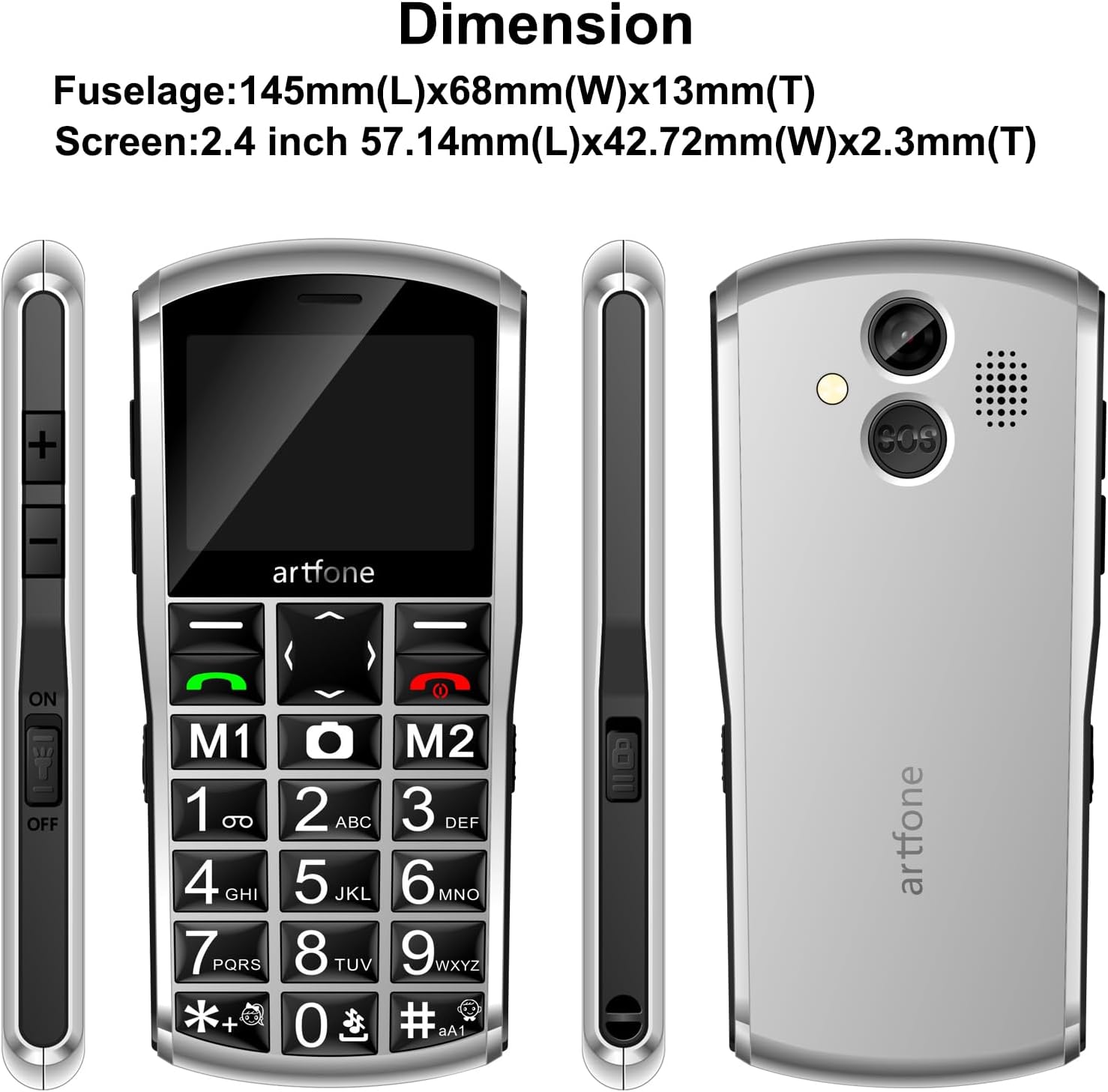
Figure 7: Dimensions of the artfone A400 mobile phone.
| Feature | Detail |
|---|---|
| Model Name | A400 |
| Brand | artfone |
| Screen Size | 2.4 Inches |
| Resolution | 240 x 320 |
| Cellular Technology | 4G, 3G, 2G |
| Operating System | artfone OS |
| RAM Memory Installed Size | 48 MB |
| Memory Storage Capacity | 0.13 GB |
| Connectivity Technology | USB Type C, Bluetooth |
| Batteries | 1 Lithium Ion batteries (included) |
| Package Dimensions | 15.2 x 11.9 x 5.9 cm |
| Item Weight | 100 g |
| Manufacturer | artfone |
| Country of Origin | China |
8. Warranty and Support
8.1. Warranty Information
The artfone A400 typically comes with a standard manufacturer's warranty. Please refer to the warranty card included in your package for specific terms and conditions. In general, a return policy of 30 days for refund/replacement is offered.
8.2. Customer Support
For any technical assistance, troubleshooting beyond this manual, or warranty claims, please contact artfone customer support. You can usually find contact information on the manufacturer's website or through the retailer where you purchased the device.