1. Introduction
This manual provides essential instructions for the safe and effective use of your Pro'sKit SDT63516 Adjustable Torque Screwdriver. Designed for precision fastening, this tool ensures accurate torque application across a range of tasks. Please read this manual thoroughly before operation and retain it for future reference.
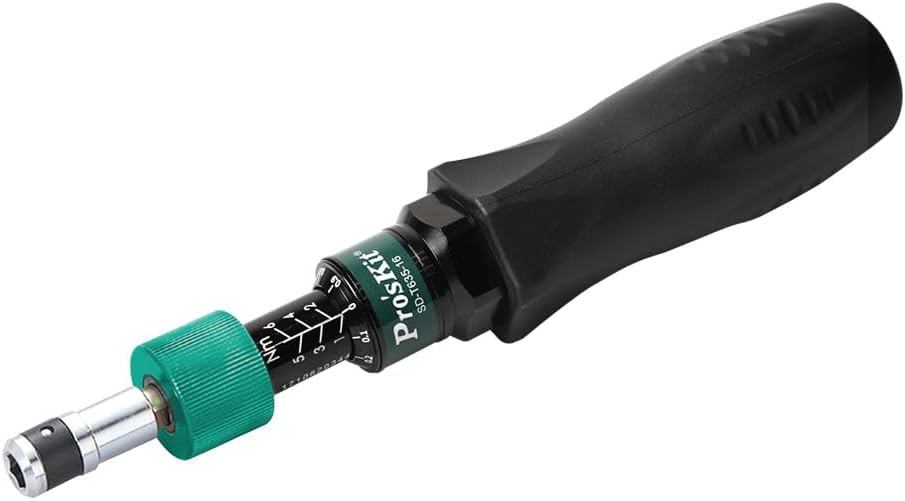
Image 1.1: Pro'sKit SDT63516 Adjustable Torque Screwdriver.
2. Safety Information
Always observe the following safety precautions to prevent injury or damage to the tool:
- Wear appropriate personal protective equipment, such as safety glasses, during operation.
- Do not exceed the specified torque range of 1.0~6.0 N-m (13.28~48.68 in-lbs).
- Ensure the bit is correctly seated and locked in the bit holder before applying torque.
- Do not use the screwdriver as a pry bar, hammer, or for any purpose other than its intended use.
- Keep the tool clean and dry to maintain its functionality and longevity.
- Store the tool in its protective case when not in use to prevent damage.
3. Package Contents
Verify that all items are present upon opening the package:
- Pro'sKit SDT63516 Adjustable Torque Screwdriver
- Protective Storage Case
- Calibration Certificate (may be included, refer to Image 7.1)

Image 3.1: Pro'sKit SDT63516 Adjustable Torque Screwdriver with its storage case.
4. Product Overview
The Pro'sKit SDT63516 is an adjustable torque screwdriver engineered for precise fastening applications. It features a dual scale for Newton-meter (N-m) and inch-pound (in-lbs) readings and is equipped with a standard 1/4" (6.3mm) hexagon drive for compatibility with various bits.

Image 4.1: Key components and features of the Pro'sKit SDT63516 Torque Screwdriver.
- Bit Holder: Constructed from S45C material with electroplating for durability.
- Hexagon Knob: Features an anodic treatment in yellow for corrosion resistance and clear identification.
- Graduated Ring & Tube: Made from aluminum with an anodic black treatment, providing clear and durable torque markings.
- Grip: Manufactured from TPR (Thermoplastic Rubber) for a non-slip, ergonomic, and comfortable hold during use.
5. Setup
5.1 Installing a Bit
- Select the appropriate 1/4" hex bit for your specific application.
- Insert the hex bit firmly into the screwdriver's bit holder until it engages with the positive locking mechanism and clicks into place. Ensure the bit is securely seated before proceeding.

Image 5.1: The 1/4" (6.3mm) Hexagon Drive for bit installation.
6. Operating Instructions
6.1 Setting the Torque Value
- Unlock the Adjustment Ring: Grasp the green adjustment ring and pull it down towards the handle. This action unlocks the torque setting mechanism.
- Adjust the Torque: While the adjustment ring is pulled down, rotate it to align the desired torque value on the graduated scale with the indicator line. The screwdriver features a dual scale, allowing you to set values in both Newton-meters (N-m) and inch-pounds (in-lbs).
- Lock the Adjustment Ring: Once the desired torque value is set, release the adjustment ring. It will automatically spring back into its locked position, securing the set torque value.

Image 6.1: Unlocking the adjustment ring for torque setting.

Image 6.2: Rotating the adjustment ring to set torque.

Image 6.3: Detailed view of the dual scale (N-m and in-lbs).
6.2 Applying Torque
- Place the screwdriver bit onto the fastener head, ensuring a snug fit.
- Apply steady, consistent pressure and rotate the screwdriver in a clockwise (CW) direction for tightening or counter-clockwise (CCW) direction for loosening (if applicable for the fastener type).
- Continue turning until the internal cam mechanism automatically slips. This distinct click or slip indicates that the preset torque value has been accurately reached, preventing over-tightening and potential damage to the fastener or workpiece.
7. Maintenance
- Cleaning: After each use, wipe the screwdriver with a clean, dry, lint-free cloth. Avoid using abrasive cleaners, solvents, or harsh chemicals, as these can damage the tool's finish or internal components.
- Storage: Always store the screwdriver in its protective case when not in use. Keep it in a dry environment, away from direct sunlight, extreme temperatures, and corrosive substances.
- Calibration: To ensure the continued accuracy and reliability of your torque screwdriver, periodic calibration by a qualified service center is recommended. The tool is supplied with a calibration certificate, which should be retained for reference.

Image 7.1: Example of a calibration certificate provided with the tool.
8. Troubleshooting
| Problem | Possible Cause | Solution |
|---|---|---|
| Torque value cannot be set or adjusted. | Adjustment ring is not fully unlocked or is jammed. | Ensure the adjustment ring is pulled down completely to unlock before rotating. If jammed, gently try to free it without excessive force. |
| Screwdriver does not click or slip at the set torque. | Incorrect torque setting; tool malfunction; worn or incorrect bit. | Double-check the torque setting. Ensure the bit is appropriate for the fastener and not worn. If the issue persists, discontinue use and contact customer support. |
| Bit falls out during use. | Bit not fully inserted; bit holder mechanism is worn or damaged. | Ensure the bit is pushed into the holder until it clicks securely. If the problem continues with multiple bits, the bit holder may require inspection or service. |
| Inconsistent torque application. | Improper technique; tool requires calibration. | Apply steady, consistent pressure and rotation. Avoid jerky movements. Consider having the tool recalibrated if accuracy is critical and inconsistencies persist. |
9. Specifications
| Feature | Detail |
|---|---|
| Model Number | SDT63516 |
| Brand | Pro'sKit |
| Torque Range | 1.0~6.0 N-m (13.28~48.68 in-lbs) |
| Accuracy | ±6% |
| Drive Size | 1/4" (6.3mm) Hex |
| Head Style Compatibility | Torq-Set (compatible with 1/4" hex bits, including Torq-Set type) |
| Dimensions (L x W x H) | 7.87 x 1.46 x 0.1 inches |
| Item Weight | 11.8 ounces (335.4 Grams) |
| Grip Material | TPR (Non-slip NBR rubber) |
| Bit Holder Material | S45C, Electroplated |
| Hexagon Knob Material | Anodic treated (Yellow) |
| Graduated Ring & Tube Material | Aluminum, Anodic treated (Black) |
| Compliance Standards | DIN ISO 6789, ASME B107.300-2010 |


