OBO HANDS WiFi TUYA Smart Access Controller User Manual
Model: S20-TY
1. Introduction
Thank you for choosing the OBO HANDS WiFi TUYA Smart Access Controller. This advanced access control keypad offers multiple unlocking methods including RFID card, password, and convenient control via the Tuya Smart APP. Designed for durability, it features an IP68 waterproof rating, a responsive touch panel, and a backlight for visibility in low light conditions. This manual provides detailed instructions for installation, operation, maintenance, and troubleshooting to ensure optimal performance and security.
2. Product Overview
2.1 Package Contents
- 1 x WiFi TUYA Smart Access Controller Keypad
- 10 x Blue RFID Keyfobs (13.56MHz)
- Mounting Screws and Wall Plugs
- User Manual (this document)
2.2 Key Features
- Tuya Wireless Access Control System: Remote unlocking, public password setting, user management (fingerprint/passwords/ID cards), and door opening record viewing via Tuya APP.
- Multiple Access Ways: Supports RFID card, code password, and Tuya APP for unlocking.
- High User Capacity: Stores up to 10,000 users.
- IP68 Waterproof: Fully encapsulated in epoxy, anti-vandal, and weatherproof for indoor or outdoor installation.
- Blue Backlight Keypad: Digits are clearly visible even in dark conditions.
- Integrated Doorbell Button: Allows for connection to a wired doorbell.
- Wiegand Output: WG26 and WG34 Wiegand output for use as a card reader.
2.3 Product Components and Dimensions

Figure 2.3.1: Access Controller Components and Wiring Diagram
The image above illustrates the main components of the access controller, including the work indicator, digital buttons, card reading area, and doorbell button. It also shows the internal wiring and corresponding color codes for connection.

Figure 2.3.2: Access Controller Dimensions
The access controller measures approximately 70mm (width) x 140mm (height) x 16mm (depth). The mounting holes are spaced 40mm horizontally and 80mm vertically.

Figure 2.3.3: RFID Keyfobs
The included RFID keyfobs are made of ABS material, operate at 13.56MHz, and support read-only functionality with a reading distance of 0-10cm.
3. Setup
3.1 Installation Guidelines
The access controller is IP68 waterproof and can be installed both indoors and outdoors. Ensure the mounting surface is flat and stable. Use the provided screws and wall plugs for secure installation.
3.2 Wiring Diagram
The access controller requires a 12V DC power source. Refer to the wiring diagram below for proper connection to your electric lock, exit button, and power supply. Incorrect wiring can damage the device.

Figure 3.2.1: Comprehensive Wiring Diagram
Wiring Color Codes:
- Black: GND (Ground)
- Red: 12V (Power Input)
- Yellow: NO (Normally Open)
- Grey: COM (Common)
- Purple: NC (Normally Closed)
- Brown: BTN (Exit Button)
- Green: D0 (Wiegand Data 0)
- White: D1 (Wiegand Data 1)
- Blue (x2): BELL (Doorbell)
3.3 Tuya APP Connection
To utilize the smart features, connect your access controller to the Tuya Smart APP. Ensure your smartphone is connected to a 2.4GHz Wi-Fi network.

Figure 3.3.1: Tuya APP Device Pairing Process
- Download and install the Tuya Smart APP from your app store.
- Register or log in to your Tuya account.
- Tap the '+' icon to add a new device.
- Select 'Security & Video Surveillance' > 'Smart Lock' or search for 'Access Controller'.
- Power on the device and confirm the indicator light is blinking rapidly. If not, reset the device (refer to troubleshooting).
- Enter your 2.4GHz Wi-Fi network credentials.
- Follow the on-screen instructions to complete the pairing process.
4. Operating Instructions
4.1 Unlocking Methods
The access controller supports three primary methods for unlocking:
- RFID Card: Present a registered RFID keyfob to the card reading area on the keypad.
- Password: Enter a valid user password on the touch keypad, followed by the '#' key.
- Tuya APP: Use the Tuya Smart APP on your smartphone for remote unlocking.

Figure 4.1.1: Multiple Access Methods
4.2 User Management via Tuya APP
The Tuya APP provides comprehensive control over user access and settings.

Figure 4.2.1: Tuya APP Interface for User Management
- Remote Unlocking: Tap the lock icon in the app to remotely open the door.
- Member Management: Add, modify, or delete user accounts (administrators, ordinary members).
- Temporary Codes: Generate one-time or time-limited access codes for guests.
- Attendance: View records of door openings and user activity.
- Public Password: Set a common password for general access.
4.3 Setting Management Cards
You can program a management card to easily add or delete user RFID cards without needing to connect to a computer.
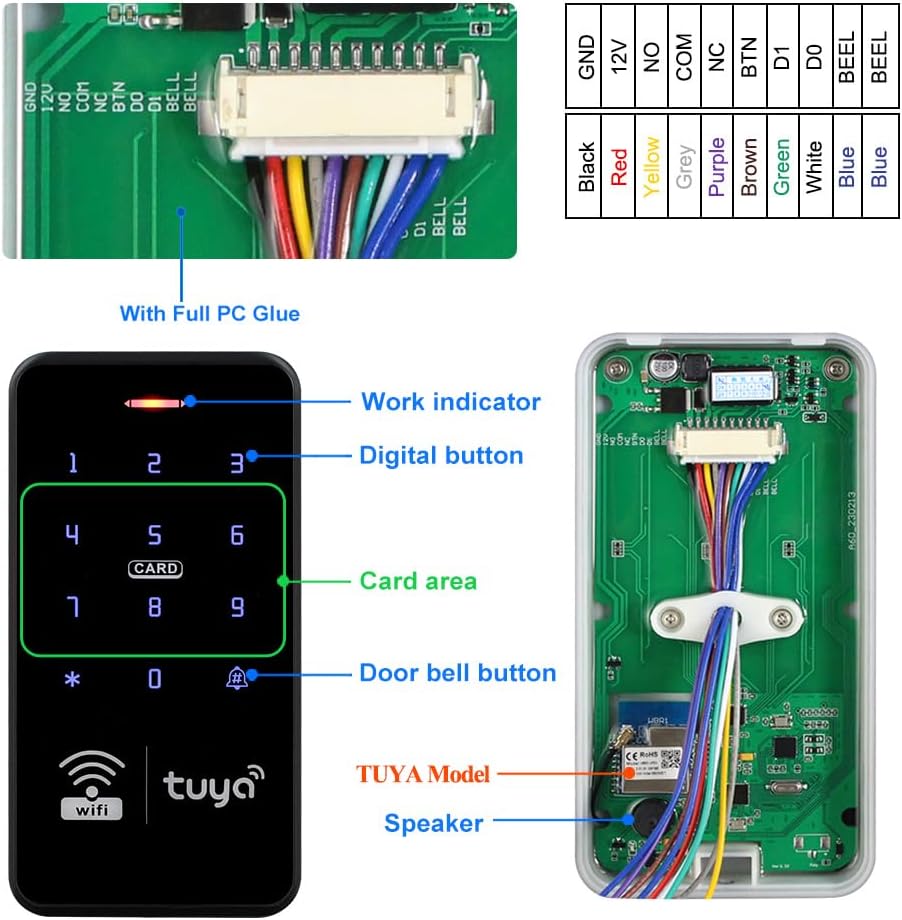
Figure 4.3.1: Management Card Setup
Refer to the detailed programming instructions in the quick start guide included with your product for specific steps on setting up management cards.
5. Maintenance
Regular maintenance ensures the longevity and reliable operation of your access controller.
- Cleaning: Wipe the keypad surface with a soft, damp cloth. Avoid abrasive cleaners or solvents that could damage the touch panel.
- Connection Check: Periodically inspect all wiring connections to ensure they are secure and free from corrosion.
- Firmware Updates: Check the Tuya Smart APP regularly for any available firmware updates for your device. Updates can improve performance and add new features.
- Environmental Protection: While the device is IP68 waterproof, avoid prolonged submersion or exposure to extreme temperatures beyond its operating range.

Figure 5.1.1: IP68 Waterproof and Backlight Features
The IP68 rating ensures protection against dust and water immersion, making it suitable for outdoor use. The blue backlight ensures visibility in low-light conditions.
6. Troubleshooting
If you encounter issues with your OBO HANDS Access Controller, refer to the following common problems and solutions:
| Problem | Possible Cause | Solution |
|---|---|---|
| Device does not power on. | No power, incorrect wiring, faulty power supply. | Check 12V DC power connection. Verify wiring according to Section 3.2. Test power supply. |
| Keypad is unresponsive. | Power issue, internal fault. | Ensure device is powered. Try power cycling the device. If issue persists, contact support. |
| RFID card not recognized. | Card not registered, incorrect card type, card damaged. | Ensure the card is registered in the system. Verify it is a 13.56MHz RFID card. Try a different registered card. |
| Cannot connect to Tuya APP. | Incorrect Wi-Fi, device not in pairing mode, network interference. | Ensure phone is on 2.4GHz Wi-Fi. Reset the device to pairing mode (indicator blinking rapidly). Check Wi-Fi signal strength. |
| Door does not unlock. | Incorrect code/card, lock malfunction, wiring issue. | Verify code/card is correct and registered. Check the electric lock's functionality. Inspect wiring to the lock. |
If you are unable to resolve the issue using the above steps, please contact customer support.
7. Specifications
| Feature | Specification |
|---|---|
| Brand | OBO HANDS |
| Model Number | S20-TY |
| Power Source | Corded Electric (12 Volts DC) |
| Connectivity Technology | Wireless (WiFi) |
| Compatible Devices | Smartphone (Tuya APP) |
| Item Dimensions (L x W x H) | 2.76 x 5.51 x 0.59 inches (70 x 140 x 16 mm) |
| Item Weight | 0.29 Kilograms (10.2 ounces) |
| Control Method | Touch Panel |
| Alert Type | Entry |
| Installation Type | Self-Adhesive (also screw-mountable) |
| IP Rating | IP68 Waterproof |
| User Capacity | 10,000 users |
| RFID Frequency | 125KHz / 13.56MHz |
| Wiegand Output | WG26, WG34 |
8. Warranty and Support
OBO HANDS products are manufactured to high-quality standards. For any questions or concerns regarding your access controller, please contact our customer support team.
Customer Support:
- Whatsapp: +86 177 2255 8183
- Availability: Monday - Sunday, 24/7
Please have your product model number (S20-TY) and purchase information ready when contacting support.


