
Raddy RF886
Raddy RF886 Portable Digital Radio
Instruction Manual
Introduction
This manual provides comprehensive instructions for the operation and maintenance of your Raddy RF886 Portable Digital Radio. The RF886 is a versatile multi-band radio offering AM, FM, Shortwave (SW), VHF, and Weather Band (WB) reception, along with Bluetooth connectivity. Please read this manual thoroughly before using the device to ensure proper function and safety.

Image: Raddy RF886 Portable Shortwave Radio with multi-band capabilities.
Safety Information
- Do not expose the radio to extreme temperatures, direct sunlight, or high humidity.
- Avoid dropping or subjecting the radio to strong impacts.
- Do not attempt to disassemble or modify the radio. This will void the warranty and may cause damage.
- Keep the radio away from water and other liquids.
- Use only the provided charging cable for recharging the battery.
- Dispose of the battery according to local regulations.
Package Contents
Verify that all items are present in the package:
- 1 x Raddy RF886 Radio
- 1 x Wire Antenna (9.85 ft)
- 1 x USB Type-C Charging Cable

Image: The Raddy RF886 radio and its included wire antenna.
Product Overview
The Raddy RF886 features a compact design with intuitive controls and a clear LCD display. Key components include:
- Telescopic Antenna: For enhanced reception.
- LCD Display: Shows frequency, band, time, battery status, and other information.
- Control Buttons: For power, tuning, band selection, memory, and other functions.
- Speaker: Integrated for audio output.
- USB Type-C Port: For charging the internal battery.
- Headphone Jack: For private listening.
- Flashlight/SOS Light: Located on the side/top of the unit.

Image: The compact size of the Raddy RF886, highlighting its dimensions (124x67x29 mm / 4.9x2.6x1.1 in) and weight (150g / 5.3 oz).
Setup
1. Charging the Battery
The Raddy RF886 is equipped with a built-in rechargeable Lithium Ion battery. Before first use, fully charge the radio.
- Connect the supplied USB Type-C charging cable to the radio's charging port.
- Connect the other end of the cable to a standard USB power adapter (not included) or a computer's USB port.
- The battery indicator on the LCD display will show charging status. Charging is complete when the indicator shows full.

Image: The Raddy RF886 connected via USB-C for charging, showing the 1000mAh battery capacity.
2. Antenna Connection
For optimal reception, especially on Shortwave (SW) and VHF bands, extend the telescopic antenna fully. For even stronger reception, utilize the included 9.85 ft wire antenna.
- Telescopic Antenna: Gently pull the telescopic antenna upwards until fully extended. Adjust its angle for best reception.
- Wire Antenna: Plug the 3.5mm jack of the wire antenna into the antenna input port on the radio. Extend the wire antenna as much as possible, ideally hanging it vertically or horizontally in an open area.
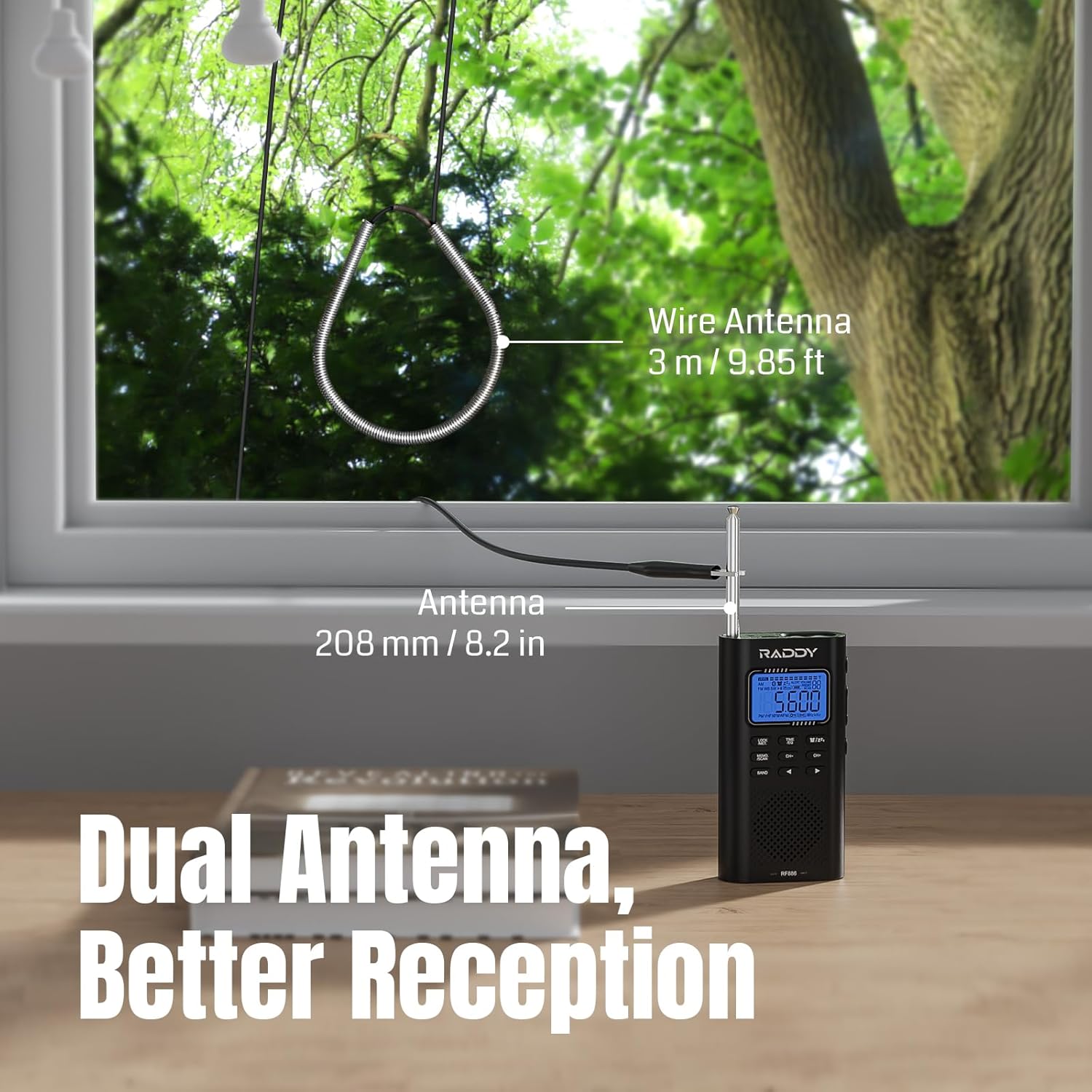
Image: Illustration of the Raddy RF886 using both its built-in telescopic antenna and the external 9.85 ft wire antenna for improved reception.
Operating Instructions
1. Power On/Off
- Press and hold the POWER button to turn the radio on or off.
- A short press of the POWER button acts as a mute/unmute function when the radio is on.
2. Band Selection (AM/FM/SW/VHF/WB)
Press the BAND button repeatedly to cycle through the available frequency bands: AM, FM, Shortwave (SW), VHF, and Weather Band (WB).

Image: The Raddy RF886 displaying its multi-band reception capabilities (AM/FM/SW/VHF/WB).
3. Tuning and Station Search
- Manual Tuning: Use the CH+ and CH- buttons to adjust the frequency in small increments.
- Fast Tuning: Press and hold CH+ or CH- for faster frequency scanning.
- Auto Search (ATS): Press and hold the MEMO/SCAN button to initiate an automatic station search. The radio will scan and store available stations in memory.
- Manual Search: Briefly press the MEMO/SCAN button to manually scan for the next available station.

Image: Icons representing Auto Search & Stored and Manual Search & Stored functions on the Raddy RF886.
4. Station Storage and Recall
- Storing a Station: Tune to the desired station. Press and hold the MEMO/SCAN button until the memory location flashes. Use CH+ or CH- to select a memory slot, then press MEMO/SCAN again to confirm.
- Recalling a Station: Briefly press the MEMO/SCAN button to enter memory mode, then use CH+ or CH- to navigate through stored stations.
5. NOAA Weather Alert
The RF886 supports 7 NOAA weather bands and features a weather alert function to keep you informed about hazardous weather conditions.
- Switch to the WB band using the BAND button.
- To activate the weather alert, press the ALERT button. The radio will monitor for NOAA alerts and sound an alarm when one is detected.

Image: The Raddy RF886 with an extended antenna, illustrating its NOAA Reception & Alert feature for various weather hazards.
6. Bluetooth Connectivity
The radio can connect to Bluetooth devices to function as a portable speaker.
- Press the BAND button until "BT" appears on the display.
- On your Bluetooth device (e.g., smartphone), search for "RF886" in the Bluetooth settings and pair with it.
- Once connected, audio from your device will play through the radio's speaker.
- The radio offers six different sound effects (EQ modes) in Bluetooth mode. Use the EQ button to cycle through them.

Image: The Raddy RF886 connected via Bluetooth 5.0 to a smartphone, indicating its wireless audio streaming capability.

Image: Icons representing various sound effects (Pop, Rock, Country, Normal, Classic, Jazz) available in Bluetooth mode.
7. Headphone Use
For private listening, plug 3.5mm headphones (not included) into the headphone jack on the radio. The internal speaker will automatically mute.

Image: A person listening to the Raddy RF886 with headphones, highlighting its FM Stereo support.
8. Flashlight and SOS Function
- Flashlight: Press the dedicated LIGHT button to turn the flashlight on or off.
- SOS Function: Press and hold the SOS button to activate the SOS alarm and flashing light. Press again to deactivate.

Image: The Raddy RF886 with its flashlight illuminated, showing icons for charging, SOS, and flashlight features.
9. Setting Time and Alarm
The radio includes a clock and alarm function.
- Setting Time: In time display mode, press and hold the TIME/SET button. Use CH+ and CH- to adjust hours and minutes, then press TIME/SET to confirm each setting.
- Setting Alarm: In time display mode, briefly press the ALARM button. The alarm icon will flash. Use CH+ and CH- to set the alarm time, then press ALARM to confirm.
- Activating/Deactivating Alarm: Briefly press the ALARM button to toggle the alarm on or off.

Image: The Raddy RF886 displaying time and an alarm clock icon, indicating its alarm function.
Maintenance
- Cleaning: Use a soft, dry cloth to clean the radio's exterior. Do not use abrasive cleaners or solvents.
- Battery Care: To prolong battery life, avoid fully discharging the battery frequently. Recharge the radio regularly, even if not in use for extended periods.
- Storage: When storing the radio for a long time, ensure it is fully charged and store it in a cool, dry place.
Troubleshooting
| Problem | Possible Cause | Solution |
|---|---|---|
| No power | Battery is depleted. | Charge the radio using the provided USB Type-C cable. |
| Poor reception | Antenna not extended; weak signal; interference. | Fully extend the telescopic antenna. Connect the external wire antenna. Try moving to an open area away from electronic devices. |
| Bluetooth not connecting | Radio not in BT mode; device not discoverable; already paired with another device. | Ensure the radio is in BT mode. Make sure your device's Bluetooth is on and discoverable. Disconnect from other Bluetooth devices. |
| No sound from speaker | Volume too low; headphones connected; radio muted. | Increase volume. Disconnect headphones. Press the POWER button briefly to unmute. |
Specifications
| Feature | Detail |
|---|---|
| Model | RF886 |
| Dimensions (L x W x H) | 124 x 67 x 29 mm (4.9 x 2.6 x 1.1 inches) |
| Weight | 150 g (5.3 ounces) |
| Frequency Bands | AM, FM, Shortwave (SW), VHF, Weather Band (WB) |
| VHF Range | 30.00-199.975 MHz |
| Shortwave Range | 3.20-21.95 MHz |
| NOAA Weather Bands | 7 channels with alert function |
| Bluetooth Version | BT 5.0 |
| Battery Type | 1 x Lithium Ion (included) |
| Charging Port | USB Type-C |
| Display | LCD |
| Included Components | RF886 radio, Wire antenna, Charging cable |
Warranty and Support
For warranty information, technical support, or customer service inquiries, please refer to the official Raddy website or contact their customer support directly. Details can typically be found on the product packaging or the manufacturer's official online channels.
Visit the Raddy Store on Amazon for more products and information.
Related documentsRF886


Ask a question about this manual
Ask about setup, troubleshooting, compatibility, parts, safety, or missing instructions. Manuals+ will review the question and use this page’s manual context to help answer it.