
1. Product Overview
The iHave Wall Mounted Electric Toothbrush Holder is designed to provide a hygienic and organized solution for your oral care essentials. It features advanced UV sanitization, a convenient toothpaste dispenser, and storage for multiple toothbrushes and cups.

Image: The iHave toothbrush holder mounted on a wall, showing the UV disinfection light in operation and organized toothbrushes and cups.
2. Package Contents
- iHave Wall Mounted Electric Toothbrush Holder
- 3 Mouthwash Cups
- Adhesive Mounting Strip
- Reinforcement Nails (for uneven surfaces)
- USB Charging Cable
3. Setup and Installation
Follow these steps to properly install your iHave toothbrush holder:
- Clean the Wall: Ensure the wall surface is clean and dry before installation.
- Apply Adhesive: Peel off the protective film from the adhesive mounting strip and firmly press it onto the desired wall location.
- Mount the Holder: Align the toothbrush holder with the adhesive strip and securely hang it.
- Place Toothbrushes and Cups: Insert your toothbrushes into the designated slots and place the cups on top.

Image: Visual guide demonstrating the four steps for installation: cleaning the wall, applying the adhesive, hanging the holder, and placing toothbrushes and cups. The image also shows suitable surfaces (tiles, marble, glass, metal, wood) for adhesive mounting and options for reinforcement with nails on uneven surfaces (wallpaper, lime wall, painted wall).
Note on Surfaces:
- For smooth surfaces like metal, wood, mirrors, tiles, and marble, the strong adhesive tape provides secure attachment.
- For uneven walls or wallpaper that cannot bear weight, use the provided nails for reinforcement and drilling.
4. Operating Instructions
4.1 UV Disinfection
The toothbrush holder utilizes advanced UVC+UVA dual-band technology for effective disinfection. It achieves a disinfection rate of up to 99.99% against common bacteria such as Escherichia coli and Staphylococcus aureus.
The intelligent cruise mode ensures continuous disinfection every 4 hours, preventing bacterial regrowth and providing 24/7 hygiene protection.

Image: A table illustrating the powerful UV disinfection capability, showing high killing rates (up to 99.99%) for bacteria like Escherichia coli and Staphylococcus aureus at different positions within the holder.
4.2 Toothpaste Dispenser
To use the toothpaste dispenser, simply insert your toothpaste tube into the designated slot. The dispenser is suitable for most toothpaste tubes with an aperture of up to 0.47 inches. Gently push your toothbrush against the lever to dispense toothpaste.
4.3 Light Indicators
The device interacts with you through a breathing light system:
- Red Light: Indicates the device is currently charging.
- Green Light: Indicates the device is fully charged.
- Blue Breathing Light: Indicates the device is in operation (e.g., during disinfection cycle).
- Blue Light Blinking 10 Times: Indicates the battery is low and requires charging.

Image: A diagram illustrating the different light indicators (red, green, blue) and their corresponding meanings for charging status, operation, and low battery.
5. Maintenance
Regular cleaning ensures optimal performance and hygiene:
- Toothpaste Pusher: The toothpaste pusher is detachable for easy cleaning. Remove it periodically to clean any residue.
- Toothbrush Slots: Manually clean the toothbrush slots and surrounding areas to prevent buildup.
- Cups: The mouthwash cups are reinforced and can be easily removed for cleaning.
- Exterior: Wipe the exterior of the holder with a damp cloth as needed.

Image: Details of easy-to-use features, including the detachable design of the toothpaste dispenser for cleaning, the luminous breathing light, and the reinforced mouthwash cups.
6. Troubleshooting
- UV Light Not Working: If the UV light is not activating, ensure the device is charged. Check the light indicators for battery status. If the issue persists, contact customer support.
- Battery Drains Quickly / Needs Constant Charging: Ensure the device is fully charged. If the battery life is significantly shorter than expected, it may indicate a battery issue. Try charging it for a longer duration. If the problem continues, contact customer support.
- Toothpaste Dispenser Malfunction:
- Ensure the toothpaste tube is correctly inserted and the aperture fits the dispenser mechanism.
- Check for any dried toothpaste blocking the dispenser. Clean the detachable pusher thoroughly.
- If the plastic press mechanism is broken, the unit may require replacement.
- Toothbrushes Falling Out: Ensure toothbrushes are securely placed in their slots. Some electric toothbrush models may require careful placement.
7. Specifications
| Feature | Detail |
|---|---|
| Brand | iHave |
| Material | Plastic |
| Color | Uv Black 3 Cups |
| Mounting Type | Wall Mount |
| Special Feature | UV Disinfection, Toothpaste Dispenser, Quick Dry |
| Number of Items | 1 |
| Number of Compartments | 4 (for toothbrushes, cups, toothpaste) |
| Item Weight | 1.96 pounds |
| Package Dimensions | 13.82 x 6.38 x 4.69 inches |
| Batteries | 1 Lithium Ion battery (included) |
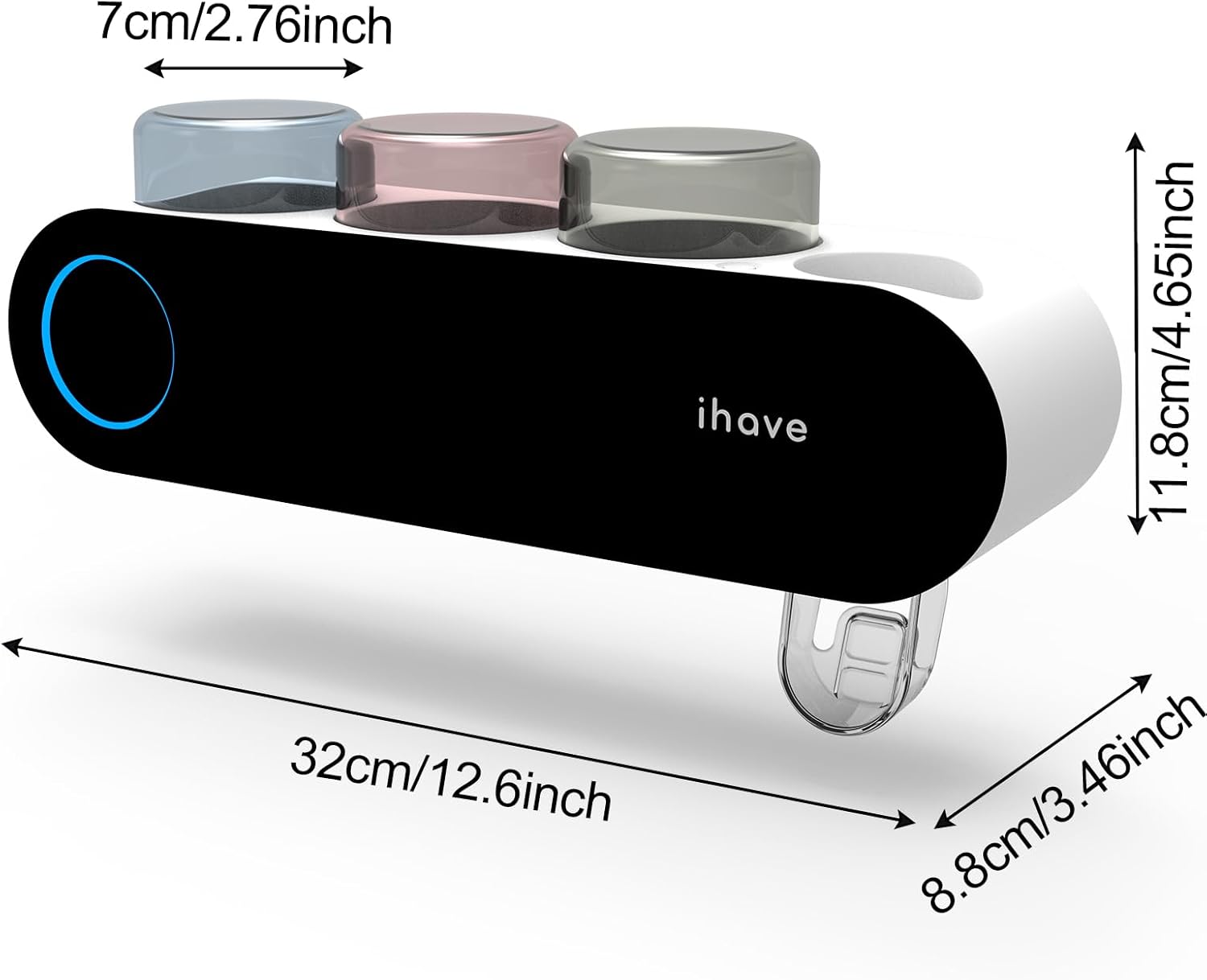
Image: A diagram illustrating the physical dimensions of the toothbrush holder in both centimeters and inches.
8. Warranty and Support
For warranty information, technical support, or any product-related inquiries, please contact iHave customer service through the retailer where the product was purchased or visit the official iHave website. Please retain your proof of purchase for warranty claims.