Toputure TP1 2-in-1 Folding Treadmill User Manual
1. Product Overview
The Toputure TP1 is a versatile 2-in-1 folding treadmill designed for both walking and running. It features a powerful 2.5 HP motor, dual LED displays, and smart app control, making it suitable for various fitness levels and home environments.

Image 1.1: The Toputure TP1 treadmill in both operational and folded states, demonstrating its compact design.
2. Setup and Assembly
2.1 Unboxing and Initial Placement
The Toputure TP1 treadmill requires no complex assembly. Simply remove it from the packaging and place it on a flat, stable surface. Ensure there is adequate clear space around the treadmill for safe operation, at least 2 meters behind and 0.6 meters on each side.
2.2 Unfolding the Treadmill
- Locate the folding mechanism release pin or lever, typically near the base of the uprights.
- Carefully lower the running deck until it is fully flat on the floor. Ensure it locks securely into place.
- Raise the handrails to their upright position if they are folded down.
2.3 Folding for Storage
To fold the treadmill for storage:
- Ensure the treadmill is powered off and unplugged.
- Carefully lift the running deck upwards until it clicks into its vertical, folded position.
- The treadmill features transport wheels for easy relocation. Tilt the unit and roll it to your desired storage location, such as under a bed or sofa. The folded height is approximately 130mm.

Image 2.1: Illustration of the tool-free handrail installation and the folding process for compact storage.

Image 2.2: The treadmill's space-saving design and transport wheels facilitate easy movement and storage.
3. Operating Instructions
3.1 Power On/Off
Connect the power cord to a grounded outlet. Press the main power switch, usually located near the front base of the treadmill, to turn it on. To power off, press the main power switch again and unplug the unit.
3.2 Safety Key
Always attach the safety key clip to your clothing before starting your workout. If you fall or move too far back on the belt, the safety key will detach, immediately stopping the treadmill to prevent injury.
3.3 Dual LED Display and Controls
The treadmill features dual LED screens that display real-time workout data including speed, distance, time, and calories burned. Heart rate can also be monitored.

Image 3.1: The multifunction LED display provides clear visibility of time, speed, calories, distance, and heart rate during exercise.
3.4 Speed Adjustment and Programs
The treadmill offers two primary modes:
- Walking Mode: 1 to 8 km/h. This mode is typically used when the handrails are folded down, allowing the treadmill to function as a walking pad.
- Running Mode: 1 to 16 km/h. This mode is used with the handrails in the upright position.
Adjust speed using the touch screen controls or the included remote control. The treadmill also includes 12 predefined programs to vary your workout intensity. A pause button allows you to temporarily stop your workout without losing data.

Image 3.2: The treadmill supports both running (1-16 km/h) and walking (1-8 km/h) modes, adapting to different exercise needs.
3.5 Bluetooth Speaker and Heart Rate Monitoring
- Bluetooth Speaker: Connect your smartphone via Bluetooth to the treadmill's integrated speaker to enjoy music during your workout.
- Heart Rate Monitoring: Hold the metal sensors on both sides of the display for 3 seconds to detect and monitor your heart rate in real-time.
3.6 Smart App Control
The treadmill can connect to fitness applications such as 'FITSHOW'. This allows for additional training programs and tracking of your workout progress directly from your smartphone or tablet.
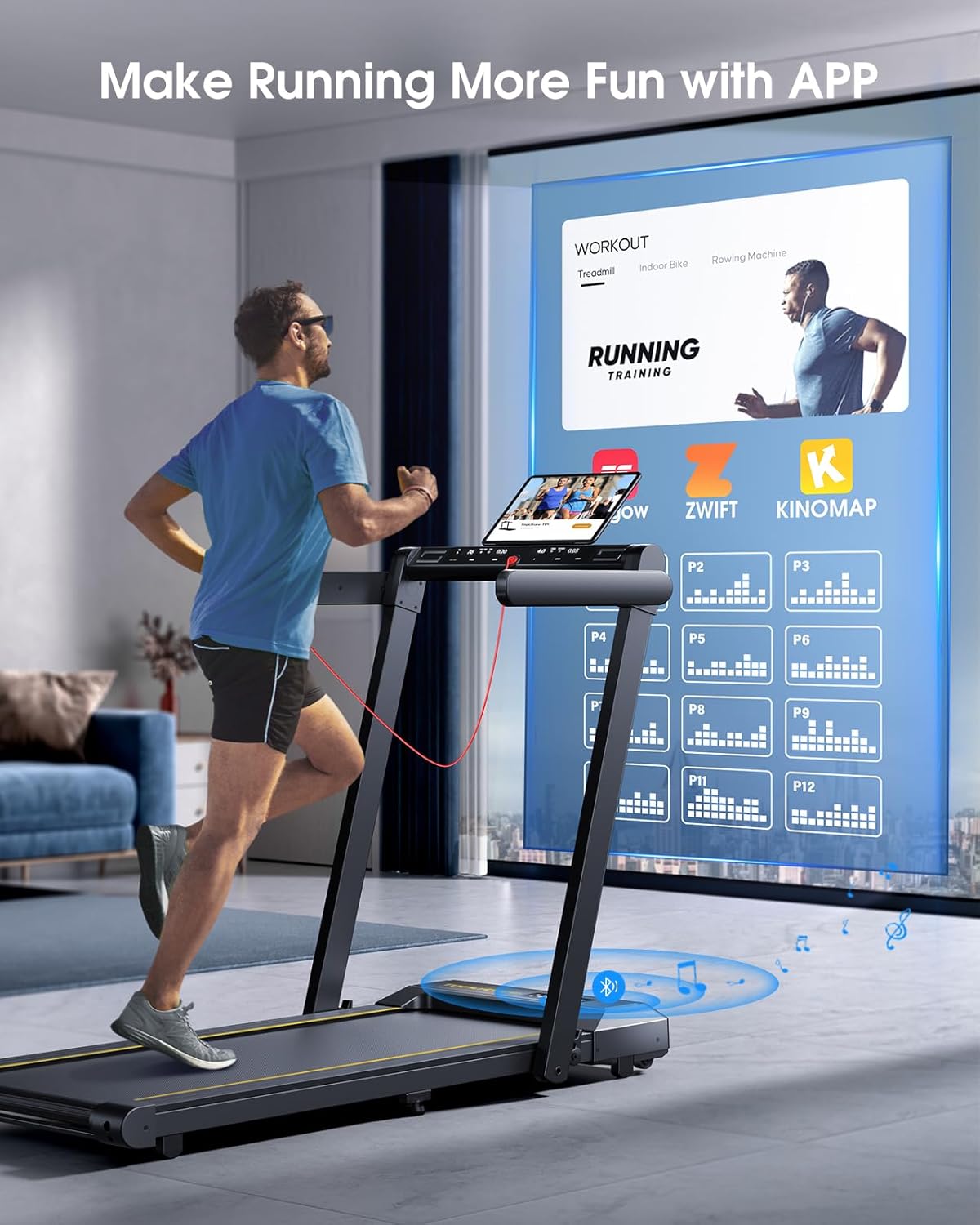
Image 3.3: The treadmill integrates with fitness apps like FITSHOW, offering diverse training courses and enhanced control.

Image 3.4: Control the treadmill via the integrated touch screen, remote control, or a connected smartphone application.
4. Maintenance
4.1 Cleaning
Regularly clean the treadmill to ensure optimal performance and longevity. Wipe down the console and frame with a damp cloth after each use. Avoid using abrasive cleaners or solvents.
4.2 Lubrication
The running belt requires periodic lubrication to reduce friction and wear. Refer to the specific instructions in your included user manual for the correct type of lubricant and application frequency. Note: Lubricant may not be included with the product and might need to be purchased separately.
4.3 Running Belt Adjustment
Over time, the running belt may become misaligned or loose. Consult the detailed instructions in your user manual for how to properly adjust the belt tension and centering. Incorrect adjustment can lead to premature wear or unsafe operation.

Image 4.1: The 7-layer non-slip running belt and internal silicone columns are designed for impact absorption and joint protection.
5. Troubleshooting
If you encounter any issues with your Toputure TP1 treadmill, please refer to the following common troubleshooting steps:
- Treadmill does not power on: Ensure the power cord is securely plugged into a working outlet and the main power switch is in the 'ON' position. Check the circuit breaker.
- Running belt stops unexpectedly: Verify that the safety key is properly inserted into the console. If it detaches, the treadmill will stop for safety.
- Unusual noises: Inspect the running belt for any foreign objects. Check for proper lubrication and belt alignment.
- Display not working: Ensure all connections are secure. Try restarting the treadmill.
For persistent issues or error codes not listed, please contact customer support.
6. Specifications
| Feature | Specification |
|---|
| Model Number | TP1 |
| Motor Power | 2.5 HP |
| Speed Range (Walking) | 1 - 8 km/h |
| Speed Range (Running) | 1 - 16 km/h |
| Maximum Weight Capacity | 130 kg |
| Running Area | 1040 x 420 mm |
| Display Type | Dual LED |
| Programs | 12 Predefined |
| Connectivity | Bluetooth (for speaker and app) |
| Folded Dimensions (L x W x H) | Approx. 125 x 55 x 71 cm |
| Product Dimensions (L x W x H) | Approx. 132.84 x 71.63 x 12.95 cm |
| Item Weight | 34 kg |
| Material | Alloy Steel |

Image 6.1: The treadmill is equipped with a powerful and quiet 2.5 HP motor, supporting a maximum user weight of 130 kg.

Image 6.2: The treadmill features an extra-wide running area of 1040mm by 420mm for comfortable use.
7. Warranty and Support
The Toputure TP1 treadmill typically comes with a 2-year warranty. For warranty claims, technical support, or any questions not covered in this manual, please contact Toputure customer service through their official channels or the retailer where the product was purchased.
You can visit the Toputure Brand Store for more information.


