
1. Introduction
This manual provides essential information for the proper installation, operation, and maintenance of your Stetsom Bravo Charger 120A PRO Bivolt. Please read this manual thoroughly before using the device to ensure safe and efficient operation.
The Stetsom Bravo Charger 120A PRO Bivolt is designed to provide high energy efficiency for charging automotive batteries and powering automotive audio systems. It features automatic bivolt input and a smart charging system to optimize battery life and performance.
2. Key Features
- High Energy Efficiency: Optimized for effective battery charging and powering automotive equipment.
- Three Charging Modes: Includes Fast Charge, Slow Charge, and Fixed Voltage modes to suit various needs.
- Smart Charge System (Slow Charge Mode): Regulates voltages to prevent overcharging and overheating, extending battery lifespan.
- Fixed Voltage Mode: Allows selection of output voltage from 12.6Vdc to 14.4Vdc for direct power supply to audio amplifiers and other devices.
- Automatic BI-VOLT AC Input: Automatically adapts to 127V or 220V AC power sources, eliminating concerns about outlet currents.
- Durable Construction: Manufactured with steel and aluminum for a lightweight design, enhanced heat dissipation, and modern aesthetics.
3. Product Overview

Figure 3.1: Front view of the Stetsom Bravo Charger 120A PRO Bivolt, showing the display and control buttons.

Figure 3.2: Top and bottom views of the charger, highlighting cooling fans and ventilation.
3.1. Main Components

Figure 3.3: Diagram illustrating the main components of the power supply.
- AC Power Connector: For connecting the device to the main power supply.
- Display: Digital display showing voltage and current information.
- DC Output Connector (Output): Terminals for connecting to batteries or automotive equipment.
- ON/OFF Key with LED (Power/Prot): Power switch with protection indicator.
3.2. Display and Controls

Figure 3.4: Detailed view of the charger's display and indicators.
- MODE / PROGRAMMING BUTTON (MODE & PROG.): Used to cycle through display information and adjust settings.
- Multimeter (CURRENT): Displays the current output.
- Multimeter (VOLTAGE): Displays the output voltage.
- CHARGED Indicator: Illuminates when the battery is fully charged in Slow Charge mode.

Figure 3.5: Indicators for different operating modes.
- FIXED VOLTAGE Mode Indicator: Illuminates when the charger is in Fixed Voltage mode.
- SMART FAST CHARGING Mode Indicator (FAST CHARGE): Illuminates when the charger is in Fast Charge mode.
- SMART SLOW CHARGE Mode Indicator (SLOW CHARGE): Illuminates when the charger is in Slow Charge mode.
4. Setup and Installation
4.1. AC Power Connection
Connect the AC power cord to a standard wall outlet. The Bravo Charger features an automatic BI-VOLT input, adapting to 127V or 220V AC without manual selection.
4.2. DC Output Connection (Battery/System)
Ensure the charger is turned off before making any connections. Connect the positive (+) terminal of the charger to the positive terminal of the battery/system, and the negative (-) terminal of the charger to the negative terminal of the battery/system. Use appropriate gauge cables as specified in your system requirements.
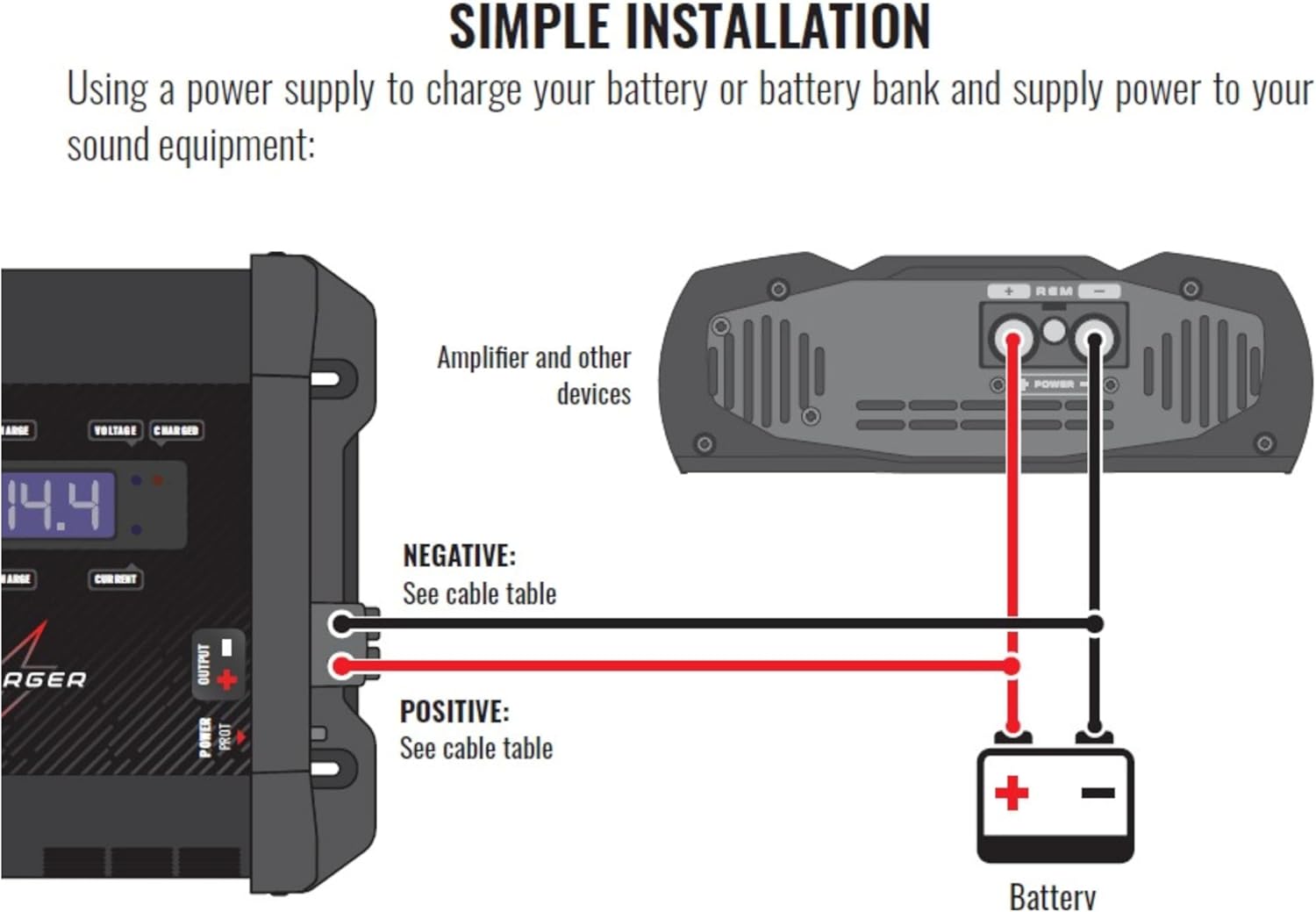
Figure 4.1: Simple installation diagram for charging a single battery or powering sound equipment.
4.3. Parallel Installation
For powering sound equipment and maintaining a charged battery bank using two or more power supplies in parallel, it is crucial to use only the FIXED VOLTAGE mode. All power supplies must be configured for the same output voltage. Smart charge modes (Fast/Slow Charge) should only be used with a single power supply connected.

Figure 4.2: Parallel installation diagram for multiple chargers powering a system and charging a battery bank.
5. Operating Modes
5.1. Fast Charge Mode
This mode delivers a higher current to the battery, suitable for situations where batteries are significantly discharged and a quick charge is required. The charger will provide maximum current until the battery reaches a full charge, then transition to float mode.
5.2. Slow Charge Mode (Smart Charge System)
The exclusive Smart Charge System in this mode regulates voltages for efficient and gentle charging. It prevents overcharging and excessive heating, which helps to prolong the overall lifespan and performance of your batteries. Once the battery is fully charged, the system automatically switches to a float charge to maintain the charge without damage.
5.3. Fixed Voltage Mode
This mode allows you to select a constant output voltage to directly power audio amplifiers or other 12V DC devices. Available voltage options typically include 12.6Vdc, 14.4Vdc, and 15.4Vdc. This mode is ideal for maintaining a stable power supply to your audio system, even when the vehicle's battery is discharged or not present.
5.4. Adjusting Voltage Settings
The voltage settings (12.6V, 14.4V, 15.4V) can be easily adjusted using the switch located on the side panel of the charger. Refer to Figure 3.3 for the location of the voltage selection switch.
6. Safety Information
- Always ensure proper ventilation around the charger to prevent overheating.
- Do not expose the charger to rain, moisture, or extreme temperatures.
- Avoid short-circuiting the output terminals.
- Do not attempt to open or modify the charger. Refer all servicing to qualified personnel.
- Keep out of reach of children.
- Ensure all connections are secure before turning on the charger.
7. Troubleshooting
If you encounter any issues with your Stetsom Bravo Charger, please refer to the following general guidelines:
- No Power: Check the AC power connection and ensure the ON/OFF switch is in the 'ON' position. Verify the power outlet is functional.
- No Output/Charging: Ensure DC output connections to the battery/system are correct and secure. Check the selected mode and voltage settings.
- Overheating: Ensure the charger has adequate ventilation and is not covered. Reduce the load if possible.
For persistent issues or complex problems, please contact Stetsom customer support.
8. Specifications
| Specification | Value |
|---|---|
| Model Number | BCHARGER_120A |
| Brand | Stetsom |
| Product Dimensions | 13 x 7 x 3.24 inches (330 x 178 x 82 mm) |
| Item Weight | 7 pounds (3.2 kg) |
| Output Voltage | 12.6V, 14.4V, 15.4V (DC) |
| Color | Black |
| ASIN | B0CQRYK1HX |
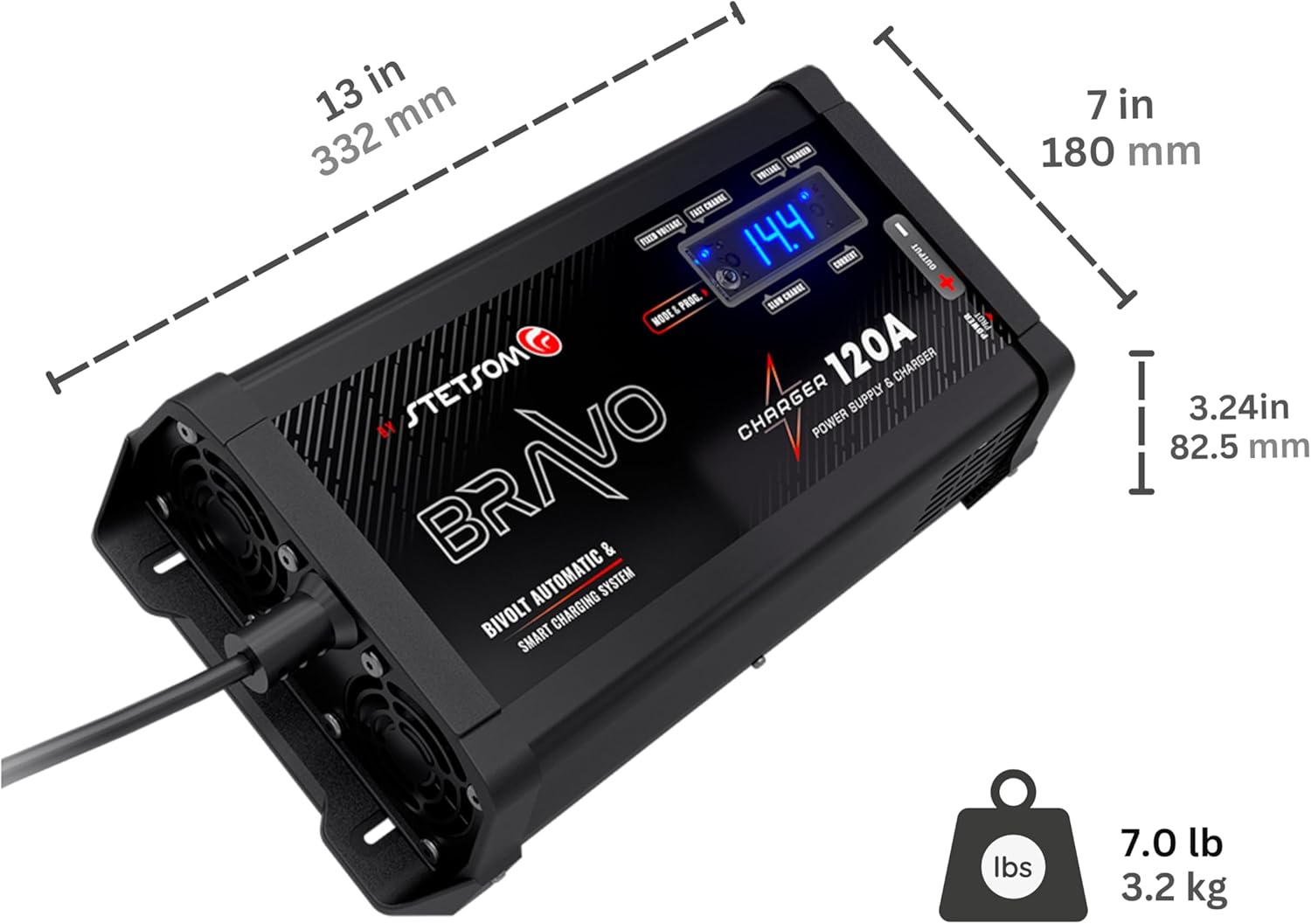
Figure 8.1: Product dimensions of the Stetsom Bravo Charger 120A PRO Bivolt.
9. Official Product Video
Video 9.1: An official presentation video of the Stetsom Bravo Charger line, highlighting its features and benefits for car audio enthusiasts. This video provides a visual overview of the product's capabilities and design.
10. Warranty and Support
For warranty information, technical support, or service inquiries, please contact Stetsom customer service through their official website or the retailer where the product was purchased. Keep your proof of purchase for warranty claims.