1. Introduction
This manual provides essential information for the safe and efficient operation of your Daikin EcoSwing Gold 12000 BTU Inverter Split Air Conditioner. Please read this manual thoroughly before using the unit and keep it for future reference. Proper use and maintenance will ensure optimal performance and extend the lifespan of your air conditioner.
Key Features:
- Integrated Wi-Fi: Control your unit remotely via the Daikin Smart AC app or voice commands with Google Assistant and Alexa.
- Inverter Technology with Procel Gold Seal: Achieves up to 70% energy savings compared to conventional models.
- Dual Filtration: Features an antibacterial Silver Ion filter for cleaner, safer air.
- R-32 Refrigerant: Utilizes an environmentally friendly refrigerant with lower global warming potential.
- Corrosion-Resistant Heat Exchanger: Outdoor unit heat exchanger features copper tubes and aluminum fins with special anti-corrosion treatment.
- Quiet Operation: Both indoor and outdoor units are designed for low noise levels, ensuring a comfortable environment.
2. Safety Information
To prevent injury to the user or other people and property damage, the following instructions must be followed. Incorrect operation due to ignoring instructions may cause harm or damage.
- Professional Installation: Installation, relocation, and maintenance of this air conditioner must be performed by a qualified service technician. Improper installation can lead to electric shock, fire, or water leakage.
- Power Supply: Ensure the power supply voltage matches the specifications of the unit (220V). Do not use extension cords or multi-outlet adapters.
- Electrical Safety: Do not operate the unit with wet hands. Do not insert fingers or objects into the air inlet/outlet.
- Refrigerant: The unit uses R-32 refrigerant. Only qualified personnel should handle refrigerant.
- Cleaning: Always turn off the power supply before cleaning or performing any maintenance.
- Children and Pets: Keep children and pets away from the unit, especially the outdoor unit, to prevent injury.
3. Product Overview
Your Daikin EcoSwing Gold air conditioner consists of an indoor unit, an outdoor unit, and a remote control. Familiarize yourself with these components.
Indoor Unit

Figure 3.1: Front view of the indoor unit. This unit is installed inside your room and is responsible for circulating cooled air.
Outdoor Unit

Figure 3.2: Outdoor condenser unit. This unit houses the compressor and heat exchanger, releasing heat to the outside environment.
Remote Control
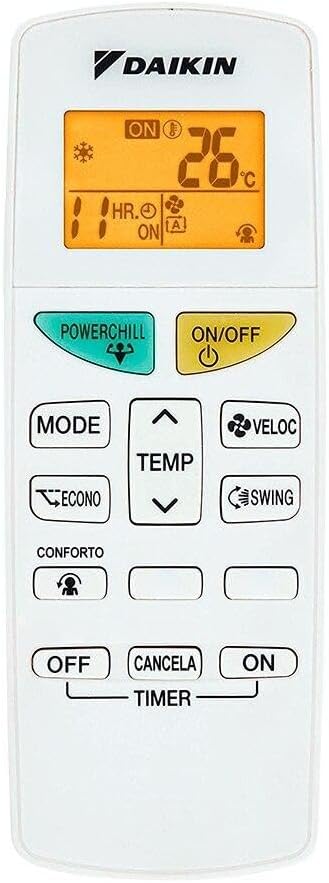
Figure 3.3: Remote control. Used to adjust settings, modes, and temperature.
4. Setup
4.1 Installation
The installation of your Daikin EcoSwing Gold air conditioner requires specialized knowledge and tools. It is mandatory that installation be performed by a certified and qualified technician. Improper installation can void your warranty and lead to serious operational issues or safety hazards.
The technician will handle:
- Mounting of indoor and outdoor units.
- Connecting refrigerant lines and electrical wiring.
- Vacuuming the system and charging with R-32 refrigerant.
- Testing the unit for proper operation.
4.2 Wi-Fi Setup
Your Daikin EcoSwing Gold unit features integrated Wi-Fi for smart control. To set up Wi-Fi connectivity:
- Download the Daikin Smart AC application from your smartphone's app store (available on Android and iOS).
- Follow the in-app instructions to register your device and connect it to your home Wi-Fi network.
- Once connected, you can monitor and control your air conditioner from anywhere, as well as integrate it with voice assistants like Google Assistant and Amazon Alexa.
5. Operating Instructions
This section explains the basic functions and modes of your air conditioner using the remote control.
5.1 Basic Operation
- Power ON/OFF: Press the ON/OFF button to start or stop the unit.
- Mode Selection: Press the MODE button to cycle through available modes: Cool, Fan, Dry.
- Temperature Adjustment: Use the TEMP ▲ and TEMP ▼ buttons to increase or decrease the desired temperature.
- Fan Speed: Press the VELOC (Fan Speed) button to adjust the fan speed (Auto, Low, Medium, High).
- Swing Function: Press the SWING button to activate or deactivate the automatic vertical airflow swing.
5.2 Advanced Functions
- ECONO Mode: Activates energy-saving operation. Press the ECONO button.
- POWERCHILL: Provides rapid cooling. Press the POWERCHILL button.
- TIMER: Set the unit to turn ON or OFF automatically after a specified period. Refer to the detailed remote control guide for specific timer settings.
- COMFORTO (Comfort Airflow): Adjusts the airflow direction to prevent direct drafts. Press the COMFORTO button.
6. Maintenance
Regular maintenance ensures efficient operation and prolongs the life of your air conditioner. Always disconnect power before performing any maintenance.
6.1 Air Filter Cleaning
The Silver Ion antibacterial filter should be cleaned regularly (approximately every two weeks, or more often depending on usage and air quality).
- Open the front panel of the indoor unit.
- Remove the air filters.
- Clean the filters with a vacuum cleaner or wash them with lukewarm water and a mild detergent. Rinse thoroughly.
- Allow the filters to dry completely in a shaded area before reinstalling. Do not expose to direct sunlight.
- Reinstall the filters and close the front panel.
6.2 Unit Exterior Cleaning
Wipe the indoor and outdoor units with a soft, dry cloth. For stubborn dirt, use a damp cloth with a mild detergent, then wipe dry. Do not use harsh chemicals, abrasive cleaners, or hot water.
6.3 Seasonal Checks
- Before the cooling season, ensure the outdoor unit is free from obstructions (leaves, debris).
- Check for any unusual noises or odors during operation. If detected, contact a service technician.
7. Troubleshooting
Before contacting service, please check the following common issues and solutions:
| Problem | Possible Cause | Solution |
|---|---|---|
| Unit does not operate. | No power supply; circuit breaker tripped; remote control batteries depleted. | Check power connection; reset circuit breaker; replace remote control batteries. |
| Insufficient cooling. | Dirty air filters; blocked outdoor unit; windows/doors open; temperature setting too high. | Clean air filters; clear obstructions from outdoor unit; close windows/doors; lower temperature setting. |
| Unusual noise. | Loose parts; foreign objects in fan; unit not level. | Turn off unit and inspect for loose parts or objects. If noise persists, contact service. |
| Wi-Fi connection issues. | Router issues; incorrect Wi-Fi password; unit too far from router. | Restart router; re-enter Wi-Fi password in app; ensure unit is within Wi-Fi range. |
If the problem persists after attempting these solutions, please contact a qualified service technician.
8. Specifications
Technical specifications for the Daikin EcoSwing Gold 12000 BTU Inverter Split Air Conditioner.
| Feature | Specification |
|---|---|
| Model Information | RKP12S5VL | FTKP12S5VL |
| Cooling Capacity | 12000 BTUs |
| Voltage | 220 Volts |
| Power Consumption | 877 watts |
| Annual Energy Consumption | 350 Kilowatt Hours Per Year |
| Energy Efficiency Rating | A |
| Noise Level | 19 Decibels |
| Product Dimensions (Indoor Unit) | 22.5 x 77 x 28.5 cm (Depth x Width x Height) |
| Product Weight | 29.5 Kilograms (Total) |
| Special Features | Inverter, Wi-Fi Integrated |
| Refrigerant Type | R-32 |
9. Warranty and Support
9.1 Warranty Information
Daikin offers a comprehensive warranty for your EcoSwing Gold air conditioner:
- 10 Years Warranty on Compressor: The compressor is covered for a period of 10 years from the date of purchase.
- 3 Years Total Warranty: The entire unit, including parts and labor (excluding compressor), is covered for 3 years from the date of purchase.
Please retain your proof of purchase for warranty claims. Warranty terms and conditions may apply; refer to your warranty card for full details.
9.2 Customer Support
For technical assistance, service requests, or warranty inquiries, please contact Daikin customer support or your authorized dealer.
Daikin Official Website: www.daikin.com
Service Hotline: Refer to your local Daikin service center contact information.


