
1. Product Overview
The Kohree 12V RV Macerator Pump is designed for efficient and convenient waste disposal from RV black and gray water tanks. It features a powerful motor and specialized blades to process waste, allowing for discharge through a standard garden hose.
Key features include:
- 4-Blade Anti-Clog Design: Upgraded SK5 steel blades grind waste into a fine slurry (≤1/16 inch or 1.6mm), significantly reducing clogging risk.
- High-Efficiency Drainage: Delivers a stable 12 GPM (gallons per minute), capable of emptying a 40-gallon tank in approximately 4-6 minutes. Provides 15 PSI pressure and a 10ft vertical lift for versatile disposal options.
- Low Amp Draw: Operates on 12V DC power, drawing 7-10 amps directly from your RV battery. Includes built-in thermal protection to prevent burnout and copper motor windings for extended life.
- Black & Gray Water Compatible: Handles both solid waste (black water) and soap/food residue (gray water) with a self-priming design.

2. Safety Information
Read all instructions carefully before operating the pump. Failure to follow these instructions may result in property damage, injury, or death.
- Always wear appropriate personal protective equipment, including gloves and eye protection, when handling waste.
- Ensure the pump is securely connected to a stable 12V power source before operation.
- Do not operate the pump dry for extended periods, as this can cause damage.
- Verify all hose connections are tight to prevent leaks.
- Keep children and pets away from the operating area.
- Never attempt to service the pump while it is connected to a power source.
- Dispose of waste according to local regulations.
3. Package Contents
Verify that all items listed below are included in your package:
- RV Macerator Pump x 1
- Alligator Clip x 1
- 2.3M Cigarette Lighter Power Cable x 1
- 3/4" Hose Connector x 1
- Rubber Glove x 1 pair
- Adjustable Metal Clamps x 2
- Waterproof Tape x 1
- Screwdriver x 1
- RV Black Water Hose x 1
- Durable Storage Kit (Case) x 1
- Spare O-ring x 1
- Transparent tube (for clear view of flow) x 1
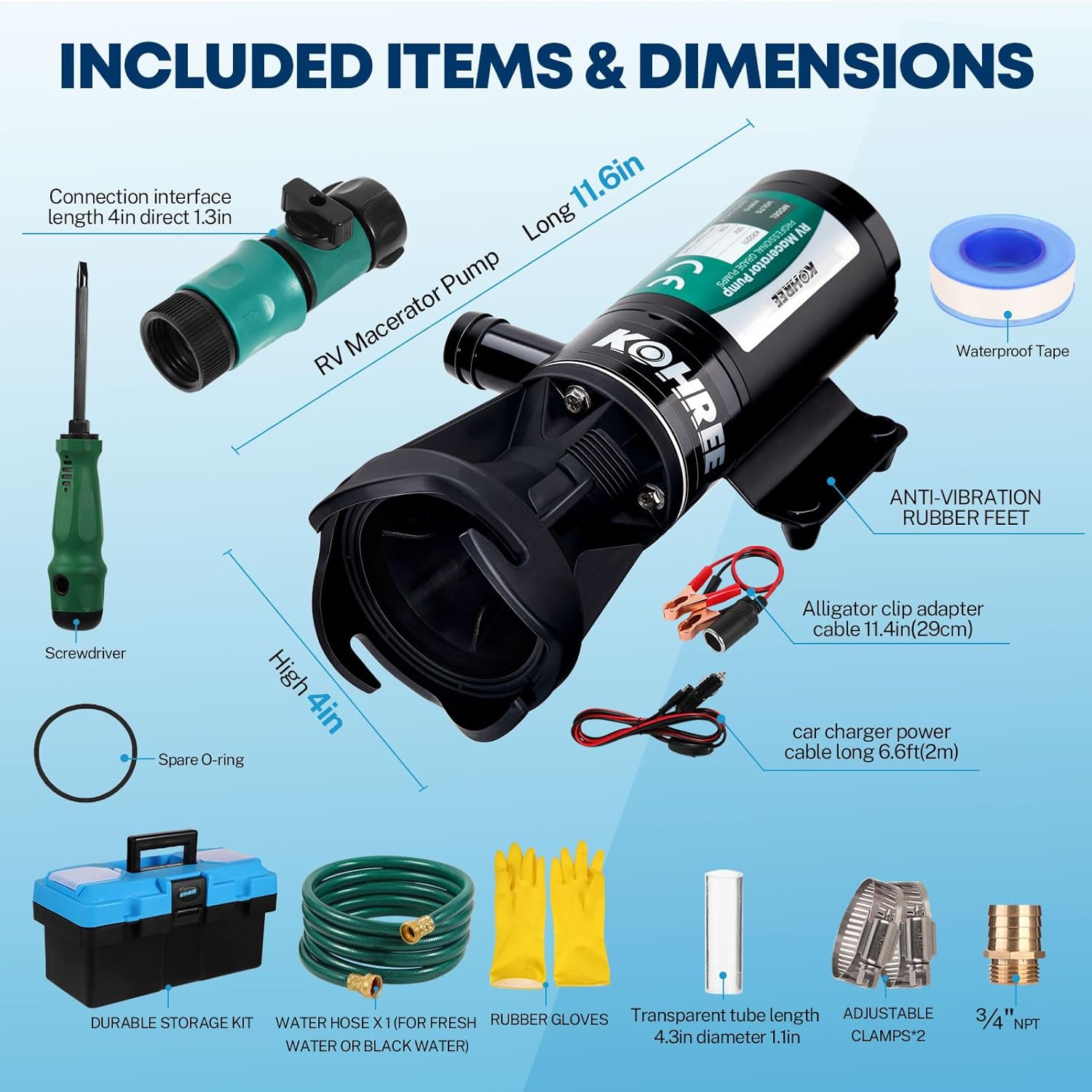
4. Setup Instructions
Follow these steps to set up your Kohree RV Macerator Pump:
- Prepare the Pump: Attach the transparent tube to the pump's inlet and secure it with one of the adjustable metal clamps.
- Connect to RV Waste Port: Ensure the O-ring is present on the pump's inlet connection. Twist the pump onto your RV's waste port until securely locked.
- Connect Rinse Water Hose: Attach your rinse water hose (not included) to the on-off valve on the pump.
- Connect Discharge Hose: Connect the provided RV black water hose (or a standard garden hose) to the pump's discharge outlet. Secure with the remaining adjustable metal clamp.
- Power Connection: Connect the power cable to the pump. Use either the alligator clips for direct battery connection (positive to positive, negative to negative) or the cigarette lighter adapter for a 12V cigarette lighter socket. Ensure a secure connection to a 12V power source.
- Position Discharge: Route the discharge hose to a suitable and legal waste disposal point (e.g., sewer cleanout, toilet, dump station). Ensure the hose is free of kinks and has a continuous downward slope if possible, or is within the pump's 10ft vertical lift capacity.


Video 1: Official product video demonstrating the setup and operation of the Kohree RV Macerator Pump 12V.
5. Operating Instructions
Once the pump is set up, follow these steps for operation:
- Open RV Waste Valve: Open the black water tank valve on your RV.
- Activate Pump: Turn on the macerator pump using the power switch on the cable. The pump will begin to draw and macerate the waste. Monitor the transparent tube to observe flow.
- Rinse Tank (Optional but Recommended): Once the black tank is empty (indicated by clear flow in the transparent tube or reduced pump noise), close the black tank valve. Open the gray water tank valve to flush the pump and discharge hose with gray water. Alternatively, use the rinse water connection on the pump to flush the black tank with fresh water while the pump is running.
- Complete Drainage: After flushing, allow the pump to run until the discharge is clear.
- Shut Down: Turn off the pump, then close all RV waste valves. Disconnect the discharge hose and power.
Important: Do not run the pump dry for more than a few seconds. The pump is equipped with thermal protection to prevent damage from overheating, but continuous dry running should be avoided.
6. Maintenance
Regular maintenance ensures optimal performance and longevity of your macerator pump:
- Rinsing After Use: Always rinse the pump and hoses thoroughly with fresh water after each use, especially after processing black water. This prevents residue buildup and odors.
- Blade Inspection: Periodically inspect the macerator blades for any signs of wear or damage. While designed for durability, foreign objects can cause issues.
- Seal and O-ring Check: Inspect all seals and O-rings for cracks or wear. Replace if necessary to prevent leaks. A spare O-ring is included in your kit.
- Storage: After cleaning, disconnect all hoses and store the pump and accessories in the provided durable storage case in a dry, cool place.
- Winterization: In freezing temperatures, ensure the pump is completely drained of water to prevent damage from ice expansion.

7. Troubleshooting
| Problem | Possible Cause | Solution |
|---|---|---|
| Pump does not turn on. | No power, loose connection, blown fuse, thermal protection activated. |
|
| Low flow or no discharge. | Clogged inlet/outlet, kinked hose, low voltage, air leak in suction line. |
|
| Pump is running but not priming. | Air leak in suction, insufficient liquid, pump run dry. |
|
| Leaks from connections. | Loose connections, damaged O-ring/gasket, insufficient waterproof tape. |
|
8. Specifications
| Feature | Detail |
|---|---|
| Brand | Kohree |
| Model Number | KR2211 |
| Power Source | 12V DC (Battery Powered) |
| Maximum Flow Rate | 12 GPM (Gallons Per Minute) |
| Maximum Lifting Height | 10 feet |
| Material | Stainless Steel (blades) |
| Amp Draw | 7-10 Amps |
| Waste Particle Size Reduction | ≤1/16 inch (1.6mm) |
| UPC | 850077750304 |
9. Warranty and Support
For warranty information, please refer to the documentation included with your purchase or visit the official Kohree website. Warranty terms typically cover manufacturing defects for a specified period from the date of purchase.
For technical support, troubleshooting assistance beyond this manual, or to inquire about replacement parts, please contact Kohree customer service through their official channels. Contact details can usually be found on the product packaging or the manufacturer's website.
You can visit the Kohree store on Amazon for more products and information: Kohree Store