
1. Introduction
This manual provides instructions for the Brookstone 3-in-1 Wireless Charging Station. This device is designed to simultaneously charge compatible iPhone models, Apple Watch, and AirPods.
Package Contents
- 1 x Brookstone 3-in-1 Wireless Charging Station
- 1 x USB-C Cable
- 1 x User Guide

Image: The Brookstone 3-in-1 Wireless Charging Station in white, shown charging an iPhone, Apple Watch, and AirPods simultaneously. The iPhone is magnetically attached to the upright stand, the Apple Watch is on its dedicated charger, and the AirPods case rests on the base.
2. Product Features
- 3-in-1 Wireless Charging: Charges iPhone (MagSafe compatible), Apple Watch, and AirPods simultaneously.
- Magnetic Alignment: Strong magnetic connection for secure iPhone placement.
- Flexible Viewing: Supports charging in both portrait and landscape modes for iPhone.
- Fast Wireless Charging: Delivers up to 15W for iPhone and 5W for Apple Watch and AirPods.
- Advanced Safety Features: Built-in protection against overcurrent, overvoltage, overheating, short circuits, and foreign object detection.

Image: A close-up view of the 3-in-1 magnetic charging stand, highlighting its ability to charge an iPhone, Apple Watch, and AirPods together. The iPhone is shown horizontally, the Apple Watch is on its charger, and AirPods are on the base.
3. Setup Instructions
- Connect Power: Insert the provided USB-C cable into the charging port on the back of the charging station. Connect the other end of the USB-C cable to a compatible power adapter (not included). A power adapter with 9V-3A output is recommended for optimal performance.
- Power On: Once connected to power, the charging station will be ready for use. A small LED indicator on the front of the base may illuminate.
- Placement: Place the charging station on a flat, stable surface.

Image: A visual comparison showing a cluttered desk with multiple charging cables (labeled 'Before') next to a tidy desk featuring the Brookstone 3-in-1 Wireless Charging Station (labeled 'After'), demonstrating improved organization.
4. Operating Instructions
Charging Your iPhone
- Align your MagSafe-compatible iPhone with the magnetic charging pad on the upright stand. The magnets will automatically snap the phone into place.
- The iPhone can be charged in both portrait and landscape orientations.
- Ensure the phone is centered on the charging pad for optimal charging.
Charging Your Apple Watch
- Place your Apple Watch onto the dedicated charging module located on the upright stand.
- Ensure the watch is properly seated and the charging icon appears on the watch screen.
Charging Your AirPods
- Place your AirPods charging case (compatible with wireless charging) onto the flat charging pad on the base of the station.
- Ensure the AirPods case is centered on the charging pad. The charging indicator on the AirPods case should illuminate.

Image: An iPhone is shown magnetically attached to the charging stand, displaying a charging animation. Text indicates "15W OUTPUT" and "STRONG MAGNETIC, SNAP-CHARGER-USE".
5. Compatibility
The Brookstone 3-in-1 Wireless Charging Station is compatible with the following devices:
- iPhone: iPhone 15, 14, 13, 12 Pro Max, Pro, Mini, and Plus series (MagSafe compatible).
- Apple Watch: Apple Watch Ultra, Ultra 2, Series 8, 7, SE, 6, 5, 4, 3, and 2.
- AirPods: AirPods Pro, AirPods (3rd Generation), AirPods (2nd Generation) with wireless charging case.
- Other Devices: Android phones with Qi2 or Qi with compatible magnet cases/rings may also be supported.
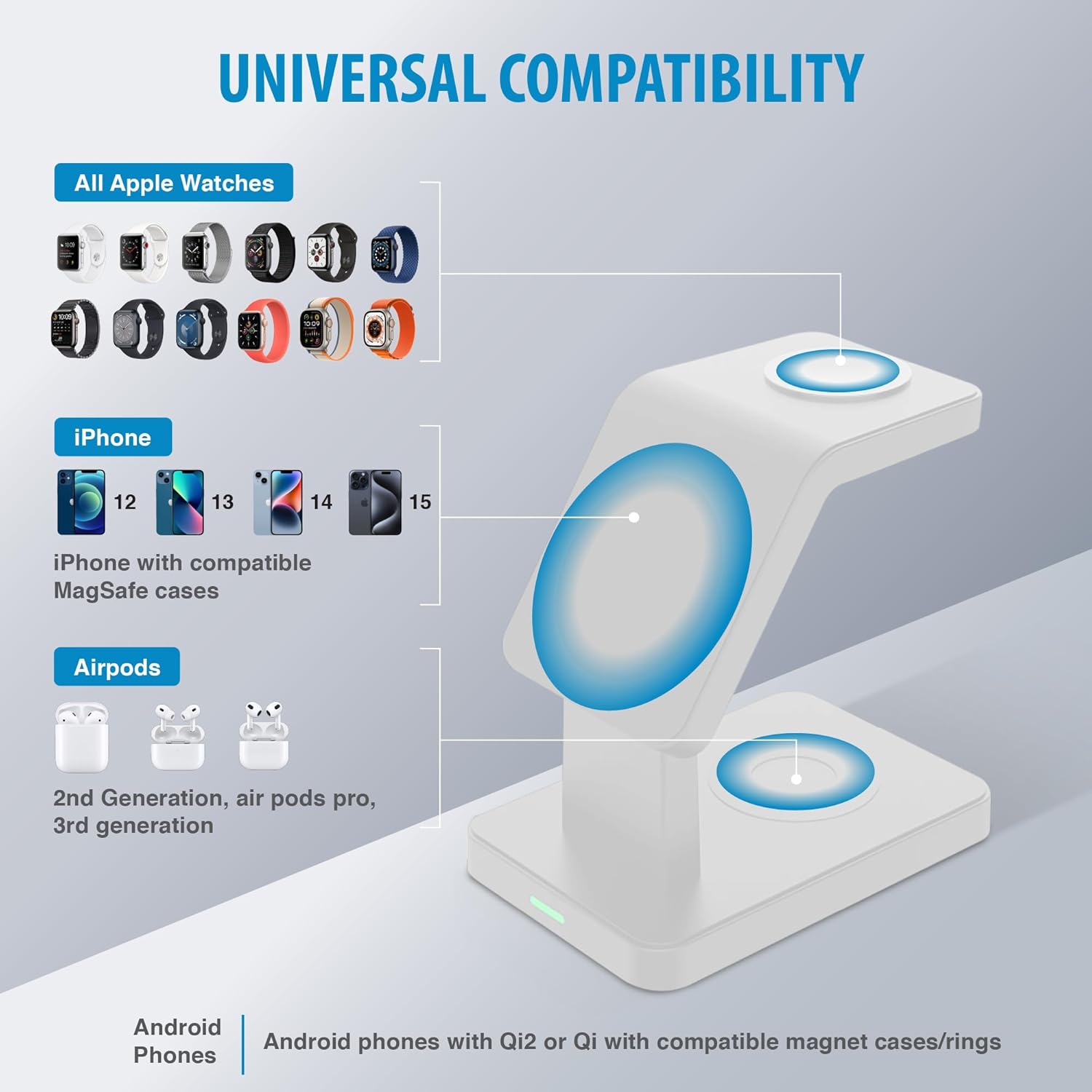
Image: A diagram titled "UNIVERSAL COMPATIBILITY" showing icons for various Apple Watch models, iPhone models (12, 13, 14, 15), and AirPods (2nd Gen, Pro, 3rd Gen), indicating their compatibility with the charging station.
6. Safety Guidelines
To ensure safe operation and prolong the life of your charging station, please observe the following:
- Do not disassemble or modify the device.
- Keep the device away from water, moisture, and high temperatures.
- Avoid dropping or subjecting the device to strong impacts.
- Use only the provided USB-C cable and a compatible power adapter.
- Do not place metal objects or foreign materials on the charging pads, as this may interfere with charging or cause overheating.
- The charging station incorporates intelligent protection against overcurrent, overvoltage, overheating, short circuits, magnetic field interference, and foreign object detection.

Image: Three icons illustrating the safety features of the charging station: a shield with a lightning bolt for over-current protection, a thermometer for over-temperature protection, and a voltage symbol for over-voltage protection.
7. Maintenance
To maintain your charging station in optimal condition:
- Clean the surface with a soft, dry cloth.
- Do not use harsh chemicals or abrasive cleaners.
- Ensure the charging pads are free of dust and debris for efficient charging.
8. Troubleshooting
- Device not charging:
- Ensure the charging station is properly connected to a power source.
- Verify that your device is correctly aligned on the charging pad.
- Check if your device is compatible with wireless charging or MagSafe.
- Remove any thick phone cases or cases that are not MagSafe compatible, as they may interfere with charging.
- Ensure no foreign objects (e.g., metal, credit cards) are between the device and the charging pad.
- Slow charging:
- Use a power adapter that meets the recommended specifications (e.g., 9V-3A).
- Ensure your device is centered on the charging pad.
- Charging multiple devices simultaneously may affect individual charging speeds.
- LED indicator is too bright:
- The LED indicates power status. If the brightness is disruptive, consider placing the unit in a location where the light is less visible or using a small piece of opaque tape to cover the LED.
- Phone magnet not strong enough:
- Ensure your phone case is MagSafe compatible. Non-MagSafe cases may weaken the magnetic connection.
- Verify that the phone is correctly aligned with the magnetic charging pad.
9. Technical Specifications
| Model Number | BK15-3M1D-WT |
| Product Dimensions | 5 x 5 x 5 inches |
| Item Weight | 14.9 ounces |
| Input Voltage | 12 Volts (requires compatible power adapter) |
| iPhone Output | Up to 15 Watts |
| Apple Watch Output | 5 Watts |
| AirPods Output | 5 Watts |
| Connector Type | USB Type C |
| Special Feature | Magnetic |
| Color | White |
10. Warranty and Support
For warranty information or technical support, please refer to the documentation included with your purchase or visit the official Brookstone website. Keep your proof of purchase for warranty claims.
