
1. Introduction
This manual provides essential information for the proper use and understanding of the YOURRYONG NRF51822-A1 Module Board. The NRF51822-A1 is a powerful, highly flexible, multi-protocol SoC (System on Chip) ideally suited for Bluetooth Low Energy (BLE) and 2.4 GHz ultra low-power wireless applications. It integrates a 2.4 GHz multi-protocol radio, ARM Cortex-M0 CPU, 256 kB/128 kB flash memory, and 32 kB/16 kB RAM.
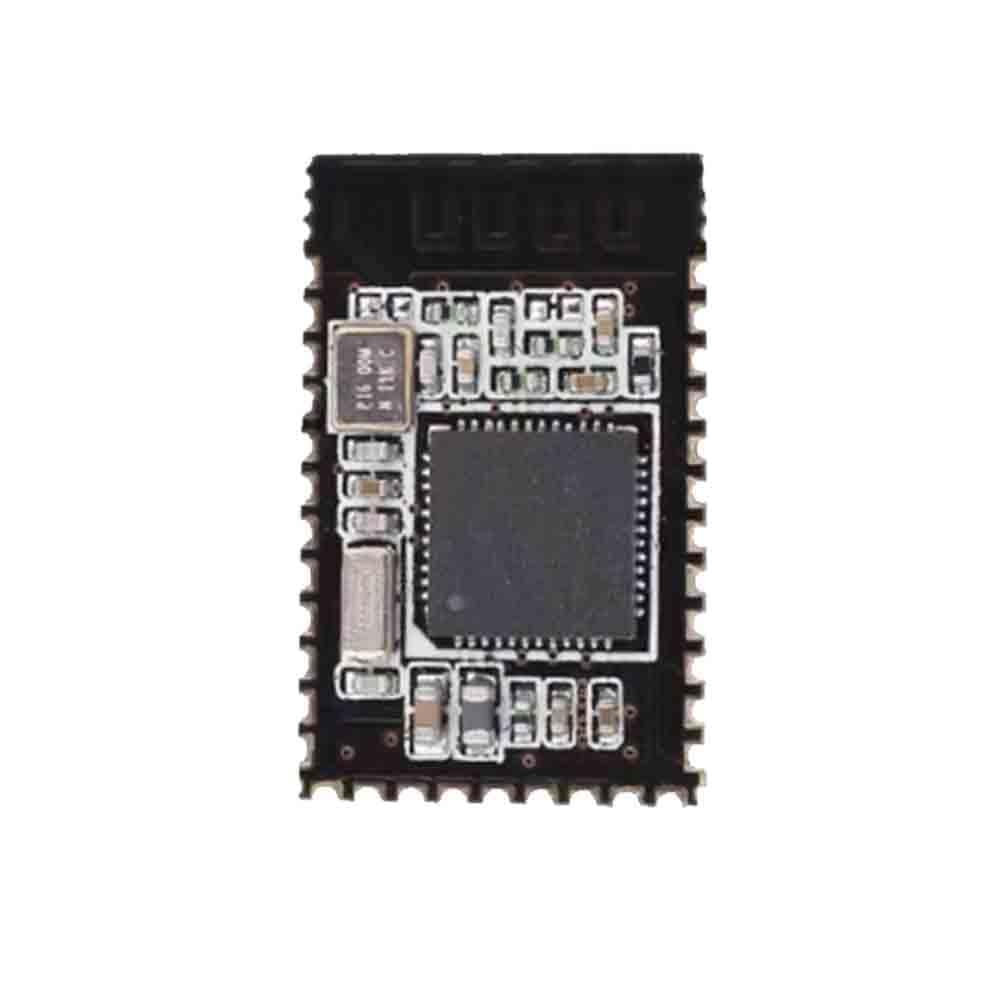
Figure 1: Overview of the YOURRYONG NRF51822-A1 Module Board. This image displays the compact design of the module, highlighting the main SoC, crystal oscillators, and various passive components on the PCB.
2. Setup and Installation
Before proceeding with installation, ensure you have the necessary development tools and a compatible host board. The NRF51822-A1 module requires a stable power supply and appropriate communication interfaces.
2.1 Power Supply Requirements
- Voltage: 1.8V to 3.6V DC.
- Current: Varies based on operation mode (e.g., transmit, receive, sleep). Refer to the NRF51822 datasheet for detailed current consumption figures.
- Filtering: It is recommended to use appropriate decoupling capacitors near the power pins to ensure stable operation.
2.2 Pin Connections
Connect the module to your host board using the provided pin headers. Ensure correct polarity and pin assignments to prevent damage.
| Pin Name | Description | Type |
|---|---|---|
| VCC | Power Supply Input | Power |
| GND | Ground | Ground |
| SWDIO | SWD Data I/O | Digital I/O |
| SWCLK | SWD Clock | Digital Input |
| P0.xx | General Purpose I/O (GPIO) | Digital I/O |
Note: Refer to the NRF51822-A1 module's specific pinout diagram for a complete list of available pins and their functions.
3. Operating Instructions
The NRF51822-A1 module operates based on the firmware loaded onto its flash memory. This section outlines general operational principles.
3.1 Firmware Upload
- Connect a compatible SWD (Serial Wire Debug) programmer (e.g., J-Link, ST-Link) to the SWDIO and SWCLK pins of the module.
- Ensure the module is powered correctly.
- Use your preferred IDE (e.g., Keil MDK, Segger Embedded Studio, VS Code with extensions) and SDK (e.g., Nordic nRF5 SDK) to compile your application.
- Flash the compiled firmware (.hex file) to the module using the programmer.
- Verify the successful upload through the IDE's output.
3.2 Bluetooth Low Energy (BLE) Operation
Once firmware is loaded, the module can operate as a BLE peripheral or central device, depending on the application. Common operations include:
- Advertising: Broadcasting its presence to other BLE devices.
- Scanning: Discovering other BLE devices.
- Connecting: Establishing a connection with another BLE device.
- Data Exchange: Sending and receiving data via GATT services and characteristics.
For detailed programming and API usage, refer to the Nordic Semiconductor nRF5 SDK documentation.
4. Maintenance
The NRF51822-A1 module is designed for robust operation with minimal maintenance. However, adhering to certain practices can prolong its lifespan and ensure reliable performance.
- Environmental Conditions: Operate the module within specified temperature and humidity ranges. Avoid extreme conditions.
- Cleaning: If necessary, gently clean the module with a soft, dry, anti-static brush or cloth. Do not use liquids or abrasive materials.
- Storage: Store the module in an anti-static bag in a dry, cool environment when not in use.
- Firmware Updates: Regularly check for updated SDKs and example code from Nordic Semiconductor to benefit from performance improvements and bug fixes.
5. Troubleshooting
This section addresses common issues encountered during the use of the NRF51822-A1 module.
5.1 Module Not Powering On
- Check Power Supply: Verify that the VCC and GND connections are correct and the voltage is within the 1.8V to 3.6V range.
- Inspect Connections: Ensure all power connections are secure and free from shorts.
5.2 Firmware Upload Failure
- SWD Connections: Confirm SWDIO and SWCLK pins are correctly connected to the programmer.
- Programmer Driver: Ensure the SWD programmer drivers are installed and up-to-date on your computer.
- Power to Module: The module must be powered during firmware upload.
- IDE/SDK Configuration: Verify that your IDE and SDK are correctly configured for the NRF51822 target.
5.3 BLE Connection Issues
- Advertising State: Ensure the module is actively advertising if it's intended to be discovered.
- Device Compatibility: Confirm the connecting device supports BLE and is within range.
- Antenna: Check if the antenna is properly connected or integrated (if applicable to your specific module variant).
- Firmware Logic: Review your application firmware for correct BLE stack initialization and event handling.
6. Specifications
Key technical specifications for the NRF51822-A1 Module Board.
| Feature | Detail |
|---|---|
| Model | NRF51822-A1 |
| Microcontroller | ARM Cortex-M0 |
| Flash Memory | 256 kB |
| RAM | 32 kB |
| Wireless Protocol | Bluetooth Low Energy (BLE), 2.4 GHz proprietary |
| Operating Voltage | 1.8V - 3.6V DC |
| Manufacturer | YOURRYONG |
| UPC | 749771625783 |
| Mfr Part Number | 749771625776 |
7. Warranty Information
This product is covered by a standard manufacturer's warranty. For specific warranty terms and conditions, please refer to the documentation provided with your purchase or contact YOURRYONG customer support. The warranty typically covers defects in materials and workmanship under normal use.
Note: Unauthorized modifications, improper installation, or use outside of specified operating conditions may void the warranty.
8. Customer Support
For technical assistance, troubleshooting, or general inquiries regarding your YOURRYONG NRF51822-A1 Module Board, please contact our customer support team.
- Manufacturer: YOURRYONG
- Online Resources: Refer to the official Nordic Semiconductor documentation and community forums for detailed technical information and development resources related to the NRF51822 SoC.
- Contact: Please refer to your purchase invoice or the seller's contact information for direct support channels.