
Introduction
Thank you for choosing the VRURC 20000mAh Portable Charger. This compact and powerful device is designed to keep your electronic devices charged on the go. With multiple input and output ports, fast charging capabilities, and built-in safety features, it is an essential accessory for travel and daily use. Please read this manual carefully to ensure proper operation and maintenance of your power bank.
Package Contents
- 1 x VRURC 20000mAh Power Bank
- 1 x USB-C to USB-C Cable
- 1 x User Manual
Product Overview

The VRURC 20000mAh Power Bank features a sleek design with a digital display showing the remaining battery percentage.

Equipped with 3 input ports (Micro, USB-C, Lightning) and 4 output ports (3 USB-A, 1 USB-C), allowing for versatile charging.
Setup: Charging the Power Bank
Before using your power bank for the first time, it is recommended to fully charge it. The power bank supports three input methods for recharging:
- USB-C Input: Use the provided USB-C to USB-C cable or another compatible USB-C cable.
- Micro USB Input: Use a standard Micro USB cable.
- Lightning Input: Use a standard Lightning cable (for Apple devices).
Connect the appropriate cable to one of the input ports on the power bank and the other end to a compatible wall adapter (9V 2A adapter recommended for fastest charging). A full charge typically takes approximately 6 hours.
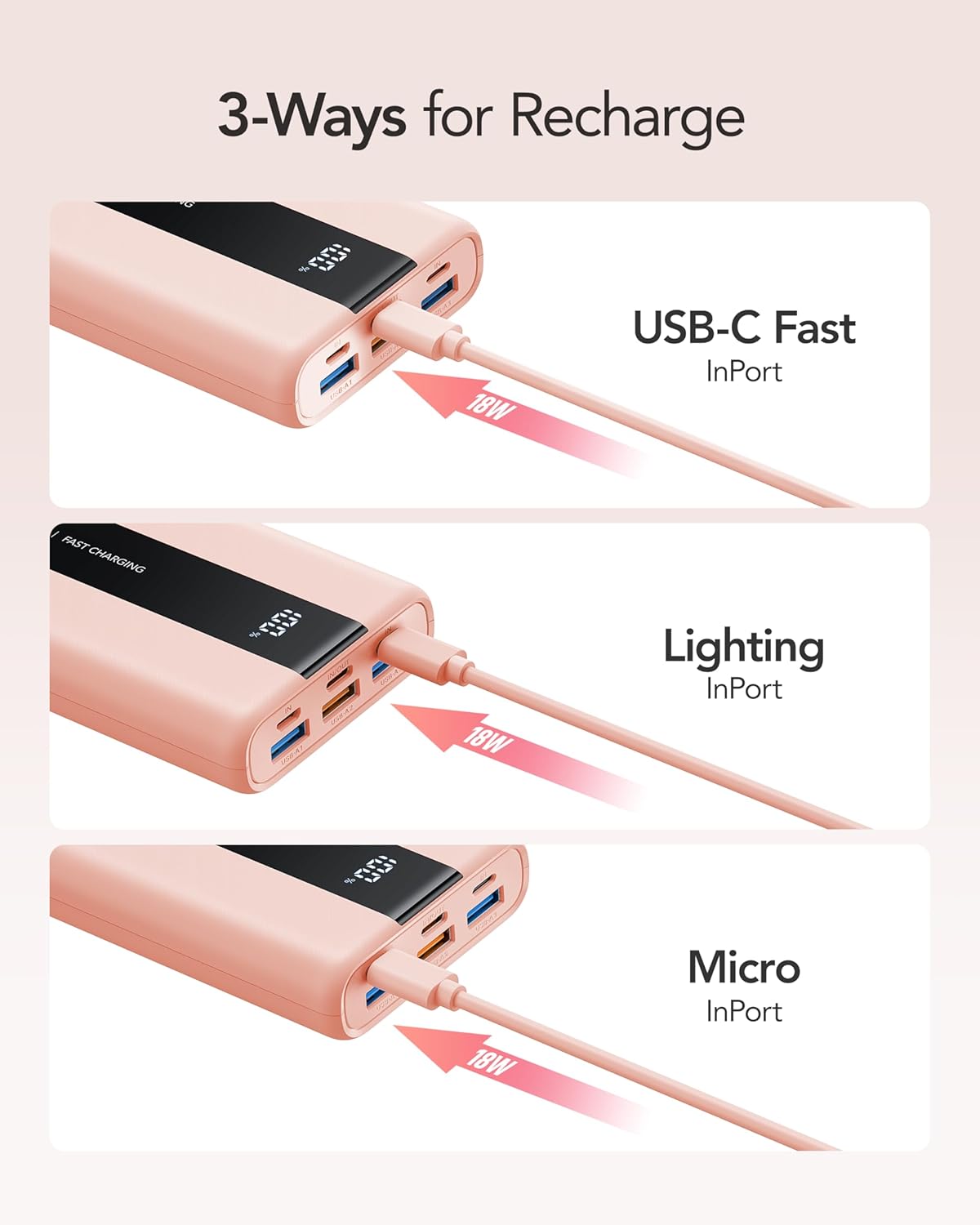
The power bank can be recharged via USB-C, Lightning, or Micro USB ports.
Operating: Charging Your Devices
The VRURC Power Bank is equipped with 4 output ports, allowing you to charge multiple devices simultaneously. It supports fast charging protocols (PD QC 3.0) for compatible devices.
- USB-A Outputs: Three USB-A ports (22.5W max for one, 12W max for others) are available for charging various devices.
- USB-C Output: One USB-C port (20W max) supports both input and output, ideal for newer smartphones and tablets.
Simply connect your device's charging cable to the appropriate output port on the power bank. The digital display will show the remaining battery percentage of the power bank.

Charge up to four devices concurrently with the multiple output ports.
Official Product Videos
Video: Overview of the 20000mAh Mini Power Bank, highlighting its 3 USB ports and 3 inputs.
Video: Demonstrates the VRURC 6-port power bank, emphasizing its small size and 20000mAh capacity.
Safety Features
Your VRURC Power Bank is built with multiple automatic protection modes to ensure safe charging for both the power bank and your connected devices:
- Overheating Protection: Prevents the device from reaching unsafe temperatures.
- Overvoltage Protection: Safeguards against excessive voltage input/output.
- Overcharging Protection: Stops charging once the battery is full to prevent damage.
- Short Circuit Protection: Automatically cuts off power in case of a short circuit.
Maintenance
To ensure the longevity and optimal performance of your power bank, follow these maintenance guidelines:
- Keep the power bank dry and away from moisture.
- Avoid exposing the device to extreme temperatures (hot or cold).
- Clean the surface with a soft, dry cloth. Do not use harsh chemicals or abrasive materials.
- Store in a cool, dry place when not in use.
Troubleshooting
If you encounter any issues with your VRURC Power Bank, please refer to the following common solutions:
- Power Bank Not Charging: Ensure the charging cable and wall adapter are securely connected and functioning correctly. Try a different cable or adapter.
- Device Not Charging from Power Bank: Check if the power bank has sufficient charge. Ensure the cable connecting your device to the power bank is working and properly connected.
- Slow Charging: Verify that your device and cable support fast charging protocols. Some devices may charge slower if multiple devices are connected simultaneously.
- Digital Display Not Working: Press the power button to activate the display. If it remains unresponsive, contact customer support.
Specifications
| Feature | Detail |
|---|---|
| Model Number | T2055 |
| Battery Capacity | 20000mAh |
| Product Dimensions | 4.21 x 2.74 x 0.99 inches |
| Item Weight | 10 ounces |
| USB-A Output 1 | 12W Max |
| USB-A Output 2 | 22.5W Max (Fast Charging) |
| USB-A Output 3 | 12W Max |
| USB-C In/Out | 20W Max (PD QC 3.0) |
| Micro Input | 18W Max |
| Lightning Input | 18W Max |
| Special Features | Digital Display, Automatic Protection Modes |
Warranty and Support
VRURC products are designed and manufactured to the highest quality standards. For any questions, concerns, or warranty claims, please contact VRURC customer support through the retailer's platform or the official VRURC website. Please retain your proof of purchase for warranty service.


