
XTRONS XTRONS 12.3 Inch Android 14 Car Stereo for BMW X1 F48 (2016-2017) NBT System
XTRONS 12.3 Inch Android 14 Car Stereo User Manual
Model: XTRONS 12.3 Inch Android 14 Car Stereo for BMW X1 F48 (2016-2017) NBT System
Brand: XTRONS
1. Introduction
This user manual provides comprehensive instructions for the installation, operation, and maintenance of your XTRONS 12.3 Inch Android 14 Car Stereo. This unit is designed to upgrade the in-car entertainment system for BMW X1 F48 (2016-2017) models equipped with the NBT System, offering advanced features and seamless integration with your vehicle's original functions.
The system features an Octa-core processor with 4GB DDR4 RAM and 64GB Solid State ROM, ensuring responsive performance. Its 12.3-inch IPS touch screen provides a clear and vibrant display. Key functionalities include Wireless Car Play, Wireless/Wired Android Auto, Global 4G LTE connectivity, Bluetooth 5.0, Dual Wi-Fi Band, Multi-task Display, and Picture-in-Picture (PIP) mode.
2. Key Features
- 12.3-inch IPS Screen: High-fidelity 1920x720 HD IPS display with 24:9 aspect ratio for wide viewing angles and detailed visuals.
- Octa Core Processor with Android 14: Equipped with 4GB RAM and 64GB ROM for stable and responsive operation, supporting various applications.
- Global 4G LTE Connectivity: Insert a Micro-SIM card directly into the unit for mobile broadband access up to 300Mbps download speed, supporting 99% of worldwide carriers (data only).
- Wireless Car Play & Wireless/Wired Android Auto: Seamless integration with smartphones for navigation, calls, music, and voice commands (Siri/Google Assistant).
- Bluetooth 5.0: Ensures stable connections and high-quality transmission for hands-free calls and music streaming.
- Dual Wi-Fi Band: Supports 2.4GHz or 5GHz bands for faster internet speed and flexibility.
- Multi-task Display & Picture-in-Picture (PIP): Run two applications simultaneously or watch videos while using other apps.
- Built-in DSP: Enhances audio experience with advanced sound processing.
- Retains Original Car Functions: Integrates with OEM car-centric functions like speed, fuel level, safety warnings, iDrive system, original fiber optic sound system, radio, CD player, and Bluetooth.
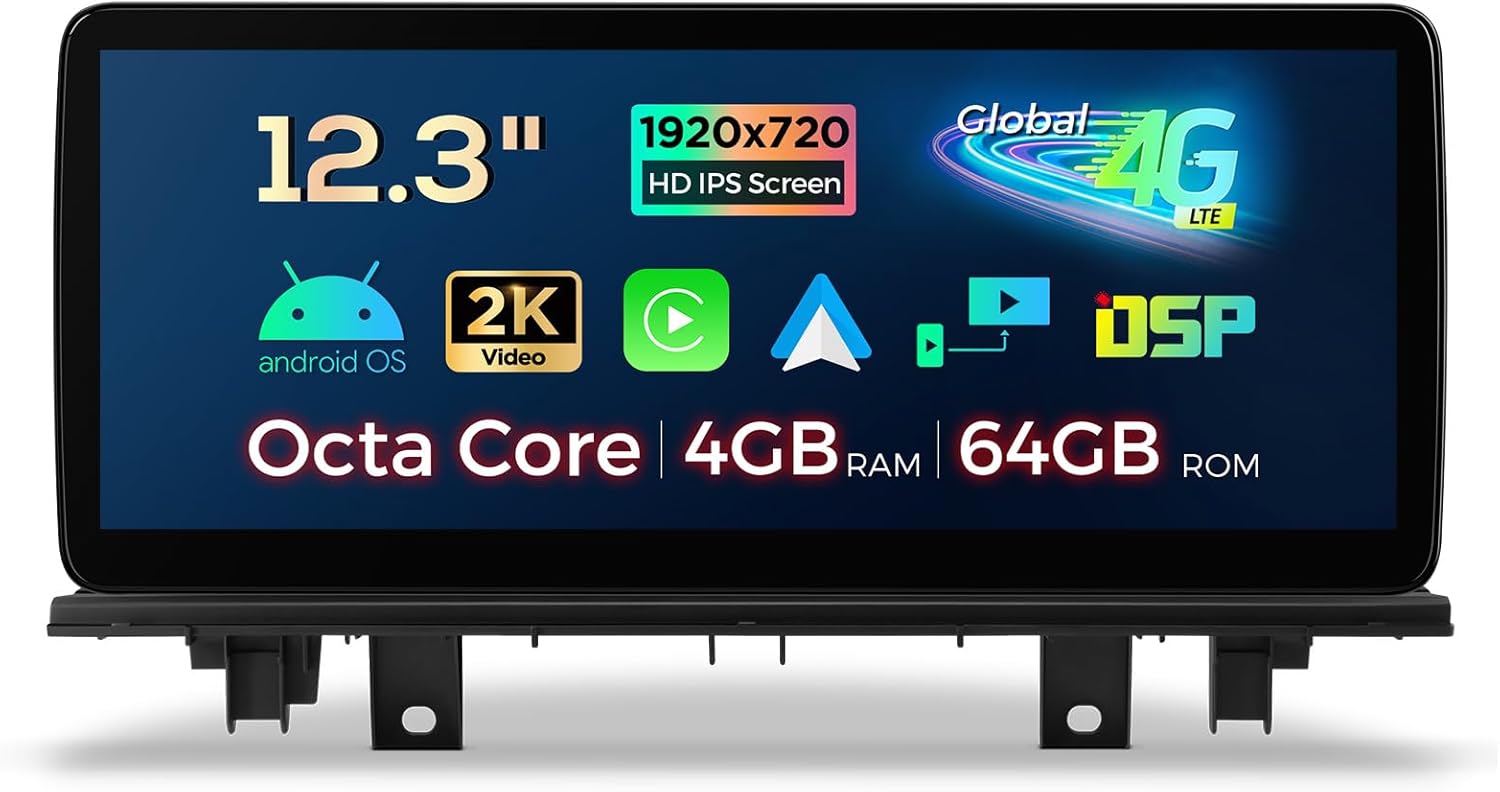
Figure 2.1: The XTRONS 12.3 Inch Android 14 Car Stereo, showcasing its large display and key technical specifications like Octa Core, 4GB RAM, 64GB ROM, 1920x720 HD IPS Screen, and Global 4G LTE support.

Figure 2.2: Detailed view of the XTRONS Car Stereo's internal specifications, highlighting the 12nm Octa-core processor (2x Cortex-A75, 6x Cortex-A55), 4GB LPDDR4 RAM, 64GB EMMC 5.1 ROM, Global 4G LTE, and the fully-laminated HD IPS screen. Also shows built-in DSP, Wireless CarPlay, Wireless Android Auto, and AHD Camera support.
3. Applicable Models & Compatibility
This XTRONS car stereo is specifically designed for:
- BMW X1 F48 (2016-2017) with NBT System.
Important Note on Compatibility:
This unit ONLY works with the original X1 F48 NBT system. If your car comes with NO audio AUX input, you may need to order an FM transmitter (e.g., XTRONS CA/ITR/FM02 or CA/ITR/FM03) to aid in the installation for audio output.

Figure 3.1: Visual comparison of the BMW X1 F48 dashboard before and after the XTRONS unit installation. It also illustrates key components of the NBT system: A 6 Pin LVDS port at the rear of the unit, Media button, Touch pad controller, and a BMW ConnectedDrive interface, along with a note about requiring an FM transmitter if no audio AUX input is present.
4. Setup and Installation
The XTRONS 12.3 Inch Android 14 Car Stereo is designed for a seamless upgrade. For detailed installation steps, please refer to the included "Installation Instruction" manual. Professional installation is recommended.
4.1. Package Contents
Your product is delivered in two separate professionally-designed packages for better protection during transport: a Mounting Pack and a Main Unit Pack.
The following accessories are included in your package:
- 1 x ISO Wiring Harness
- 1 x Audio Cable
- 1 x GPS Antenna
- 1 x Tweezers
- 1 x 4G Antenna
- 1 x USB Cable
- 1 x Installation Instruction
- 1 x User Manual (this document)

Figure 4.1: The physical dimensions of the XTRONS 12.3 Inch Car Stereo (312mm x 135mm) and a visual representation of all included accessories: ISO Wiring Harness, USB Cable, GPS Antenna, Audio Cable, 4G Antenna, Tweezers, User Manual, and Installation Instruction.
4.2. Wiring Harness Diagram
Refer to the diagram below for proper connection of the wiring harness components.

Figure 4.2: Detailed wiring harness diagram for the XTRONS Car Stereo, labeling each connection point: 1. ISO port to original CD player, 2. ISO wiring harness, 3. AUDIO OUT, 4. REVERSE-IN, 5. P. CAM, 6. ACC, 7. MIC, 8. CAM IN, 9. USB port1, 10. USB port2, 11. 4G antenna, 12. GPS antenna, 13. LVDS port, 14. 4G SIM card slot.
5. Operating Instructions
5.1. Display and User Interface
The 12.3-inch IPS touch screen offers clear, vivid display effects and a super responsive touch experience. You can easily switch between multiple UI themes to personalize your experience.

Figure 5.1: The XTRONS Car Stereo's display features, including a comparison of 12.3" vs 10.25" screen sizes, Multi-task Display allowing two apps side-by-side, Picture-in-Picture (PIP) mode for video playback while navigating, responsive IPS Touch Screen, and Built-in Two USB Inputs for connectivity.
5.2. Smartphone Integration (CarPlay & Android Auto)
The unit supports both Wireless Car Play and Wireless/Wired Android Auto, allowing you to seamlessly display compatible apps from your smartphone onto the large screen. This enables safer operations and access to voice commands like Siri or Google Assistant directly from the head unit.

Figure 5.2: The XTRONS Car Stereo demonstrating wireless connectivity options: Wireless CarPlay for iPhone, Wireless & Cable Android Auto for Android phones, and Screen Mirroring for displaying smartphone content. Voice assistant integration is also highlighted.
5.3. Internet Access
Stay connected with multiple internet access options:
- Global 4G LTE: Insert a Micro-SIM card directly into the unit for mobile broadband.
- Dual Wi-Fi Band: Connect to 2.4GHz or 5GHz Wi-Fi networks for fast internet.
- USB Tethering: Connect your smartphone via USB and enable tethering to share its internet connection.

Figure 5.3: Overview of the three internet access options for the XTRONS Car Stereo: Global 4G LTE (up to 300Mbps, supports 99% of carriers worldwide, Micro-SIM card not included), Dual Wi-Fi (2.4GHz and 5GHz bands), and USB Tethering for connecting via smartphone.
5.4. Audio Features (Built-in DSP)
The built-in Digital Sound Processor (DSP) allows for advanced audio customization, including Smart Bass, Equalizer, Loudness, Balance, Delay, and Filter settings, to enhance your music listening experience.
5.5. Bluetooth 5.0
Enjoy stable connections and high-quality transmission for hands-free calls and music streaming via Bluetooth 5.0.
5.6. GPS Navigation
The unit supports various Android navigation software, including Sygic, IGO, Waze, Google Maps, and more, providing reliable guidance for your journeys.
5.7. Retaining Original Car Functions
The XTRONS unit is designed to seamlessly integrate with and retain your BMW's original functions, including:
- iDrive System: Retains control for full range of functions and navigation.
- Amplifier System: Retains original fiber optic sound system.
- Original Radio and CD Player.
- Original Bluetooth.
- Backup Camera Display.
- Steering Wheel Control Function.

Figure 5.4: Visual representation of original BMW functions retained by the XTRONS Car Stereo, including iDrive System, Amplifier System, Original Radio, Original CD Player, Bluetooth, Backup Camera Display, and Steering Wheel Control Function.
6. Specifications
| Feature | Detail |
|---|---|
| Brand | XTRONS |
| Model Name | 12.3 Inch Android 13 Car Stereo (Note: Product title indicates Android 14) |
| Display Size | 12.3 Inches |
| Screen Resolution | 1920x720 HD IPS |
| Operating System | Android 14 (as per product title) |
| Processor | Octa Core |
| RAM | 4GB DDR4 |
| ROM | 64GB Solid State |
| Connectivity Technology | Bluetooth 5.0, Wi-Fi (2.4GHz/5GHz), USB, Global 4G LTE |
| Special Feature | Global 4G, Wireless CarPlay, Wireless/Wired Android Auto, Built-in DSP, Multi-task Display, PIP |
| Map Type | North America (supports various Android navigation software) |
| Audio Output Mode | Stereo |
| Mounting Type | Dashboard Mount |
| Manufacturer | XTRONS |
| Country of Origin | China |
| Warranty | 1 Year |
7. Troubleshooting
This section addresses common issues you might encounter with your XTRONS Car Stereo. For more complex problems, please contact XTRONS customer support.
7.1. Common Issues and Solutions
- No Audio Output:
- Ensure all audio cables are securely connected.
- Verify that the original car's AUX input is selected if required.
- If your car lacks an AUX input, an FM transmitter (e.g., XTRONS CA/ITR/FM02 or CA/ITR/FM03) might be necessary.
- Check volume settings on both the stereo and your connected device.
- Unit Not Powering On:
- Check all power connections in the wiring harness.
- Ensure the vehicle's ignition is on.
- Verify vehicle's fuse for the stereo.
- Poor GPS Signal:
- Ensure the GPS antenna is properly installed and has a clear view of the sky.
- Avoid placing the antenna near metal objects that could interfere with the signal.
- Bluetooth Connectivity Issues:
- Ensure Bluetooth is enabled on both the stereo and your mobile device.
- Delete previous pairings and re-pair the devices.
- Move your mobile device closer to the stereo.
- Slow Performance / App Crashes:
- Close unused applications running in the background.
- Clear cache for problematic apps.
- Perform a system restart.
- Ensure sufficient storage space is available.
- Reverse Camera Briefly Cuts Out on Startup:
- This is a minor known quirk. Allow the system to fully boot before shifting into reverse.
7.2. OBD2 Support (Optional)
The unit supports OBD2 functionality with an optional OBD2 dongle (e.g., B09D3DVZVR, B015MU8UN6, B07X9JXV28, B08HQ9LQ9X). This allows you to retrieve real-time data and trouble codes from your vehicle's computer.
8. Product Demonstrations
Watch the official product video below for a visual overview of the XTRONS 12.3 Inch Car Stereo's features and functionality.
Video 8.1: Official XTRONS demonstration of the 12.3 Inch Car Stereo for BMW X1 F48 NBT. This video highlights key features such as the IPS screen, Global 4G LTE, Wireless CarPlay/Android Auto, Built-in DSP, GPS Navigation, Multiple UI Themes, Dual Band WiFi, USB Tethering, PIP Mode, Multi-window View, DAB+ Tuner Ready (Optional), OBD2 Support (Optional), and professional packaging.
9. Warranty and Support
The XTRONS 12.3 Inch Android 14 Car Stereo comes with a 1-year manufacturer's warranty. For warranty claims, technical support, or any inquiries regarding your product, please contact XTRONS customer service through their official channels or the retailer where you purchased the product.
For additional accessories and support items such as DAB Radio, OBD, Keyboard, DVR, Camera, MIC, and TPMS, please visit the official XTRONS website or authorized dealers.
Ask a question about this manual
Ask about setup, troubleshooting, compatibility, parts, safety, or missing instructions. Manuals+ will review the question and use this page’s manual context to help answer it.