
Introduction
This manual provides essential information for the installation, operation, and maintenance of your XTRONS 12.3 Inch Android 14 Car Stereo. This unit is specifically designed for BMW X1 E84 models manufactured between 2009 and 2015, equipped with the CIC System. It integrates advanced features to enhance your in-car experience while retaining original vehicle functionalities.
What's in the Box
Carefully unpack the contents and ensure all items listed below are present:
- 1 x ISO Wiring Harness
- 1 x Audio Cable
- 1 x GPS Antenna
- 1 x Tweezers
- 1 x 4G Antenna
- 1 x USB Cable
- 1 x Installation Instruction
- 1 x User Manual

Image: All accessories included with the XTRONS Car Stereo.
Specifications
Key technical specifications of the XTRONS 12.3 Inch Android 14 Car Stereo:
- Display Size: 12.3 Inches
- Resolution: 1920x720
- Operating System: Android 14
- Processor: Octa-core (2 x Cortex-A75, 6 x Cortex-A55)
- RAM: 4GB DDR4
- ROM: 64GB EMMC 5.1
- Connectivity: Global 4G LTE, Dual-Band Wi-Fi (2.4GHz/5GHz), Bluetooth 5.0, USB
- Special Features: Wireless Car Play, Wireless/Wired Android Auto, Built-in DSP, Multi-task Display, Picture-in-Picture (PIP), GPS Navigation
- Mounting Type: Dashboard Mount
- Audio Output Mode: Stereo

Image: Overview of XTRONS Car Stereo's core specifications.
Setup
Installation Overview
The installation process involves removing the original head unit and connecting the new XTRONS unit using the provided wiring harness. It is crucial to follow the detailed steps outlined in the dedicated "Installation Instruction" manual included in the package. Professional installation is highly recommended to ensure correct wiring and functionality, especially when dealing with vehicle-specific systems.
Wiring Diagram
The provided ISO wiring harness connects the XTRONS unit to your vehicle's electrical system. Ensure all connectors are securely plugged in. The diagram below illustrates the various ports and their functions:

Image: Wiring harness connections for the XTRONS Car Stereo.
- ISO port to connect to original CD player
- ISO wiring harness
- AUDIO OUT, Audio output
- REVERSE-IN, Reversing control cable
- P. CAM, Camera ACC
- ACC
- MIC, Microphone port
- CAM IN, Camera input
- USB port 1
- USB port 2
- 4G antenna
- GPS antenna
- LVDS port
- 4G SIM card slot
Compatibility Notes
This unit is designed to work exclusively with BMW X1 E84 models (2009-2015) that feature the original CIC System. Before installation, verify your vehicle's system type. If your vehicle lacks an audio AUX input, an external FM transmitter may be required for audio integration.
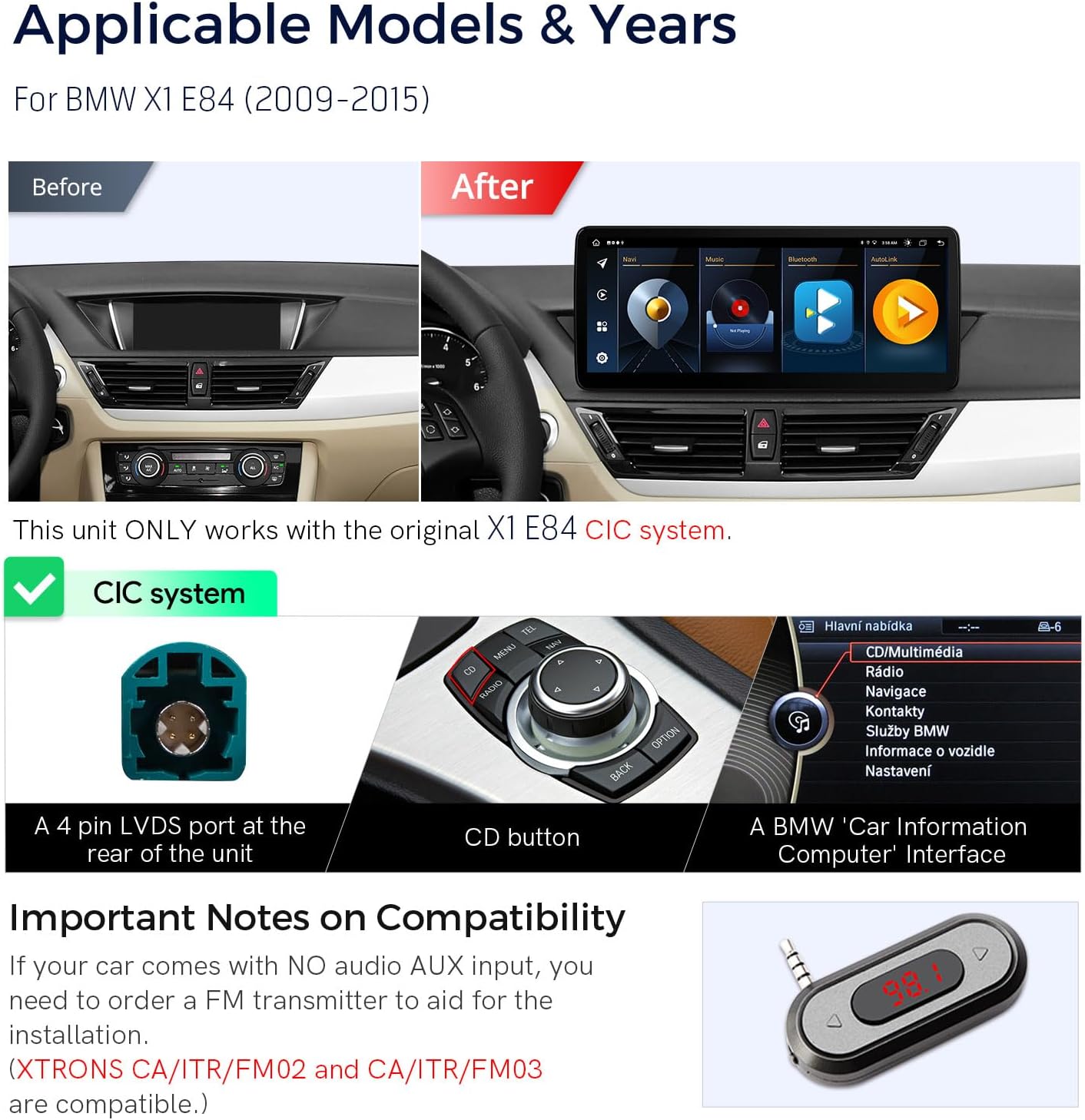
Image: Visual guide for BMW X1 E84 CIC system compatibility.
Operating Instructions
Display and Interface
The 12.3-inch IPS touch screen offers a 1920x720 HD display with a 178° viewing angle, ensuring clear and vibrant visuals. The responsive touch interface allows for smooth navigation through menus and applications. You can customize the user interface with various themes to suit your preference.

Image: Display features including multi-tasking and Picture-in-Picture.
Wireless Connectivity (CarPlay & Android Auto)
The unit supports built-in wireless Apple CarPlay and wireless/wired Android Auto. Connect your iPhone via Bluetooth for CarPlay, or your Android phone wirelessly via Bluetooth or with a USB cable. This allows seamless access to compatible smartphone apps, including navigation, calls, music, and voice assistants like Siri or Google Assistant, directly from the car stereo screen.
Video: Official product video demonstrating the XTRONS Android Car Stereo's features, including wireless CarPlay and Android Auto functionality, for BMW X1 E84 CIC systems.

Image: Displaying smartphone integration features.
Global 4G LTE Connectivity
The unit features Global 4G LTE connectivity. Simply insert a Micro-SIM card (not included) into the designated slot to access mobile broadband internet. This allows for online navigation, streaming, and app usage directly from the head unit without relying on your phone's hotspot. Note that 4G supports internet data only, not phone calls.

Image: Global 4G LTE and Wi-Fi connectivity options.
Dual Wi-Fi Band
The unit supports both 2.4GHz and 5GHz Wi-Fi bands, providing faster and more flexible internet connection speeds. This ensures a stable connection for online services and content streaming.
Built-in DSP
A built-in Digital Sound Processor (DSP) allows for advanced audio customization. Adjust equalizer settings, balance, delay, and filter options to optimize your music listening experience to your preference.
Multi-task Display & Picture-in-Picture (PIP)
Leverage the large screen to run two applications simultaneously side-by-side, such as navigation and music. The Picture-in-Picture (PIP) mode allows you to watch videos in a small window while navigating or using other apps, ensuring you don't miss any content.
Retained Original Functions
The XTRONS unit is designed to seamlessly integrate with and retain many of your BMW's original functions, including:
- iDrive System control
- Original fiber optic sound system
- Original radio and CD player
- Vehicle's original Bluetooth functionality
- Backup camera display
- Steering wheel control functions

Image: Overview of original car functions retained by the unit.
Maintenance
General Care
To ensure the longevity and optimal performance of your car stereo, follow these general care guidelines:
- Clean the screen regularly with a soft, lint-free cloth. Avoid using abrasive cleaners or solvents that could damage the display.
- Keep the unit free from dust and debris.
- Avoid exposing the unit to extreme temperatures or direct sunlight for prolonged periods.
- Ensure all cables are securely connected and not pinched or damaged.
Software Updates
Periodically check for available software updates. Updates can provide new features, performance improvements, and bug fixes. Refer to the XTRONS website or contact customer support for information on how to download and install the latest firmware.
Troubleshooting
If you encounter any issues with your XTRONS Car Stereo, refer to the following common troubleshooting steps:
- No Power: Verify that the ISO wiring harness is correctly connected and that the vehicle's fuse for the stereo is intact.
- No Sound: Check all audio cable connections. Ensure the original fiber optic sound system is properly integrated. Review the DSP settings to confirm audio output is enabled and configured correctly.
- Touch Screen Unresponsive: Try restarting the unit by turning off the vehicle's ignition and then restarting. If the issue persists, check for any available software updates.
- GPS Signal Loss: Ensure the GPS antenna is securely connected and placed in a location with a clear view of the sky, free from obstructions.
- Bluetooth Connection Issues: Confirm that Bluetooth is enabled on both the car stereo and your mobile device. Delete any previous pairings and attempt to re-pair the devices.
- Intermittent Functionality: Ensure all connections are tight and free from corrosion. Check for any loose wires.
For issues not covered here, please consult the detailed User Manual or contact XTRONS customer support.
Warranty and Support
The XTRONS 12.3 Inch Android 14 Car Stereo is backed by a 1-year warranty. This warranty covers manufacturing defects and ensures your rights and interests are protected.
For technical assistance, warranty claims, or any product-related inquiries, please do not hesitate to contact XTRONS customer service. You can reach us via Amazon email, and our professional technical support team will respond promptly.
For information on optional accessories or support items that can further enhance your unit's capabilities, please visit the official XTRONS website or contact our support team.


