
1. Introduction
Thank you for choosing the LinkedSparx RGB LED Star String Lights. This manual provides detailed instructions for setting up, operating, and maintaining your new smart lighting product. These versatile lights offer a wide range of customizable colors and effects, controllable via a remote or a dedicated mobile application, perfect for enhancing any indoor space.
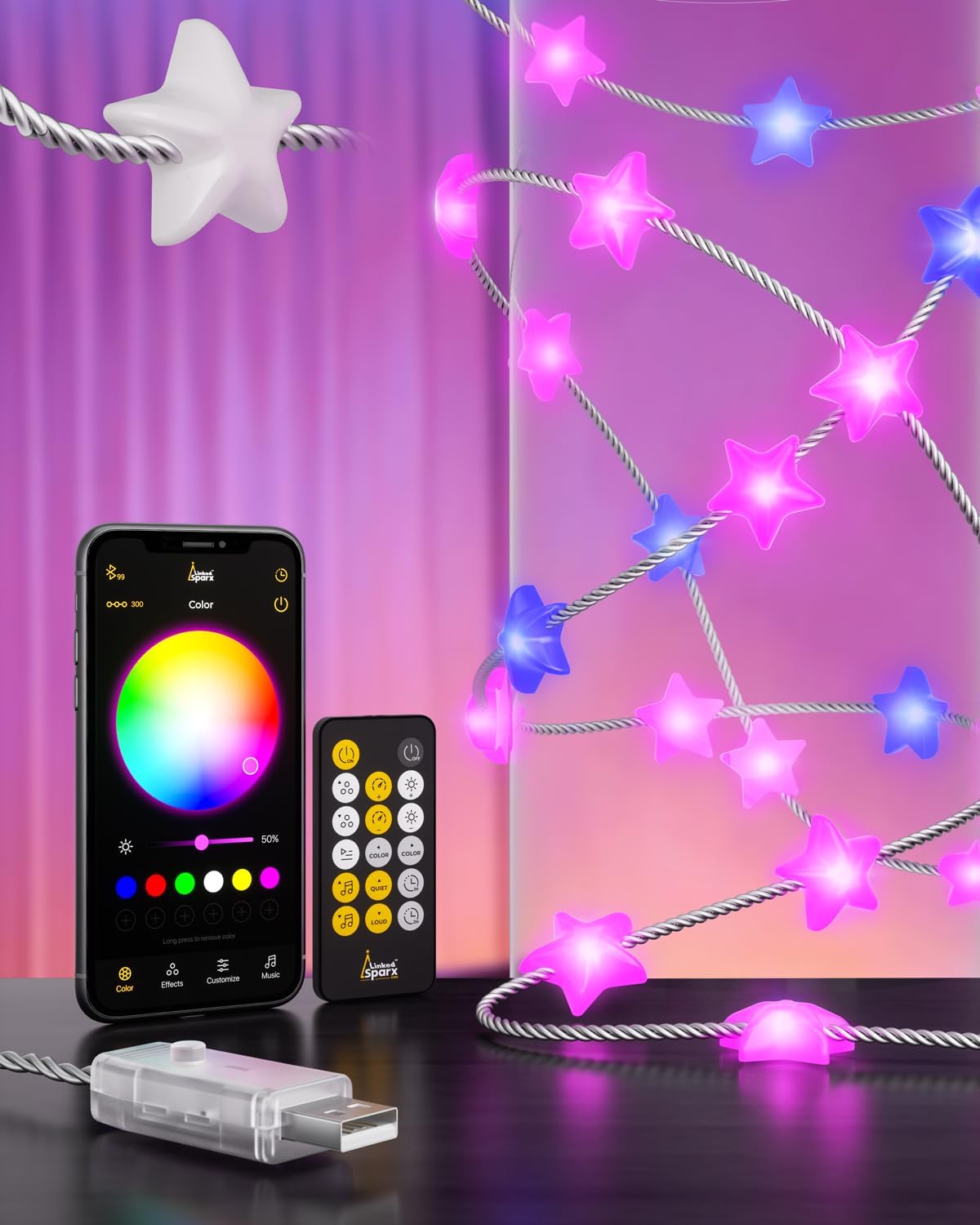
Image 1.1: LinkedSparx RGB LED Star String Lights, showing the product, remote control, and app interface.
2. What's in the Box
Please verify that all items are present in your package:
- 1 x 22.9ft Smart LED string lights
- 1 x User manual (this document)
- 1 x RF Remote control
3. Safety Information
To ensure safe operation and prevent damage, please adhere to the following guidelines:
- This product is designed for indoor use only.
- The USB controller is non-waterproof. Ensure it is used in a dry environment to prevent electrical hazards.
- Do not expose the lights or controller to excessive heat, direct sunlight, or moisture.
- Avoid bending or twisting the wire excessively, as this may damage the internal circuitry.
- Keep out of reach of children and pets.
- Do not attempt to disassemble or modify the product.
4. Setup
4.1 Physical Installation
Carefully uncoil the LED string lights. You can drape them along walls, windows, furniture, or any desired indoor surface. The flexible wire allows for creative placement. Ensure the lights are securely positioned to prevent accidental falls.

Image 4.1: Examples of decorative placement for the LED string lights.
4.2 Power Connection
The LinkedSparx LED string lights are USB-powered. Connect the USB plug to any standard 10W USB port. Compatible power sources include:
- USB wall chargers (not included)
- Power banks
- Computer USB ports
- Other USB sockets

Image 4.2: The USB connector and various compatible power sources.
4.3 App Installation
For advanced control and customization, download the 'LED SMART' application. Scan the QR code located on the back of the product packaging or search for 'LED SMART' in your device's App Store (iOS) or Google Play Store (Android).

Image 4.3: Product packaging displaying app download information.
4.4 Bluetooth Pairing
Once the app is installed and the lights are powered on, open the 'LED SMART' app. The app will automatically search for nearby LinkedSparx devices via Bluetooth. Select your device from the list to establish a connection. No manual pairing code is typically required.
5. Operating Instructions
Your LinkedSparx LED string lights can be controlled using three methods: the inline cable controller, the RF remote control, and the 'LED SMART' mobile application.
5.1 Cable Controller
A small button on the USB cable controller allows for basic operation. Press the button to cycle through various preset lighting modes and to turn the lights on/off.
5.2 RF Remote Control
The included RF remote provides convenient control over your lights. Functions typically include:
- Power On/Off
- Brightness Adjustment
- Color Selection
- Preset Scene/Effect Modes
- Speed Adjustment for dynamic effects
- Music Mode activation
5.3 APP Control
The 'LED SMART' app unlocks the full potential of your lights, offering extensive customization and smart features:
- Color Selection: Choose from 16 million RGB colors to create your desired ambiance.
- Dynamic Effects: Access a wide array of pre-programmed lighting effects (e.g., fades, jumps, chases). Adjust the speed and brightness of these effects.
- Customization: Create and save your own unique lighting scenes.
- Music Sync: Utilize the built-in sound sensor to synchronize light patterns with music. The app offers 16 music modes.
- Scheduling: Set timers to automatically turn the lights on or off at specific times.
- Memory Function: The lights will remember your last setting when powered off and on.

Image 5.1: App interface for selecting and programming light effects.

Image 5.2: App interface for music synchronization, showing various music modes.
Video 5.3: Demonstration of various color and effect changes of the LinkedSparx LED string lights.
6. Maintenance
To ensure the longevity and optimal performance of your LinkedSparx LED string lights, follow these simple maintenance tips:
- Cleaning: Gently wipe the lights and wire with a soft, dry cloth. Do not use liquid cleaners or abrasive materials.
- Storage: When not in use, carefully coil the lights and store them in a cool, dry place, away from direct sunlight and extreme temperatures.
- Handling: Avoid pulling or tugging on the wire or individual LED stars, as this can damage the connections.
7. Troubleshooting
If you encounter any issues with your LinkedSparx LED string lights, please refer to the following common solutions:
| Problem | Possible Cause | Solution |
|---|---|---|
| Lights do not turn on. | No power, loose connection, or faulty USB port. | Ensure the USB plug is fully inserted into a working 10W USB port. Try a different USB power source. Check the inline controller button. |
| Remote control is not responding. | Battery depleted or remote out of range. | Replace the remote battery. Ensure you are within effective range of the lights. |
| App cannot connect to the lights. | Bluetooth is off, lights are off, or app issue. | Ensure Bluetooth is enabled on your smartphone. Verify the lights are powered on. Close and reopen the app, or restart your phone. |
| Lights are flickering or inconsistent. | Insufficient power or damaged wire. | Ensure the USB power source provides sufficient and stable power (10W recommended). Inspect the wire for any visible damage. |
8. Specifications
| Feature | Specification |
|---|---|
| Model Number | LS-S100-3F |
| Light Source Type | LED |
| Number of Light Sources | 100 |
| Light Color | Multicolor (RGB 16 Million Colors) |
| Length | 22.9 FT |
| Power Source | DC (USB-Powered) |
| Wattage | 10 watts |
| Control Method | App, Remote, Cable Controller |
| Connectivity Technology | USB, Bluetooth |
| Indoor/Outdoor Usage | Indoor |
| Material | Transparent Wire |
| Item Weight | 3.63 ounces (103 Grams) |
9. Warranty and Support
LinkedSparx is committed to providing high-quality products and excellent customer service. If you encounter any issues or have questions regarding your RGB LED Star String Lights, please do not hesitate to contact our friendly customer service team. Refer to the product packaging or the LinkedSparx official website for contact information.