
1. Introduction
The FNIRSI-1014D is a versatile 2-in-1 device combining a digital oscilloscope and a signal generator. It features a 7-inch 800x480 resolution color TFT LCD, dual channels with 100MHz bandwidth, and a 1GS/s sampling rate. This manual provides essential information for the proper setup, operation, and maintenance of your device.
This device is suitable for various applications including electronic DIY, appliance repair, car repair, equipment debugging, scientific research, and product development.
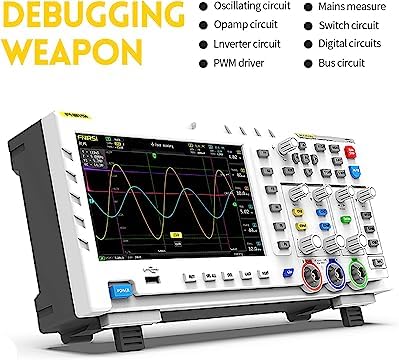
Figure 1: FNIRSI-1014D demonstrating its applicability in multiple fields such as electronic DIY, appliance repair, and scientific research.
2. Safety Information
Please read and understand all safety instructions before operating the device. Failure to follow these instructions may result in electric shock, fire, or damage to the device.
- Use only the provided power adapter and cables.
- Do not operate the device in wet or damp conditions.
- Ensure proper ventilation to prevent overheating.
- Avoid exposing the device to direct sunlight or extreme temperatures.
- Do not attempt to open or modify the device. Refer all servicing to qualified personnel.
- Always connect the ground lead of the probe before connecting the signal lead.
3. Package Contents
Carefully unpack the device and check for the following items. If any item is missing or damaged, contact your supplier immediately.
- FNIRSI-1014D Digital Oscilloscope
- 100MHz Oscilloscope Probes (x2)
- USB Charger
- USB Cable
- Alligator Clip Cable
- User Manual (this document)

Figure 2: The FNIRSI-1014D oscilloscope shown with its complete set of accessories, including probes, cables, and power adapter.
4. Device Overview
4.1 Front Panel
The front panel features the 7-inch LCD display, control buttons, rotary encoders, and input connectors for the oscilloscope channels and signal generator output.
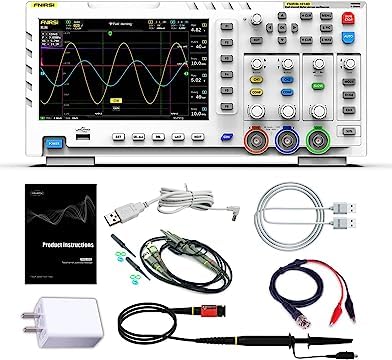
Figure 3: Front view of the FNIRSI-1014D, highlighting the display, control panel, and input/output ports.
4.2 Rear Panel
The rear panel typically includes the power input and possibly a USB port for data transfer or firmware updates.
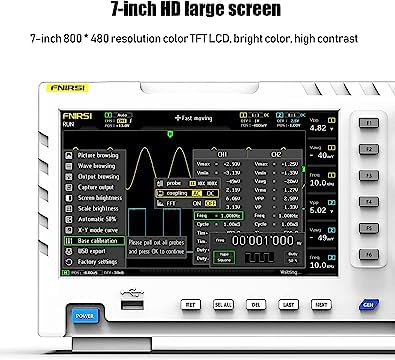
Figure 4: Rear view of the FNIRSI-1014D, showing the power input and identification label.
5. Setup
- Power Connection: Connect the provided USB charger and cable to the device's power input port. Plug the charger into a suitable power outlet.
- Power On: Press the 'POWER' button located on the front panel to turn on the device.
- Probe Connection: For oscilloscope measurements, connect the 100MHz probes to the CH1 and CH2 BNC input connectors. Ensure the probes are securely twisted into place.
- Probe Compensation: Before taking measurements, it is recommended to compensate the probes. Connect the probe tip to the probe compensation output (usually a square wave signal on the device) and adjust the probe's compensation trimmer until a flat-top square wave is displayed on the screen.
6. Basic Operation
6.1 Oscilloscope Mode
The FNIRSI-1014D operates primarily as a dual-channel digital oscilloscope. The main display shows the waveforms, measurement parameters, and control settings.
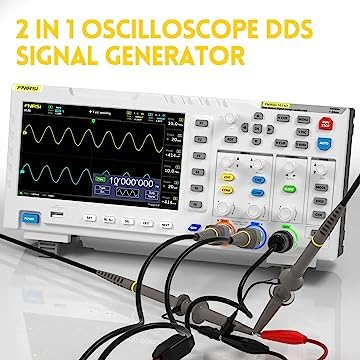
Figure 5: The oscilloscope display showing various menu options for settings like coupling, scale, and trigger.
- Vertical Controls: Use the CH1/CH2 buttons and associated rotary encoders to adjust vertical position and voltage scale (Volts/Div) for each channel.
- Horizontal Controls: Use the TIME/DIV rotary encoder to adjust the horizontal time base.
- Trigger Settings: The 'EDGE' button allows selection of rising or falling edge trigger. 'MODE' button selects trigger mode (Auto, Normal, Single).
- AUTO Button: Pressing the 'AUTO' button automatically adjusts the vertical and horizontal settings to display a stable waveform.
- Measurement Functions: The device supports various automatic measurements. Refer to the on-screen menu for available parameters.
6.2 Signal Generator Mode
The FNIRSI-1014D includes a built-in 10MHz DDS signal generator capable of producing 14 types of waveforms.
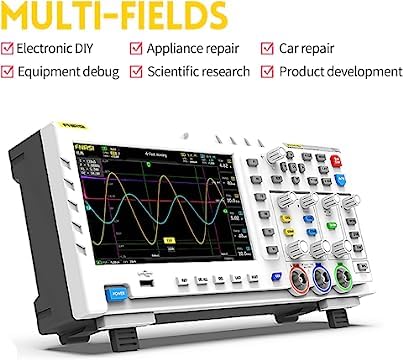
Figure 6: The FNIRSI-1014D connected with probes, demonstrating its signal generation capabilities.
- Activating Generator: Press the 'GEN' button to access the signal generator functions.
- Waveform Selection: Use the navigation buttons to select the desired waveform type (e.g., Sine, Square, Triangle).
- Frequency/Amplitude Adjustment: Use the rotary encoders to set the frequency and amplitude of the generated signal.
- Output Connection: Connect the signal generator output (typically a dedicated BNC port or shared with CH2 in generator mode) to the circuit or device under test.
7. Maintenance
- Cleaning: Use a soft, dry cloth to clean the device's exterior. For stubborn dirt, a slightly damp cloth with mild detergent can be used, ensuring no liquid enters the device.
- Storage: Store the device in a cool, dry place away from direct sunlight and extreme temperatures when not in use.
- Probe Care: Handle probes carefully. Avoid bending or stressing the cables. Keep probe tips clean.
- Battery (if applicable): If the device has an internal rechargeable battery, follow manufacturer guidelines for charging and storage to prolong battery life.
8. Troubleshooting
- No Power:
- Ensure the power adapter is correctly connected and the power outlet is functional.
- Check the power button for proper engagement.
- No Waveform Display:
- Verify probes are correctly connected to the input channels and the signal source.
- Adjust the vertical (Volts/Div) and horizontal (Time/Div) scales.
- Check trigger settings (Mode, Level, Edge). Try pressing the 'AUTO' button.
- Ensure the input coupling (AC/DC) is appropriate for the signal.
- Distorted Waveform:
- Perform probe compensation.
- Check for proper grounding of the device and the circuit under test.
- Ensure the signal amplitude does not exceed the input range of the oscilloscope.
9. Specifications
Figure 7: Detailed specifications of the FNIRSI-1014D, including display, performance, and accessory information.
| Feature | Specification |
|---|---|
| Model | FNIRSI-1014D |
| Channels | 2 |
| LCD Size | 7 Inch |
| LCD Resolution | 800 * 480 |
| Display Technology | TFT LCD |
| Bandwidth | 100MHz |
| Sampling Rate | 1GS/s |
| Rise Time | <3.5ns |
| Storage Depth | 240kbit |
| Input Resistance | 1MΩ |
| Sensitivity | 50mV - 500V |
| Time Base | 50S - 10nS |
| Trigger Mode | Single/Normal/Auto |
| Trigger Edge | Rising/Falling |
| Coupling | AC/DC |
| Highest Test Voltage | 1X: 40V, 10X: 400V |
| Cursor | Position XY Trigger Y |
| Roll Mode | Supported |
| One-button AUTO | Supported |
| Waveform Storage | 1000 pictures + 1000 waveforms |
| Waveform Manager | Supported |
| Voltage Accuracy | ±5% |
| Frequency Precision | ±0.01% High precision |
| Parameter Measurements | 12 kinds in total |
| Signal Generator | 14 kinds of waveforms |
| Capture Output | Supported |
| Extension | USB export |
| Power Supply | 5V 2A/3A/4A |
| Dimensions | 310mm * 145mm * 70mm |
| Accessories | 2x 100M Probes, USB Charger, User Manual |
10. Warranty and Support
FNIRSI products are designed for reliability and performance. For warranty information, technical support, or service inquiries, please refer to the contact information provided with your purchase or visit the official FNIRSI website. Please retain your proof of purchase for warranty claims.


