
1. Introduction
Thank you for choosing the Parts Express Executive 200 Watt Portable Bluetooth Speaker Kit. This kit provides a high-quality audio experience with a powerful 3-driver system, delivering exceptional depth, clarity, and detail. Designed for versatility, it is suitable for various environments, from offices and bedrooms to outdoor picnics. The kit features onboard controls for sound customization and a rugged Baltic birch plywood enclosure for durability and easy assembly. This manual will guide you through the assembly process, operation, and maintenance of your new speaker kit.
Key Features:
- High power 3-driver system for amazing depth, clarity, detail, and output.
- Onboard controls for easy sound customization.
- Designed for excellent on-axis performance and accurate response.
- High-quality Baltic birch plywood enclosure, rugged and easy to assemble.
- Includes all necessary components for construction.
2. Safety Information
Please read and understand all safety instructions before assembling and operating this product. Failure to follow these instructions may result in injury or damage to the product.
- Electrical Safety: Ensure all electrical connections are secure and properly insulated. Disconnect power before performing any maintenance or assembly.
- Tools: Use appropriate tools for assembly. Exercise caution when using sharp objects or power tools.
- Ventilation: Ensure adequate ventilation around the speaker to prevent overheating.
- Placement: Place the speaker on a stable, flat surface to prevent it from falling.
- Moisture: This product is not waterproof. Avoid exposure to water or excessive moisture.
- Volume Levels: Prolonged exposure to high volume levels can cause hearing damage. Use responsibly.
3. What's in the Box
Carefully unpack all components and verify that you have received all items listed below. If any parts are missing or damaged, please contact customer support.

Image 3.1: All components of the Parts Express Executive 200 Watt Portable Bluetooth Speaker Kit, including drivers, amplifier, crossover components, knock-down enclosure panels, and power supply.
- Knock-down enclosure panels (Baltic birch plywood)
- Drivers (woofers, mid-range/tweeters)
- Crossover Components
- Amplifier module
- Batteries
- Power supply/charger
- Wiring and connectors
- Mounting hardware (screws, feet)
4. Assembly Instructions
Follow these step-by-step instructions to assemble your Parts Express Executive Portable Bluetooth Speaker Kit. It is recommended to have basic tools such as a screwdriver, wood glue, and clamps available.
- Prepare the Enclosure:
Identify all the Baltic birch plywood panels for the enclosure. Dry-fit the panels together to understand their orientation before applying any adhesive. Ensure all cutouts for drivers, control panel, and port are correctly aligned.
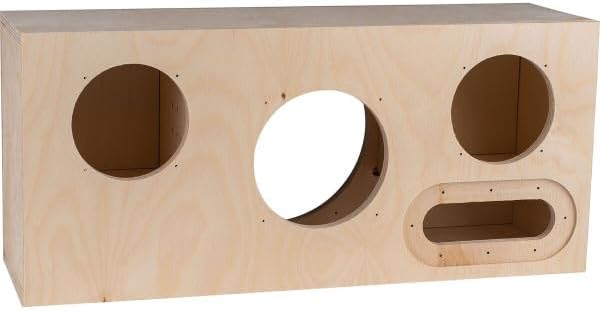
Image 4.1: Front view of the unassembled wooden speaker enclosure, showing the cutouts for the main drivers and the control panel.

Image 4.2: Rear view of the unassembled wooden speaker enclosure, featuring a large circular cutout for the subwoofer and a smaller port opening.
- Assemble the Enclosure:
Apply wood glue to the edges of the enclosure panels and carefully assemble them. Use clamps to hold the panels firmly in place while the glue dries. Ensure all joints are tight and flush. Allow sufficient drying time as per the glue manufacturer's instructions.
- Install Crossover Components and Wiring:
Mount the crossover components inside the enclosure according to the provided wiring diagram. Connect the internal wiring to the appropriate terminals for the drivers, amplifier, and control panel. Ensure all connections are secure and properly insulated.
- Mount the Amplifier and Control Panel:
Install the amplifier module and the control panel into their designated cutouts. Secure them with the provided screws. Connect the pre-wired control panel to the amplifier module.

Image 4.3: Close-up view of the speaker's control panel, featuring five rotary knobs for adjusting Sub Level, Sub Filter, Mid/High Level, Treble, and Master Volume.
- Install the Drivers:
Carefully mount the woofers and mid-range/tweeters into their respective cutouts on the front baffle. Secure them with the provided screws. Connect the driver wires to the crossover network and amplifier, ensuring correct polarity.

Image 4.4: Front view of the fully assembled speaker, showcasing the two smaller full-range drivers, the central larger mid-bass driver, and the integrated control panel.
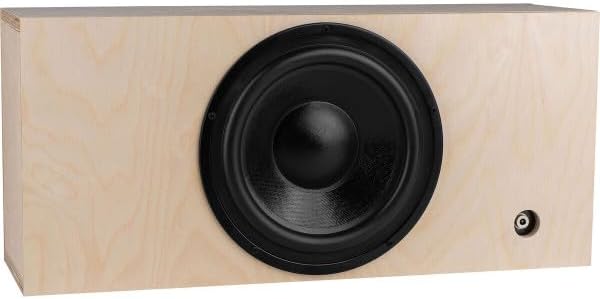
Image 4.5: Rear view of the fully assembled speaker, highlighting the large subwoofer driver and the rear port.
- Install Batteries and Power Supply:
Insert the batteries into their compartment and connect them to the amplifier. Connect the external power supply to the speaker's power input for charging and continuous operation.
- Final Inspection:
Before first use, perform a visual inspection to ensure all components are securely mounted, all wires are connected correctly, and there are no loose parts.
5. Operating Instructions
Once assembled, your Parts Express Executive speaker is ready for use. Follow these steps to power on, connect, and control your speaker.
5.1 Powering On/Off
- To power on the speaker, locate the power switch (usually integrated with the Master Volume knob or a separate switch on the control panel) and turn it to the 'ON' position.
- To power off, turn the switch to the 'OFF' position.
5.2 Bluetooth Pairing
- Ensure the speaker is powered on and in Bluetooth pairing mode (an indicator light may flash).
- On your audio device (smartphone, tablet, laptop), enable Bluetooth and search for available devices.
- Select "Executive Speaker" or a similar name from the list of devices.
- Once paired, the speaker will indicate a successful connection (e.g., a solid indicator light or an audible tone).
5.3 Control Panel Functions
The control panel allows you to customize the sound output. Refer to Image 4.3 for knob identification.
- Sub Level: Adjusts the output volume of the subwoofer. Turn clockwise to increase bass, counter-clockwise to decrease.
- Sub Filter: Controls the crossover frequency for the subwoofer. This determines which low frequencies are sent to the subwoofer.
- Mid/High Level: Adjusts the output volume of the mid-range and high-frequency drivers.
- Treble: Fine-tunes the high-frequency response. Turn clockwise for brighter sound, counter-clockwise for softer highs.
- Master Volume: Controls the overall output volume of the speaker.
6. Maintenance
Proper care will ensure the longevity and optimal performance of your speaker kit.
- Cleaning: Use a soft, dry cloth to clean the exterior of the speaker. Avoid abrasive cleaners or solvents.
- Storage: When not in use for extended periods, store the speaker in a cool, dry place away from direct sunlight and extreme temperatures.
- Battery Care: If the speaker uses rechargeable batteries, follow the manufacturer's guidelines for charging and discharging to maximize battery life. Avoid fully draining the batteries frequently.
- Connections: Periodically check all external connections for tightness and corrosion.
7. Troubleshooting
If you encounter issues with your speaker, refer to the following common problems and solutions.
| Problem | Possible Cause | Solution |
|---|---|---|
| No sound | Speaker not powered on; Volume too low; Bluetooth not connected; Incorrect wiring. | Ensure power is on; Increase Master Volume; Re-pair Bluetooth; Check internal wiring connections. |
| Distorted sound | Volume too high; Source audio quality poor; Driver damage. | Reduce volume; Try a different audio source; Inspect drivers for physical damage. |
| Bluetooth connection issues | Speaker too far from device; Interference; Speaker not in pairing mode. | Move device closer; Avoid obstacles; Ensure speaker is in pairing mode; Forget device on phone and re-pair. |
| Battery not charging | Power adapter not connected; Faulty adapter/cable; Battery issue. | Ensure power adapter is securely connected to speaker and outlet; Try a different outlet; Contact support if issue persists. |
If the problem persists after trying these solutions, please contact Parts Express customer support for further assistance.
8. Specifications
Below are the technical specifications for the Parts Express Executive 200 Watt Portable Bluetooth Speaker Kit.

Image 8.1: Dimensions of the assembled Parts Express Executive speaker, measuring 20 inches in width, 9 inches in height, and 6 inches in depth.
- Model Name: Executive
- Brand: Parts Express
- Speaker Type: Multimedia, Portable Bluetooth Speaker Kit
- Connectivity Technology: Bluetooth
- Wireless Communication Technology: Bluetooth
- Speaker Maximum Output Power: 200 Watts
- Audio Output Mode: Stereo
- Surround Sound Channel Configuration: 2.1
- Power Source: Battery Powered
- Control Method: Touch (via knobs)
- Product Dimensions: 20"W x 9"H x 6"D
- Woofer Diameter: 5.25 Inches
- Audio Driver Type: Dynamic Driver
- Enclosure Material: Baltic birch plywood
- Compatible Devices: Laptop, MP3 Player, Smartphone, Tablet
- UPC: 848864056418
9. Warranty and Support
This Parts Express product comes with a limited warranty. Please refer to the warranty documentation included with your purchase for specific terms and conditions. For technical support, troubleshooting assistance, or to inquire about replacement parts, please contact Parts Express customer service.
Parts Express Customer Service:
- Visit the Parts Express Store on Amazon for more information and contact options.


