
ODK ZJZ-JJYZJTXW
ODK L-Shaped Gaming Desk Instruction Manual
Model: ZJZ-JJYZJTXW | Brand: ODK
1. Introduction
Thank you for choosing the ODK L-Shaped Gaming Desk. This manual provides essential information for the safe assembly, operation, and maintenance of your new desk. Please read these instructions carefully before beginning assembly and retain them for future reference.

Overall view of the ODK L-Shaped Gaming Desk with a complete setup, showcasing its spacious design and integrated monitor stand.
2. Important Safety Information
Please observe the following safety guidelines to ensure safe use and prevent damage to the product or injury.
- Assemble with caution. Follow all steps precisely as outlined in the assembly instructions.
- Do not use the desk if it feels unstable after assembly. Recheck all connections and tighten fasteners.
- Secure the monitor to prevent tipping hazards, especially if using a monitor arm or stand not integrated with the desk.
- Do not overload the desk. Refer to the specifications for weight capacity.
- Keep small parts and packaging materials away from children to prevent choking hazards.
3. Package Contents
Before beginning assembly, please verify that all components listed in the packaging's parts list are present and undamaged. If any parts are missing or damaged, please contact customer support.
4. Assembly Instructions
The assembly of your ODK L-Shaped Gaming Desk is designed to be straightforward. Please refer to the detailed assembly manual included in your package for step-by-step instructions, diagrams, and a list of all included tools and fasteners. Ensure you have ample space and a clean area for assembly.

View of the desk's X-shaped frame, emphasizing its robust and modern design, which contributes to stability.
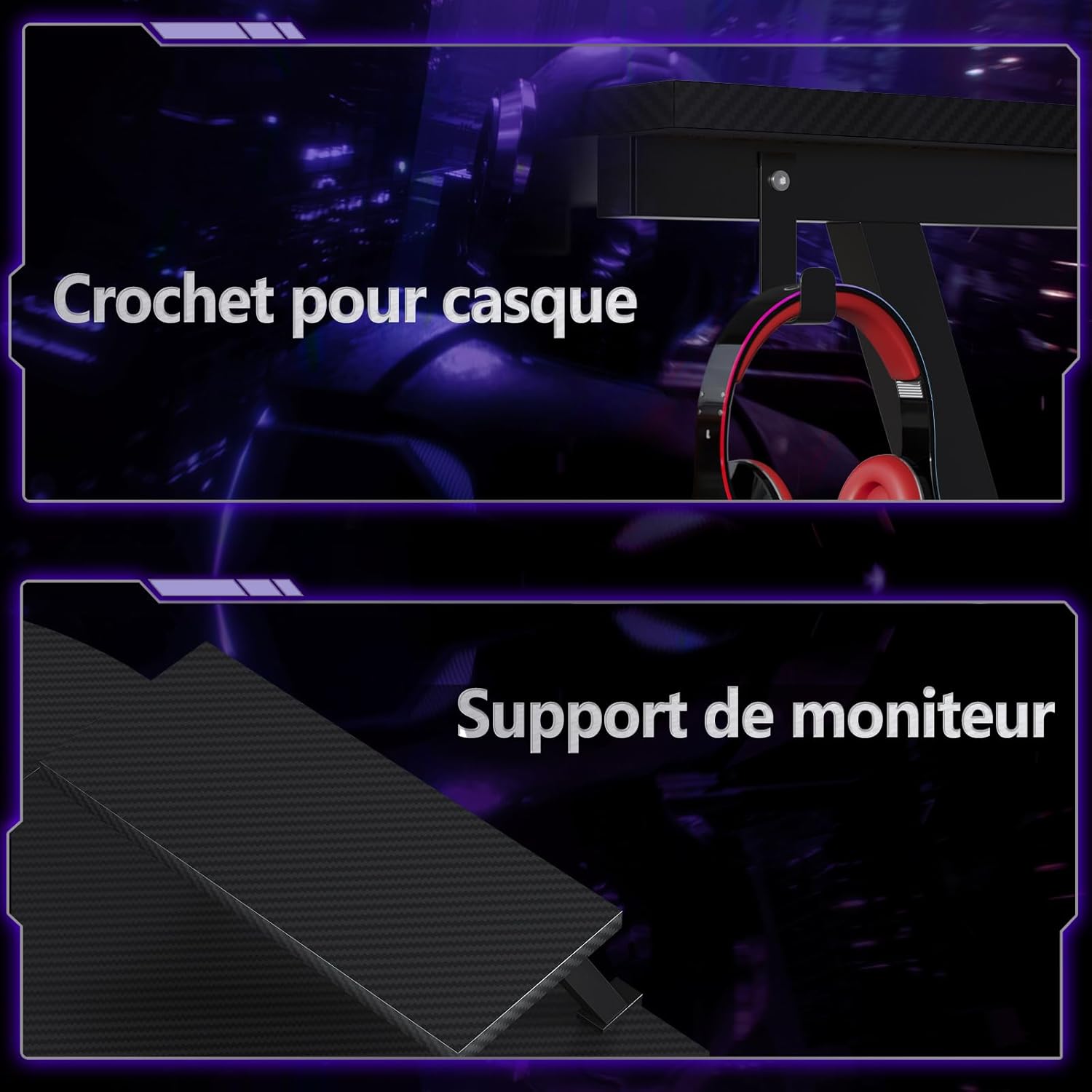
Detailed images showing the integrated headphone hook for convenient storage and the elevated monitor support for ergonomic viewing.
Key Assembly Tips:
- Identify all parts before starting.
- Do not overtighten screws until all components are loosely assembled.
- Ensure the desk is on a level surface once assembled. Adjustable feet can help compensate for uneven floors.
5. Operating Your Desk
Your ODK L-Shaped Gaming Desk is designed for optimal functionality in both gaming and home office environments. Here are some key features:
5.1 Monitor Support
The integrated monitor support allows for optimal positioning of your screens, promoting an ergonomic working posture and reducing neck and back strain. Place your monitor(s) directly on the elevated platform.
5.2 Detachable Storage Bag
The desk includes a convenient detachable storage bag, perfect for organizing files, notebooks, and small accessories, keeping your workspace tidy.

Close-up view of the detachable storage bag, demonstrating its capacity for organizing files and small items.
5.3 Headphone Hook
A dedicated hook is provided for convenient storage of your headphones, keeping them within reach and off your main desk surface.
5.4 Spacious Work Surface
The L-shaped design offers ample space for computers, multiple monitors, printers, and other office equipment, allowing for an efficient and organized workspace.

Illustration of two ODK L-Shaped Gaming Desks combined to create an expansive workspace, highlighting the large usable area.

A gaming setup featuring the ODK L-Shaped Gaming Desk, illustrating its space-saving design in a room corner.
6. Care and Maintenance
To ensure the longevity and appearance of your ODK L-Shaped Gaming Desk, follow these simple care instructions:
- Cleaning: Wipe the desk surface with a soft, damp cloth. Avoid harsh chemicals or abrasive cleaners that could damage the finish.
- Spills: Clean up spills immediately to prevent staining or damage to the carbon fiber finish.
- Stability Check: Periodically check all screws and fasteners to ensure they are tight. Retighten if necessary.
- Avoid Direct Sunlight: Prolonged exposure to direct sunlight may cause fading or damage to the desk material.
7. Troubleshooting
If you encounter any issues with your ODK L-Shaped Gaming Desk, please refer to the following common solutions:
- Desk is Wobbly: Ensure all screws are fully tightened. Check that the desk is on a level surface; use the adjustable feet to stabilize if needed.
- Missing Parts: Double-check the packaging and compare with the parts list in the assembly manual. If parts are genuinely missing, contact customer support.
- Difficulty Assembling: Review the assembly instructions carefully. Ensure you are using the correct fasteners for each step. Do not force parts together.
If the problem persists, please contact ODK customer support for further assistance.
8. Product Specifications

Detailed dimensions of the ODK L-Shaped Gaming Desk, including length, width, height, and monitor stand measurements.
| Feature | Detail |
|---|---|
| Brand | ODK |
| Model Number | ZJZ-JJYZJTXW |
| Color | Carbon Fiber Black |
| Product Dimensions (L x W x H) | 127 x 127 x 77.2 cm |
| Material | Metal |
| Special Feature | Monitor Support, Headphone Hook, Storage Bag |
| Item Weight | 15.5 Kilograms |
| Recommended Uses | Video Gaming, Computer Work, Office Use |
| Mounting Type | Freestanding |
| Finish Type | Matte |
| Date First Available on Amazon.fr | March 2, 2024 |
9. Warranty and Customer Support
ODK is confident in the quality of our L-shaped desk and offers a satisfaction guarantee to our customers. If you have any questions, concerns, or require assistance with assembly or product issues, our friendly customer service team is available to help you at any time.
Please refer to your purchase documentation or the ODK brand store on Amazon for specific warranty details and contact information.
Ask a question about this manual
Ask about setup, troubleshooting, compatibility, parts, safety, or missing instructions. Manuals+ will review the question and use this page’s manual context to help answer it.