
EasyCount E HP1mini
Easy Count E Mini Heat Press Machine
User Manual
Model: HP1mini
Introduction
Thank you for choosing the Easy Count E Mini Heat Press Machine. This compact yet powerful device is designed for various heat transfer projects, including T-shirts, hats, shoes, and small HTV vinyl applications. Its user-friendly design and versatile temperature options make it ideal for both craft enthusiasts and professionals. Please read this manual carefully before operation to ensure safe and efficient use.

Image: The Easy Count E Mini Heat Press Machine, a compact green and white device with a handle and an insulated base.
Safety Precautions
To ensure safe operation and prevent damage to the device or injury, please observe the following safety guidelines:
- Check Voltage before Use: Always verify that the power supply voltage matches the machine's requirements (110 Volts).
- Operate with Flat Surface: Use the heat press on a stable, flat, and heat-resistant surface.
- Unplug When Not Using: Disconnect the power cord from the outlet when the machine is not in use or before cleaning.
- No Water: Do not expose the machine to water or operate it with wet hands. Avoid using it in damp environments.
- No Children: Keep the heat press out of reach of children. This is not a toy.
- No Heating Parts: Avoid direct contact with the hot heating plate during and immediately after operation. Always use the insulated base.

Image: Visual representation of safety precautions including checking voltage, operating on a flat surface, unplugging when not in use, avoiding water, keeping away from children, and not touching heating parts.
Package Contents
Upon opening the package, please ensure all the following items are present and in good condition:
- 1 x Easy Count E Mini Heat Press Machine
- 1 x Insulated Safety Base
- 1 x User Manual (this document)
- 2 x Decorative Stickers
- 1 x Fleece Storage Bag

Image: A visual display of the package contents, including the mini heat press machine, its insulated base, a user manual, two stickers, and a fleece bag.
Specifications
| Feature | Detail |
|---|---|
| Model Number | HP1mini |
| Brand | EasyCount E |
| Voltage | 110 Volts |
| Wattage | 160 watts |
| Lower Temperature Rating | 145°C (285°F) |
| Upper Temperature Rating | 185°C (365°F) |
| Product Dimensions | 7.04 x 5.8 x 3.1 inches (5"L x 3.3"W x 7"H) |
| Item Weight | 1.19 pounds (0.54 Kilograms) |
| Material | Alloy Steel, Aluminum, Plastic |
| Color | Green |
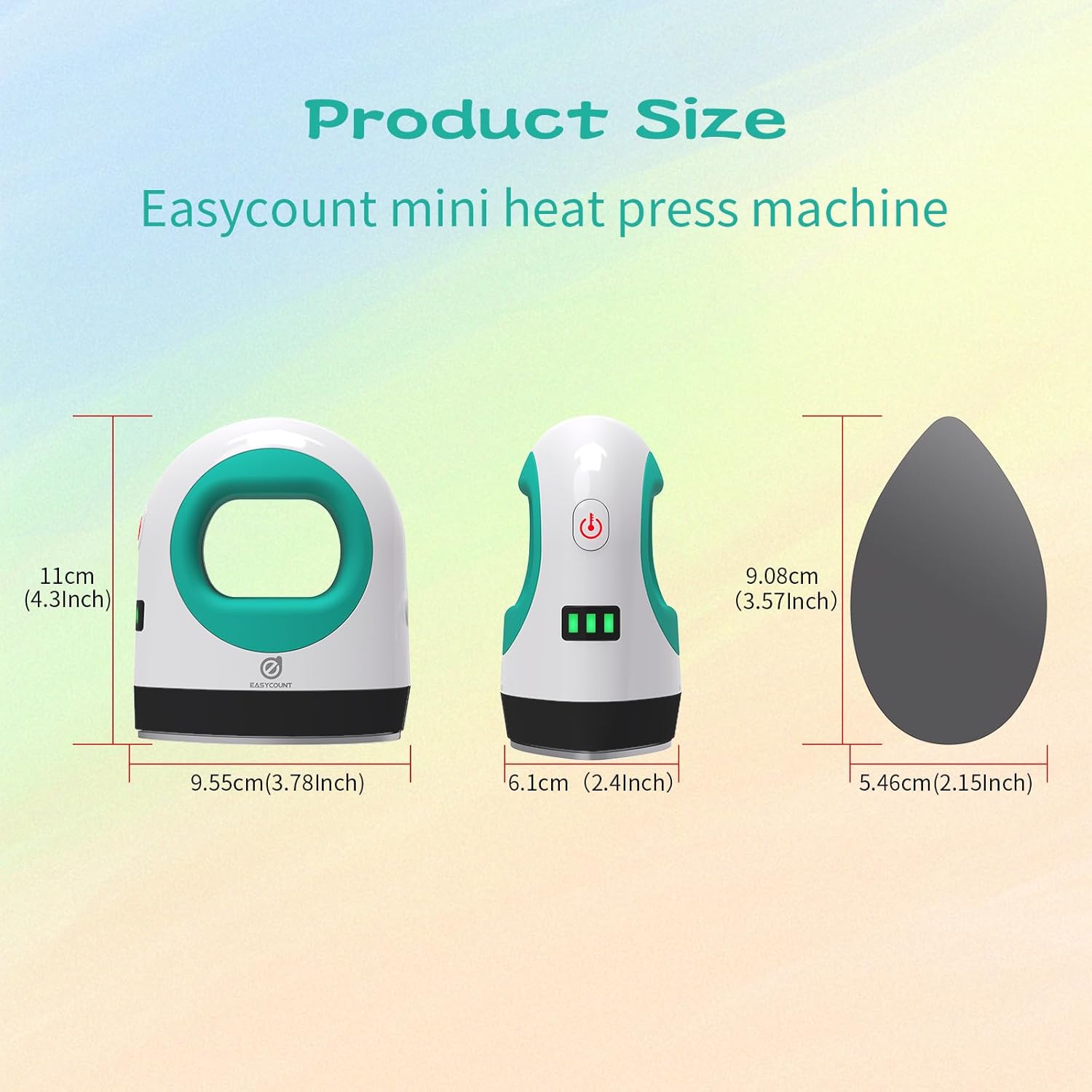
Image: Diagram showing the precise dimensions of the Easy Count E Mini Heat Press Machine in both centimeters and inches.
Setup
- Unpack: Carefully remove all components from the packaging.
- Inspect: Check the machine and accessories for any signs of damage. If damaged, do not use and contact customer support.
- Placement: Place the insulated safety base on a flat, stable, and heat-resistant surface. Ensure there is adequate clearance around the machine for ventilation and safe operation.
- Power Connection: Plug the power cord into a standard 110V electrical outlet.
Operating Instructions
Power On/Off
- To turn on the machine, press and hold the power button (located on the side) for a few seconds until the indicator light illuminates.
- To turn off the machine, press and hold the power button again until the indicator light turns off.
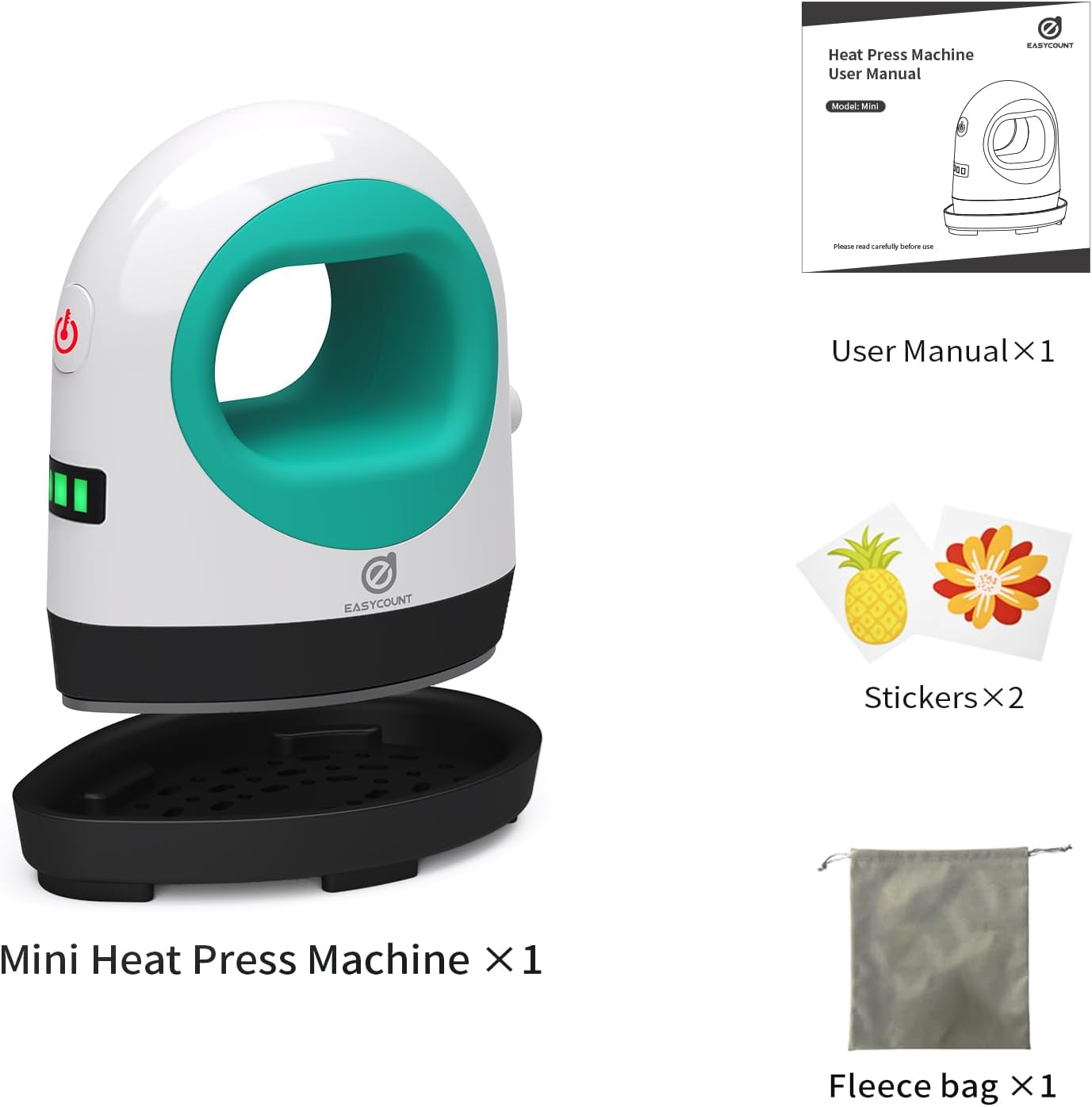
Image: Close-up of the heat press machine showing the power button and temperature indicator. The button glows red when heating up and green when heating is complete.
Temperature Settings
The Easy Count E Mini Heat Press Machine offers three distinct temperature settings. The indicator lights on the side of the machine will show the current temperature level:
- Low Temperature: 145°C (285°F) - Indicated by one green light.
- Medium Temperature: 160°C (320°F) - Indicated by two green lights.
- High Temperature: 185°C (365°F) - Indicated by three green lights.
To cycle through the temperature settings, short press the power button. The machine will heat up rapidly to the selected temperature.
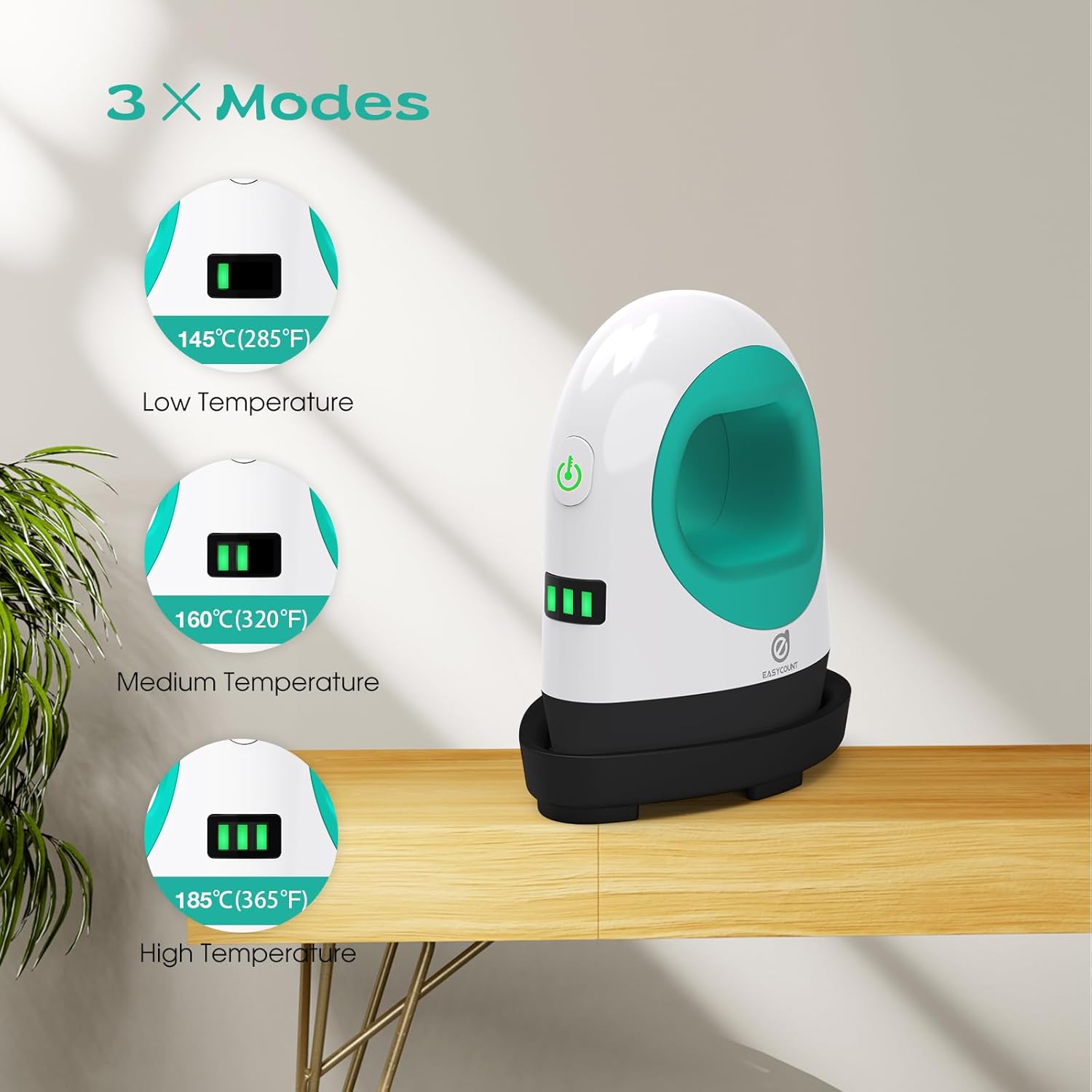
Image: Diagram illustrating the three temperature modes (Low, Medium, High) with their corresponding Celsius and Fahrenheit values, and how they are indicated by the green lights on the machine.
General Usage Steps
- Prepare Your Item: Place your garment or item on a flat, firm, and heat-resistant surface. Ensure it is smooth and free of wrinkles.
- Place Design: Position your HTV vinyl or transfer design onto the item as desired.
- Preheat Machine: Turn on the heat press and select your desired temperature setting. Allow the machine to preheat until the indicator light turns green, signifying it has reached the set temperature.
- Apply Heat: Gently place the hot plate of the heat press onto your design. Apply even, firm pressure. The duration of pressing will depend on your material and transfer type; refer to your vinyl or transfer instructions.
- Cool Down: Once pressing is complete, carefully lift the heat press and immediately place it back on its insulated safety base. Allow the item and design to cool before peeling (if required by your transfer type).

Image: Examples of various items that can be customized with the heat press, including clothes, shoes, hats, pillows, mouse pads, burp cloths, cloth bags, and phone cases.
Maintenance
- Cleaning: Ensure the machine is unplugged and completely cool before cleaning. Wipe the heating plate with a soft, damp cloth. Do not use abrasive cleaners or solvents.
- Storage: Store the heat press in a dry, cool place, away from direct sunlight and moisture. Always place it on its insulated safety base when not in use. The included fleece bag can be used for protection during storage or travel.
- Regular Inspection: Periodically check the power cord for any signs of damage. If any damage is found, discontinue use and contact customer support.
Troubleshooting
| Problem | Possible Cause | Solution |
|---|---|---|
| Machine does not turn on. | Not plugged in; power outlet issue; faulty cord. | Ensure power cord is securely plugged into a working outlet. Try a different outlet. Inspect cord for damage. |
| Machine not heating up. | Incorrect temperature setting; internal malfunction. | Ensure desired temperature is selected (check indicator lights). Allow sufficient time to heat. If problem persists, contact support. |
| Heat transfer not adhering properly. | Insufficient heat; insufficient pressure; incorrect pressing time; material incompatibility. | Increase temperature or pressing time. Apply more firm, even pressure. Consult your transfer material's instructions. Ensure material is suitable for heat pressing. |
Warranty and Customer Support
EasyCount E is committed to providing top-tier service. If any issues arise with your purchase, or if you have questions not covered in this manual, please do not hesitate to contact our dedicated customer support team. We are ready to provide a tailored solution to ensure your satisfaction.
For support, please visit the official EasyCount E store on Amazon or refer to the contact information provided with your purchase documentation.
Ask a question about this manual
Ask about setup, troubleshooting, compatibility, parts, safety, or missing instructions. Manuals+ will review the question and use this page’s manual context to help answer it.