
Gizoon AP16
Gizoon 71-inch Kitchen Pantry Storage Cabinet Instruction Manual
Model: AP16
Product Overview
This manual provides detailed instructions for the assembly, operation, and maintenance of your Gizoon 71-inch Kitchen Pantry Storage Cabinet. Please read all instructions carefully before assembly and use.
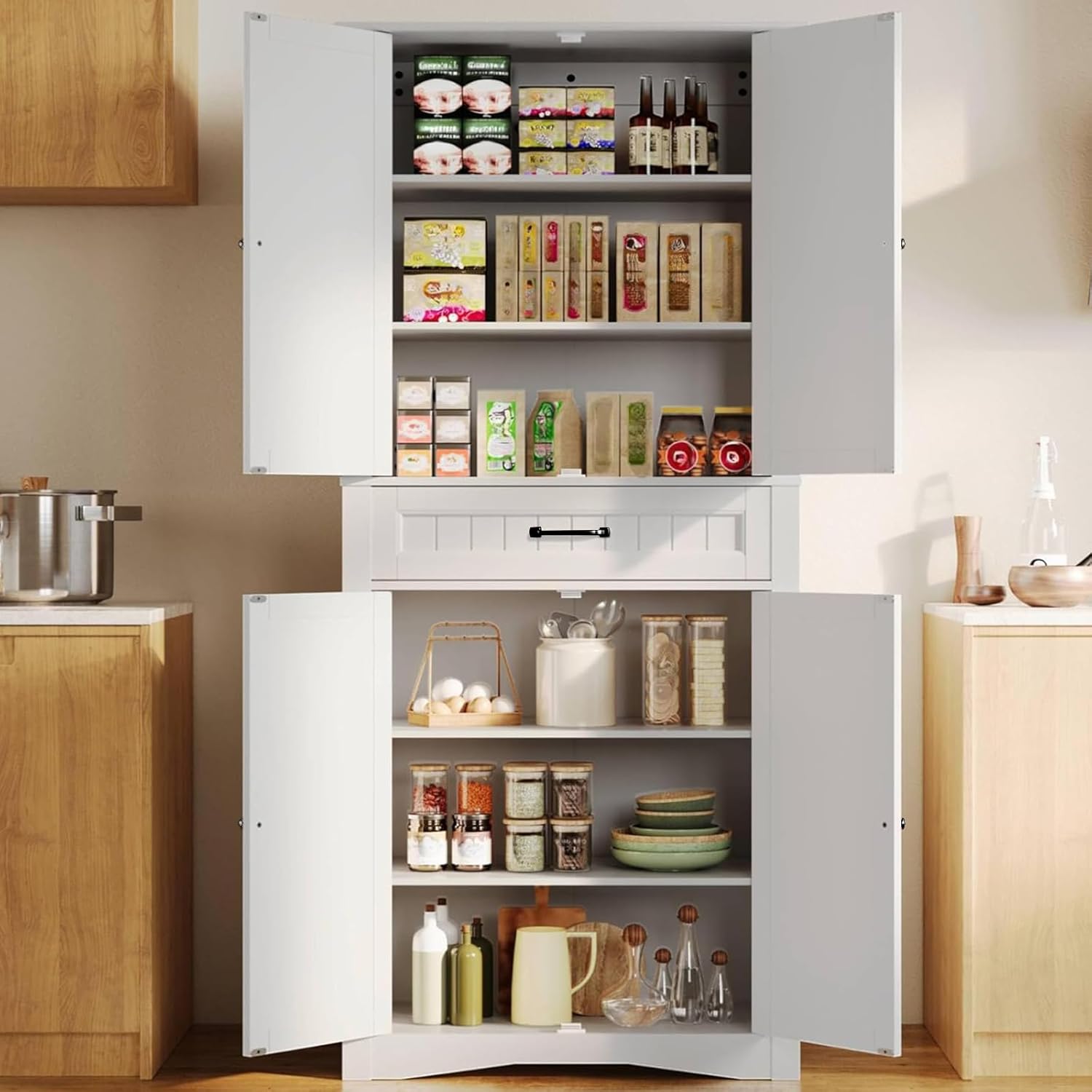
Image: Fully assembled Gizoon 71-inch Kitchen Pantry Storage Cabinet, showcasing its storage capacity with various kitchen items.
Video: Overview of the Gizoon 71-inch Kitchen Pantry Storage Cabinet features and design.
Safety Information
WARNING:
- Always secure the cabinet to the wall using the anti-tip device provided to prevent injury.
- Exercise caution during assembly to avoid injury.
- Do not overload the cabinet; the maximum safe load is 240 pounds.
- Ensure all parts are present and undamaged before beginning assembly.

Image: Detail of the anti-tip device, essential for cabinet stability.
Parts List
Before assembly, verify that all components listed below are present. If any parts are missing or damaged, please contact customer support.

Image: Comprehensive diagram of all parts and hardware required for assembly.
- Cabinet Panels (various sizes)
- Adjustable Shelves (4)
- Drawer Components
- Hardware: Screws (M6x35mm, M4x30mm, M3x14mm, M3x12mm, M4x10mm, M4x12mm), Dowels, Cam Locks, Shelf Pins, Drawer Slides, Handles, Anti-tip Device.
- Tools: Screwdriver (included)
Note: An electric screwdriver (not included) can be used for efficiency. Adequate workspace is recommended. Wear gloves to prevent injury.
Assembly Instructions
Follow the steps below for proper assembly. Refer to the assembly video for visual guidance.
Video: Detailed assembly guide for the Gizoon Kitchen Pantry Storage Cabinet.
- Prepare Drawer Components: Assemble the drawer box and attach the drawer slides.
- Construct Lower Cabinet: Build the base frame of the lower cabinet, including side panels and bottom. Insert the back panels.
- Construct Upper Cabinet: Build the base frame of the upper cabinet, including side panels and top. Insert the back panels.
- Join Cabinet Sections: Carefully place and secure the upper cabinet section onto the lower cabinet section.
- Install Doors: Attach hinges to the four doors and then mount the doors onto the cabinet.
- Install Drawer: Insert the assembled drawer into its designated slot, ensuring smooth operation.
- Install Adjustable Shelves: Place the shelf pins into the desired height holes and position the adjustable shelves.
- Secure Anti-Tip Device: Attach the anti-tip device to the top rear of the cabinet and secure it to the wall for stability.

Image: Assembly tips, emphasizing careful review of instructions and parts.
Operating Instructions
Adjustable Shelves
The cabinet features four adjustable shelves. To adjust a shelf, remove all items from the shelf. Carefully lift the shelf and remove the shelf pins from their current positions. Reinsert the pins into the desired height holes and place the shelf back onto the pins. Each shelf can hold up to 60 lbs.

Image: Visual guide for adjusting shelf height.
Drawer Usage
The large drawer provides additional storage. It features smooth-gliding slides for easy opening and closing. Ensure the drawer is not overloaded to maintain smooth operation.

Image: The spacious drawer, ideal for various items.
Door Operation
The four doors are equipped with magnetic closures to keep them securely shut. Gently pull the handles to open and push to close. Avoid forcing the doors.

Image: Magnetic closure for secure door fastening.
Maintenance
- Cleaning: Wipe the cabinet surfaces with a soft, damp cloth. Avoid abrasive cleaners or harsh chemicals, as they may damage the finish.
- Spills: Clean up spills immediately to prevent staining or damage to the wood finish.
- Hardware: Periodically check all screws and fasteners to ensure they are tight. Retighten if necessary.
- Moisture: The cabinet is designed with a waterproof finish, but prolonged exposure to excessive moisture should be avoided.
Troubleshooting
- Cabinet is Wobbly:
- Ensure all assembly screws are tightened.
- Verify the anti-tip device is correctly installed and secured to the wall.
- Check that the cabinet is placed on a level surface.
- Drawer Does Not Slide Smoothly:
- Ensure the drawer slides are properly aligned and free of obstructions.
- Check that the drawer is not overloaded.
- Verify all screws on the drawer slides are securely fastened.
- Doors Do Not Close Properly:
- Check the alignment of the hinges and adjust if necessary.
- Ensure the magnetic closures are properly aligned and functioning.
Specifications
| Feature | Detail |
|---|---|
| Brand | Gizoon |
| Model Name | Kitchen pantry storage cabinet (AP16) |
| Color | White |
| Product Dimensions | 15.4"D x 28.5"W x 71"H |
| Item Weight | 89 Pounds |
| Weight Limit | 240 Pounds |
| Number of Shelves | 4 (Adjustable) |
| Number of Doors | 4 |
| Number of Drawers | 1 |
| Material | Engineered Wood (MDF) |
| Finish Type | Wood, Waterproof, Easy-to-clean |
| Special Features | Adjustable Shelf, Anti-toppling, Large Drawer, Moisture Resistant, Small Footprint |
| Installation Type | Freestanding |
| Assembly Required | Yes |
Customer Support
For any assembly questions, missing parts, or damaged components, please contact Gizoon customer support. We aim to respond within 24 hours.
Customer Service Email: support.us@soforoom.com
Ask a question about this manual
Ask about setup, troubleshooting, compatibility, parts, safety, or missing instructions. Manuals+ will review the question and use this page’s manual context to help answer it.