
Supersonic SC-820SV
Supersonic SC-820SV Robot Vacuum & Dry Mop User Manual
Model: SC-820SV
1. Introduction
Thank you for choosing the Supersonic SC-820SV Robot Vacuum & Dry Mop. This intelligent cleaning device is designed to provide efficient and quiet cleaning for your home. Featuring a low-profile design, extended battery life, and drop-sensing technology, it offers a convenient solution for maintaining clean floors.
Please read this manual thoroughly before operating the device to ensure proper use, maintenance, and optimal performance.
2. Safety Instructions
To reduce the risk of injury or damage, read these safety instructions carefully and keep them for future reference.
- Do not operate the robot vacuum near open flames or heat sources.
- Ensure the charging adapter and cable are not damaged before use.
- Keep hair, loose clothing, fingers, and all parts of the body away from openings and moving parts.
- Do not immerse the robot vacuum or its charging base in water or other liquids.
- This appliance is not intended for use by persons (including children) with reduced physical, sensory or mental capabilities, or lack of experience and knowledge, unless they have been given supervision or instruction concerning use of the appliance by a person responsible for their safety.
- Only use the original charging adapter provided with the device.
- Do not use the robot vacuum to pick up large objects, sharp objects, or liquids.
- Before cleaning or maintenance, ensure the device is turned off and unplugged.
3. Package Contents
Verify that all items are present and in good condition upon unpacking.
- Supersonic SC-820SV Robot Vacuum
- Charging Adapter
- Charging Cable
- Mop Wipes (2 included)
- User Manual (this document)

Image: The product packaging for the Supersonic SC-820SV Robot Vacuum, illustrating the main unit, charging adapter, charging cable, and mop wipes.
4. Product Overview
Top View

Image: Top view of the Supersonic SC-820SV Robot Vacuum, highlighting the central power button and the Supersonic brand logo.
Underside View
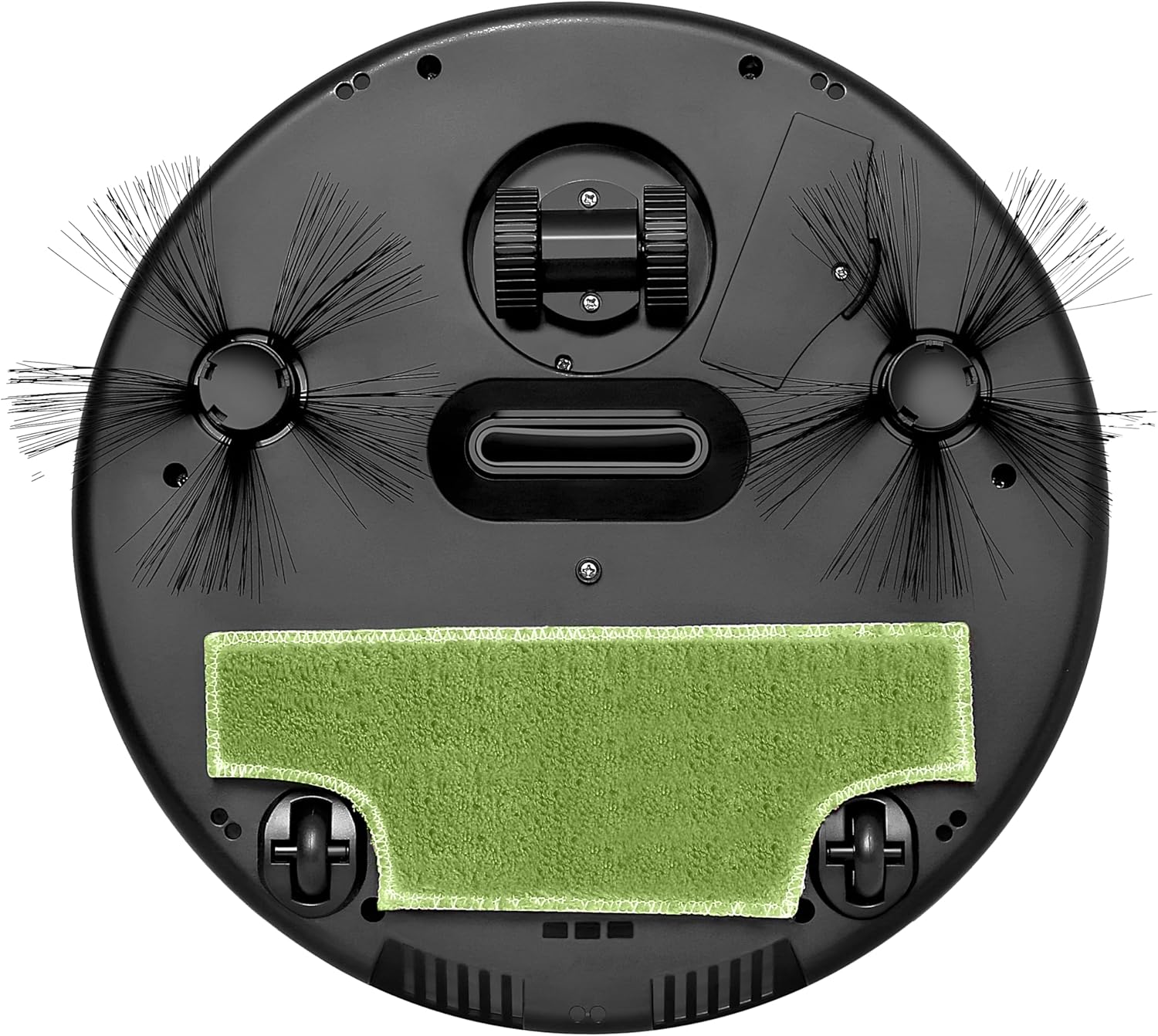
Image: Underside view of the Supersonic SC-820SV Robot Vacuum, detailing the two rotating side brushes, the central suction area, the removable mop attachment, and the large drive wheels.
Key Components

Image: A detailed illustration of the robot vacuum's key components, including the side brushes for edge cleaning, the reusable mop wipe for wet cleaning, and the large wheels designed for climbing over obstacles and continuous cleaning.
- Power Button: Located on the top of the unit, used to turn the robot on/off and start/pause cleaning.
- Dust Bin: Integrated within the robot, collects dust and debris. Capacity: 420 ml.
- Side Brushes: Two rotating brushes on the underside that sweep debris into the suction path.
- Mop Attachment: A removable pad for dry mopping.
- Drive Wheels: Large wheels designed to navigate various floor types and small obstacles.
- Drop-Sensing Sensors: Located on the underside to prevent the robot from falling down stairs or ledges.
- Charging Port: Located on the side of the unit for connecting the charging cable.
5. Setup
5.1 Initial Charging
- Connect the charging adapter to the charging cable.
- Plug the charging cable into the charging port on the side of the robot vacuum.
- Plug the adapter into a wall outlet.
- Allow the robot to charge fully before first use. A full charge takes approximately 4 hours. The indicator light will change to indicate a full charge.
5.2 Preparing the Cleaning Area
- Remove any large obstacles, loose cables, or small items from the floor that could entangle the robot.
- For optimal performance, ensure the cleaning area is free of excessive clutter.
- If using the dry mop function, ensure the mop wipe is properly attached to the underside of the robot.

Image: The robot vacuum operating in a living space, demonstrating its ability to navigate around furniture and avoid obstacles using its drop-sensing technology.
6. Operating Instructions
6.1 Starting a Cleaning Cycle
- Ensure the robot is fully charged.
- Place the robot on the floor in the area you wish to clean.
- Press the power button on the top of the robot. The robot will emit a sound and the indicator light will illuminate, indicating it has started cleaning.
- The robot will clean in a random path pattern, covering the area.
6.2 Pausing/Resuming Cleaning
To pause the cleaning cycle, press the power button once. To resume, press the power button again.
6.3 Ending a Cleaning Cycle
To stop the cleaning cycle, press and hold the power button until the robot turns off. The robot will automatically return to its charging base if it has one (Note: This model charges via cable, not a base) or stop when its battery is low.
6.4 Battery Life
The Supersonic SC-820SV provides up to 120 minutes (2 hours) of cleaning time on a single charge, depending on floor type and usage.
7. Maintenance
Regular maintenance ensures optimal performance and extends the lifespan of your robot vacuum.
7.1 Emptying the Dust Bin
It is recommended to empty the dust bin after each cleaning cycle, especially if cleaning large areas or areas with significant debris.
- Turn off the robot vacuum.
- Locate the dust bin release mechanism (usually a latch or button).
- Remove the dust bin from the robot.
- Open the dust bin and discard collected debris into a trash receptacle.
- Close the dust bin and reinsert it into the robot until it clicks into place.
7.2 Cleaning the Mop Wipe
The mop wipes are machine washable and reusable.

Image: Two green mop wipes, designed for dry mopping with the robot vacuum. These are reusable and machine washable.
- Remove the mop wipe from the robot's underside.
- Wash the mop wipe with water and mild detergent.
- Allow the mop wipe to air dry completely before reattaching it to the robot.
7.3 Cleaning the Side Brushes
Periodically check the side brushes for tangled hair or debris. Use a small brush or your fingers to remove any obstructions.
7.4 Cleaning Sensors
Wipe the drop-sensing sensors on the underside of the robot with a clean, dry cloth to ensure they remain free of dust and debris.
8. Troubleshooting
| Problem | Possible Cause | Solution |
|---|---|---|
| Robot does not turn on. | Battery is low or depleted. | Charge the robot fully. Ensure the charging cable is securely connected. |
| Robot stops cleaning unexpectedly. | Dust bin is full; brushes are tangled; battery is low. | Empty the dust bin. Clean the side brushes. Recharge the robot. |
| Robot gets stuck frequently. | Obstacles on the floor; drop-sensing sensors are dirty. | Clear the cleaning area of loose cables and small items. Clean the drop-sensing sensors. |
| Poor cleaning performance. | Dust bin is full; side brushes are worn or dirty; mop wipe is dirty. | Empty the dust bin. Clean or replace side brushes. Clean or replace the mop wipe. |
9. Specifications
- Brand: Supersonic
- Model Name: SC-820SV
- Color: Black
- Product Dimensions: 13.62"L x 12"W x 3.54"H
- Item Weight: 2.16 pounds
- Dust Bin Capacity: 420 Milliliters
- Battery Life: Up to 120 minutes (2 Hours)
- Power Source: Battery Powered
- Control Method: Touch
- Filter Type: Cloth
- Batteries: 1 CR5 battery (included)
- UPC: 639131208209
10. Warranty and Support
For warranty information or technical support, please contact Supersonic customer service. Details can typically be found on the product packaging or the official Supersonic website.
Please retain your purchase receipt as proof of purchase for warranty claims.
Manufacturer: Supersonic
Related Documents - SC-820SV
 |
Smart Robot Vacuum Cleaner V16/SC-860SV Instruction Manual | Supersonic Inc Comprehensive instruction manual for the Supersonic Inc Smart Robot Vacuum Cleaner (Models V16, SC-860SV). Learn about safety precautions, operating instructions, maintenance, function descriptions, and troubleshooting. |
 |
BISSELL SpinWave Robot Quick Tips and Manual A guide to using and maintaining your BISSELL SpinWave Robot, including setup, app connectivity, mopping, dry vacuuming, and spot cleaning modes. Learn about BISSELL formulas and cleaning best practices. |
 |
Tapo LiDAR Navigation Robot Vacuum & Mop User Manual Comprehensive user manual for the Tapo LiDAR Navigation Robot Vacuum & Mop, covering safety instructions, setup, operation, maintenance, and troubleshooting. |
 |
Shark AI Robot VACMOP™ 2000WD Series Owner's Guide: Setup, Operation, and Maintenance Comprehensive owner's guide for the Shark AI Robot VACMOP™ 2000WD Series Wet/Dry Robot Floor Cleaner. Includes setup instructions, safety warnings, operation details, maintenance tips, troubleshooting, and warranty information. |
 |
Shark AI Robot VACMOP™ 2000WD Series Owner's Guide - Wet/Dry Robot Floor Cleaner Comprehensive owner's guide for the Shark AI Robot VACMOP™ 2000WD Series. Learn about setup, charging, operation, maintenance, troubleshooting, safety instructions, and warranty for your wet/dry robot floor cleaner. |
 |
Shark AI Robot VACMOP™ RV2000WD Owner's Guide Comprehensive owner's guide for the Shark AI Robot VACMOP™ RV2000WD, covering setup, operation, maintenance, and troubleshooting for this wet/dry robot floor cleaner. |
Ask a question about this manual
Ask about setup, troubleshooting, compatibility, parts, safety, or missing instructions. Manuals+ will review the question and use this page’s manual context to help answer it.