
1. Introduction
Thank you for choosing the IKT A7 Bluetooth Wireless Earbuds. These earbuds are designed to provide a high-quality audio experience with features tailored for active lifestyles. This manual will guide you through the setup, operation, and maintenance of your new earbuds.
2. What's in the Box
Please check the package contents to ensure all items are present:
- Charging Case (1)
- Earbuds (2)
- USB Charging Cable (1)
- Eartips (Multiple sizes)
- Product Manuals (1)
3. Product Overview
The IKT A7 earbuds feature an ergonomic design with earhooks for a secure fit, an LED digital display on the charging case, and intuitive button controls.
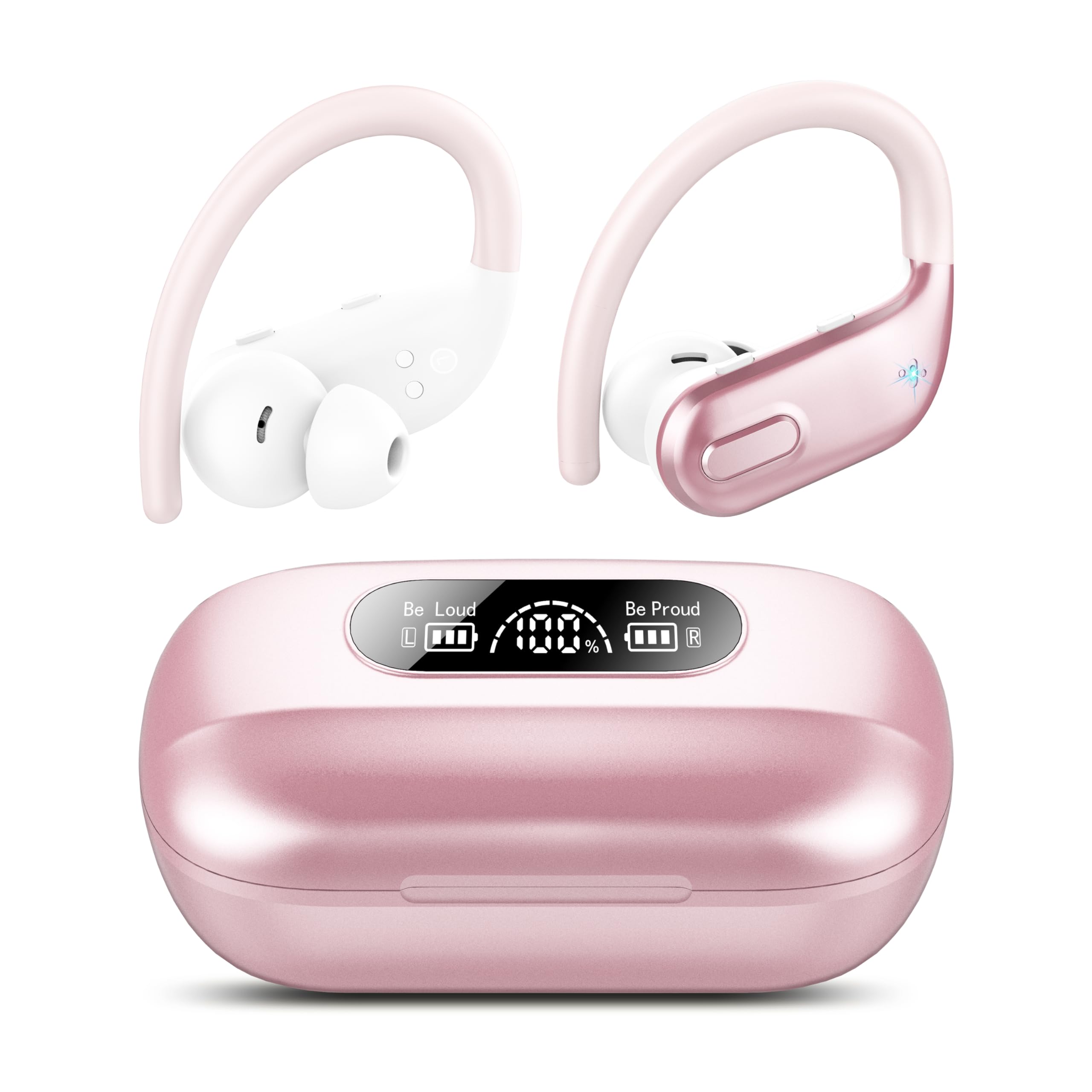
Figure 3.1: IKT A7 Bluetooth Wireless Earbuds and Charging Case (Rose Gold variant).

Figure 3.2: IKT A7 Bluetooth Wireless Earbuds and Charging Case, showcasing multiple color options.
Charging Case LED Display
The charging case features a dual LED digital display that indicates the battery status of both the earbuds and the charging case itself. This allows for real-time monitoring of power levels.
Earbud Components
- Earhook: Provides a stable and secure fit, especially during strenuous activities.
- Eartips: Soft silicone eartips (S/M/L) for comfortable wear and sound isolation.
- Control Button: Multi-function button for various operations.
- Microphone: Built-in for clear calls.
4. Setup
4.1 Charging the Earbuds and Case
- Place the earbuds into the charging case. Ensure they are correctly seated.
- Connect the USB charging cable to the charging port on the case and to a power source.
- The LED digital display on the charging case will show the current battery percentage and charging status of both the case and the individual earbuds.
- A full charge provides up to 10 hours of listening time per earbud, with the charging case extending total playtime up to 80 hours.
4.2 Pairing with a Bluetooth Device
- Ensure the earbuds are charged.
- Open the charging case. The earbuds will automatically power on and enter pairing mode.
- On your device (smartphone, tablet, laptop), enable Bluetooth.
- Search for available Bluetooth devices and select "IKT A7" from the list.
- Once connected, you will hear an audible confirmation, and the earbuds will be ready for use.
- For subsequent use, the earbuds will automatically connect to the last paired device when removed from the case.
5. Operating Instructions
5.1 Wearing the Earbuds
Select the appropriate size of silicone eartips for a comfortable and secure fit. Place the earbud in your ear and adjust the earhook over your ear until it feels stable. The non-slip design ensures they stay in place during exercise.
5.2 Button Controls
The IKT A7 earbuds feature a unique button design for easy control:
- Play/Pause Music: Single press the button on either earbud.
- Next Track: Double press the button on the right earbud.
- Previous Track: Double press the button on the left earbud.
- Volume Up: Triple press the button on the right earbud.
- Volume Down: Triple press the button on the left earbud.
- Answer/End Call: Single press the button on either earbud during an incoming call.
- Reject Call: Press and hold the button on either earbud for 2 seconds during an incoming call.
- Activate Voice Assistant (Siri/Google Assistant): Press and hold the button on either earbud for 3 seconds.
5.3 Call Functionality
The built-in 4 ENC (Environmental Noise Cancellation) microphones enhance call clarity by reducing external ambient noise, making them ideal for web conferencing and online classes.
5.4 Audio Experience
Equipped with a large 14.5mm speaker driver unit, these earbuds deliver an immersive listening experience with 85% bass enhancement.
6. Maintenance
6.1 Cleaning
Regularly clean the earbuds and charging case with a soft, dry cloth. Avoid using harsh chemicals or abrasive materials. Ensure the charging contacts on both the earbuds and case are free of debris.
6.2 Water Resistance
The earbuds feature IPX7 rated seam sealing and nano-coating waterproof technology, making them resistant to daily sweat and rain. Do not submerge them in water or expose them to high-pressure water jets.
6.3 Storage
When not in use, store the earbuds in their charging case to protect them and keep them charged. Store in a cool, dry place away from extreme temperatures.
7. Troubleshooting
If you encounter issues with your IKT A7 earbuds, please refer to the following common solutions:
- No Sound: Ensure earbuds are charged, properly paired, and volume is adjusted on both the earbuds and your device.
- Cannot Pair: Make sure Bluetooth is enabled on your device and the earbuds are in pairing mode. Try turning Bluetooth off and on again on your device. If issues persist, reset the earbuds (refer to manufacturer's specific reset instructions if available, otherwise place back in case and try re-pairing).
- Intermittent Connection: Ensure there are no obstructions between the earbuds and your device. Keep the device within the Bluetooth range.
- Charging Issues: Check if the charging cable is securely connected and the power source is working. Clean the charging contacts if necessary.
- Microphone Not Working: Ensure the earbuds are properly connected and selected as the audio input device on your phone during calls.
For further assistance, please contact customer support.
8. Specifications
| Feature | Specification |
|---|---|
| Model Name | A7 |
| Connectivity Technology | Wireless (Bluetooth 5.3) |
| Playtime (Earbuds) | Up to 10 hours per charge |
| Total Playtime (with Charging Case) | Up to 80 hours |
| Water Resistance Level | IPX7 Waterproof |
| Audio Driver Size | 14.5 Millimeters |
| Noise Control | Sound Isolation, ENC Clear Calls |
| Control Type | Button Control (Volume, Track, Calls, Voice Assistant) |
| Ear Placement | Over Ear (with Earhook) |
| Item Weight | 2.82 ounces (80 Grams) |
| Product Dimensions | 1.94 x 1.61 x 1.09 inches |
| Compatible Devices | Android, iOS, Cellphones, Laptops |
9. Safety Information
Please read and follow these safety guidelines to prevent damage to your device or injury to yourself:
- Do not disassemble, repair, or modify the product.
- Keep the product away from extreme temperatures, direct sunlight, and fire.
- Avoid exposing the product to strong magnetic fields.
- Use only the provided or certified charging cable.
- Do not use the earbuds at excessively high volumes for prolonged periods to prevent hearing damage.
- Be aware of your surroundings when using earbuds, especially in traffic or other potentially dangerous situations.
10. Warranty and Support
IKT provides a 2-Year Warranty for the A7 Bluetooth Wireless Earbuds from the date of purchase. This warranty covers manufacturing defects. Please retain your proof of purchase for warranty claims.
For technical support, warranty claims, or any other inquiries, please contact IKT Customer Service. We offer 24-hour customer service to assist you.
You can find contact information on the official IKT website or through your purchase platform.
