
1. Introduction
Thank you for choosing the ulafbwur Mini Bluetooth Speaker BS-10. This portable soundbar is designed to deliver high-quality audio for your home theater experience, featuring Bluetooth 5.0 connectivity, FM radio, and multiple input options. Please read this manual carefully before using the product to ensure proper operation and to maximize its lifespan.

Figure 1: ulafbwur Mini Bluetooth Speaker BS-10, showcasing its sleek black design and control panel on the side.
2. Package Contents
Please check the package contents upon unboxing. If any items are missing or damaged, contact customer support.
- 1 x ulafbwur Mini Bluetooth Speaker BS-10 Sound Bar
- 1 x Charging Cable
- 1 x RCA Cable
- 1 x User Manual (this document)
3. Product Features
- Bluetooth 5.0 Connectivity: Ensures faster and more stable wireless audio transmission.
- Multiple Audio Inputs: Supports Bluetooth, FM radio, TF card, 3.5mm AUX, U Disk, and RCA connections.
- High-Quality Sound: Equipped with 4 internal magnetic speakers (5W*4) and 2 bass diaphragms for rich audio.
- Built-in FM Radio: Enjoy your favorite radio stations with a frequency range of 87.5-108 MHz.
- Rechargeable Battery: Integrated 2000mAh battery provides extended playback time.
- Portable Design: Compact and lightweight, ideal for various indoor settings.
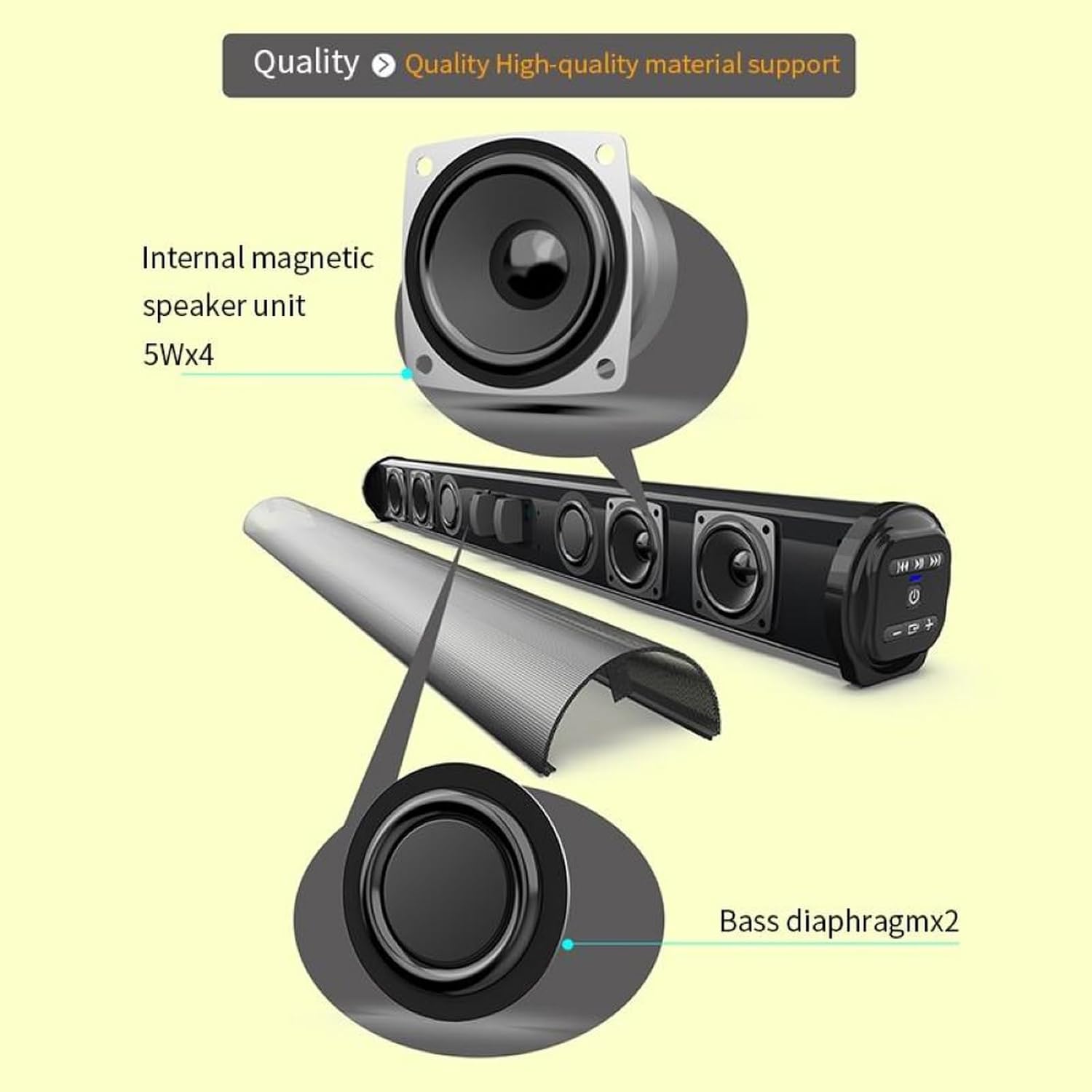
Figure 2: Diagram showing the internal magnetic speaker units (5W x 4) and bass diaphragms (x 2) for enhanced sound quality.
4. Setup
4.1 Charging the Speaker
Before first use, fully charge the speaker. Connect the provided charging cable to the speaker's charging port and the other end to a USB power adapter (not included) or a computer's USB port. The charging indicator light will show the charging status.

Figure 3: Illustration of the built-in 2000mAh rechargeable battery, providing extended standby time.
4.2 Powering On/Off
Press and hold the Power button (usually marked with a circle and vertical line) located on the side panel to turn the speaker on or off. A voice prompt or indicator light will confirm the status.
4.3 Bluetooth Pairing
- Ensure the speaker is powered on and in Bluetooth mode. If not, press the Mode button to switch to Bluetooth. The Bluetooth indicator light will flash, indicating it's ready for pairing.
- On your mobile device (smartphone, tablet, computer), enable Bluetooth and search for available devices.
- Select "BS-10" or "ulafbwur Speaker" from the list of found devices.
- Once connected, the speaker will emit a confirmation sound, and the Bluetooth indicator light will become solid.

Figure 4: Demonstrating the easy Bluetooth 5.0 connection process with a mobile device.
4.4 Connecting via Other Inputs
- TF Card/U Disk: Insert a TF card or U Disk (USB flash drive) into the respective slot. The speaker will automatically switch to the corresponding mode and begin playing audio files (MP3, WMA, WAV, FLAC, APE formats supported).
- 3.5mm AUX: Connect one end of a 3.5mm audio cable (not included) to the speaker's AUX input and the other end to your audio source's headphone jack. The speaker will automatically switch to AUX mode.
- RCA: Use the provided RCA cable to connect the speaker to devices with RCA audio outputs.
5. Operating Instructions
5.1 Basic Controls
- Power Button: Press and hold to turn on/off.
- Mode Button (M): Short press to switch between Bluetooth, FM, TF, AUX, and U Disk modes.
- Play/Pause Button (▶‖): Short press to play or pause audio. In FM mode, short press to auto-scan and save stations.
- Previous Track/Volume Down (-): Short press for previous track (in Bluetooth/TF/U Disk mode) or previous station (in FM mode). Press and hold to decrease volume.
- Next Track/Volume Up (+): Short press for next track (in Bluetooth/TF/U Disk mode) or next station (in FM mode). Press and hold to increase volume.
5.2 FM Radio Operation
- Switch the speaker to FM mode using the Mode button.
- Short press the Play/Pause button to initiate an automatic scan for available radio stations. The speaker will save the found stations.
- Use the Previous Track (-) and Next Track (+) buttons to navigate between saved stations.
- Adjust volume using the Volume Up (+) and Volume Down (-) buttons (press and hold).

Figure 5: The speaker's FM radio feature allows users to enjoy local broadcasts within the 87.5-108 MHz range.
6. Maintenance
- Keep the speaker away from water, moisture, and extreme temperatures.
- Clean the speaker with a soft, dry cloth. Do not use abrasive cleaners or solvents.
- Avoid dropping or subjecting the speaker to strong impacts.
- When not in use for extended periods, store the speaker in a cool, dry place and charge it periodically to maintain battery health.
7. Troubleshooting
| Problem | Possible Cause | Solution |
|---|---|---|
| Speaker does not power on. | Low battery; Power button not pressed correctly. | Charge the speaker fully. Press and hold the Power button for a few seconds. |
| No sound. | Volume too low; Incorrect input mode; Device not connected properly. | Increase volume on both speaker and connected device. Ensure correct mode is selected. Reconnect the device. |
| Bluetooth connection fails. | Speaker not in pairing mode; Device too far; Interference. | Ensure speaker is in Bluetooth pairing mode. Move device closer to speaker. Clear previous Bluetooth connections on your device and try again. |
| FM radio reception is poor. | Weak signal; Environmental interference. | Relocate the speaker to an area with better signal. Extend any external antenna if available. |
8. Specifications
| Feature | Detail |
|---|---|
| Model Name | BS-10 |
| Bluetooth Version | V5.0 |
| Transmission Distance | 10m |
| Battery Capacity | 2000mAh |
| Output Power | 5W*4 |
| Audio Device | Internal Magnetic x 4 + Diaphragm Device x 2 |
| FM Radio Frequency | 87.5-108 MHz |
| Input Modes | Bluetooth, FM, TF, 3.5mm AUX, U Disk, RCA |
| Supported Audio Formats | MP3, WMA, WAV, FLAC, APE |
| Total Harmonic Distortion | 1% |
| Rated Impedance | 4Ω |
| Frequency Response | 20Hz - 20KHz |
| SNR | -80dB |
| Product Dimensions | 56.9 x 10.9 x 8.92 cm |
| Material | Metal + ABS |
9. Warranty and Support
Specific warranty information for the ulafbwur Mini Bluetooth Speaker BS-10 is not provided in this manual. Please refer to the product packaging or the retailer's website for warranty details.
For technical support or inquiries, please contact the manufacturer or your point of purchase. Keep your purchase receipt as proof of purchase for any warranty claims.