
1. Introduction
Thank you for choosing the SOFTSEA Full Size Low Loft Bed with Desk. This instruction manual provides essential information for the safe assembly, operation, and maintenance of your new loft bed. Please read this manual thoroughly before beginning assembly and retain it for future reference.
This low loft bed is designed to maximize space, featuring an integrated desk, under-bed storage area, and LED lighting. It is constructed from durable metal for stability and includes full-length guardrails and a ladder for safety.
2. Safety Information
WARNING: Failure to follow these safety instructions could result in serious injury.
- Always exercise caution around sharp edges during assembly and use.
- Do not exceed the maximum weight capacity of 350 pounds for the loft bed.
- Ensure all bolts and fasteners are securely tightened before use and check periodically.
- Follow all assembly instructions carefully to prevent instability or collapse.
- Only use a mattress that meets the standard full size dimensions and thickness requirements for loft beds to ensure guardrail effectiveness.
- The bed is not intended for children under 6 years of age.
- Prohibit more than one person on the upper bunk.
- Always use the ladder for entering and exiting the bed. Do not use the bed as a jumping surface.
3. Package Contents
Before assembly, verify that all components are present and undamaged. If any parts are missing or damaged, please contact customer support.
- Metal Bed Frame Components (Side Rails, End Panels, Bed Slats)
- Integrated Desk Surface
- Under-Bed Storage Shelf/Basket
- Ladder
- LED Light Strip with Power Adapter
- Hardware Pack (Bolts, Screws, Washers, Allen Wrench)
- Assembly Instructions
4. Assembly Instructions
Assembly is required. Two adults are recommended for safe and efficient assembly. All necessary tools are included in the hardware pack.
4.1. Pre-Assembly Checklist
- Clear a spacious area for assembly.
- Lay out all components and hardware on a soft, clean surface to prevent scratches.
- Familiarize yourself with the parts list and diagrams.
4.2. Frame Assembly
Begin by connecting the main frame components. Ensure all connections are finger-tightened initially, then fully tighten once the entire frame is assembled and stable.

4.3. Desk and Storage Installation
Attach the desk surface to the designated side of the bed frame using the provided hardware. Secure the under-bed storage shelf/basket beneath the bed platform as shown in the diagrams.

4.4. Ladder Attachment
Securely attach the ladder to the bed frame using the provided bolts. Ensure the ladder is stable and firmly connected before use.

4.5. LED Light Installation
Carefully attach the LED light strip along the designated edge of the desk or bed frame. Connect the light strip to the power adapter and plug it into a standard electrical outlet.
5. Operating Instructions
5.1. Using the LED Lights
The LED light strip features multiple color options and modes. Use the inline controller to power the lights on/off, change colors, adjust brightness, and select different lighting effects. Refer to the LED light controller's specific instructions for detailed functionality.
5.2. Utilizing the Desk and Storage
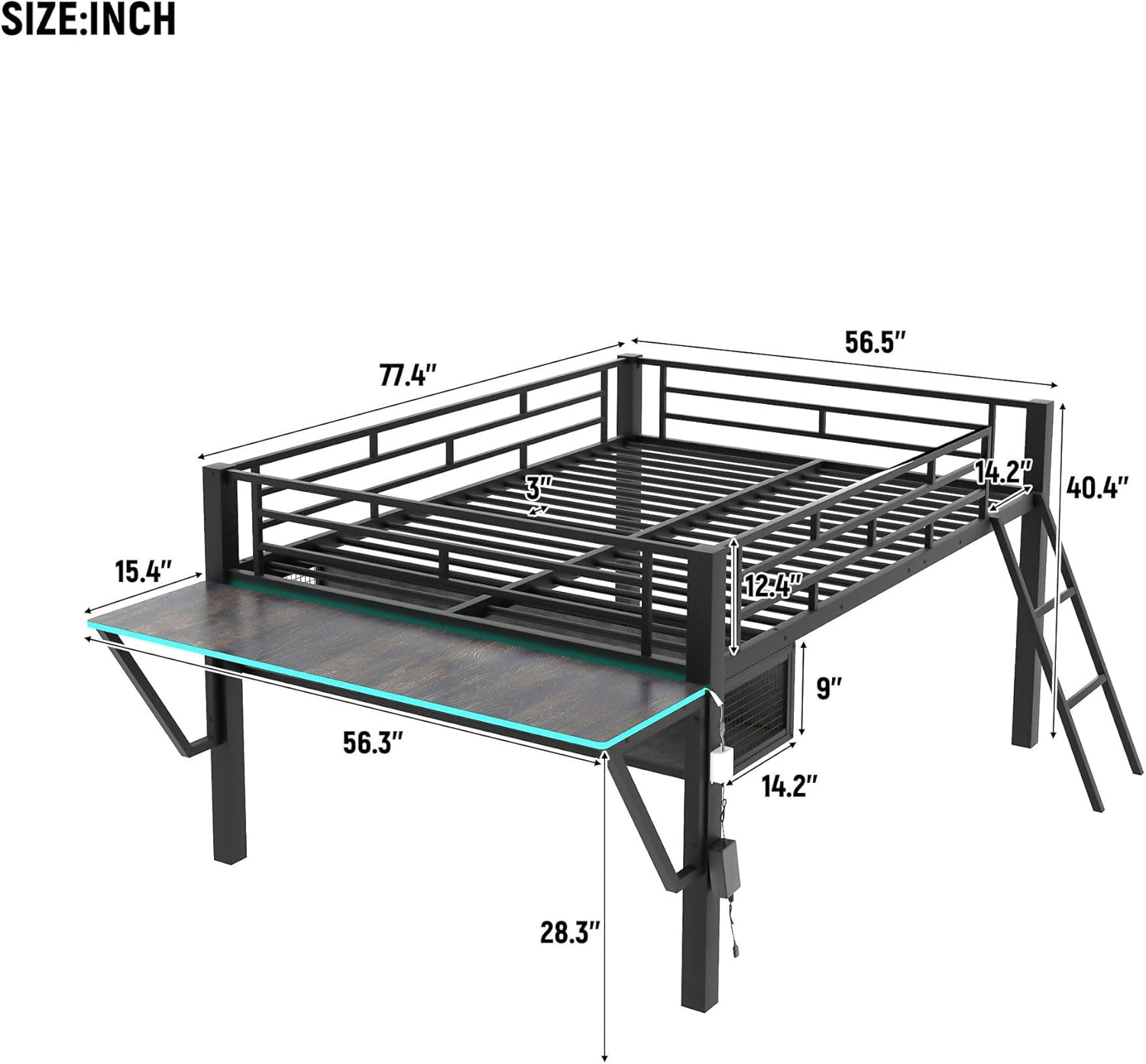
The integrated desk provides a dedicated space for studying, gaming, or other activities. The under-bed clearance of approximately 28 inches offers additional space for storage or a seating area. The attached storage basket can hold books, accessories, or other small items.
6. Maintenance
- Cleaning: Wipe the metal frame and desk surface with a damp cloth and mild detergent. Avoid abrasive cleaners or harsh chemicals that could damage the finish.
- Fastener Checks: Periodically check all bolts, screws, and connections to ensure they remain tight. Re-tighten as necessary to maintain stability and safety.
- LED Lights: If the LED lights malfunction, check the power connection and the controller. If issues persist, contact customer support.
7. Troubleshooting
| Problem | Possible Cause | Solution |
|---|---|---|
| Bed feels wobbly or unstable. | Loose fasteners. | Check and tighten all bolts and screws. Ensure the bed is on a level surface. |
| LED lights not turning on. | Power connection issue; faulty controller. | Ensure the power adapter is securely plugged into the outlet and the light strip. Check the inline controller for damage. |
| Missing parts during assembly. | Packaging error. | Contact customer support with your purchase details and the specific missing parts. |
8. Specifications

| Feature | Detail |
|---|---|
| Product Dimensions (L x W x H) | 77.4" x 56.5" x 40.4" |
| Material | Alloy Steel, Metal |
| Color | Black |
| Weight Capacity (Loft Bed) | 350 lbs |
| Desk Dimensions (L x W) | 56.3" x 15.4" |
| Under-Bed Clearance | 28.3" |
| Included Components | Loft bed frame, desk, storage shelf, ladder, LED lights, assembly tools |
| Assembly Required | Yes |
| Item Weight | 114 Pounds |
9. Warranty and Support
9.1. Returns and Exchanges
This product is eligible for 30-day easy returns. Please refer to your retailer's return policy for specific details and procedures regarding returns or exchanges.
9.2. Customer Support
For any questions, missing parts, or assistance with assembly or operation, please contact SOFTSEA customer support. Have your model number (Y640BG) and purchase information ready when contacting support.
Contact information can typically be found on your purchase receipt or the retailer's website.