
DieseRC EW-1CH (EW748)
DieseRC 1 Channel WiFi Smart Switch Instruction Manual
Model: EW-1CH (EW748)
Brand: DieseRC
Introduction
The DieseRC 1 Channel WiFi Smart Switch is a versatile relay module designed to integrate various devices into your smart home ecosystem. It offers remote control capabilities via Wi-Fi, compatibility with popular smart assistants like Amazon Alexa and Google Home, and flexible operating modes to suit diverse applications.
Key Features:
- Wireless WIFI Smart Switch: Stable and reliable performance with high reception sensitivity (2.4GHz WIFI) for remote operation from anywhere.
- APP Control: Compatible with "eWelink" APP for unlimited wireless control via Android and iOS devices.
- Voice Control: Seamless integration with Amazon Alexa (Amazon Echo / Dot / Spot) and Google Home for convenient voice commands.
- Flexible Operating Modes: Supports both Inching (pulse switch) and Toggle (on/off switch) modes, programmable to your specific needs.
- Wide Voltage Compatibility: Suitable for DC 5V or DC 7V~48V voltage, including 12V, 24V, 36V, and 48V.
- Passive Output (Dry Contacts): Features a 10A high-quality relay with Normally Open (NO), Common (COM), and Normally Closed (NC) pins.
- Compact Design: Small size (55*29*17 mm / 2.2*1.1*0.7 in) allows for easy concealment in electrical or junction boxes.
- Advanced APP Functions: Set schedules, timers, and share control with family members.
- Bluetooth Remote Control Compatibility: Can be linked with RM2.4G Bluetooth remote control (not included).
Product Overview
Familiarize yourself with the components and connections of the DieseRC 1 Channel WiFi Smart Switch.

Detailed view of the smart switch board, highlighting the relay, input terminals (NO, COM, NC), USB 5V/0.5A input, relay indicator light, WiFi network indicator light, and the pairing button.
- NO: Normally Open pin
- COM: Common pin
- NC: Normally Closed pin
- Input USB 5V/0.5A: Power input via Micro USB port.
- +V / -V: Screw terminals for DC 7V-48V power input.
- Relay indicator light: Indicates relay status.
- WiFi network indicator light: Indicates Wi-Fi connection status.
- Open the key / Pairing button: Used for device pairing and mode switching.
Setup & Installation
Power Supply Options
The smart switch can be powered using either a DC 5V USB power source or a DC 7V-48V power supply.

The smart switch supports both 5V DC USB power and 7V-48V DC power input.
Wiring Diagrams
The smart switch provides passive output (dry contacts), meaning it acts as a switch without providing voltage. You need to supply power to the device you are controlling.
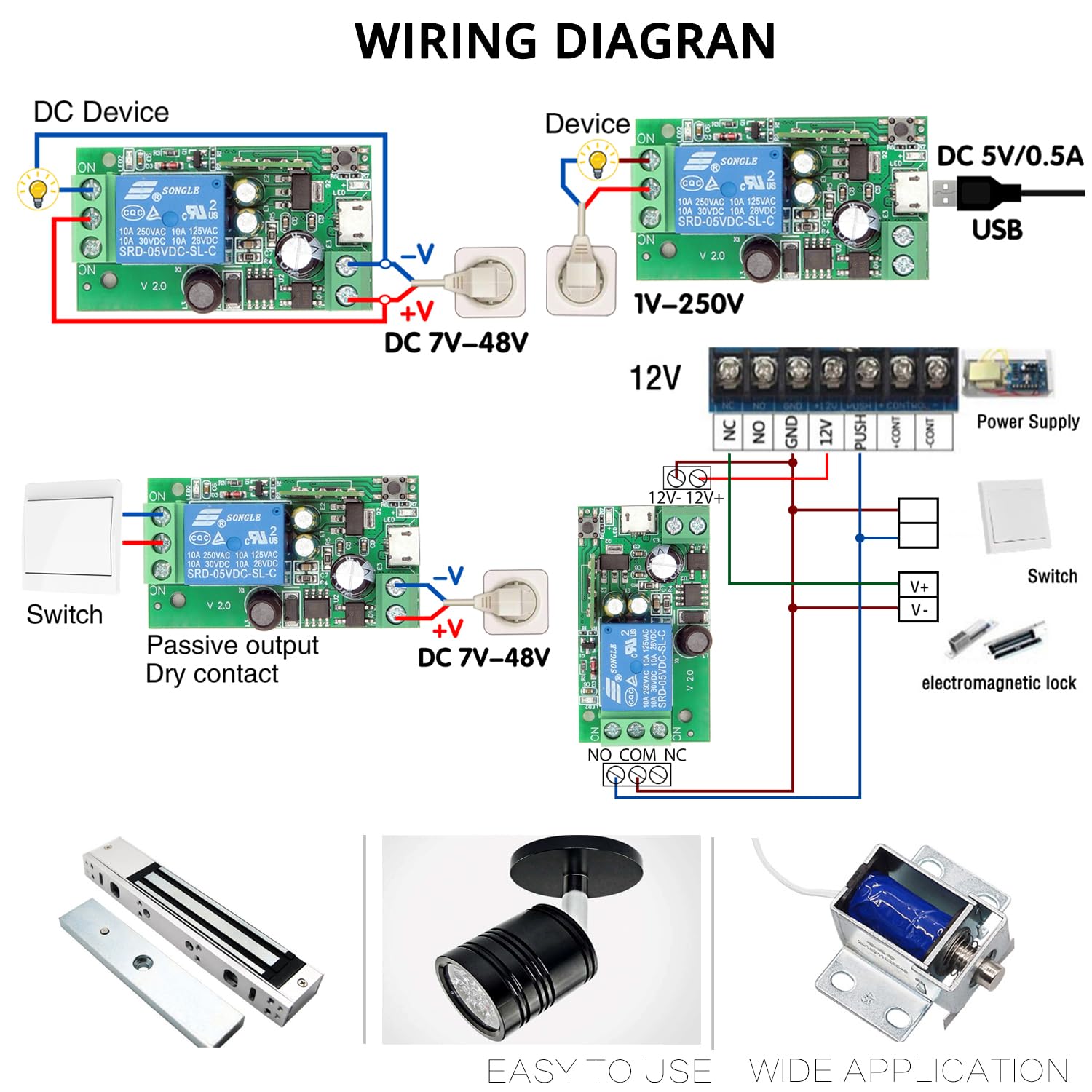
Examples of wiring configurations for different applications, including DC devices, AC devices, and passive output setups.
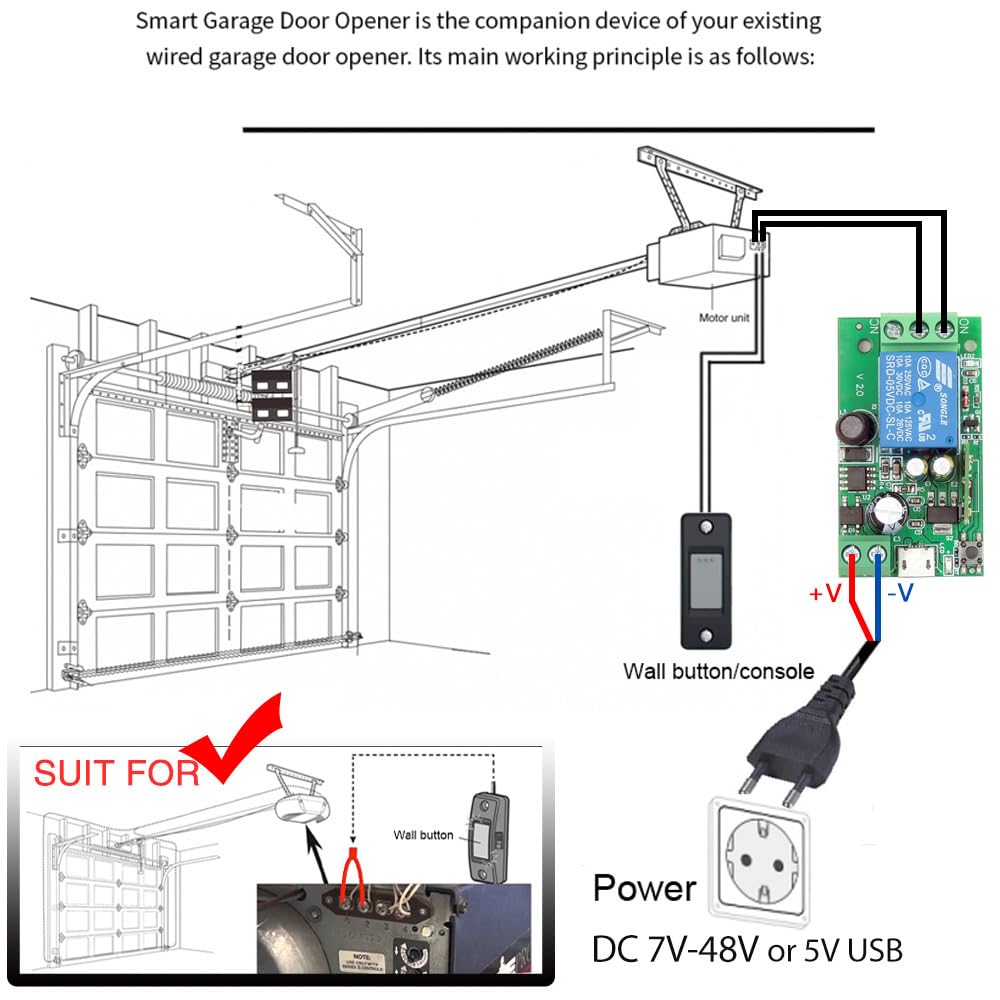
Wiring diagram for integrating the smart switch with an existing wired garage door opener system.
App Installation
Download the "eWelink" APP to control your smart switch. You can scan the QR code below or visit the provided link.

Scan this QR code to download the eWelink APP.
Alternatively, download from: http://app.coolkit.cc/dl.html
Device Pairing
- Ensure the smart switch is powered on and the Wi-Fi indicator light is blinking.
- Open the eWelink APP and follow the on-screen instructions to add a new device.
- Select the appropriate device type and enter your Wi-Fi network credentials (2.4GHz network required).
- The app will guide you through the pairing process. Once successful, the Wi-Fi indicator light on the module will become solid.
Operating Modes
The DieseRC smart switch supports two main operating modes: Inching (Momentary) and Self-Locking (Toggle).

The smart switch can be configured to operate as a pulse switch (inching mode) or a toggle switch (self-locking mode).
- Inching Mode: In this mode, the relay will turn on for a brief, set duration (e.g., 0.5 seconds) and then automatically turn off. This is ideal for applications like garage door openers or momentary button presses.
- Self-Locking Mode: In this mode, the relay acts like a traditional on/off switch. One command turns it on, and another command turns it off. This is suitable for controlling lights or other devices that need to remain in a specific state.
You can adjust the operating mode and inching duration within the eWelink APP settings for the device.
Smart Control Features
APP Control
Control your devices from anywhere in the world using the eWelink APP on your smartphone or tablet.

Remote control your devices via the eWelink APP with no distance limitations.
Voice Control
Integrate your smart switch with Amazon Alexa or Google Home for convenient hands-free control.

Control your connected devices using voice commands through Amazon Alexa or Google Home.
Example commands:
- "Alexa, turn [device name] on."
- "Hey Google, turn [device name] off."
Scheduling & Timing
Set up custom schedules and timers within the eWelink APP to automate your devices.

Automate your devices by setting daily schedules, one-time timers, or countdowns through the eWelink APP.
- Timing: Set a specific time for the device to turn on or off once.
- Schedule: Create recurring schedules for daily or weekly automation.
- Countdown: Set a countdown timer for the device to turn off after a specified duration.
Wide Applications
The DieseRC 1 Channel WiFi Smart Switch can be used in a variety of settings and for numerous applications, making any connected device an Internet-controlled device.

The smart switch can be configured to operate as a pulse switch (inching mode) or a toggle switch (self-locking mode).
Common applications include:
- Garage door opener systems
- Electric locks and electromagnetic doors
- Lighting and lamps
- Controlling various home appliances
- Signal transmission for DIY remote control projects
- Use in homes, farms, factories, offices, laboratories, and supermarkets
Maintenance
To ensure optimal performance and longevity of your DieseRC 1 Channel WiFi Smart Switch, follow these general maintenance guidelines:
- Keep the device in a dry environment, away from moisture and extreme temperatures.
- Avoid exposing the device to direct sunlight or corrosive substances.
- Regularly check wiring connections to ensure they are secure and free from damage.
- Clean the exterior of the device with a soft, dry cloth. Do not use harsh chemicals or abrasive cleaners.
- Ensure proper ventilation if the device is enclosed to prevent overheating.
Troubleshooting
If you encounter issues with your DieseRC 1 Channel WiFi Smart Switch, consider the following troubleshooting steps:
- Device Not Connecting to Wi-Fi:
- Ensure your Wi-Fi network is 2.4GHz. The device does not support 5GHz networks.
- Check if the Wi-Fi signal strength is adequate at the device's location.
- Verify that the Wi-Fi password entered during pairing is correct.
- Try restarting your Wi-Fi router and the smart switch.
- Attempt to re-pair the device with the eWelink APP.
- Device Not Responding to APP/Voice Commands:
- Confirm the device is connected to Wi-Fi (solid blue indicator light).
- Check your internet connection.
- Ensure the eWelink APP is updated to the latest version.
- For voice control, verify that the device is correctly linked in your Alexa or Google Home app and that the device name is recognized.
- Relay Not Activating/Deactivating:
- Check the power supply to the smart switch.
- Inspect the wiring connections to the controlled device (NO, COM, NC terminals). Ensure they are secure and correctly configured for your application.
- Verify the operating mode (Inching/Self-Locking) is correctly set in the eWelink APP for your intended use.
- Ensure the load connected does not exceed the relay's maximum current rating (10 Amps).
- Device Overheating:
- Ensure the device is not enclosed in a way that restricts airflow.
- Verify the connected load does not exceed the specified limits.
If problems persist, please contact customer support.
Specifications
| Attribute | Value |
|---|---|
| Product Dimensions | 4.88 x 3.39 x 0.75 inches |
| Item Weight | 0.88 ounces |
| Model Number | EW748 |
| Manufacturer | DieseRC |
| Connector Type | Crimp |
| Contact Material | Metal |
| Contact Type | Normally Open |
| Current Rating | 10 Amps |
| Mounting Type | Surface Mount |
| Input Voltage | DC 5V (USB) or DC 7V-48V |
What's in the Box:
- 1 x DieseRC 1 Channel WiFi Smart Switch
Warranty & Support
DieseRC is committed to providing high-quality products and excellent after-sales service. We strive to solve any issues you may encounter with our products.
For technical support, troubleshooting assistance, or any inquiries regarding your DieseRC 1 Channel WiFi Smart Switch, please contact us:
- Manufacturer: DieseRC
- Service Email: dieseelectronic@163.com
Please refer to your purchase documentation for specific warranty terms and conditions.
Related documentsEW-1CH (EW748)

Ask a question about this manual
Ask about setup, troubleshooting, compatibility, parts, safety, or missing instructions. Manuals+ will review the question and use this page’s manual context to help answer it.