
1. Introduction
Thank you for choosing the ODK 13-Drawer Dresser. This manual provides essential information for the safe assembly, operation, and maintenance of your new furniture. Please read it thoroughly before beginning assembly and keep it for future reference.

Image 1.1: The ODK 13-Drawer Dresser, showcasing its design and integrated power strip.
2. Safety Instructions
To ensure safe use of this product, please observe the following guidelines:
- Anti-Tipping Device: Always install the included anti-tipping device to prevent accidental tipping, especially in households with children or pets.
- Weight Capacity: Do not overload drawers or the top surface. Distribute weight evenly.
- Electrical Safety: The integrated power strip is designed for indoor use only. Do not expose it to moisture. Ensure the total power consumption of connected devices does not exceed the specified limits.
- Assembly: Follow all assembly instructions carefully. Do not use power tools for tightening screws unless explicitly stated, as this may damage components.
- Placement: Place the dresser on a level, stable surface.
3. Package Contents
Before assembly, verify that all components are present. If any parts are missing or damaged, please contact customer service.
- Dresser Frame Components (Metal, Wood)
- 13 Fabric Drawers
- Integrated Power Strip with 2 AC Outlets and 2 USB Ports
- Assembly Hardware (Screws, bolts, etc.)
- Anti-Tipping Kit
- Instruction Manual
4. Setup and Assembly
Assembly of the ODK dresser is designed to be straightforward. Please follow the detailed instructions provided in the separate assembly guide included with your product. Below are general steps and important considerations:
- Unpack Components: Carefully remove all parts from the packaging and lay them out on a clean, soft surface to prevent scratches.
- Assemble Frame: Connect the metal frame components using the provided hardware. Ensure all connections are secure but do not overtighten until the frame is fully assembled. The X-brace at the back enhances durability.
- Install Top Panel: Secure the wooden top panel to the assembled frame.
- Insert Power Strip: Integrate the power strip into its designated slot on the top panel.
- Prepare Drawers: Unfold the fabric drawers and insert the bottom panels to give them shape.
- Install Anti-Tipping Device: Attach the anti-tipping device to the dresser and secure it to a wall stud according to the instructions. This is a critical safety step.
- Adjust Feet: Use the adjustable feet to level the dresser on uneven floors, ensuring stability.

Image 4.1: The ODK dresser integrated into a bedroom, demonstrating drawer access and overall aesthetic.
5. Operating Instructions
5.1 Using the Drawers
The dresser features 13 extra-large fabric drawers designed for daily storage. To use:
- Gently pull the wooden handles to open the drawers.
- Push the drawers back in until they are fully closed.
- Avoid forcing drawers open or closed, as this can cause wear.
5.2 Using the Integrated Charging Ports
Your ODK dresser includes a convenient power strip with 2 AC outlets and 2 USB charging ports (1 USB-A, 1 USB-C) to keep your devices charged and your space tidy.
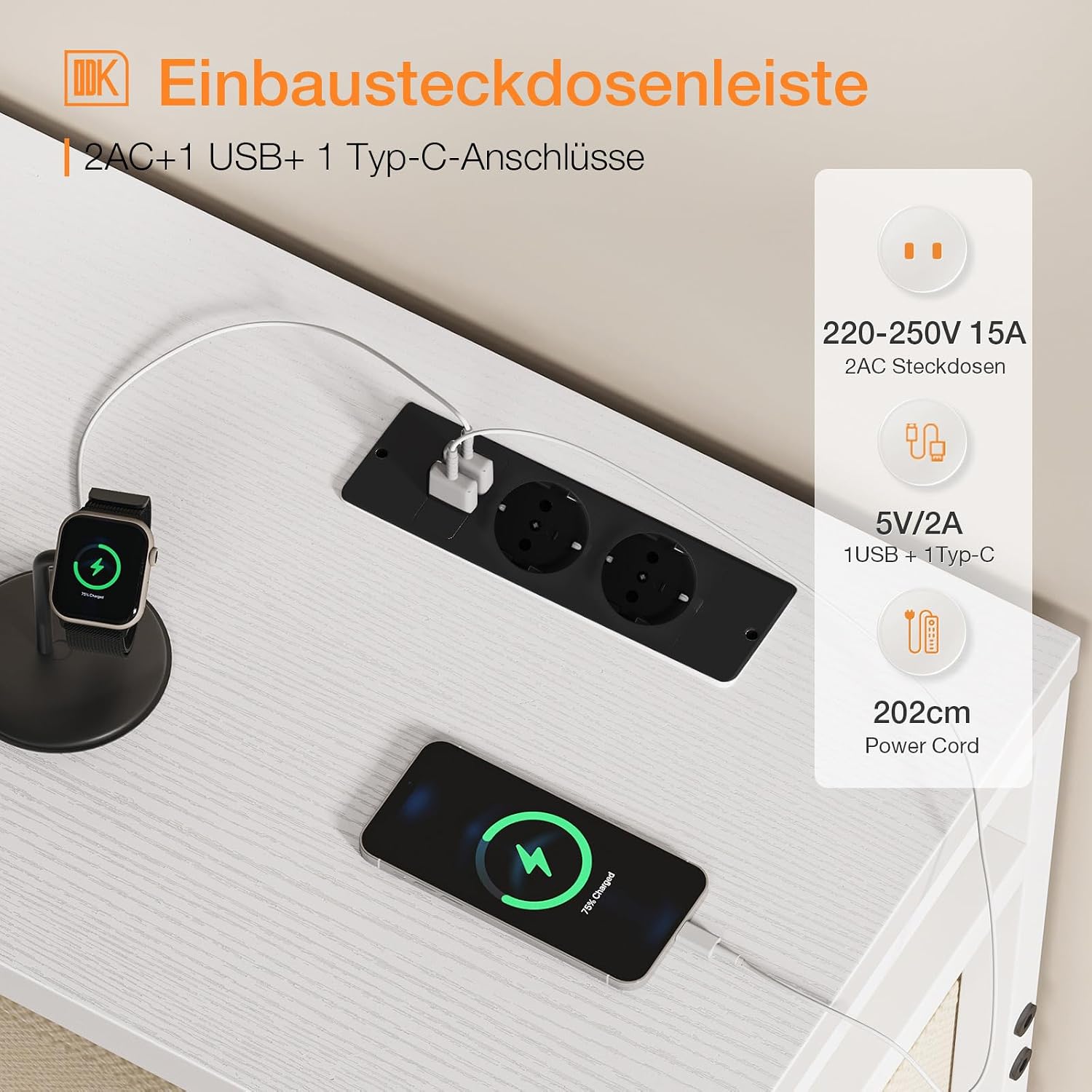
Image 5.1: Detail of the integrated power strip, showing 2 AC outlets and 2 USB charging ports.
- Connect to Power: Plug the dresser's power cord into a standard wall outlet.
- AC Outlets: Insert your device's power adapter into one of the 2 AC outlets (220-250V 15A).
- USB Charging: Connect your USB-compatible device (e.g., smartphone, tablet, smartwatch) to either the USB-A or USB-C port (5V/2A).
- Power Cord Length: The power cord is approximately 202 cm long.
Caution: Do not exceed the maximum power rating of the integrated strip. Avoid connecting high-power appliances like heaters or microwaves.
6. Maintenance
6.1 Cleaning
- Frame and Top: Wipe surfaces with a soft, damp cloth. Avoid harsh chemicals or abrasive cleaners.
- Fabric Drawers: Spot clean with a mild detergent and a damp cloth. Allow to air dry completely. Do not machine wash.
6.2 General Care
- Regularly check all screws and connections to ensure they remain tight.
- Keep the dresser away from direct sunlight and excessive moisture to prevent material degradation.
- Avoid placing hot items directly on the wooden top surface. Use coasters if necessary.
7. Troubleshooting
If you encounter any issues with your ODK dresser, please refer to the following common problems and solutions:
| Problem | Possible Cause | Solution |
|---|---|---|
| Dresser is wobbly/unstable. | Uneven floor; loose connections. | Adjust the leveling feet at the bottom. Tighten all assembly screws. Ensure the anti-tipping device is securely installed. |
| Drawers do not slide smoothly. | Drawer is overloaded; fabric is creased; frame is misaligned. | Reduce drawer contents. Reshape the fabric drawer. Check frame assembly for proper alignment. |
| Power outlets/USB ports are not working. | Dresser not plugged in; wall outlet issue; device issue. | Ensure the dresser's power cord is securely plugged into a functional wall outlet. Test the wall outlet with another device. Check if the device being charged is working correctly. |
| Missing parts during assembly. | Packaging error. | Contact ODK customer service immediately with your purchase details. |
8. Specifications

Image 8.1: Detailed dimensions of the ODK 13-Drawer Dresser.
| Feature | Detail |
|---|---|
| Brand | ODK |
| Model Number | SNG-0157-13 |
| Color | White (Frame), Beige (Drawers) |
| Product Dimensions (L x W x H) | 145 x 30 x 101 cm |
| Material | Wood, Metal, Fabric |
| Integrated Features | 2 AC Outlets, 1 USB-A Port, 1 USB-C Port |
| Item Weight | 21 Kilograms |
| Number of Drawers | 13 |
| Room Type | Bedroom, Living Room |
| Assembly Required | Yes |
9. Warranty and Support
ODK offers a free return or exchange service within 30 days of purchase. Our professional 24-hour online customer service team is available to resolve any issues you may encounter as quickly as possible.
For support, please refer to the contact information provided with your purchase or visit the official ODK website.