
1. Introduction
Thank you for choosing the ODK Multifunctional Drawer Dresser, Model SNG-0156. This commode is designed to provide versatile storage and convenient charging capabilities for your bedroom or living room. It features eight spacious fabric drawers, a robust steel frame, a durable wooden top, and an integrated charging station with 2 USB ports and 2 AC outlets.
This manual provides detailed instructions for assembly, operation, maintenance, and troubleshooting to ensure safe and optimal use of your new furniture.

Image 1.1: The ODK Commode with integrated charging station and eight fabric drawers.
2. Safety Information
Please read and understand all safety instructions before assembling and using this product. Failure to follow these instructions may result in injury or damage to the product.
- Anti-Tip Safety: Always secure the dresser to the wall using the provided anti-tip kit. This prevents accidental tipping, which can cause serious injury.
- Electrical Safety: The integrated charging station is designed for indoor use only. Do not expose it to moisture. Ensure the power cord is not pinched or damaged. Do not overload the outlets.
- Weight Capacity: Do not exceed the recommended weight capacity for the top surface or drawers. Distribute weight evenly.
- Assembly: Assemble the dresser on a soft, clean surface to prevent scratches. Ensure all screws and fasteners are tightened securely before use.
- Children: Keep small parts and packaging materials away from children during assembly. Do not allow children to climb on or play with the dresser.
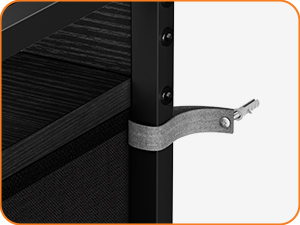
Image 2.1: Example of an anti-tip kit, essential for securing the dresser to the wall.
3. Package Contents
Before beginning assembly, please verify that all components are present and undamaged. If any parts are missing or damaged, please contact customer support.
- Steel Frame Components
- Wooden Top Panel
- Wooden Shelf Panels
- Fabric Drawers (8 units)
- Drawer Handles
- Integrated Charging Station (2 USB, 2 AC)
- Adjustable Feet
- Anti-Tip Kit
- Assembly Hardware (screws, wrench, screwdriver)
- Instruction Manual
4. Assembly Instructions
Assembly of the ODK Commode is straightforward with the provided detailed instructions and tools. It is recommended to assemble the unit on a soft, flat surface to prevent damage.
- Unpack Components: Carefully remove all parts from the packaging and lay them out. Verify against the package contents list.
- Assemble Frame: Connect the steel frame components according to the diagrams in the included paper manual. Ensure all connections are secure.
- Attach Wooden Panels: Secure the wooden top panel and any shelf panels to the steel frame using the provided screws.
- Install Charging Station: Place the integrated charging station into its designated slot on the top panel and secure it.
- Assemble Drawers: Insert the bottom panels into the fabric drawers and attach the handles.
- Insert Drawers: Place the assembled fabric drawers into their respective compartments in the frame.
- Attach Adjustable Feet: Screw the adjustable feet into the bottom of the frame. Adjust them to ensure the dresser is level and stable.
- Secure with Anti-Tip Kit: Attach the anti-tip kit to the back of the dresser and to a wall stud, following the specific instructions provided with the kit.

Image 4.1: Visual guide highlighting key features and components for assembly.
5. Operating Instructions
The ODK Commode is designed for both storage and convenient device charging.
5.1 Using the Charging Station
- Power Connection: Plug the dresser's power cord into a standard wall outlet.
- USB Charging: Connect your USB-powered devices (e.g., smartphones, tablets, smartwatches) to the two USB-A ports for charging.
- AC Outlets: Use the two standard AC outlets to power or charge other electronic devices (e.g., lamps, laptops).
- Safety Note: Always ensure devices are compatible with the power output and do not exceed the maximum wattage of the charging station.

Image 5.1: Example of devices being charged using the integrated USB ports and AC outlets.

Image 5.2: Detailed view of the 2 USB-A ports and 2 AC outlets on the dresser top.
5.2 Using the Drawers
- Storage: The eight fabric drawers provide ample space for clothing, accessories, books, or other household items.
- Organization: Utilize the drawers to keep your space tidy and organized.
- Smooth Operation: The drawers are designed for smooth opening and closing. Avoid forcing them.

Image 5.3: The eight spacious fabric drawers, shown open to illustrate storage capacity.
6. Maintenance
Proper care and maintenance will extend the life of your ODK Commode.
- Cleaning the Wooden Top: Wipe the wooden top surface with a soft, damp cloth. Avoid harsh chemicals or abrasive cleaners.
- Cleaning Fabric Drawers: Spot clean fabric drawers with a mild detergent and a damp cloth. Allow to air dry completely. Do not machine wash.
- Frame Care: Wipe the steel frame with a soft, dry cloth.
- Regular Checks: Periodically check all screws and fasteners to ensure they remain tight. Re-tighten if necessary.
- Avoid Moisture: Keep the dresser away from excessive moisture and direct sunlight to prevent damage to the wood and fabric.
7. Troubleshooting
If you encounter any issues with your ODK Commode, refer to the following common problems and solutions:
| Problem | Possible Cause | Solution |
|---|---|---|
| Dresser is wobbly | Uneven floor; loose fasteners | Adjust the leveling feet at the bottom of the frame. Check and tighten all assembly screws. |
| Charging station not working | Power cord not plugged in; wall outlet issue; device incompatibility; overloaded circuit | Ensure the power cord is securely plugged into a working wall outlet. Test the outlet with another device. Check device compatibility. Do not exceed the charging station's maximum load. |
| Drawers do not slide smoothly | Overloaded drawer; obstruction; misaligned frame | Reduce the weight in the drawer. Check for any items obstructing the drawer's path. Ensure the dresser frame is properly assembled and level. |
| Missing parts during assembly | Packaging error | Contact ODK customer support with your purchase details and the list of missing parts. |
If the problem persists after attempting these solutions, please contact ODK customer support for further assistance.
8. Specifications
| Feature | Detail |
|---|---|
| Brand | ODK |
| Model Number | SNG-0156 |
| Color | Black |
| Product Dimensions (L x W x H) | 132 x 30 x 88 cm |
| Item Weight | 18.76 Kilograms |
| Number of Drawers | 8 |
| Charging Ports | 2 USB-A Ports, 2 AC Outlets |
| Material | Steel Frame, Wooden Top, Fabric Drawers |
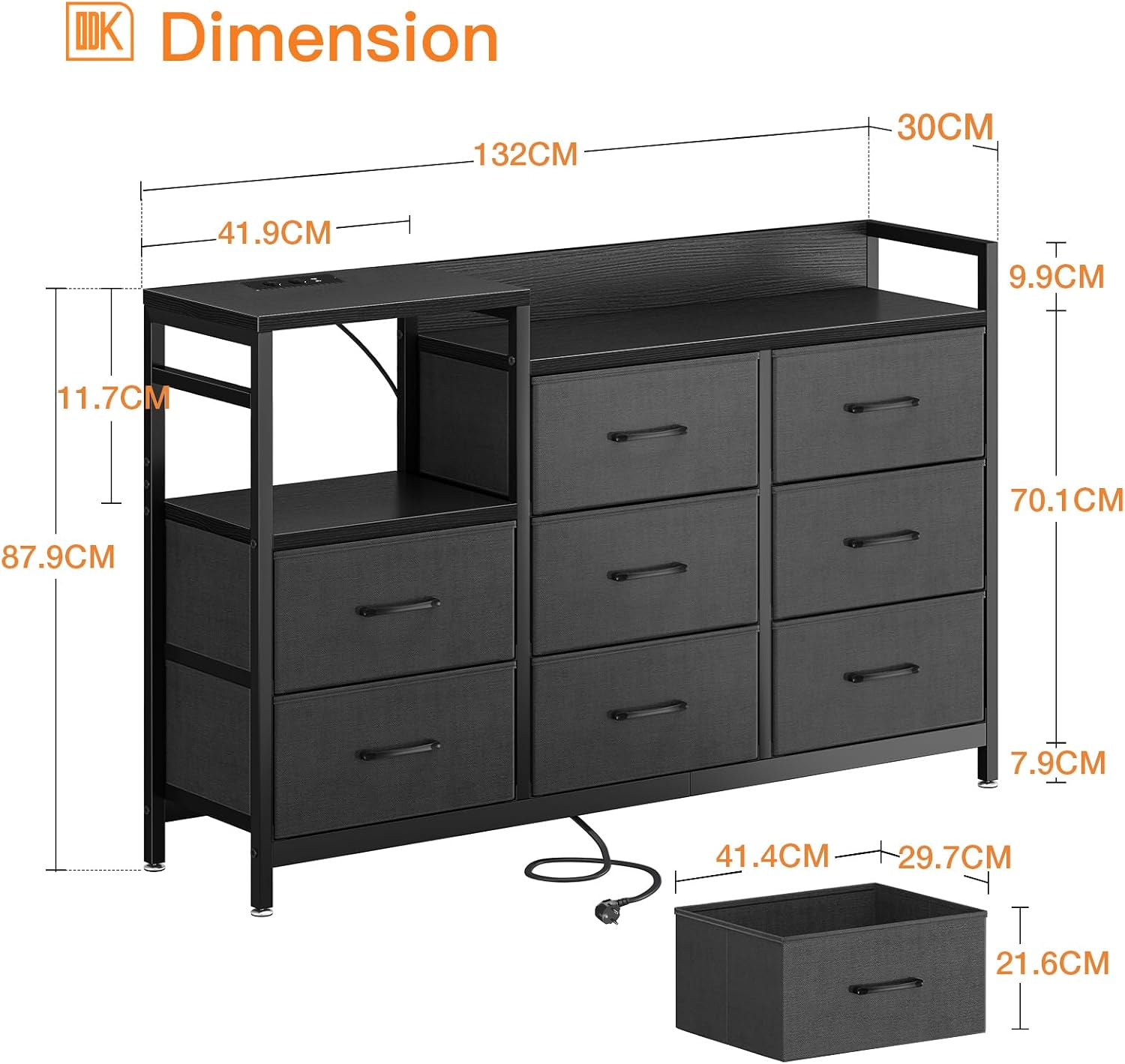
Image 8.1: Detailed dimensions of the ODK Commode.
9. Warranty and Support
ODK is committed to providing high-quality products and excellent customer service.
- Warranty: ODK offers a 30-day free return or exchange service from the date of purchase.
- Customer Support: For any questions, concerns, or issues, please contact our professional 24-hour online customer service team. They will assist you as quickly as possible.
Please retain your proof of purchase for warranty claims.