
Introduction
This manual provides detailed instructions for the assembly, operation, and maintenance of your RFIVER MT5003 Mobile TV Stand. Please read this manual thoroughly before installation and retain it for future reference. This stand is designed to securely hold televisions ranging from 50 to 86 inches.

Image: The RFIVER MT5003 Mobile TV Stand, featuring a black frame, a mounted television, and a lower shelf for media devices. The stand is equipped with wheels for mobility.
Important Safety Information
Please observe the following safety precautions to prevent injury or damage to the product:
- Weight Capacity: Do not exceed the maximum load capacity of 68 kg (150 lbs) for the TV mount and 15 kg (33 lbs) for the media shelf. Overloading can cause instability and potential injury.
- TV Size: This stand is designed for TVs between 50 and 86 inches. Ensure your TV falls within this range.
- VESA Compatibility: Verify your TV's VESA mounting pattern is compatible (100x100mm to 800x600mm).
- Assembly: Follow all assembly instructions carefully. Incorrect assembly can lead to product failure.
- Stability: Always ensure the wheels are locked when the stand is stationary to prevent accidental movement.
- Children: Keep children away from the stand during assembly and ensure they do not climb on or play with the stand once assembled.
- Placement: Place the stand on a flat, stable surface. Avoid uneven ground.

Image: A visual guide illustrating the compatibility requirements for the TV stand, including VESA patterns (Min: 100x100mm, Max: 800x600mm), supported screen sizes (50"-86"), and maximum TV weight (68 KGS).
Package Contents
Before beginning assembly, verify that all parts are present and undamaged. Refer to the included graphical instructions for a complete list of components and hardware. All nuts, screws, and bolts are typically provided in separately labeled packages.
- Main Support Columns
- Base Legs with Wheels
- TV Mounting Brackets
- Media Shelf
- Hardware Kit (screws, washers, spacers, Allen keys)
- Instruction Manual
Assembly Instructions
Assembly typically requires two people. Follow the step-by-step graphical instructions provided in your package. Ensure all connections are secure before mounting the television.
- Attach Wheels to Base: Secure the four 360° lockable wheels to the base legs using the provided hardware.
- Assemble Base and Columns: Connect the base legs to the main support columns.
- Install Media Shelf: Attach the media shelf to the main support columns at your desired height.
- Attach TV Brackets to TV: Secure the TV mounting brackets to the back of your television, ensuring the correct VESA pattern is used.
- Mount TV to Stand: Carefully lift the television and hook the TV mounting brackets onto the main support columns. Secure the TV in place with the safety screws.


Image: Details of the media shelf, designed to hold audio equipment or other devices, and the robust base with integrated wheels for stability and mobility.
Operating Instructions
Adjusting TV Height
The TV mounting brackets allow for four levels of height adjustment, with each adjustment changing the height by 45mm. To adjust, carefully lift the TV slightly, reposition the brackets to the desired height slots on the main columns, and ensure they are securely seated.
Adjusting Media Shelf Height
The media shelf offers two height adjustment positions, with each adjustment changing the height by 250mm. To adjust, loosen the shelf fasteners, move the shelf to the desired position, and re-tighten the fasteners securely.
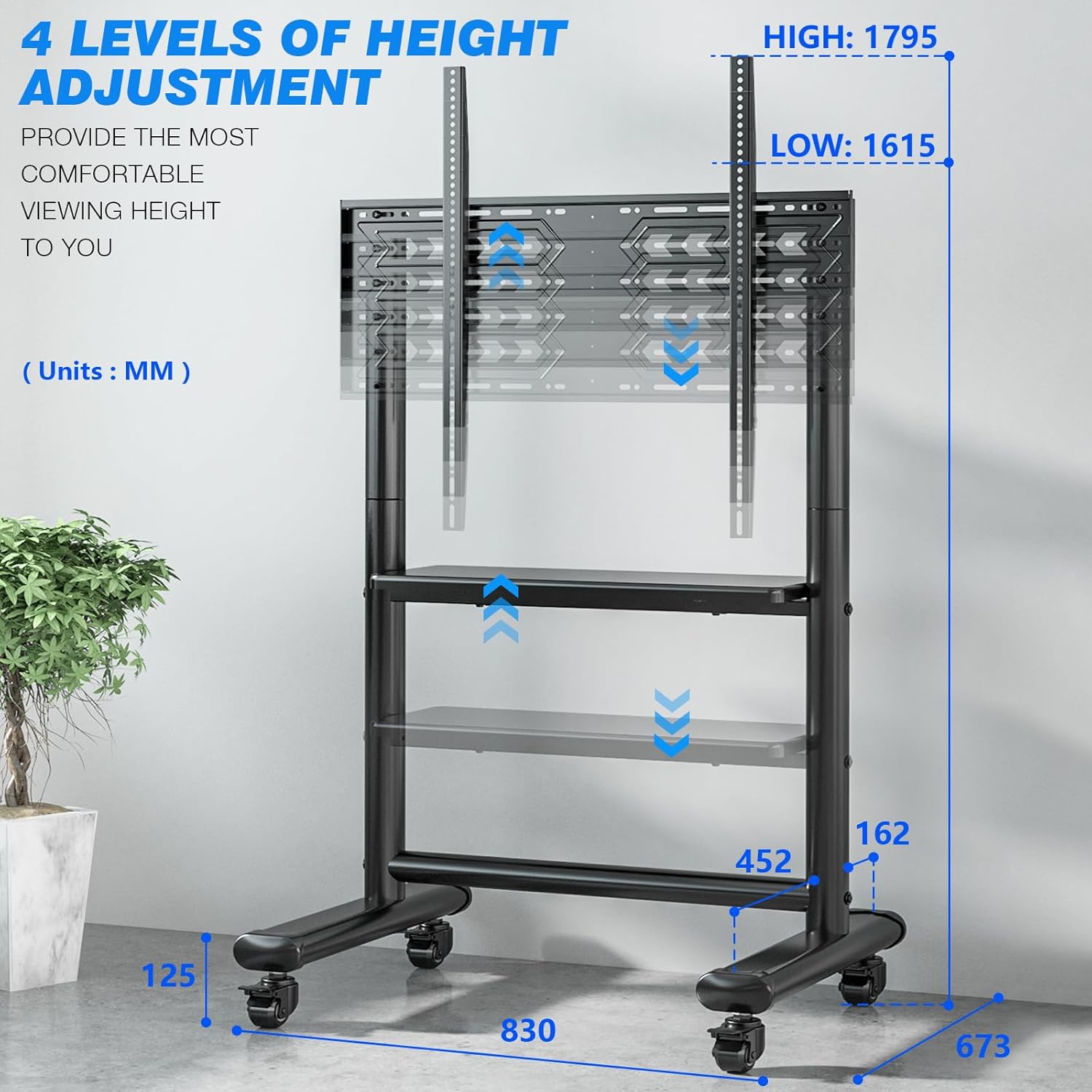
Image: A diagram showing the adjustable height features of the TV stand, indicating four levels for the TV mount (from 1615mm to 1795mm) and two levels for the media shelf (from 523mm to 773mm).
Moving the TV Stand
The stand is equipped with four 360° swivel wheels for easy mobility. To move the stand, unlock all four wheels by disengaging their locking mechanisms. Gently push the stand to its new location. Always ensure the path is clear of obstacles.
Locking the Wheels
Once the stand is in its desired position, engage the locking mechanism on all four wheels to prevent unintended movement. This ensures stability and safety.

Image: A visual demonstration of the TV stand's ease of movement and stopping capability, showing a person effortlessly rolling the stand and then securing it in place.

Image: A close-up view of one of the stand's wheels, clearly showing the locking mechanism engaged to prevent movement.
Maintenance
- Cleaning: Wipe the stand with a soft, damp cloth. Avoid harsh chemicals or abrasive cleaners that could damage the finish.
- Inspections: Periodically check all screws and bolts to ensure they remain tight. Re-tighten if necessary.
- Wheel Care: Keep the wheels free of debris to ensure smooth movement.
Troubleshooting
| Problem | Possible Cause | Solution |
|---|---|---|
| Stand is unstable. | Wheels are not locked, or assembly hardware is loose. | Ensure all four wheels are locked. Check and tighten all assembly screws and bolts. Ensure the stand is on a flat surface. |
| Difficulty moving the stand. | Wheels are locked, or debris is obstructing movement. | Unlock all wheels. Clear any debris from the wheels. |
| TV does not fit the stand. | Incorrect TV size or VESA pattern. | Verify your TV's screen size (50-86 inches) and VESA pattern (100x100mm to 800x600mm) against the stand's specifications. |
| Missing parts. | Packaging error. | Contact RFIVER customer support with your purchase details. |
Specifications
- Model Number: MT5003
- Brand: RFIVER
- Compatible TV Sizes: 50 - 86 inches
- VESA Compatibility: 100x100mm to 800x600mm
- Maximum TV Load Capacity: 68 kg (150 lbs)
- Media Shelf Load Capacity: 15 kg (33 lbs)
- Material: Alloy Steel
- Color: Black
- TV Height Adjustment: 1615mm to 1795mm (4 levels, 45mm increments)
- Shelf Height Adjustment: 523mm to 773mm (2 levels, 250mm increments)
- Mobility: Four 360° lockable heavy-duty casters

Image: A visual guide illustrating the compatibility requirements for the TV stand, including VESA patterns (Min: 100x100mm, Max: 800x600mm), supported screen sizes (50"-86"), and maximum TV weight (68 KGS).
Warranty and Support
For warranty information or technical support, please refer to the documentation included with your product or visit the official RFIVER website. Contact details for customer service are typically provided on the product packaging or within the included manual.
Note: Specific warranty terms and support contact information were not provided in the product data. Please consult your product packaging or the manufacturer's official resources for the most accurate details.


