
1. Product Overview
The BESTEK 400W Pure Sine Wave Power Inverter is designed to convert 12V DC power from your vehicle's battery into 110V AC household power. This device provides 400 watts of continuous power and an 800-watt peak surge, making it suitable for a wide range of electronic devices and small appliances. Featuring advanced pure sine wave technology, it delivers clean and stable power, essential for sensitive electronics. Additionally, it includes fast-charging USB ports (PD30W USB-C and QC18W USB-A) for convenient mobile device charging.

Image: The BESTEK 400W Pure Sine Wave Power Inverter, showing its compact design, dual AC outlets, USB-C and USB-A ports, and the attached cigarette lighter plug.
2. Important Safety Information
Please read and understand all safety instructions before operating this power inverter. Failure to follow these instructions may result in electric shock, fire, or serious injury.
- Ventilation: Ensure the inverter is placed in a well-ventilated area. Do not block the cooling fan or vents.
- Moisture: Do not expose the inverter to rain, moisture, or water.
- Flammable Materials: Do not operate the inverter near flammable materials, gases, or vapors.
- Overload Protection: The inverter is equipped with multiple safety protections. Do not attempt to draw more power than its rated capacity (400W continuous, 800W peak).
- Vehicle Power Limits: Be aware of your vehicle's 12V cigarette lighter socket power output limits, typically 120W to 180W. For loads exceeding this, direct connection to the vehicle battery may be required (consult a professional for installation).
- Children: Keep the inverter out of reach of children.
- Disassembly: Do not attempt to disassemble or modify the inverter. Refer all servicing to qualified personnel.
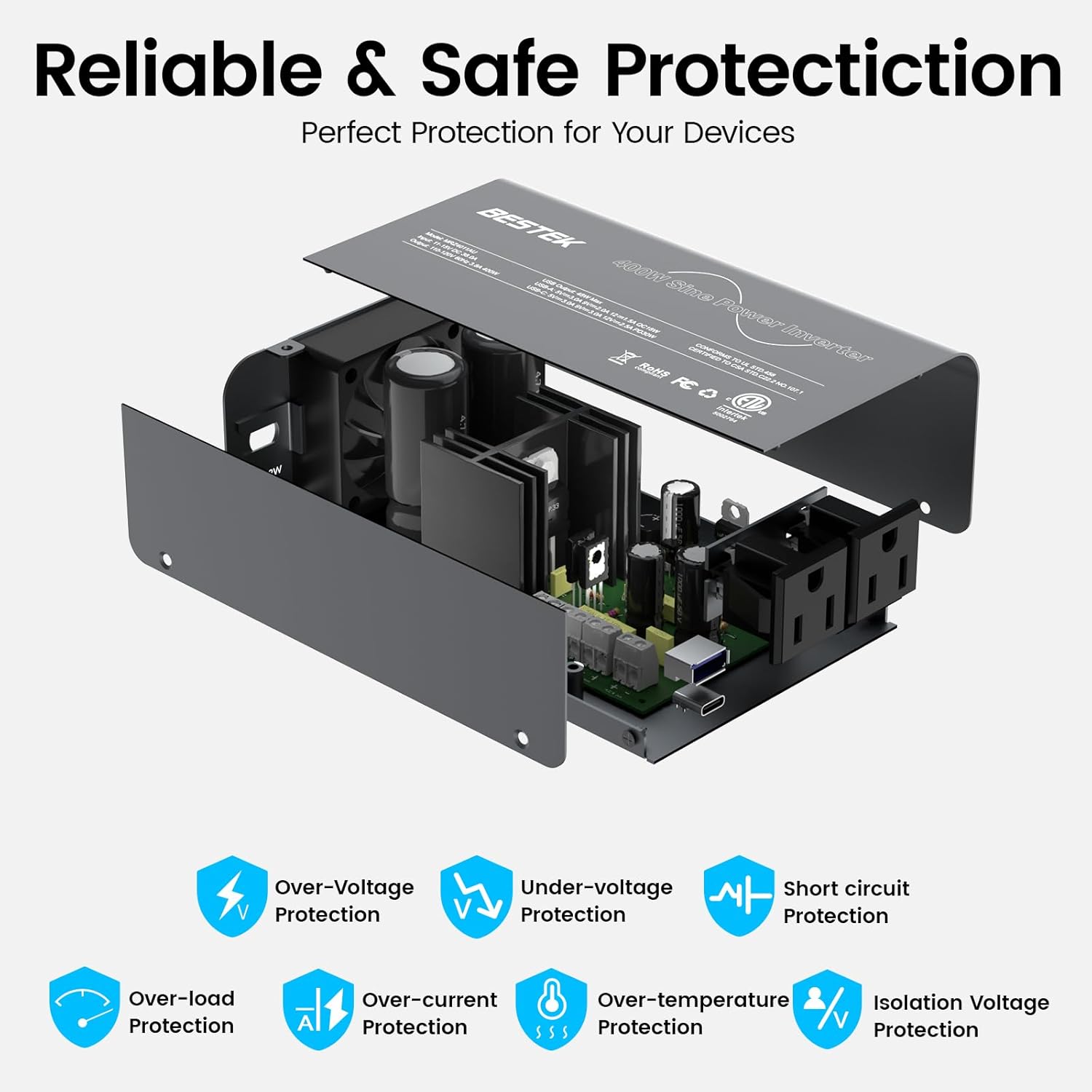
Image: An exploded view of the inverter highlighting its internal components and icons representing various safety protections: Over-Voltage, Under-voltage, Short-circuit, Over-load, Over-current, Over-temperature, and Isolation Voltage Protection.
3. Package Contents
Verify that all items are present in your package:
- BESTEK 400W Pure Sine Wave Power Inverter
- Cigarette Lighter Plug Cable (integrated)
- User Manual
4. Product Features
- Pure Sine Wave Output: Provides high-quality AC power, identical to grid power, ensuring compatibility and prolonging the life of sensitive electronics like CPAP machines, nebulizers, and laptops.
- High Power Output: Delivers 400W continuous DC to AC power and 800W peak surge power.
- Fast Charging Ports:
- 1 x USB-C Port (PD30W): For rapid charging of compatible smartphones (e.g., iPhone series) and small laptops.
- 1 x USB-A Port (QC18W): Supports Quick Charge 3.0 for fast charging of Android devices.
- Dual 110V AC Outlets: Allows connection of two standard AC devices simultaneously.
- Advanced Safety Protections: Built-in safeguards against short-circuit, overvoltage, overload, overcurrent, low-voltage, and overheating.
- Smart Cooling Fan: Automatically adjusts rotation speed based on power load and temperature, reducing noise and preventing overheating.
- Wide Compatibility: Suitable for various devices including laptops, phones, drones, cameras, CPAP machines, breast pumps, and small appliances (under 400W).
- Tesla Compatibility: Input voltage range of 11-17V makes it perfectly suitable for Tesla vehicles with a 16V cigarette lighter socket.

Image: A graphic illustrating the smooth, consistent waveform of pure sine wave power compared to the stepped, less stable modified sine wave, emphasizing the benefits for equipment service life.

Image: The inverter connected to a laptop via a wall adapter plugged into an AC outlet, and a smartphone charging via the PD30W USB-C port, demonstrating fast charging capabilities.
5. Setup and Installation
- Vehicle Compatibility: Ensure your vehicle provides a 12V DC power source via a cigarette lighter socket. The inverter's input voltage range is 11-17V.
- Placement: Place the inverter on a stable, flat surface in a location with good airflow. Avoid placing it directly on carpets or near heat sources.
- Connect to Power Source: Insert the inverter's cigarette lighter plug firmly into your vehicle's 12V cigarette lighter socket.
- Power On: The inverter typically powers on automatically when connected. Some models may have a power switch; ensure it is in the 'ON' position.
- Check Indicator Lights: Observe the indicator lights on the inverter. A green light usually indicates normal operation.
Important Note on Vehicle Power: Standard vehicle cigarette lighter sockets are typically rated for 120W to 180W. If you intend to use devices that collectively exceed this wattage, the vehicle's fuse for the cigarette lighter socket may blow. For continuous use of devices close to the inverter's 400W capacity, a direct connection to the vehicle's battery with appropriate wiring and fusing is recommended. Consult a qualified auto electrician for such installations.
6. Operating Instructions
- Connect Devices: Once the inverter is powered on, plug your AC-powered devices into the 110V AC outlets or your USB-powered devices into the USB-C (PD30W) or USB-A (QC18W) ports.
- Monitor Power Consumption: Ensure the total power consumption of all connected devices does not exceed 400W. Overloading the inverter will trigger safety protections and shut down the unit.
- Fan Operation: The intelligent cooling fan will activate automatically when the inverter's internal temperature rises or when a significant load is applied. The fan speed will vary depending on the load and temperature. This is normal operation.
- Disconnecting: When finished, disconnect your devices from the inverter, then unplug the inverter from the vehicle's 12V socket.

Image: The inverter positioned in a car's center console, simultaneously charging a laptop, a smartphone, and other small devices, demonstrating its multi-device charging capability.

Image: The inverter placed on a nightstand, connected to a CPAP machine, illustrating its use for sensitive medical equipment.
7. Maintenance
- Cleaning: Periodically clean the exterior of the inverter with a dry, soft cloth. Do not use abrasive cleaners or solvents.
- Ventilation: Ensure the cooling vents are free from dust and debris to maintain optimal airflow.
- Storage: When not in use, store the inverter in a cool, dry place, away from direct sunlight and extreme temperatures.
8. Troubleshooting
| Problem | Possible Cause | Solution |
|---|---|---|
| Inverter not powering on / Red LED indicator | Overload, low battery voltage, over-temperature, short circuit, or vehicle's cigarette lighter fuse blown. | Reduce connected load. Check vehicle battery voltage (must be 11-17V). Allow inverter to cool down. Check for short circuits in connected devices. Inspect and replace vehicle's cigarette lighter fuse if necessary. |
| Connected device not working | Device power consumption exceeds inverter capacity, device fault, or improper connection. | Verify device wattage is within 400W. Test device with a standard wall outlet. Ensure all connections are secure. |
| Fan is noisy or constantly running | Normal operation under load or high ambient temperature. | This is expected behavior. The fan adjusts speed to dissipate heat. Ensure vents are not blocked. |
| Inverter beeps intermittently | Low input voltage, overload, or other protection triggered. | Check vehicle battery voltage. Reduce load. If beeping persists without clear cause, contact support. |
9. Technical Specifications
- Model: MRZ4011AU
- Continuous Power: 400 Watts
- Peak Power: 800 Watts
- Input Voltage: DC 11-17V
- Output Voltage: AC 110V
- Output Waveform: Pure Sine Wave
- AC Outlets: 2 x 110V AC
- USB-C Output: PD30W
- USB-A Output: QC18W
- Product Dimensions: 6.45 x 3.93 x 2.36 inches
- Item Weight: 2.2 pounds
- Manufacturer: BESTEK
10. Warranty and Support
BESTEK offers the following for this product:
- 30-Day Hassle-free Return: For a no-questions-asked return within 30 days of purchase.
- 18-Month Replacement Guarantee: Covers product defects and malfunctions for 18 months from the date of purchase.
For further assistance, please visit the official BESTEK store or contact customer support through your purchase platform.
For more information, visit the BESTEK Store on Amazon.


