
1. Introduction
Thank you for choosing the ODSD Electric Ear Wax Removal Tool. This device is designed to provide a safe, effective, and comfortable solution for ear wax removal at home. Featuring advanced water temperature detection, multiple pressure settings, and a user-friendly design, it offers a customizable and gentle ear cleaning experience.

Figure 1: The ODSD Electric Ear Wax Removal Tool, including the main unit, water basin, and six reusable tips.
2. Safety Information
Please read all instructions carefully before using the device. Improper use can lead to injury.
- Do not use if you have ear infections, perforated eardrums, ear tubes, or have recently had ear surgery.
- Consult a medical professional if you experience pain, dizziness, or discomfort during or after use.
- Always use water within the recommended temperature range (95-102°F / 35-39°C) to prevent dizziness or nausea.
- Keep out of reach of children.
- Ensure the device is fully charged before use to maintain consistent performance.
Legal Disclaimer:
Statements regarding dietary supplements have not been evaluated by the FDA and are not intended to diagnose, treat, cure, or prevent any disease or health condition.
3. Package Contents
Your ODSD Electric Ear Wax Removal Kit includes:
- 1 x Ear Irrigator Main Unit
- 1 x Water Basin
- 6 x Reusable Tips
- 1 x USB Charging Cable
4. Setup
4.1 Charging the Device
Before first use, fully charge the device using the provided USB charging cable. The charging indicator will show the charging status.
4.2 Attaching a Tip
Select one of the reusable tips and firmly attach it to the nozzle of the main unit. Ensure it clicks securely into place.
4.3 Filling the Water Basin
Fill the water basin with warm water. The device features water temperature detection, so ensure the water is between 95-102°F (35-39°C) for optimal comfort and safety. The display on the device will show the current water temperature.

Figure 2: The device's display indicates the water temperature, ensuring it is within the optimal range of 95-102°F.
5. Operating Instructions
5.1 Understanding Pressure Settings
The device offers four pressure settings to suit different needs and sensitivities:
- Low: Suitable for new users or sensitive ears.
- Medium: For efficient general cleaning.
- High: For deep cleaning and stubborn wax.
- Flush (Pulse): Provides a massaging, pulsating stream to help loosen and remove wax.

Figure 3: Visual representation of the four distinct pressure settings and their water stream patterns.
5.2 Using the Device
- Ensure the water reservoir is filled with water at the optimal temperature (95-102°F).
- Select your desired pressure setting by pressing the mode button.
- Position the flexible nozzle gently at the entrance of your ear canal. The enhanced flared design prevents over-insertion, safeguarding your eardrum.
- Hold the provided water basin directly under your ear to catch the expelled water and wax. Alternatively, the IPX7 waterproof design allows for use in the shower.
- Press the power button to start the water flow. Move the nozzle slightly to ensure thorough cleaning.
- Continue until the ear feels clean or the water runs clear. Do not force the device into the ear canal.
- After use, turn off the device and remove the tip.

Figure 4: The massaging triple jet stream helps to effectively loosen and remove ear wax.
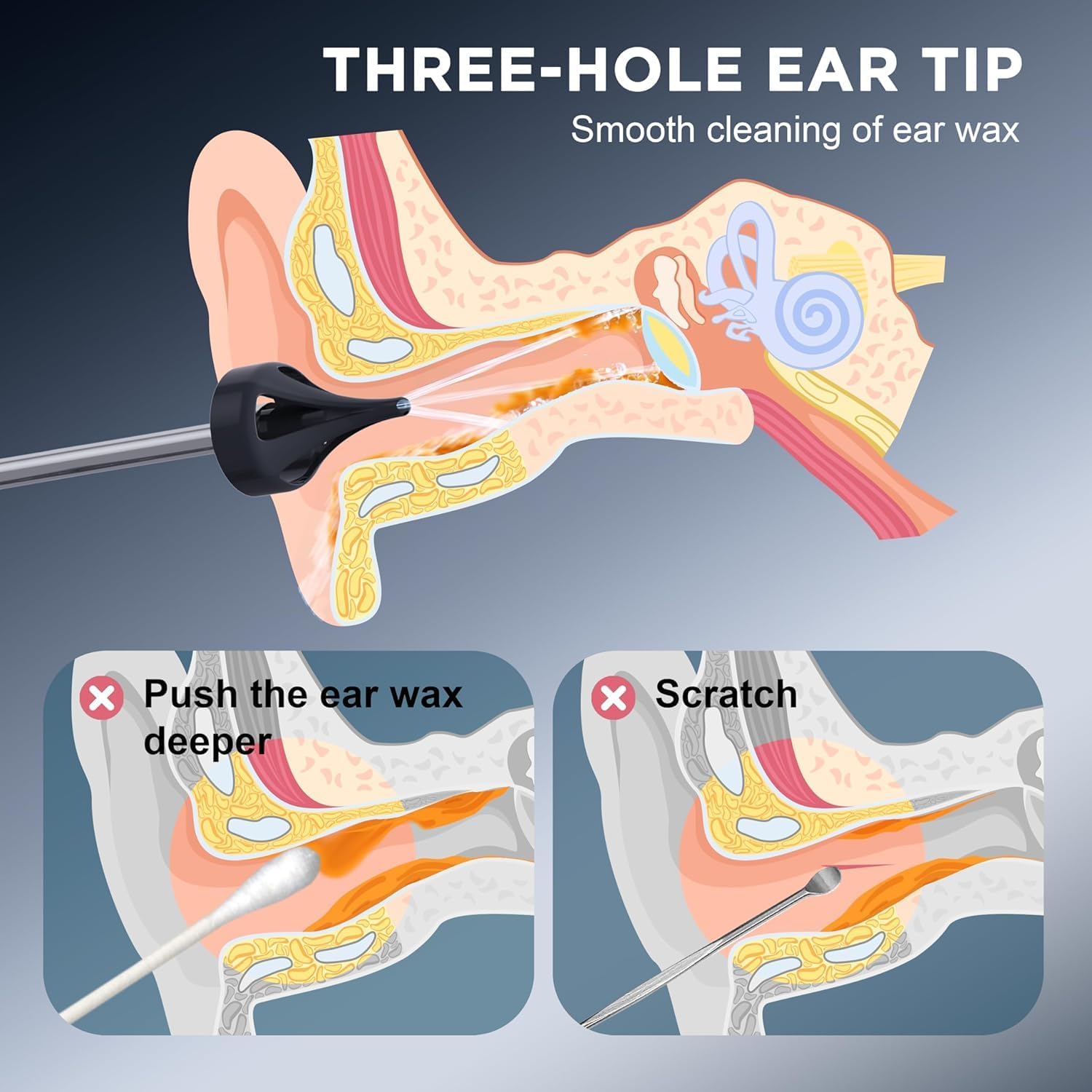
Figure 5: The three-hole ear tip is designed for smooth and effective ear wax removal, unlike cotton swabs that can push wax deeper.
6. Maintenance and Cleaning
Regular cleaning ensures the longevity and hygiene of your device.
- After each use, detach the tip and rinse it thoroughly under warm running water.
- Empty any remaining water from the device's reservoir.
- Wipe the main unit with a soft, damp cloth. The IPX7 waterproof rating allows for easy cleaning, but avoid submerging the entire unit for extended periods.
- Allow all components to air dry completely before reassembling or storing.
- Store the device and tips in a clean, dry place.
7. Troubleshooting
If you encounter any issues, please refer to the following table:
| Problem | Possible Cause | Solution |
|---|---|---|
| Device does not turn on. | Low battery or not charged. | Charge the device fully using the USB cable. |
| No water flow or weak flow. | Water reservoir is empty or tip is clogged. | Refill the reservoir. Remove and clean the tip thoroughly. |
| Water temperature display is inaccurate. | Sensor obstruction or malfunction. | Ensure the sensor area is clean. If issue persists, contact support. |
| Discomfort during use. | Water temperature too high/low or pressure setting too strong. | Adjust water temperature to 95-102°F. Lower the pressure setting. Stop use if discomfort continues and consult a doctor. |
8. Specifications
- Model: B0CQJ9J5H6
- Manufacturer: ODSD
- Power Source: USB Rechargeable
- Water Temperature Range: 95-102°F (35-39°C)
- Pressure Settings: Low, Medium, High, Flush (Pulse)
- Waterproof Rating: IPX7
- Package Dimensions: 10.59 x 6.22 x 3.23 inches
- Weight: 1.21 Pounds
9. Warranty and Support
ODSD is committed to providing high-quality products. This product comes with a standard manufacturer's warranty covering defects in materials and workmanship under normal use. For specific warranty details, duration, or to obtain support, please refer to the product packaging or contact ODSD customer service through the retailer where the product was purchased.
For further assistance or inquiries, please visit the official ODSD store or contact their customer support channels.