
Introduction
Welcome to the OLEVS Men's Watch user manual. This guide provides comprehensive instructions for the setup, operation, maintenance, and troubleshooting of your new OLEVS Square Business Dress Diamond Analog Quartz Date Luxury Watch (Model: OW-CA-G2858GD-BH-1). Please read this manual carefully to ensure proper use and longevity of your timepiece.
Product Overview
The OLEVS Men's Watch is a sophisticated timepiece designed for business and casual wear, featuring a square case, diamond accents, and a multi-functional analog quartz movement. It combines durability with elegant design.

Front view of the OLEVS Men's Watch, showcasing its silver stainless steel band and black dial with diamond hour markers.

The OLEVS watch presented in its elegant black and white display box.

The OLEVS watch worn on a wrist, complementing business attire.
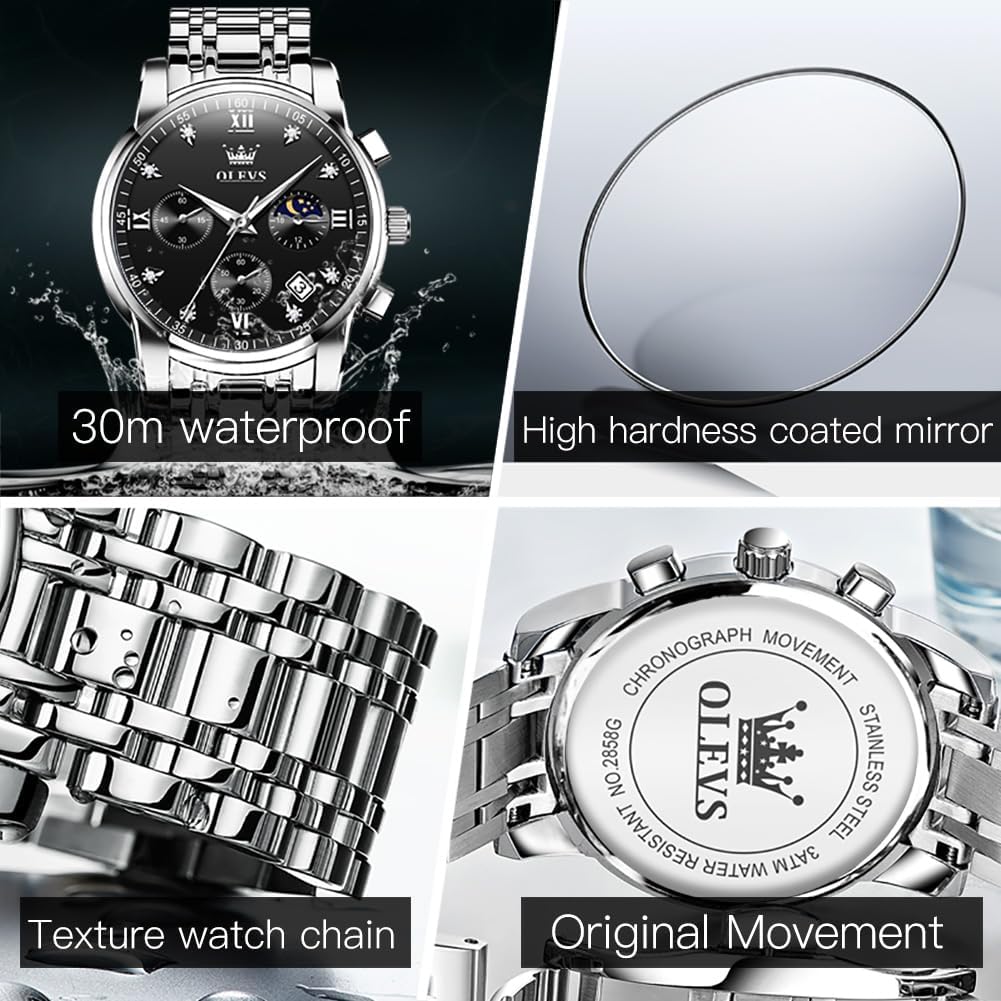
Key features of the OLEVS watch: 30m water resistance, high hardness coated mirror, detailed watch chain texture, and original movement.
Key Features:
- Moon Phase & Date Display: Features a 24-hour moon phase dial and a date window for enhanced functionality.
- Chronograph Function: Includes three functional subdials for 60-minute, 60-second, and 24-hour tracking.
- Durable Construction: Crafted with a stainless steel case (42mm diameter x 12mm thick) and a stainless steel band (210mm L x 20mm W) with a butterfly double buckle.
- Water Resistance: Rated for 30 meters (3ATM), suitable for recreational surfing, swimming, snorkeling, sailing, and water sports. Not suitable for diving.
- Luminous Hands: Luminous coating on hands and markers provides visibility in low-light conditions after exposure to strong light.
- High Hardness Coated Mirror: The watch face is protected by a high hardness coated mirror for scratch resistance.
Product Video:
Official product video showcasing the OLEVS Silver Watch for Men, highlighting its design and features.
Setup
1. Initial Time and Date Setting:
- Pull the Crown: Gently pull the crown (the knob on the side of the watch) out to the first or second position.
- Adjust Date: Pull the crown out to the first gear to adjust the calendar (date). Rotate the crown until the correct date is displayed.
- Adjust Time: Pull the crown out to the second gear to adjust the time. Rotate the crown to set the hour and minute hands to the correct time. Ensure to account for AM/PM if setting the 24-hour subdial.
- Push the Crown Back: Once the time and date are set, push the crown back into its original position to start the watch movement.
2. Band Adjustment:
The stainless steel band can be adjusted to fit your wrist size. A free adjustment tool and extra links are available from the seller if needed. For precise adjustment, it is recommended to visit a professional jeweler.

Detail of the watch's stainless steel band and butterfly double buckle clasp, designed for comfortable wear.
Operating Instructions
Your OLEVS watch features a multi-functional dial with chronograph capabilities and a moon phase display.

Detailed view of the multifunctional dial, indicating the positions of the chronometer, chronograph hand, 24-hour lunar phase dial, and calendar window.
1. Chronograph Function:
- Start/Pause: Press the top button on the side of the watch to start or pause the chronograph.
- Reset: Press the bottom button to reset the chronograph hands to zero.
- The subdials track 60 minutes (9 o'clock position), 60 seconds (6 o'clock position), and 24 hours (3 o'clock position).
2. Moon Phase Dial:
The 24-hour lunar phase dial (at the 3 o'clock position) indicates the time of day (AM/PM) and visually represents the moon's cycle. This dial typically advances with the main time setting.
3. Date Window:
The date window (between the 4 and 5 o'clock positions) displays the current day of the month. Adjust the date as described in the "Setup" section by pulling the crown to the first gear.
Maintenance
1. Water Resistance:
Your OLEVS watch is 30-meter water resistant. This means it is suitable for daily use and can withstand splashes, rain, and brief immersion in water. It is suitable for recreational surfing, swimming, snorkeling, sailing, and water sports. It is not suitable for diving. Avoid operating the crown or pushers when the watch is wet or submerged to prevent water ingress.
A short video demonstrating the water resistance of the OLEVS watch by submerging it in water.
2. Luminous Function:
The luminous function on the hands and markers can be activated by exposing the watch to strong light for 30-40 seconds. This will allow the watch to glow in the dark, providing visibility at night.
3. General Care:
- Clean the watch regularly with a soft, dry cloth to remove dust and dirt.
- Avoid exposing the watch to extreme temperatures, direct sunlight for prolonged periods, or strong magnetic fields.
- If the watch comes into contact with saltwater, rinse it with fresh water and dry it thoroughly.
- Store the watch in a cool, dry place when not in use, preferably in its original box.
Troubleshooting
| Problem | Possible Cause | Solution |
|---|---|---|
| Watch not keeping accurate time or stopped | Low battery or internal movement issue. | Ensure the crown is fully pushed in. If the issue persists, the battery may need replacement. For internal movement issues, contact customer support. |
| Date not changing correctly | Incorrect date setting or crown not fully engaged. | Re-adjust the date using the crown in the first gear position. Ensure the crown is fully pushed in after setting. |
| Chronograph hands not resetting to zero | Chronograph not properly reset. | Press the bottom pusher firmly to reset the chronograph. If they do not align, consult customer support. |
| Band adjustment difficulty | Improper use of adjustment tool or stubborn pins. | Use the provided tool carefully. If pins are difficult to remove, seek assistance from a professional jeweler to avoid damage. |
Specifications
- Model Number: OW-CA-G2858GD-BH-1
- Brand: OLEVS
- Movement: Quartz
- Case Material: Stainless Steel
- Case Diameter: 42mm
- Case Thickness: 12mm
- Band Material: Stainless Steel
- Band Length: 210mm
- Band Width: 20mm
- Clasp Type: Butterfly Double Buckle
- Water Resistance: 30M (3ATM)
- Watch Weight: 128g
- Package Dimensions: 6.06 x 2.6 x 1.1 inches
Warranty and Support
OLEVS provides warranty service for its products. If you encounter any problems during the use of your OLEVS watch, please contact the seller or OLEVS customer support for professional assistance.
For further inquiries or support, please refer to the contact information provided at the point of purchase or visit the official OLEVS website.