
1. Introduction
This manual provides essential information for the safe and efficient operation of your DAS Audio ACTION-S118A-115 Active Horn-Loaded Subwoofer System. Please read these instructions carefully before installation and use to ensure optimal performance and longevity of the product. The ACTION-S118A is a powered subwoofer system designed for high output power, extended bandwidth, and low distortion, featuring an 18LX loudspeaker with a 4-inch voice coil and a 3200W peak Class D amplifier.
2. Safety Instructions
- Power Supply: Ensure the power source matches the voltage requirements specified on the unit. Use only the provided power cable.
- Ventilation: Do not block ventilation openings. Ensure adequate airflow around the unit to prevent overheating.
- Moisture: Do not expose the unit to rain, moisture, or excessive humidity. Keep liquids away from the subwoofer.
- Placement: Place the subwoofer on a stable, level surface. Avoid placing it near heat sources or in direct sunlight.
- Servicing: Do not attempt to service this product yourself. Refer all servicing to qualified service personnel.
- Hearing Protection: This subwoofer can produce high sound pressure levels. Prolonged exposure to high SPLs can cause permanent hearing damage. Use appropriate hearing protection.
3. Package Contents
Upon unpacking, please verify that the following items are included:
- DAS Audio ACTION-S118A-115 Active Horn-Loaded Subwoofer System
- Power Cable
- User Manual (this document)
4. Product Overview
The ACTION-S118A-115 is an active horn-loaded subwoofer designed for professional audio applications. It features a robust birch plywood enclosure with durable ISO-flex paint finish.
Key Features:
- 3200 Wpeak Class D amplifier
- 63 Hz - 100 Hz variable LPF (Low Pass Filter)
- Deep - Loud EQ switch
- Birch plywood enclosure
- Durable ISO-flex paint
- Equipped with 4-inch voice coil
Components and Controls:

Figure 4.1: Rear panel of the ACTION-S118A-115 subwoofer. This view displays the amplifier module, including XLR input and loop-thru connectors, powerCON AC input and output, and control knobs for variable LPF and EQ settings.

Figure 4.2: Front view of the ACTION-S118A-115 active horn-loaded subwoofer, showcasing its protective grille and robust enclosure design.
5. Setup
5.1 Placement
The ACTION-S118A-115 is a floor-standing subwoofer. For optimal acoustic performance, place the unit on a solid, level surface. Consider room acoustics and desired bass response when positioning. Avoid placing the subwoofer directly in corners if excessive bass buildup is undesirable.
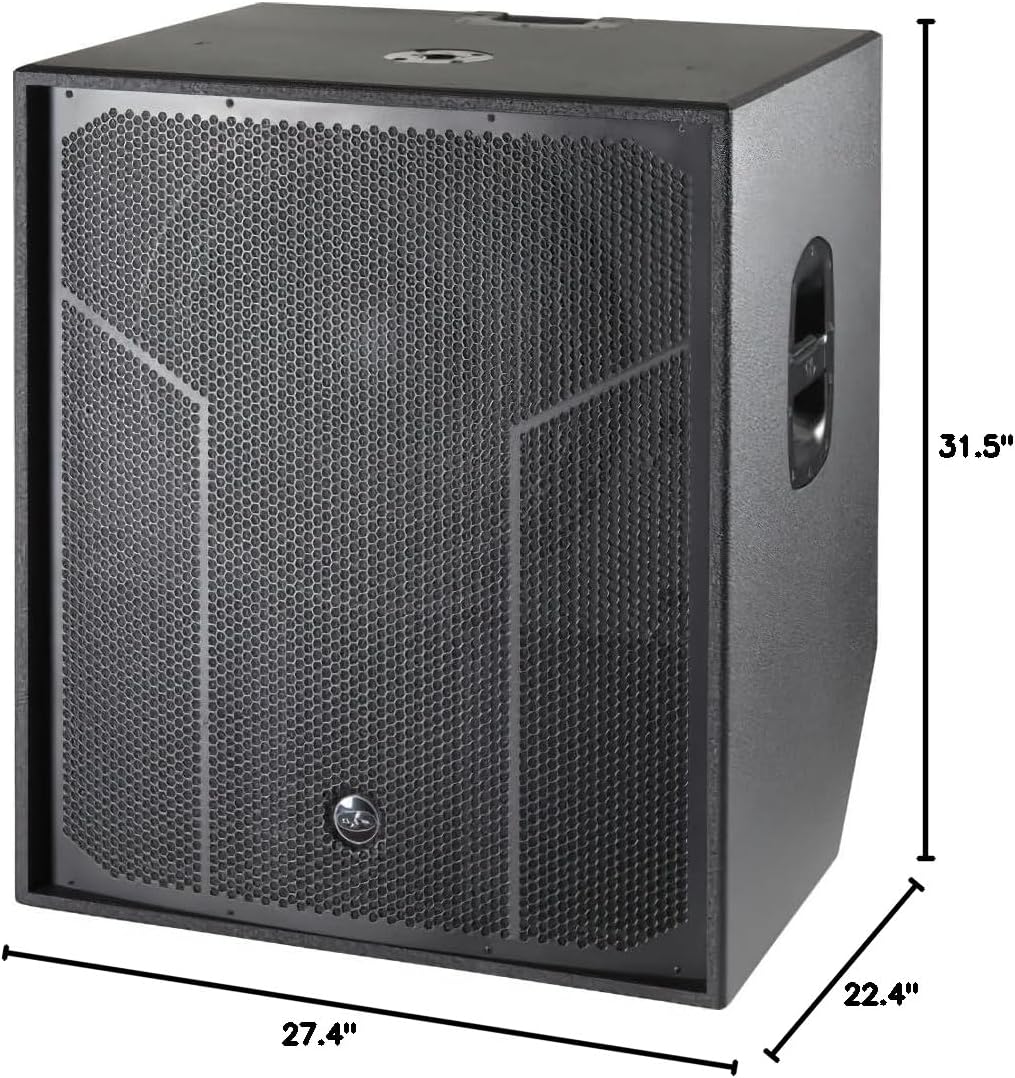
Figure 5.1: Dimensions of the ACTION-S118A-115 subwoofer. The unit measures approximately 31.5 inches (H) x 27.4 inches (W) x 22.4 inches (D).
5.2 Connections
- Audio Input: Connect your audio source (e.g., mixer, processor) to the subwoofer's Audio Signal Input Connector (2 x Female XLR).
- Audio Loop Thru: If you need to send the audio signal to another speaker or subwoofer, use the Audio Signal Loop Thru Connector (2 x Male XLR).
- Power Connection: Connect the supplied power cable to the AC Input Connector (powerCON NAC3MPA) on the subwoofer and then to a suitable electrical outlet.
- AC Output: The unit features an AC Output Connector (powerCON NAC3MPB) for daisy-chaining power to other compatible devices, if needed. Ensure total current draw does not exceed the specified limits.
6. Operating Instructions
6.1 Powering On/Off
After all connections are made, locate the power switch on the amplifier module. Turn the switch to the 'ON' position to power on the subwoofer. Turn to 'OFF' when not in use.
6.2 Adjusting the Low Pass Filter (LPF)
The ACTION-S118A-115 features a variable LPF, allowing you to set the upper frequency limit of the subwoofer's output. Adjust the LPF knob to select a crossover frequency between 63 Hz and 100 Hz. This setting should be chosen to seamlessly integrate the subwoofer with your main loudspeakers.
6.3 Using the Deep - Loud EQ Switch
The 'Deep - Loud' EQ switch provides two distinct equalization presets:
- Deep: Engages an EQ curve optimized for extended low-frequency response, providing a deeper, more resonant bass.
- Loud: Engages an EQ curve designed for maximum output and punch, suitable for applications requiring higher sound pressure levels.
Select the setting that best suits your audio content and desired sound profile.
6.4 Input Sensitivity
The input sensitivity is set at 1.95 V (+8 dBu). Ensure your audio source provides an appropriate signal level to avoid distortion or insufficient output.
7. Maintenance
- Cleaning: Use a soft, dry cloth to clean the exterior of the subwoofer. Do not use abrasive cleaners, solvents, or waxes.
- Inspection: Periodically check power cables and audio connections for any signs of wear or damage.
- Storage: If storing the unit for an extended period, ensure it is kept in a dry, temperature-controlled environment, protected from dust.
8. Troubleshooting
| Problem | Possible Cause | Solution |
|---|---|---|
| No Power | Power cable not connected; Power outlet faulty; Unit's power switch off. | Check power cable connection; Test outlet with another device; Ensure power switch is 'ON'. |
| No Sound Output | Audio input cable not connected; Source device not playing; LPF set too low; Input sensitivity too low. | Check XLR input connections; Verify source device operation; Adjust LPF; Increase input signal level. |
| Distorted Sound | Input signal too high; Amplifier overloaded. | Reduce input signal level from source; Ensure subwoofer is not driven beyond its limits. |
If the problem persists after attempting these solutions, please contact DAS Audio customer support or your authorized dealer.
9. Specifications
| Feature | Specification |
|---|---|
| Frequency Range (-10 dB) | 35 Hz - 125 Hz (variable LPF) |
| Maximum Peak SPL at 1 m | 137 dB |
| Nominal Amplifier Power (continuous) | 1600 W |
| Nominal Amplifier Power (peak) | 3200 W |
| Input Type | Balanced |
| Input Impedance | 20 kohms |
| Input Sensitivity | 1.95 V (+8 dBu) |
| Audio Signal Input Connector | 2 x Female XLR |
| Audio Signal Loop Thru Connector | 2 x Male XLR |
| AC Output Connector | powerCON NAC3MPB |
| Current Draw 230 V / 115 V | -/3.6 A |
| Enclosure Construction | Birch Plywood |
| Finish | ISO-flex Paint |
| Color | Black |
| Dimensions (H x W x D) | 31.5 x 27.4 x 22.4 inches |
| Net Weight | 125.7 pounds |
| Speaker Type | Subwoofer |
| Mounting Type | Floor Standing |
| Connectivity Technology | XLR |
| Audio Output Mode | Mono |
10. Warranty and Support
For warranty information and technical support, please refer to the documentation provided with your purchase or visit the official DAS Audio website. You may also contact your authorized DAS Audio dealer for assistance.
