
BH New York
BH New York Treadmill User Manual
Model: New York | Brand: BH
1. Safety Information
Please read this entire manual carefully before operating the BH New York Treadmill. Retain this manual for future reference. Failure to follow these instructions may result in injury or damage to the equipment.
General Safety Precautions
- Ensure the treadmill is placed on a flat, stable surface with adequate clearance around it (at least 2 meters behind and 0.6 meters on each side).
- Keep children and pets away from the treadmill during operation.
- Inspect the treadmill for loose parts or damage before each use. Do not operate if damaged.
- Wear appropriate athletic footwear and clothing. Avoid loose clothing that could get caught in moving parts.
- Consult a physician before starting any new exercise program.
Electrical Safety
- Connect the treadmill only to a properly grounded outlet.
- Do not use extension cords or adapters.
- Unplug the treadmill from the power source when not in use, before cleaning, or before performing any maintenance.
- Keep the power cord away from hot surfaces.
Usage Safety
- Always attach the safety key to your clothing before starting the treadmill. The treadmill will stop if the safety key is dislodged.
- Begin your workout at a slow speed and gradually increase it.
- Do not step on or off the treadmill while the belt is moving.
- If you feel faint, dizzy, or experience pain, stop exercising immediately.
- Hold onto the handrails for balance, especially when adjusting speed or incline.
2. Product Overview
The BH New York Treadmill is designed for home fitness, offering a range of features for an effective workout. This section provides an overview of its key components and functionalities.
Key Features
- Interactive Training: Compatible with Kinomap and Zwift applications for engaging workouts.
- Spacious Running Surface: A 125x45 cm running area designed to reduce impact on joints.
- Powerful Motor: Equipped with a 2.5 HP / 1.25 HP continuous brushless motor, offering quiet and efficient operation with speeds up to 16 km/h.
- FTMS Connectivity: Integrates the new FTMS protocol for enhanced compatibility with recognized fitness applications.
- Electronic Incline: Features a 10% electronic incline to vary workout intensity and challenge cardiovascular and muscular endurance.
- Plug & Run System: Requires no assembly, screws, or electrical connections for quick setup.
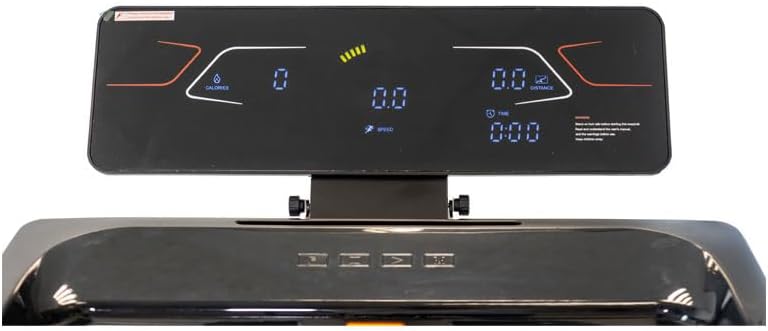
- LCD Monitor: Tricolor backlit LCD display for tracking workout data.
Components
Familiarize yourself with the main parts of your BH New York Treadmill.

- Running Belt: The surface on which you walk or run.
- Console: Houses the LCD display and control buttons.
- Handrails: Provide support and stability during your workout.
- Safety Key: A magnetic key that must be attached for the treadmill to operate.
- Frame: The main structural support of the treadmill.
- Transport Wheels: Located at the front for easy relocation when folded.

3. Setup
The BH New York Treadmill features a "Plug & Run" system, minimizing assembly requirements. Follow these steps for initial setup.
Unpacking and Placement
- Carefully remove the treadmill from its packaging.
- Place the treadmill on a firm, level surface. Ensure there is at least 2 meters of clear space behind the treadmill and 0.6 meters on each side for safe operation and access.
- Unfold the treadmill according to the instructions provided in the quick start guide (if applicable). The "Plug & Run" system means it should be largely pre-assembled.
Power Connection
- Ensure the treadmill's power switch is in the OFF position.
- Plug the power cord into a grounded electrical outlet.
- Turn the power switch to the ON position. The console should illuminate.
4. Operating Instructions
This section details how to operate your BH New York Treadmill, including console functions, program selection, and app connectivity.
Console Functions
The tricolor backlit LCD console displays important workout data and allows you to control the treadmill.
- Display: Shows speed, time, distance, calories burned, and heart rate (if applicable).
- Start/Stop Buttons: Initiate and end your workout.
- Speed Adjustment: Buttons to increase or decrease the running belt speed (1 to 16 km/h).
- Incline Adjustment: Buttons to adjust the electronic incline (up to 10%).
- Program Selection: Button to cycle through the available workout programs.
Starting a Workout
- Ensure the safety key is properly attached to the console and clipped to your clothing.
- Step onto the treadmill, placing your feet on the side rails.
- Press the START button. The belt will begin to move at a low speed.
- Carefully step onto the moving belt and gradually increase the speed and/or incline to your desired level using the respective adjustment buttons.
Using Workout Programs
The treadmill offers 40 pre-set programs to vary your training. Consult the console's specific instructions for detailed program selection and customization.
- From the main screen, press the PROGRAM button to browse through the available programs.
- Select your desired program and press START to begin.
- The treadmill will automatically adjust speed and incline according to the program's profile.
App Connectivity (Kinomap & Zwift)
Your BH New York Treadmill is compatible with Kinomap and Zwift via the FTMS protocol, allowing for interactive and immersive workout experiences.
- Download the Kinomap or Zwift app on your smartphone or tablet.
- Ensure Bluetooth is enabled on your device.
- Open the chosen app and follow its instructions to connect to your treadmill. The treadmill should appear as an available fitness device.
- Once connected, the app will control the treadmill's speed and incline based on your selected virtual route or workout.
5. Maintenance
Regular maintenance ensures the longevity and optimal performance of your BH New York Treadmill.
Cleaning
- Always unplug the treadmill before cleaning.
- Wipe down the console and exterior surfaces with a soft, damp cloth. Avoid abrasive cleaners or solvents.
- Periodically vacuum underneath the treadmill to remove dust and debris that can accumulate.
Running Belt Lubrication
The running belt requires periodic lubrication to reduce friction and extend its lifespan. Refer to your treadmill's specific lubrication instructions, typically found in a separate quick start guide or on the manufacturer's website. Use only silicone-based treadmill lubricant.
Storage
The BH New York Treadmill features a flat folding system and transport wheels for convenient storage.


- To fold the treadmill, ensure it is turned off and unplugged.
- Follow the specific folding mechanism instructions. The "Flat Folding System" allows for compact storage.
- Once folded, use the transport wheels to move the treadmill to its storage location.

6. Troubleshooting
This section provides solutions to common issues you might encounter with your BH New York Treadmill. If the problem persists, contact customer support.
| Problem | Possible Cause | Solution |
|---|---|---|
| Treadmill does not power on. | Power cord not plugged in; power switch off; circuit breaker tripped. | Ensure power cord is securely plugged into a grounded outlet. Check if the power switch is ON. Reset the household circuit breaker if necessary. |
| Treadmill stops unexpectedly or displays "Error 7". | Safety key is not properly connected or has become dislodged. | Ensure the safety key is firmly placed on the console and the clip is attached to your clothing. If the error persists, check the safety key's magnet for damage. |
| Running belt slips or hesitates. | Belt tension is too loose; belt requires lubrication. | Refer to the maintenance section for instructions on belt tension adjustment and lubrication. Do not overtighten the belt. |
| Unusual noise during operation. | Loose components; belt friction; motor issue. | Stop the treadmill and inspect for any loose screws or parts. Lubricate the belt if needed. If the noise persists, discontinue use and contact customer support. |
7. Specifications
Detailed technical specifications for the BH New York Treadmill.
| Feature | Specification |
|---|---|
| Model | New York |
| Motor Horsepower | 2.5 HP (Peak) / 1.25 HP (Continuous) |
| Speed Range | 1 - 16 km/h |
| Running Surface | 125 x 45 cm |
| Maximum Incline | 10% (Electronic) |
| Display Type | Tricolor Backlit LCD |
| Programs | 40 |
| Connectivity | Kinomap, Zwift (via FTMS protocol) |
| Max User Weight | 115 kg |
| Dimensions (L x W x H) | 152 x 72 x 125 cm |
| Folded Dimensions (L x W x H) | 158 x 73 x 26.5 cm |
| Net Weight | 48 kg |
| Frame Material | Alloy Steel |
| Power Source | Electric Cable |
8. Warranty and Customer Support
For warranty information, technical assistance, or to order replacement parts, please contact your retailer or the manufacturer directly. Keep your purchase receipt as proof of purchase.
Manufacturer: BH FITNESS
Refer to the official BH Fitness website or your purchase documentation for specific contact details and warranty terms applicable to your region.
Ask a question about this manual
Ask about setup, troubleshooting, compatibility, parts, safety, or missing instructions. Manuals+ will review the question and use this page’s manual context to help answer it.