
1. Introduction
Welcome to the user manual for your new BH Vanquish II Treadmill. This manual provides essential information for the safe and efficient operation, setup, and maintenance of your treadmill. Please read it thoroughly before first use and keep it for future reference.

Figure 1: BH Vanquish II Treadmill, showcasing its sleek design and robust frame.
The BH Vanquish II is a high-performance treadmill designed for home use, offering a comprehensive workout experience. It features a powerful motor, adjustable incline, and compatibility with popular fitness applications like Kinomap, Zwift, and Volava for interactive training sessions.
2. Important Safety Information
Before operating the BH Vanquish II Treadmill, please observe the following safety precautions to prevent injury and ensure proper equipment function:
- Always consult with a physician before starting any new exercise program.
- Ensure the treadmill is placed on a flat, stable surface with adequate clearance around it (at least 2 meters behind and 0.6 meters on each side).
- Keep children and pets away from the treadmill during operation.
- The maximum user weight for this treadmill is 150 kg (330 lbs). Do not exceed this limit.
- Wear appropriate athletic footwear and clothing. Avoid loose clothing that could get caught in moving parts.
- Always use the safety key/clip. Attach it to your clothing before starting your workout. In case of an emergency, pulling the safety key will immediately stop the treadmill.
- Do not step on or off the treadmill while the belt is moving.
- Unplug the treadmill from the power outlet when not in use or before cleaning and maintenance.
- The Soft Drop system assists in safely lowering the running deck. Always allow it to operate autonomously to prevent back injuries.
3. Setup and Assembly
The BH Vanquish II Treadmill requires some assembly. Please follow the detailed instructions provided in the separate assembly guide included with your product.
3.1 Unpacking
Carefully remove all components from the packaging. Inspect all parts for any damage. If any parts are missing or damaged, contact customer support immediately.
3.2 Placement
Choose a suitable location for your treadmill. Ensure it is on a level surface and has sufficient space around it for safe operation and access. The treadmill dimensions are approximately 200 cm (Length) x 92 cm (Width) x 159 cm (Height).
3.3 Initial Power-On
Once assembled, plug the power cord into a grounded electrical outlet. Turn on the main power switch, usually located near the front base of the treadmill. The LED display should illuminate.
3.4 Moving the Treadmill
The BH Vanquish II Treadmill is equipped with transport wheels for easier relocation once folded.
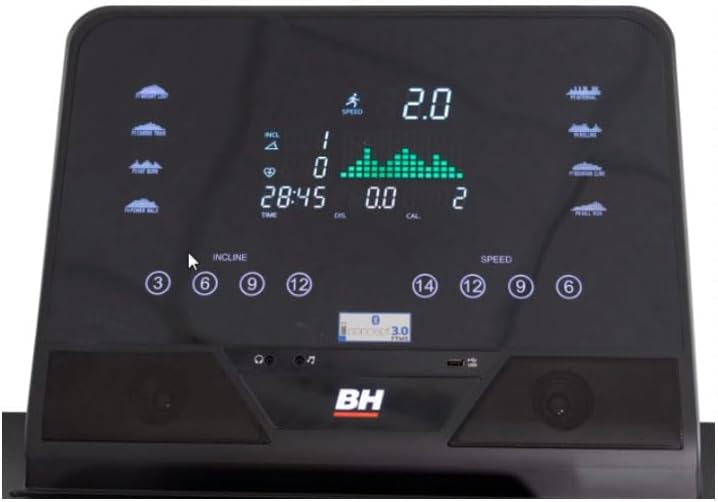
Figure 2: The sturdy base of the treadmill featuring integrated transport wheels for easy movement.
To move the treadmill, ensure it is folded and secured. Carefully tilt the treadmill back until it rests on its transport wheels, then push or pull it to the desired location.
4. Operating Instructions
The BH Vanquish II Treadmill offers a user-friendly console for controlling your workout.

Figure 3: The LED backlit console displaying speed, incline, time, distance, and calories.
4.1 Console Features
- LED Backlit Screen: Provides clear visibility of your workout metrics.
- Speed Control: Adjust speed from 1 to 22 km/h using quick keys or +/- buttons.
- Incline Control: Electronically adjust incline from 0 to 15 levels (11-12% equivalent) for varied intensity.
- Bluetooth Speakers: Connect your phone or tablet wirelessly to enjoy audio during your workout.
- Bottle Holder: Conveniently located for hydration during exercise.
- Tablet/Phone Holder: Securely holds your device for entertainment or app use.

Figure 4: Console featuring a tablet holder and integrated cup holders for user convenience.

Figure 5: Integrated cup holder on the console for convenient access to beverages during your workout.
4.2 Starting a Workout
- Ensure the safety key is in place and attached to your clothing.
- Step onto the treadmill belt, holding onto the handrails.
- Press the "Start" button on the console. The belt will begin to move at a low speed.
- Adjust the speed and incline to your desired levels using the console controls.

Figure 6: User demonstrating proper running posture on the BH Vanquish II Treadmill.
4.3 Connectivity (Kinomap, Zwift, Volava)
The BH Vanquish II Treadmill incorporates FTMS protocol connectivity, allowing for greater compatibility with recognized fitness applications.
- Download your preferred fitness application (Kinomap, Zwift, Volava) on your smartphone or tablet.
- Enable Bluetooth on your device.
- Follow the in-app instructions to connect to your BH Vanquish II Treadmill. The treadmill will appear as a discoverable device.
- Once connected, the application can control the treadmill's speed and incline based on your chosen workout or virtual route.
5. Maintenance
Regular maintenance ensures the longevity and optimal performance of your BH Vanquish II Treadmill.
- Cleaning: Wipe down the treadmill surfaces with a damp cloth after each use to remove sweat and dust. Do not use abrasive cleaners.
- Belt Lubrication: The running belt requires periodic lubrication to reduce friction and extend its lifespan. Refer to your assembly guide for specific instructions and recommended lubricant. This is typically required every 3-6 months depending on usage.
- Belt Tension and Alignment: Check the running belt tension and alignment regularly. If the belt slips or drifts to one side, adjust it according to the instructions in your assembly guide.
- Motor Cover: Periodically vacuum under the motor cover to remove dust and debris, ensuring proper ventilation. Unplug the treadmill before performing this.
- Soft Drop System: Ensure the hydraulic system for the Soft Drop function operates smoothly. Do not force the deck down manually.
6. Troubleshooting
If you encounter issues with your BH Vanquish II Treadmill, refer to the following common troubleshooting steps.
| Problem | Possible Cause | Solution |
|---|---|---|
| Treadmill does not power on. | Power cord not plugged in, main power switch off, circuit breaker tripped. | Check power connection, ensure main switch is on, reset circuit breaker if necessary. |
| Belt stops suddenly during use. | Safety key dislodged, motor overload. | Ensure safety key is properly inserted. Reduce workout intensity if motor overload is suspected. |
| Belt slips or hesitates. | Belt too loose, insufficient lubrication. | Adjust belt tension (refer to assembly guide). Lubricate the running deck. |
| Unusual noise from the treadmill. | Loose components, worn belt, motor issue. | Inspect for loose screws. Check belt condition. If noise persists, contact customer support. |
For issues not covered here or if problems persist, please contact BH customer support.
7. Specifications
| Feature | Specification |
|---|---|
| Model | BH Vanquish II |
| Motor (Continuous/Peak) | 2.5 HP / 4 HP |
| Speed Range | 1 - 22 km/h |
| Incline Levels | 15 levels (11-12% electronic incline) |
| Running Surface (L x W) | 150 cm x 55 cm (59 x 21.6 inches) |
| Maximum User Weight | 150 kg (330 lbs) |
| Dimensions (L x W x H) | 200 cm x 92 cm x 159 cm (78.7 x 36.2 x 62.6 inches) |
| Folded Dimensions (L x W x H) | 137 cm x 92 cm x 166 cm (53.9 x 36.2 x 65.3 inches) |
| Net Weight | 114 kg (251.3 lbs) |
| Gross Weight (in box) | 125 kg (275.6 lbs) |
| Damping System | 6 Elastomers for maximum comfort and joint impact reduction. |
| Connectivity | Bluetooth, FTMS protocol compatible with Kinomap, Zwift, Volava. |
| Display | LED Backlit Screen |

Figure 7: The BH Vanquish II Treadmill in its folded position, demonstrating its space-saving design.
8. Warranty and Support
For specific warranty terms and conditions, please refer to the warranty card included with your product or contact the retailer from whom you purchased the BH Vanquish II Treadmill. Warranty coverage typically includes manufacturing defects and may vary by region.
For technical support, spare parts, or service inquiries, please contact BH Fitness customer service. Contact information can usually be found on the BH Fitness official website or on your purchase documentation.
Manufacturer: BH FITNESS