
Introduction
This manual provides detailed instructions for the installation, operation, and maintenance of your MekedeTech Android Car Radio Stereo. This head unit is designed for Ford Fiesta models manufactured between 2008 and 2017, offering an enhanced in-car entertainment and navigation experience.
Please read this manual thoroughly before installation and use to ensure proper functionality and to maximize your product's performance.
Setup and Installation
The MekedeTech Android Car Radio Stereo is designed for a plug-and-play installation in compatible Ford Fiesta models (2008-2017). The package includes all necessary accessories for installation, such as the dash kit, power cable, RCA cable, reversing camera cable, and USB cables.
Installation Overview
The installation process involves replacing your existing car radio with the new Android head unit. Ensure the vehicle's power is disconnected before beginning the installation.

Image: Comparison of the Ford Fiesta dashboard before and after the installation of the MekedeTech Android Car Radio Stereo. The 'Before' image shows the original car radio, while the 'After' image displays the new 9-inch touch screen head unit seamlessly integrated into the dashboard.
Cooling Fan Setup
The unit features an integrated cooling fan system to manage CPU temperature, especially during prolonged use or in high-temperature environments. Proper setup of the cooling fan ensures optimal performance and longevity of the device.

Image: A detailed diagram showing the internal components of the head unit, including the CPU, RAM, and ROM. It highlights the cooling fan's position and provides a visual guide for connecting and activating the cooling fan through the system settings. The diagram also illustrates temperature differences with and without the cooling fan.
- Connect: Ensure the cooling fan cable is securely connected to the designated port on the head unit.
- Settings Access: Navigate to 'Settings' > 'Device' > 'Sound' on the head unit's interface.
- AMP ON: Locate and activate the 'AMP ON' option under 'Device' settings.
- Fan Activation: The cooling fan will start automatically once activated.
The unit retains all original steering wheel control functions, allowing for easy adjustment of songs, channels, and volume without removing your hands from the steering wheel, enhancing convenience and safety.
Operating Instructions
Your MekedeTech Android Car Radio Stereo offers a range of features for navigation, communication, and entertainment. This section covers the basic operation of key functionalities.
Wireless CarPlay and Android Auto
The head unit comes with built-in wireless CarPlay and wired Android Auto capabilities, providing seamless integration with your smartphone for navigation, music, and communication.

Image: Visual guide demonstrating the connection process for Wireless Car-Play (for iOS devices) and Wireless Auto (for Android devices). It shows the steps: 1. Connect Bluetooth, 2. Click on 'Car Link', and wait for connection. It also notes that Car-Play and Auto can be connected via USB cable.
Connection Steps:
- Connect Bluetooth: Pair your smartphone with the head unit via Bluetooth.
- Select 'Car Link': On the head unit's screen, select the 'Car Link' application.
- Wait for Connection: The system will automatically establish the CarPlay or Android Auto connection. For Android Auto, a wired USB connection is also an option.
4G LTE and Wi-Fi Connectivity
The unit supports 4G LTE connectivity via a SIM card and Wi-Fi for internet access. This allows for online navigation, streaming, and app usage directly from the head unit.
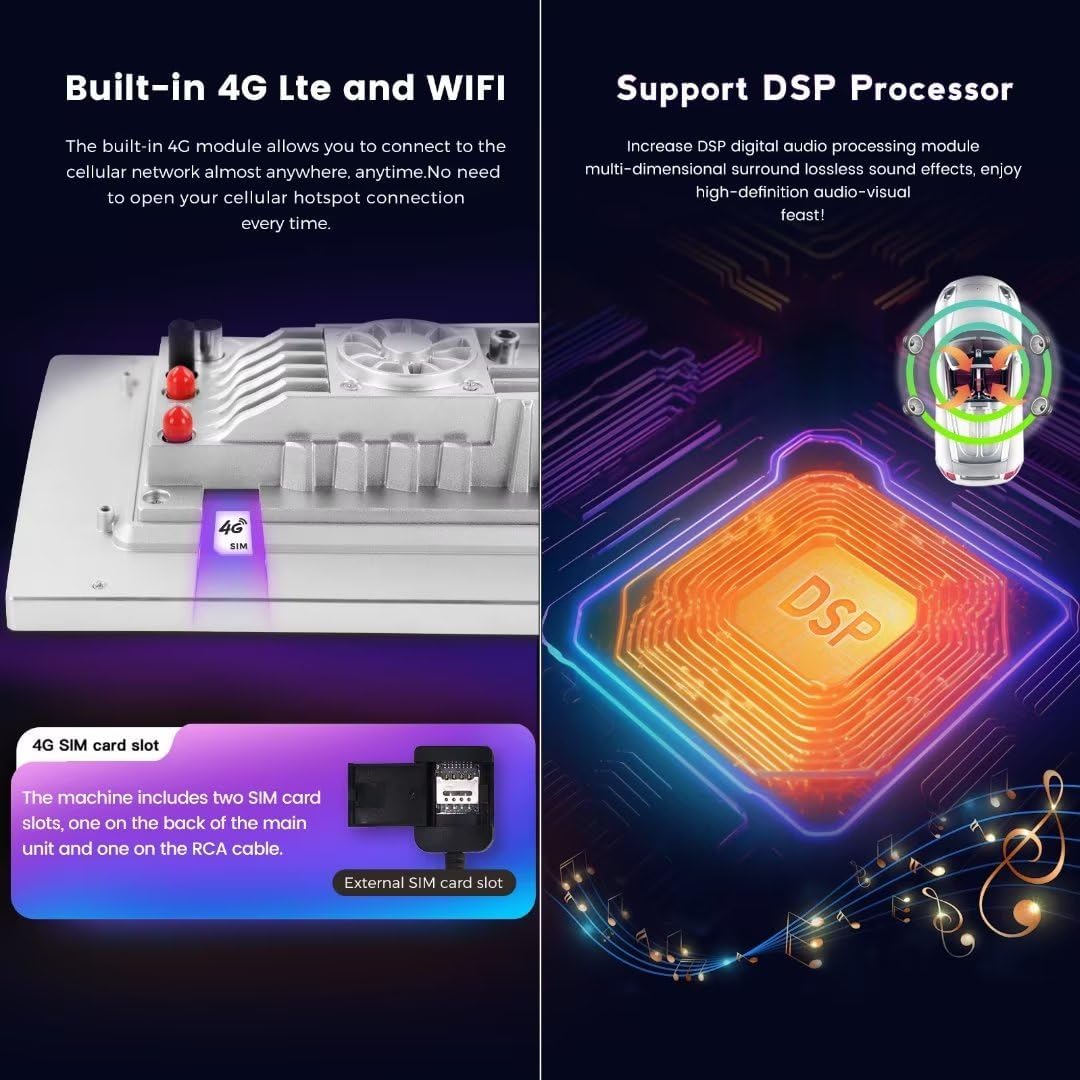
Image: A visual representation of the built-in 4G LTE module and SIM card slot, indicating where to insert a 4G SIM card. It also features a diagram of the Digital Signal Processor (DSP), highlighting its role in enhancing audio quality.
- 4G LTE: Insert a 4G SIM card into the designated slot to access the cellular network. The unit includes two SIM card slots: one on the back of the main unit and one on the RCA cable.
- Wi-Fi: Connect to available Wi-Fi hotspots for internet access.
GPS Navigation
The head unit features built-in GPS navigation with pre-installed maps, providing accurate directions and real-time traffic information (requires internet connection for real-time data).
Bluetooth 5.0
Utilize Bluetooth 5.0 for high-quality hands-free calls and audio streaming from your paired smartphone.
DSP Sound System
The integrated Digital Signal Processor (DSP) enhances audio quality, providing a multi-dimensional surround sound experience.
Maintenance
To ensure the longevity and optimal performance of your MekedeTech Android Car Radio Stereo, follow these maintenance guidelines:
- Screen Cleaning: Use a soft, lint-free cloth to gently wipe the touch screen. Avoid abrasive cleaners or solvents that may damage the display.
- Software Updates: Periodically check for and install software updates to ensure the system runs efficiently and has the latest features and security patches.
- Temperature Control: While the unit has a cooling fan, avoid exposing it to extreme temperatures for extended periods.
- Cable Connections: Ensure all cables remain securely connected. Loose connections can lead to intermittent issues.
Troubleshooting
If you encounter issues with your MekedeTech Android Car Radio Stereo, refer to the following common troubleshooting steps:
| Problem | Possible Cause | Solution |
|---|---|---|
| Unit does not power on | Loose power connection, blown fuse | Check power cables and vehicle fuses. Ensure proper installation. |
| No sound output | Incorrect audio settings, loose speaker wires | Verify audio settings (volume, mute). Check speaker wire connections. |
| GPS signal loss | Antenna obstruction, poor satellite reception | Ensure GPS antenna has a clear view of the sky. Check antenna connection. |
| CarPlay/Android Auto not connecting | Bluetooth not paired, incorrect app selection, cable issue (for wired) | Re-pair Bluetooth. Ensure 'Car Link' app is selected. Try a different USB cable if using wired connection. |
| Touch screen unresponsive | Software glitch, temporary freeze | Restart the unit. If issue persists, perform a factory reset (refer to advanced settings). |
If these steps do not resolve the issue, please contact MekedeTech customer support for further assistance.
Specifications
Below are the technical specifications for the MekedeTech Android Car Radio Stereo (Model: 8-Core 8+256G).
| Feature | Specification |
|---|---|
| Brand | MekedeTech |
| Compatible Vehicles | Ford Fiesta (2008-2017) |
| Operating System | Android 12 OS |
| CPU | 8-Core A53 1.8GHz |
| Memory (RAM) | 8GB |
| Storage (ROM) | 256GB |
| Screen Size | 9 Inches |
| Display Type | IPS LCD |
| Touch Screen Type | Capacitive |
| Resolution | 1280 * 720 |
| Power Output | 4*50W |
| Connectivity | 4G LTE, Wi-Fi, Bluetooth 5.0 |
| Special Features | Wireless CarPlay, Wired Android Auto, Built-in GPS Navigation, DSP Sound System, Steering Wheel Control Support |
| Audio Formats | APE/FLAC/WAV/MP3/WMA etc. |
| Video Formats | MKV/RMVB/AVI/MP4/MDV etc. |
| Picture Formats | PNG/JPEG/JPG/GIF/WBMP/BNP etc. |
| Map Type | Worldwide |
| Control Method | Touch |
| Manufacturer | Shenzhen Mekede Technology Co.,Ltd |
Warranty Information
The MekedeTech Android Car Radio Stereo comes with a 1-Year Warranty from the date of purchase. This warranty covers manufacturing defects and malfunctions under normal use. Please retain your proof of purchase for warranty claims.
The warranty does not cover damage caused by improper installation, misuse, accidents, unauthorized repairs, or normal wear and tear.
Customer Support
For technical assistance, troubleshooting beyond this manual, or warranty inquiries, please contact MekedeTech customer support.
- Manufacturer: Shenzhen Mekede Technology Co.,Ltd
- Online Support: Visit the MekedeTech Store on Amazon for product information and support resources.
Please have your product model number (8-Core 8+256G) and purchase details ready when contacting support.
