1. Introduction
This manual provides essential information for the safe and effective use of your SEYVUM 20V MAX 5.0Ah Lithium Ion Battery. Please read these instructions carefully before using the battery and retain them for future reference.
The SEYVUM 20V MAX 5.0Ah Lithium Ion Battery is designed for use with compatible SEYVUM 20V cordless tools and outdoor equipment, including models LB-8189, LB-8190, and LB-8192.
2. Safety Information
WARNING: Read all safety warnings and instructions before using this product. Failure to follow the warnings and instructions may result in electric shock, fire, and/or serious injury.
- Always use the battery with compatible SEYVUM chargers and tools.
- Do not expose the battery to water or rain.
- Do not store the battery in locations where the temperature may reach or exceed 122°F (50°C).
- Do not incinerate the battery, even if it is severely damaged or completely dead. The battery can explode in a fire.
- Do not short-circuit the battery terminals.
- Do not disassemble, open, or shred the battery pack.
- Keep the battery out of reach of children.
- If battery fluid comes into contact with skin, wash immediately with soap and water. If it gets into eyes, rinse with water for 15 minutes and seek medical attention.

Figure 1: The SEYVUM 20V MAX 5.0Ah Lithium Ion Battery features multiple protection mechanisms, including over-voltage, over-discharge, over-current, over-charge, short-circuit, and overheat protection.
3. Product Overview
The SEYVUM 20V MAX 5.0Ah Lithium Ion Battery is a high-capacity power source for your cordless tools. It features a robust design and integrated safety mechanisms to ensure reliable performance.
- Power Connect System: This battery is part of an interchangeable system, allowing one battery to power multiple compatible SEYVUM 20V tools.
- LED Indicators: Four LED lights on the battery provide a clear indication of the current charge level.
- Multi-Protection Technology: Built-in microchips prevent overcharging, over-discharging, over-current, over-voltage, short-circuiting, and overheating, extending battery life and ensuring safe operation.
- No Memory Effect: The lithium-ion cells allow for charging at any time without reducing the overall battery capacity.

Figure 2: Front view of the SEYVUM 20V MAX 5.0Ah Lithium Ion Battery, showing the SEYVUM branding, 20V Lithium-Ion label, 5Ah capacity, and LED charge indicators.

Figure 3: The battery features visible LED indicators to easily check the remaining power level.
4. Setup and Charging
4.1 Initial Setup
Before first use, ensure the battery is fully charged. The battery is shipped with a partial charge and should be charged completely before operating any tool.
4.2 Charging Instructions
- Connect the SEYVUM battery charger (sold separately) to a standard power outlet.
- Slide the battery pack onto the charger until it clicks into place.
- Observe the LED indicators on the battery and charger. A red light typically indicates charging, while a green light indicates a full charge.
- Once fully charged, remove the battery from the charger.
Important Charging Conditions:
- Charge the battery pack when the air temperature is between 65°F (18°C) and 75°F (24°C) for optimal life and performance.
- DO NOT charge the battery pack in air temperatures below 41°F (5°C) or above 104°F (40°C) to prevent serious damage to the battery pack.
- It is normal for the charger and battery pack to become warm during charging. This does not indicate a problem.
- If a green light appears immediately after a completely dead battery is placed on the charger, it indicates temperature control protection. Allow the battery to cool down for 5-10 minutes before attempting to charge again. The light should then turn red, indicating normal charging.
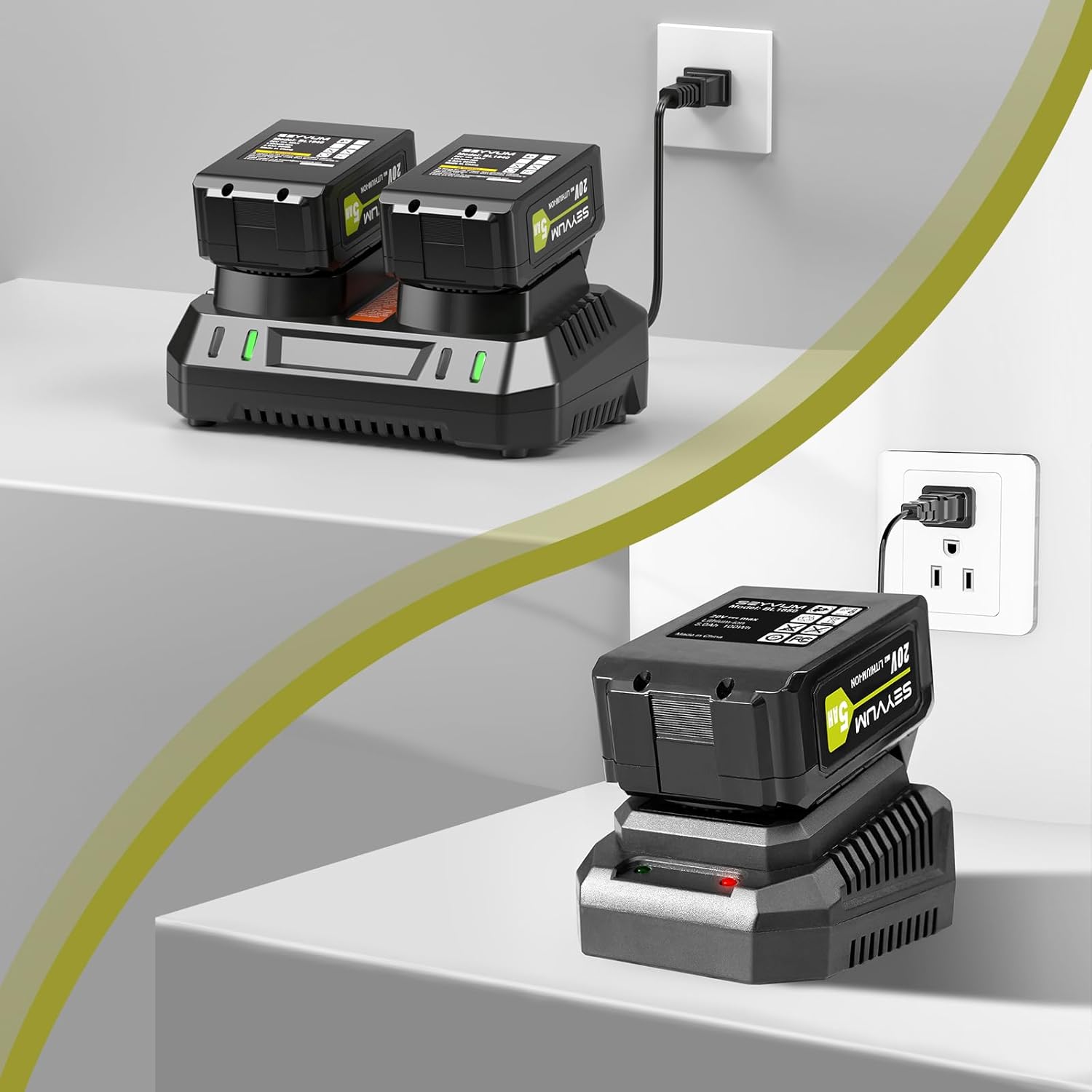
Figure 4: The SEYVUM 20V MAX 5.0Ah Lithium Ion Battery connected to a compatible charger for recharging.
5. Operating the Battery
5.1 Installing the Battery
- Align the battery pack with the battery port on your compatible SEYVUM 20V tool.
- Slide the battery into the tool until it locks securely into place. Ensure it is fully seated to prevent accidental disconnection during operation.
5.2 Removing the Battery
- Locate the battery release button on the tool or battery.
- Press and hold the release button.
- Slide the battery pack out of the tool.

Figure 5: To remove the battery, press the designated release button and slide the battery out of the tool.

Figure 6: The SEYVUM 20V MAX 5.0Ah Lithium Ion Battery provides cordless power for various outdoor equipment.
6. Maintenance and Storage
6.1 Battery Maintenance Tips
- To maximize battery life and lifespan, keep the battery fully charged when not in use for extended periods.
- Avoid completely draining the battery frequently. Lithium-ion batteries perform best when not constantly kept in a fully discharged state.
- Clean the battery terminals periodically with a dry cloth to ensure good electrical connection.
6.2 Battery Storage Suggestions
- Store the battery in a cool, dry place, away from direct sunlight and extreme heat or cold.
- The ideal storage temperature range is between -4°F (-20°C) and 113°F (45°C).
- For long-term storage (if not used very often), charge the battery to approximately 50% capacity at least once every six months. This helps maintain battery health.
- Long-term storage will not harm the battery pack or charger if stored correctly.
7. Troubleshooting
7.1 Battery Not Charging
- Ensure the charger is properly plugged into a working power outlet.
- Verify the battery is correctly seated on the charger.
- Check the charging temperature. If the battery is too hot or too cold, it may not charge. Allow it to reach room temperature (65°F-75°F or 18°C-24°C).
- If the charger shows a green light immediately after placing a dead battery, refer to the 'Important Charging Conditions' in Section 4.2.
- Inspect the battery and charger for any visible damage.
7.2 Reduced Run Time
- Ensure the battery is fully charged before use.
- Battery performance can decrease over time with repeated charge cycles.
- Extreme temperatures can affect battery performance. Operate tools within recommended temperature ranges.
7.3 Battery Not Powering Tool
- Ensure the battery is fully charged.
- Verify the battery is securely installed in the tool.
- Check if the tool itself is functioning correctly with another known-good battery (if available).
8. Specifications
| Feature | Specification |
|---|---|
| Brand | SEYVUM |
| Model Number | BL1850 |
| Battery Voltage | 20V MAX |
| Battery Capacity | 5.0Ah (5 Amp Hours) |
| Battery Cell Composition | Lithium Ion |
| Item Weight | 1.41 pounds |
| Package Dimensions | 4.72 x 3.27 x 2.91 inches |
| Compatible Tools | SEYVUM 20V Tools (e.g., LB-8189, LB-8190, LB-8192) |
9. Warranty and Support
The SEYVUM 20V MAX 5.0Ah Lithium Ion Battery is covered by a 12-month warranty. SEYVUM also offers free lifetime technical support and has a repair service center in the U.S. Online support is available within 24 hours.
For any questions, concerns, or assistance, please contact SEYVUM customer service. Refer to your product packaging or the SEYVUM official website for the most current contact information.


