
1. Product Overview
The Jadeshay 750W Variable Frequency Drive (VFD) is a compact and versatile device designed for precise motor speed control. It converts single-phase 220V input power into three-phase 220V output, enabling efficient operation of three-phase asynchronous motors up to 750W. This VFD features multiple protection functions, including overvoltage, undervoltage, overcurrent, overload, and short-circuit protection, ensuring enhanced motor and inverter lifespan.
Key features include a clear four-digit digital display, intuitive button design for easy operation, and an efficient cooling fan for optimal heat dissipation, ensuring stable long-term performance. The VFD offers a wide speed adjustment range and low power consumption, making it suitable for various industrial applications.

Image 1.1: Conceptual illustration of a Variable Frequency Drive's function.
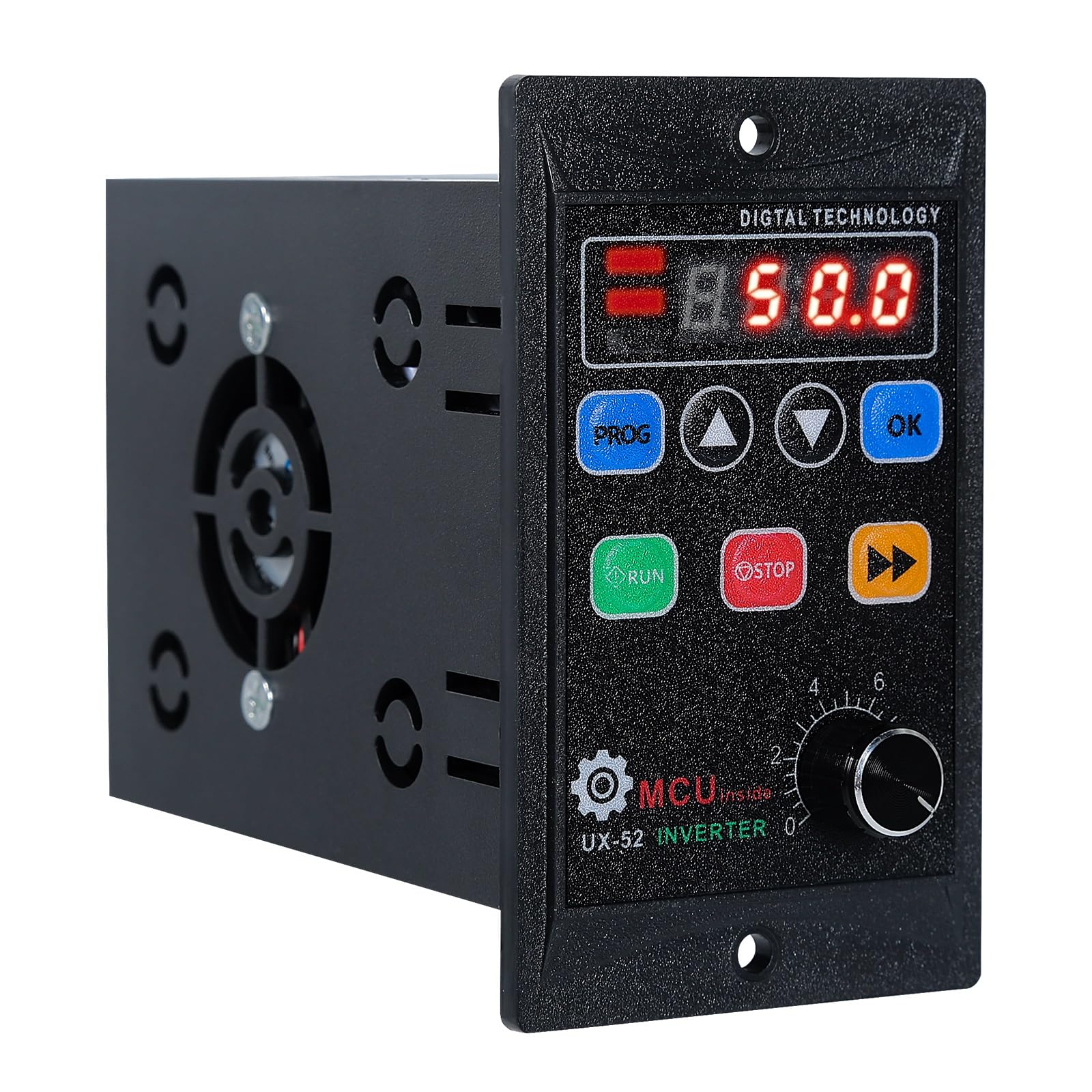
Image 1.2: Front view of the Jadeshay 750W VFD.
2. Safety Information
WARNING: Electrical shock hazard. Read all instructions carefully before installation and operation. Installation and maintenance should only be performed by qualified personnel.
- Always disconnect power before performing any wiring or maintenance.
- Ensure proper grounding of the VFD and the motor.
- Do not operate the VFD with damaged wiring or casing.
- Keep the VFD away from water, moisture, and flammable materials.
- Ensure adequate ventilation around the VFD to prevent overheating.
- Do not touch internal components when power is connected.
3. Product Components and Interface
The Jadeshay VFD features a user-friendly control panel and robust construction for reliable performance.

Image 3.1: VFD Operation Interface.
3.1 Control Panel Buttons
- PROG Button: Used to enter function group options, navigate through function group pages, and return to the previous menu level.
- Up Button (▲): In function code status, performs an upward selection. In parameter value status, increases the parameter value.
- Down Button (▼): In function code status, performs a downward selection. In parameter value status, decreases the parameter value.
- OK Button: Confirms selected options or data. Stores setting data in E²PROM for long-term storage.
- RUN Button: Start command button for panel control. Initiates acceleration according to the set acceleration time.
- STOP Button: Stop command button for panel control. Initiates deceleration and stops according to the set deceleration time. Also used to reset the VFD after a fault trigger.
- Function Parameter Display Button (►►): In function code status, performs left and right selection for the function code. In the main menu, queries different display options.
- REV Button: Start command button for reverse operation when controlled by the panel. Initiates reverse acceleration according to the set acceleration time.
3.2 Indicators and Display
- Power Indicator: Illuminates when the VFD is powered on.
- Forward Rotation Indicator Light: Illuminates when the motor is running in the forward direction.
- Reverse Indicator Light: Illuminates when the motor is running in the reverse direction.
- Four-digit Digital Tube: Displays current operating data, parameters, and error codes.
3.3 Speed Control Potentiometer
A rotary potentiometer on the panel allows for stepless speed regulation from 0 to 10, providing fine control over motor speed.

Image 3.2: Speed Adjustment Potentiometer.
4. Installation and Wiring
4.1 Physical Installation
The VFD is designed for integrated installation. Ensure it is mounted in a location with sufficient space for ventilation and easy access to controls and wiring terminals. The dimensions are approximately 17 x 12 x 9 cm (L x W x H).

Image 4.1: Control Panel Dimensions.
4.2 Electrical Wiring
The Jadeshay VFD requires a single-phase 220V input and provides a three-phase 220V output. It is crucial to connect the motor correctly. If the original three-phase motor was configured for 380V, it must be reconfigured to a delta connection for 220V operation.

Image 4.2: Basic 220V Inverter Wiring Diagram.

Image 4.3: Detailed Technical Wiring Diagram.

Image 4.4: Control Panel and Triangle Wiring Configuration.
Wiring Steps:
- Connect the single-phase 220V AC input to the 'AC' terminals on the VFD.
- Connect the ground wire to the 'FG' (Frame Ground) terminal.
- Connect the three-phase motor to the 'U', 'V', and 'W' output terminals.
- Ensure the motor is configured for 220V operation (typically delta connection for 380V motors).
- For external control, refer to the detailed wiring diagram for programmable input terminals (X1-X4, FWD, REV), analog input (AI), and relay output (FA, FB).
- A 5.1 kΩ 2W potentiometer is recommended for external speed control.
Note: The JH-100 series (which this model belongs to) does not provide FWD, REV, +10V DC, AI, AOUT, FA, and FB ports. Their corresponding functions and parameters are invalid. JH-100 also does not have RS485 function.
5. Operating Instructions
5.1 Powering On
After ensuring all wiring is correct and secure, apply single-phase 220V power to the VFD. The power indicator light will illuminate, and the digital display will show the default frequency or last set value.
5.2 Speed Adjustment
- Using the Potentiometer: Rotate the knob on the front panel to adjust the output frequency, thereby controlling the motor speed. The scale typically ranges from 0 to 10.
- Using Digital Keys: For precise adjustments or specific parameter settings, use the Up (▲) and Down (▼) buttons after entering the parameter setting mode via the PROG button.
5.3 Starting and Stopping the Motor
- Start: Press the RUN button to start the motor. The motor will accelerate to the set speed according to the configured acceleration time.
- Stop: Press the STOP button to stop the motor. The motor will decelerate and stop according to the configured deceleration time.
5.4 Forward and Reverse Operation
- Forward: After setting the desired speed, press the RUN button. The forward rotation indicator will light up.
- Reverse: Press the REV button to run the motor in reverse. The reverse indicator will light up.
5.5 Parameter Settings
To access and modify advanced parameters:
- Press the PROG button to enter the function group options.
- Use the Up (▲) and Down (▼) buttons to navigate through different function codes.
- Press the OK button to select a function code and view its current parameter value.
- Use the Up (▲) and Down (▼) buttons to adjust the parameter value.
- Press the OK button again to save the new parameter value.
- Press PROG to exit the parameter setting mode.
6. Maintenance
Regular maintenance ensures the longevity and optimal performance of your Jadeshay VFD.
- Cleaning: Periodically clean the exterior of the VFD with a soft, dry cloth. Ensure no dust or debris accumulates on the cooling fan or ventilation openings. Do not use liquid cleaners.
- Ventilation: Ensure the VFD's cooling fan and vents are unobstructed. The VFD is equipped with a strong cooling fan to dissipate heat efficiently.

Image 6.1: VFD with Cooling Radiator.
- Inspection: Regularly inspect all wiring connections for tightness and signs of wear or damage. Check for any unusual noises or smells during operation.
- Environment: Operate the VFD within its specified environmental conditions (temperature, humidity) to prevent damage.
7. Troubleshooting
This section provides solutions to common issues you might encounter with your VFD.
| Problem | Possible Cause | Solution |
|---|---|---|
| Motor does not start | No power, incorrect wiring, STOP button pressed, parameter error. | Check power supply. Verify wiring connections. Ensure STOP button is not active. Check motor parameters. |
| Motor speed is incorrect | Potentiometer setting, frequency parameter incorrect. | Adjust potentiometer. Check and set frequency parameters (e.g., maximum frequency, base frequency). |
| VFD displays an error code | Overvoltage, undervoltage, overcurrent, overload, short-circuit. | Refer to the VFD's specific error code list (if available in the full manual) for detailed solutions. Often, pressing the STOP button can reset the VFD after resolving the fault. |
| VFD overheats | Poor ventilation, excessive load, high ambient temperature. | Ensure proper airflow around the VFD. Reduce motor load if possible. Check ambient temperature. |
If the problem persists after attempting these solutions, please contact customer support.
8. Specifications
| Feature | Specification |
|---|---|
| Brand | Jadeshay |
| Model Number | LTUYOLTLO-JAY-GS109552-01 |
| Input Voltage | Single-Phase 220V |
| Output Voltage | Three-Phase 220V |
| Rated Power | 750W |
| Material | Acrylonitrile Butadiene Styrene (ABS) |
| Item Dimensions (L x W x H) | 17 x 12 x 9 cm |
| Color | Black |
| Country of Origin | China |
9. Applications
The Jadeshay 750W VFD is suitable for a wide range of applications requiring precise motor speed control, including:
- Conveyor belts
- Cable chassis
- Assembly lines
- Rotary cooking pots
- Rotary sushi equipment
- Fans
- Water Pumps
- Blenders
- Air Compressors

Image 9.1: Examples of VFD Applications.
10. Warranty and Support
For warranty information and technical support, please refer to the documentation provided with your purchase or contact Jadeshay customer service through your retailer. Keep your purchase receipt as proof of purchase.