
Introduction
This manual provides detailed instructions for the installation, setup, operation, and maintenance of your EASYGUARD EC002-HY-NFC PKE Passive Keyless Entry Car Alarm System. This system is designed to enhance vehicle security and convenience with features such as passive keyless entry, remote engine start, push start/stop functionality, NFC lock/unlock, and an optional shock sensor alarm. Please read this manual thoroughly before installation and use.
Key Features
- Passive Keyless Entry (PKE): Automatically locks/unlocks doors when approaching or walking away from the vehicle with the key fob.
- Push Start/Stop Button: Converts traditional key start vehicles to a modern push-button ignition system.
- Remote Engine Start: Allows starting the engine remotely to pre-cool or pre-warm the car.
- NFC Lock/Unlock: Provides an alternative method to lock or unlock the vehicle using an NFC card or compatible smartphone.
- Shock Sensor Alarm (Optional): Triggers an alarm if the vehicle detects vibration.
- Remote Trunk Release: Opens the trunk remotely for convenience.
- Central Door Locking Automation: Automatically locks doors when driving and unlocks when the engine is off.
- Panic/Car Finding: Helps locate your vehicle in a parking area.
- Anti-Hijacking: An optional security feature to protect your vehicle.
- Compatibility: Fits most DC12V standard key start petrol cars, including automatic and manual transmission vehicles.
Package Contents
The EASYGUARD EC002-HY-NFC system typically includes the following components. Please verify all items are present upon unboxing:
- Main control module
- Key fobs (2)
- Push start button
- PKE antennas
- NFC card reader and NFC card
- Wiring harnesses
- Shock sensor (if 'with shock sensor' variant)
- User manual

Image: Overview of the EASYGUARD EC002-HY-NFC system components, including the main unit, key fobs, push button, antennas, and wiring.
Installation
WARNING: Professional installation by a certified car alarm installer is highly recommended. Incorrect installation can lead to vehicle damage or system malfunction. This product is not compatible with cars that already have an OEM push start button. An extra bypass module may be required if your factory OEM key fob has a chip immobilizer.
The installation process involves connecting various components to your vehicle's electrical system. Key steps include:
- Mounting the main control module securely.
- Installing the push start button in place of the ignition cylinder.
- Strategically placing PKE antennas for optimal range.
- Connecting the NFC reader.
- Wiring the system to the vehicle's power, ignition, door locks, and other relevant circuits.
Video: This video demonstrates the installation of the PKE antennas within a vehicle, showing placement for front and rear antennas to ensure proper passive keyless entry functionality.

Image: A comparison showing a traditional key ignition before installation and the new push start/stop button after installation.
Setup
After physical installation, the system may require initial setup or programming, particularly for key fob recognition and NFC card pairing. Refer to the detailed wiring diagram and programming instructions provided with your specific kit for precise steps.
- Key Fob Pairing: Follow the instructions to pair your key fobs with the main control module.
- NFC Card Pairing: Present the NFC card to the reader as instructed to enable NFC lock/unlock functionality. Up to 4 NFC cards can be added.
- Shock Sensor Sensitivity: Adjust the shock sensor sensitivity if applicable, to prevent false alarms while ensuring adequate protection.
Operating Instructions
Passive Keyless Entry (PKE)
With the key fob in your possession, the vehicle will automatically unlock when you approach within 2-3 meters and lock when you walk away 1-2 meters. This feature provides hands-free convenience.
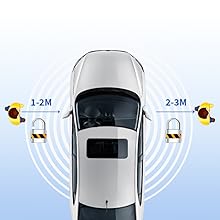
Image: A diagram illustrating the PKE function, showing the vehicle automatically locking when the key fob moves 2-3 meters away and unlocking when it approaches within 1-2 meters.
Remote Engine Start/Stop
Press the remote start button on your key fob to start the engine from a distance. This allows you to pre-condition your vehicle's interior temperature before entry. Press the button again to stop the engine remotely.

Image: A car with a remote start icon, indicating the ability to start the engine remotely using the key fob.
Push Start/Stop
With the key fob inside the vehicle, press the brake pedal and then press the push start button to start the engine. To turn off the engine, press the push start button again while the vehicle is stationary.
NFC Lock/Unlock
To lock or unlock your vehicle using the NFC function, simply tap your NFC card or a compatible smartphone with NFC enabled against the designated NFC reader on your vehicle's windshield.
Video: This video demonstrates the NFC lock and unlock feature of the EC002 system, showing a user tapping an NFC card to the windshield to control the car's locks.
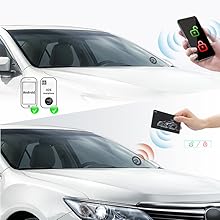
Image: A car with an NFC card being tapped to the windshield, illustrating the NFC lock or unlock function.
Remote Trunk Release
Press the designated button on your key fob to open the vehicle's trunk remotely.

Image: A car with its trunk opening, demonstrating the remote trunk release feature activated by a key fob.
Panic/Car Finding
Press the lock button on your key fob once to activate the panic/car finding function, which typically flashes the lights and sounds the horn to help you locate your vehicle.
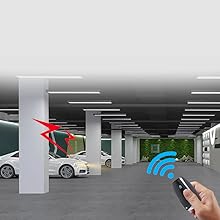
Image: A car in a parking garage with a red lightning bolt icon and blue signal waves, indicating the panic/car finding function is active.
Anti-Hijacking
This feature, if enabled, provides an additional layer of security against vehicle theft. Consult your installer or the detailed wiring diagram for information on enabling and disabling this function.
Shock Sensor Alarm
If your system includes the shock sensor, it will trigger an audible alarm if the vehicle detects significant impact or vibration. This feature is designed to deter tampering or theft attempts.
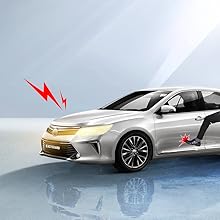
Image: A car with a red lightning bolt icon near the front wheel, indicating the shock sensor alarm has been triggered by an impact.
Maintenance
To ensure optimal performance and longevity of your EASYGUARD system:
- Keep key fobs and NFC cards dry and away from extreme temperatures.
- Replace key fob batteries as needed to maintain reliable operation.
- Periodically check wiring connections for any signs of wear or damage.
- Avoid exposing the main control module to moisture or excessive heat.
Troubleshooting
If you encounter issues with your system, consider the following common troubleshooting steps:
- System not responding: Check key fob battery. Ensure you are within range for remote functions.
- PKE not working: Verify key fob battery. Ensure PKE antennas are correctly installed and not obstructed.
- Remote start failure: Ensure all doors are closed, the hood is closed, and the parking brake is engaged (if applicable). Check for any error codes or flashing lights on the dash.
- NFC issues: Ensure the NFC card or smartphone is correctly positioned over the reader. Check if NFC is enabled on your smartphone.
- False alarms: Adjust shock sensor sensitivity if it is too high.
For persistent issues, contact a professional installer or EASYGUARD customer support.
Specifications
| Brand | EASYGUARD |
| Model Number | EC002-HY-NFC |
| Compatible Devices | Petrol Cars (Automatic/Manual) |
| Remote Control Included | Yes |
| Unit Count | 1.0 Count |
| UPC | 769326453401 |
| Item Weight | 1.3 Kilograms |
Warranty
This EASYGUARD product comes with a 1-year warranty from the date of purchase. Please retain your proof of purchase for warranty claims. The warranty covers manufacturing defects but does not cover damage resulting from improper installation, misuse, or unauthorized modifications.
Support
For technical assistance, troubleshooting, or further inquiries, please contact EASYGUARD customer support through their official website or the retailer where the product was purchased. Detailed contact information can typically be found on the product packaging or the EASYGUARD official website.


