
1. Introduction
Thank you for choosing the HONITURE S12 Cordless Vacuum Cleaner. This manual provides essential information for the safe and efficient operation, maintenance, and troubleshooting of your new appliance. Please read it thoroughly before first use and keep it for future reference.
2. Product Components
The HONITURE S12 Cordless Vacuum Cleaner comes with various components designed for versatile cleaning. Familiarize yourself with each part before assembly.
- Main Motor Unit (with dustbin and LCD screen)
- Extension Wand
- Motorized Floor Brush (with anti-tangle rollers and LED lights)
- Removable Battery Pack
- Crevice Tool
- 2-in-1 Brush Tool
- Wall Mount Bracket
- Power Adapter/Charger
- HEPA Filter (pre-installed and spare)

3. Setup and Assembly
Follow these steps to assemble your vacuum cleaner and prepare it for first use.
- Attach the Extension Wand: Insert the top end of the extension wand into the main motor unit until it clicks securely into place.
- Attach the Floor Brush: Connect the motorized floor brush to the bottom end of the extension wand until it clicks. For handheld use, attach accessories directly to the main motor unit.
- Install the Battery: Ensure the battery pack is fully charged before first use. Slide the battery pack into the designated slot on the main motor unit until it locks.
- Initial Charging: Connect the power adapter to the battery pack (either attached to the vacuum or removed) and plug it into a power outlet. The LCD screen will indicate charging status. A full charge takes approximately 4 hours.

4. Operating Instructions
Learn how to effectively use your HONITURE S12 for various cleaning tasks.
4.1 Power On/Off and Suction Adjustment
- Power On: Press the power button on the main unit to start the vacuum.
- Adjust Suction: The vacuum features an ultra-clear LCD smart screen. Touch the screen to cycle through 5 adjustable suction levels (9-38Kpa) to suit different cleaning needs, from light dust to stubborn debris.
- Power Off: Press the power button again to turn off the vacuum.

4.2 Using Attachments
- Motorized Floor Brush: Ideal for cleaning hard floors and carpets. The anti-tangle design and LED lights help illuminate dust and prevent hair entanglement. The brush head swivels for easy maneuverability around furniture and into corners.
- Crevice Tool: Use for narrow gaps, corners, and hard-to-reach areas.
- 2-in-1 Brush Tool: Suitable for cleaning upholstery, curtains, keyboards, and car interiors.
5. Maintenance
Regular maintenance ensures optimal performance and extends the lifespan of your vacuum cleaner.
5.1 Emptying the Dustbin
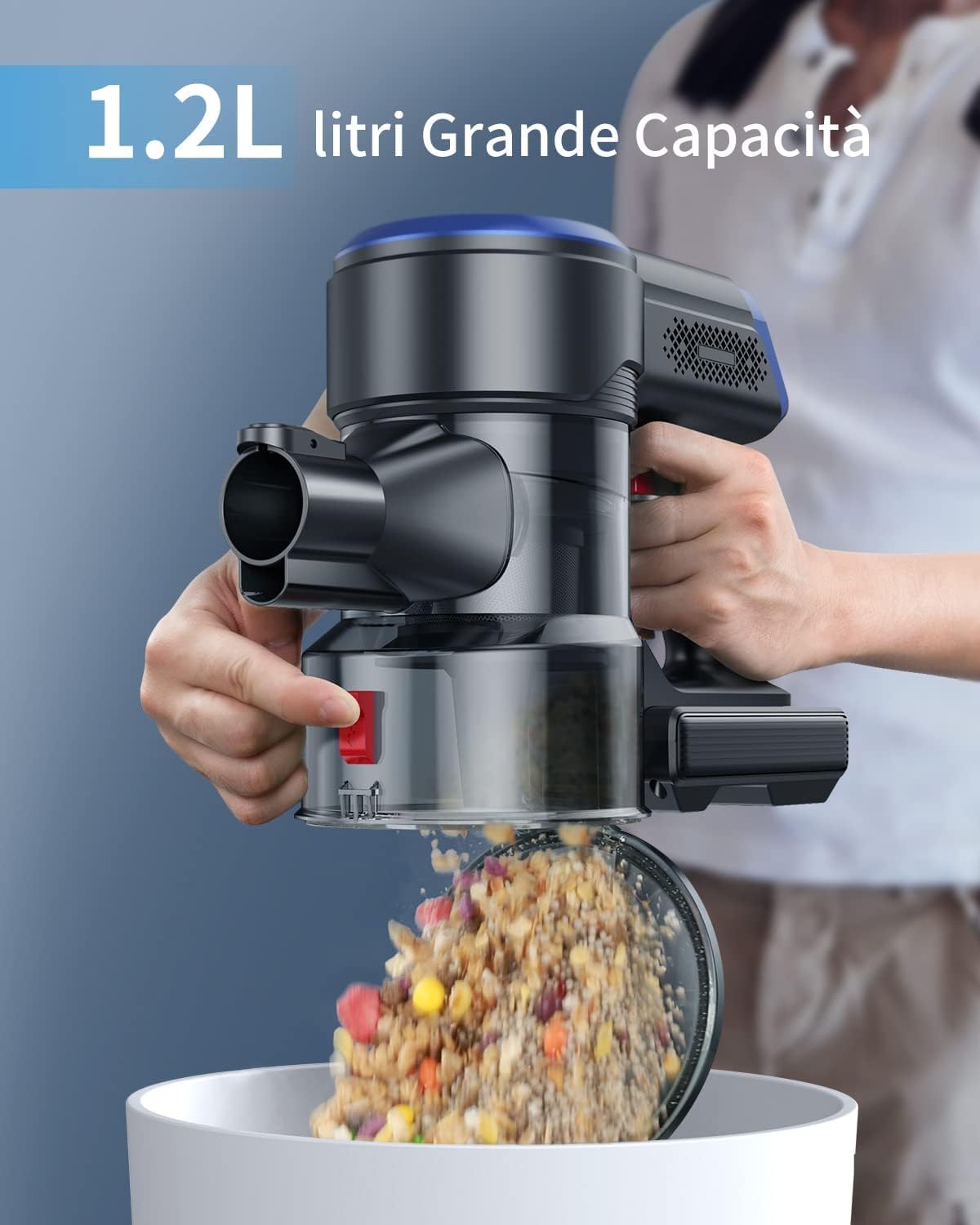
The 1.2-liter dustbin should be emptied regularly, especially when the 'Max' line is reached, to maintain suction power.
- Hold the main unit over a trash can.
- Press the dustbin release button (usually red) to open the bottom flap and empty the contents.
- Close the flap securely after emptying.

5.2 Cleaning the Filtration System
The HONITURE S12 features a 7-stage cyclone filtration system, including HEPA filters. Clean filters regularly to prevent clogging and maintain suction.
- Twist and pull to remove the dustbin from the main unit.
- Separate the internal filter components (HEPA filter, stainless steel filter, cyclone assembly).
- Tap out loose dust. Rinse washable components under cold running water. Do not use detergents.
- Allow all parts to air dry completely for at least 24 hours before reassembling. Ensure they are bone dry to prevent mold or damage to the motor.
- Reassemble the filters and dustbin, then reattach to the main unit.

5.3 Cleaning the Brush Head
Periodically check the motorized floor brush for tangled hair or debris. The anti-tangle design minimizes this, but occasional cleaning may be necessary.
- Turn off the vacuum and disconnect it from the power source.
- Release the brush roller from the brush head (refer to the product diagram for specific release mechanism).
- Use scissors or the provided cleaning tool to cut and remove any tangled hair or fibers.
- Wipe the brush head and roller with a damp cloth. Ensure all parts are dry before reassembly.

5.4 Battery Care
- Always use the original HONITURE charger.
- Do not expose the battery to extreme temperatures.
- If storing the vacuum for an extended period, charge the battery to approximately 50% and store it in a cool, dry place.
6. Troubleshooting
If you encounter issues with your HONITURE S12, refer to the following common problems and solutions.
| Problem | Possible Cause | Solution |
|---|---|---|
| Vacuum does not turn on | Battery is not charged or not installed correctly. | Ensure the battery is fully charged and securely clicked into place. |
| Low suction power | Dustbin is full, filters are clogged, or brush head is obstructed. | Empty the dustbin. Clean or replace filters. Remove any obstructions from the brush head. |
| Brush roller stops spinning | Hair or debris tangled in the brush, or an object is jammed. | Turn off the vacuum and remove any obstructions from the brush roller. |
| Short battery runtime | Battery not fully charged, or operating in high power mode continuously. | Ensure battery is fully charged. Use ECO mode for longer runtime. Battery performance may degrade over time. |
| Unusual noise | Obstruction in the air path or brush head. | Check for and remove any blockages in the nozzle, wand, or brush head. |
7. Specifications
- Model: S12
- Brand: HONITURE
- Motor Power: 450W
- Suction Power: Up to 38Kpa
- Power Levels: 5
- Battery: 7*2500 mAh Lithium-ion (Removable)
- Runtime: Up to 55 minutes (ECO mode)
- Charging Time: Approximately 4 hours
- Dustbin Capacity: 1.2 Liters
- Filtration System: 7-stage Cyclone with HEPA filter
- Recommended Surfaces: Hard floors, Carpets
- Dimensions (L x W x H): 120L x 24l x 20H cm
- Control Method: Touch Screen
- Form Factor: Portable, Stick Vacuum
8. Warranty and Support
The HONITURE S12 Cordless Vacuum Cleaner comes with a 3-year warranty. For any questions, concerns, or technical support, please refer to the contact information provided with your purchase or visit the official HONITURE website. Our support team is available to assist you.


