
1. Introduction
Thank you for choosing the COMFEE' MDDPE-50DEN7 Dehumidifier. This powerful appliance is designed to efficiently remove excess moisture from your indoor environment, preventing mold, mildew, and improving overall air quality. With a dehumidification capacity of up to 50 liters per day and a large 6-liter water tank, it is ideal for large rooms, cellars, and basements up to 116 square meters. Please read this manual thoroughly before operation to ensure safe and optimal performance.

The Comfee dehumidifier effectively eliminates humidity and dries clothes, contributing to a healthier indoor environment.
2. Safety Information
Always follow basic safety precautions when using electrical appliances to reduce the risk of fire, electric shock, and injury.
- Ensure the power supply matches the voltage specified on the unit's rating label.
- Do not operate the dehumidifier with a damaged cord or plug.
- Keep the unit away from water and other liquids. Do not immerse the unit in water.
- Do not block air inlets or outlets. Maintain at least 20 cm clearance around the unit.
- Unplug the unit before cleaning or performing any maintenance.
- This appliance uses R290 refrigerant. Do not puncture the refrigerant circuit.
- Keep children and pets away from the unit during operation.
3. Product Overview
3.1 Components

The Comfee MDDPE-50DEN7 Dehumidifier, showcasing its sleek white design and integrated water tank.
- Control Panel
- Air Outlet
- Air Inlet (with washable filter)
- Water Tank (6 Liters capacity)
- Casters for mobility
- Side Handles
- Drainage Port (for continuous drainage)
- Pump Drainage Port (if applicable)
3.2 Key Features
An overview of the dehumidifier's main features, including its capacity for large spaces, comfort mode, mobility, timer, safety features, tank size, filter, and eco-friendly refrigerant.
- Efficient Dehumidification: Absorbs up to 50 liters of moisture per day, suitable for areas up to 116㎡.
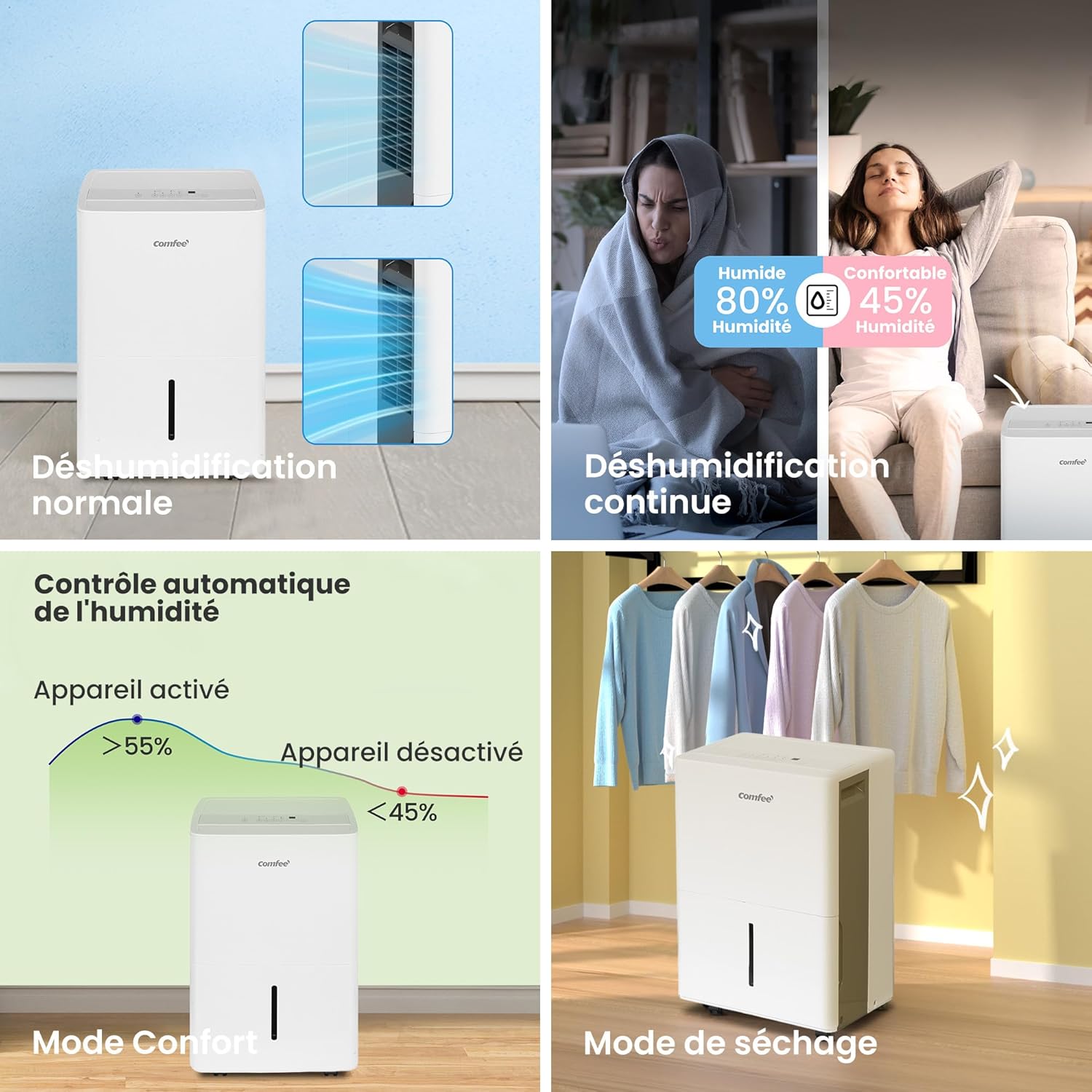
- Multiple Operating Modes: Normal, Continuous, Drying (Laundry), and Smart modes for versatile use.
- Flexible Drainage Options: Choose between the 6-liter water tank, continuous drainage via a hose (not included), or integrated pump drainage.
- User-Friendly Functions: Includes a 24-hour timer and an automatic shut-off feature when the water tank is full, preventing overflow.
- Enhanced Mobility: Equipped with side handles and smooth-rolling casters for easy relocation.
- Improved Air Quality: Helps reduce pollutants, mold, and musty odors, contributing to a healthier living environment.
4. Setup
4.1 Unpacking and Placement
- Carefully remove the dehumidifier from its packaging.
- Place the unit upright on a flat, stable surface. Allow it to stand upright for at least 24 hours before plugging it in, especially if it was transported on its side. This allows the refrigerant to settle.
- Ensure there is at least 20 cm (8 inches) of clear space around all sides of the unit for proper airflow.
- Position the unit away from heat sources, direct sunlight, and sources of excessive moisture.
4.2 Drainage Options

The dehumidifier offers three convenient drainage options: using the removable water tank, continuous drainage with a hose, or pump drainage for elevated discharge.
- Water Tank Drainage: The unit will collect water in the integrated 6-liter tank. When the tank is full, the unit will automatically shut off and an indicator light will illuminate. Carefully remove and empty the tank, then reinsert it securely.
- Continuous Drainage: For extended operation without emptying the tank, connect a standard garden hose (not included) to the continuous drainage port at the back of the unit. Ensure the hose is sloped downwards to allow gravity drainage into a floor drain or suitable receptacle.
- Pump Drainage: (If applicable to your model) For situations where water needs to be drained upwards or over a longer distance, connect a suitable hose to the pump drainage port. Refer to the specific instructions for pump operation in the full manual.

The dehumidifier is equipped with practical casters, allowing for easy movement and positioning within your home.
5. Operating Instructions
5.1 Control Panel Overview

The control panel provides intuitive access to all dehumidifier functions, including mode selection, timer, and humidity settings.
- Pump Function Button: Activates or deactivates the integrated pump for drainage.
- Comfort Mode Button: Sets the humidity level automatically between 45% and 55% for optimal comfort.
- Filter Indicator Reset: Resets the filter cleaning reminder.
- Continuous Dehumidification Button: Activates continuous operation regardless of humidity level.
- Two-Speed Fan (Turbo) Button: Adjusts fan speed between low and high (Turbo).
- Timer Control Button: Sets the 24-hour on/off timer.
- Humidity Adjustment Buttons: Increases or decreases the desired humidity level.
- On/Off Button: Powers the unit on or off.
- Digital Display: Shows current humidity, set humidity, timer settings, and error codes.
5.2 Operating Modes

The dehumidifier offers various modes to suit different needs, from standard operation to specialized drying and intelligent humidity control.
- Normal Mode: The unit operates to reach and maintain the user-set humidity level.
- Continuous Mode: The unit runs continuously, regardless of the humidity level, for maximum moisture removal. Ideal for very damp conditions.
- Drying Mode (Laundry): Designed to quickly dry clothes. The unit operates at high fan speed and continuous dehumidification.
- Smart Mode (Comfort Mode): Automatically adjusts operation to maintain indoor humidity between 45% and 55%, providing an optimal comfort level.
6. Maintenance
Regular maintenance ensures the longevity and efficiency of your dehumidifier.
6.1 Cleaning the Air Filter
The air filter should be cleaned every two weeks or more frequently depending on usage and air quality. A dirty filter can reduce efficiency and cause the unit to work harder.
- Turn off the unit and unplug it from the power outlet.
- Remove the air filter from the back of the unit.
- Wash the filter with warm, soapy water. Rinse thoroughly.
- Allow the filter to air dry completely before reinserting it.
- Once reinserted, press the "Filter" button on the control panel to reset the filter cleaning reminder.
6.2 Cleaning the Water Tank
Empty and clean the water tank regularly to prevent mold and mildew growth.
- Turn off the unit and unplug it.
- Carefully remove the water tank.
- Empty any collected water.
- Wash the tank with mild detergent and water. Rinse thoroughly.
- Dry the tank completely before placing it back into the unit.
6.3 Storage
If storing the dehumidifier for an extended period:
- Empty and clean the water tank.
- Clean the air filter.
- Wrap the power cord neatly.
- Store the unit upright in a cool, dry place, away from direct sunlight and extreme temperatures.
7. Troubleshooting
Before contacting customer service, please refer to the following troubleshooting guide for common issues.
| Problem | Possible Cause | Solution |
|---|---|---|
| Unit does not turn on. | No power; Water tank full or not properly inserted. | Check power connection; Empty and reinsert water tank securely. |
| No water collected. | Humidity level too low; Air filter clogged; Room temperature too low. | Increase target humidity or select Continuous mode; Clean air filter; Ensure room temperature is above 5°C (41°F). |
| Unit is noisy. | Unit not on a level surface; Air filter clogged. | Place on a flat surface; Clean air filter. |
| Frost on coils. | Room temperature too low. | The unit has an automatic defrost function. If frost persists, increase room temperature. |
8. Specifications

Key dimensions and certifications for the Comfee dehumidifier, including its use of R290 refrigerant.
| Attribute | Value |
|---|---|
| Model Number | MDDPE-50DEN7 |
| Dehumidification Capacity | 50 Liters/Day |
| Water Tank Volume | 6 Liters |
| Recommended Room Size | 101-116 m² |
| Airflow Capacity | 353 m³/hour |
| Power Consumption | 1060 Watts |
| Dimensions (L x W x H) | 28.2 x 39.2 x 61.6 cm |
| Weight | 23.3 kg |
| Refrigerant | R290 (Natural) |
| Number of Fan Speeds | 2 |
| Special Features | Continuous Draining, Automatic Defrost, Digital Display, Anti-overflow, Automatic Shut-off |
9. Warranty and Support
For warranty information and customer support, please refer to the warranty card included with your product or visit the official Comfee website. Keep your purchase receipt as proof of purchase for any warranty claims.
Manufacturer: Midea Europe
For further assistance, you may contact Comfee customer service through their official channels.


