
1. Safety Information
Important: Installation of this car alarm system requires professional expertise. It is strongly recommended that installation be performed by a certified or trained car alarm installer to ensure proper function and prevent damage to your vehicle. Incorrect installation can lead to system malfunction, vehicle damage, or safety hazards.
If your vehicle has a factory OEM key fob with a chip immobilizer, an additional bypass module (e.g., ASIN: B00MEHBVIC or B07NSLPBG7) is required. This product is not compatible with vehicles that already have an OEM push start button. Do not install on luxury cars such as BMW or Benz, as specific plug-and-play versions may be available for these models.
2. Product Overview
The EASYGUARD EC002-F02-NFC is a smart key PKE (Passive Keyless Entry) car alarm system designed to enhance vehicle security and convenience. It offers a range of features including passive keyless entry, remote engine start, push start/stop functionality, and NFC lock/unlock capabilities. The system utilizes rolling code and FSK technology for reliable performance.
Key Features:
- Passive Keyless Entry (PKE): Automatically locks/unlocks doors as you approach or walk away.
- Remote Engine Start: Start your vehicle remotely to pre-cool or pre-warm the interior.
- Push Start/Stop Button: Upgrade your standard key start to a convenient push-button ignition.
- NFC Lock/Unlock: Use an NFC card or compatible smartphone to lock and unlock the vehicle.
- Remote Trunk Release: Open your vehicle's trunk remotely.
- Central Door Locking Automation: Automatically locks doors when driving and unlocks when the engine is off.
- Panic/Car Finding: Easily locate your vehicle in a parking lot.
- Optional Shock Sensor Alarm: Provides an audible warning if the vehicle is triggered by vibration (available in models with a shock sensor).
- Smartphone App Control & GPS Tracking (Optional): Requires an additional 4G LTE module (GPS002-AA) for remote control and tracking via smartphone.
System Components:
The system typically includes the main control unit, two remote key fobs, a push start button, PKE antennas, an HF antenna, wiring harnesses, and an NFC reader. Specific components may vary slightly based on the package.

Image: Overview of the EASYGUARD PKE Remote Starter Kit components.
3. Installation
As noted in the safety information, professional installation is highly recommended. The following provides general guidance on antenna placement, but a detailed wiring diagram and vehicle-specific instructions should be followed by a qualified installer.
PKE Antenna Installation:
The PKE (Passive Keyless Entry) antennas are crucial for the automatic lock/unlock function. Proper placement ensures optimal range and reliability.
Video: This video demonstrates the installation process for the PKE antennas, showing typical locations for optimal signal reception within the vehicle.
HF Antenna Installation:
The HF (High Frequency) antenna is typically installed in a location that allows for good signal transmission and reception, often near the dashboard or under the steering column.

Image: A hand points to a typical installation location for the HF antenna, often concealed within the vehicle's interior panels.
4. Operating Instructions
4.1 Passive Keyless Entry (PKE)
With the PKE feature, the system automatically locks or unlocks your car doors when you approach or walk away from the vehicle with the key fob in your possession. The typical range for this function is 2-3 meters for unlocking and 1-2 meters for locking.
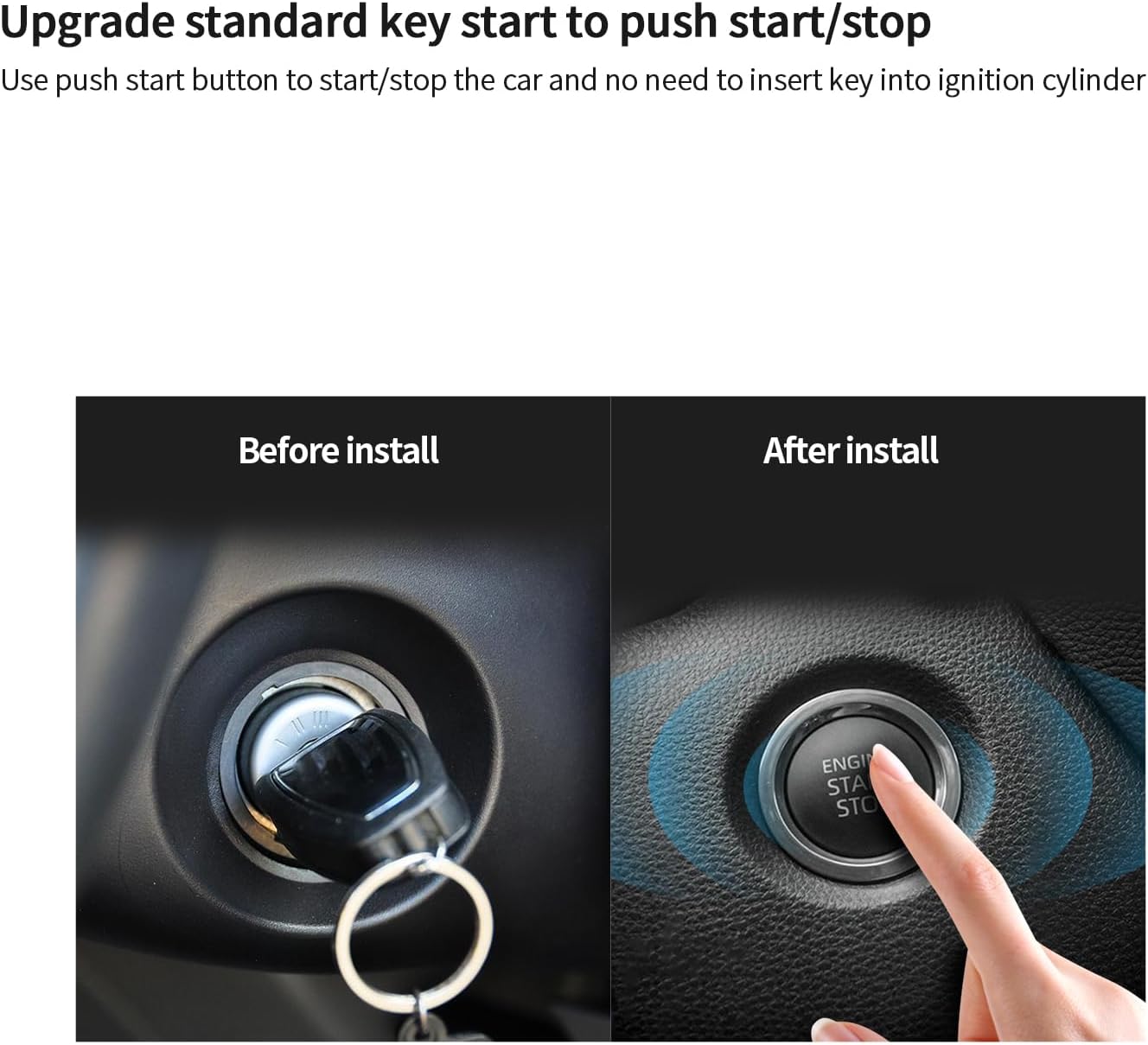
Image: Illustration showing a person approaching and walking away from a car, demonstrating the automatic lock and unlock zones for Passive Keyless Entry.
4.2 Push Start/Stop Button
This system upgrades your vehicle from a traditional key start to a modern push-button ignition. To start the engine, ensure the vehicle is in Park (P) or Neutral (N), press the brake pedal, and then press the push start button. To stop the engine, press the push start button again while the vehicle is stationary.

Image: A side-by-side comparison showing a traditional key ignition before installation and the push start button after installation.
4.3 Remote Engine Start
Use your remote key fob to start the engine from a distance. This feature allows you to pre-cool your car in hot weather or pre-warm it in cold weather before entering. Refer to your remote's specific button combination for remote start activation.

Image: A car is shown with a remote key fob in hand, indicating the remote engine start function for climate control.
4.4 NFC Lock/Unlock
The NFC (Near Field Communication) feature allows you to lock or unlock your vehicle by scanning an NFC card or a compatible smartphone with NFC functionality against the designated NFC reader on your car's windshield. You can add up to 4 NFC cards.
Video: This video demonstrates how to use the NFC card to lock and unlock the vehicle by tapping it against the windshield-mounted NFC reader.

Image: A hand holding an NFC card near a car's windshield, illustrating the NFC lock or unlock function.
4.5 Remote Trunk Release
If your vehicle supports it, you can open the trunk remotely using a button on your key fob. This provides convenient access to the trunk without needing to manually unlock it.

Image: A car's trunk opening automatically with a remote key fob in hand, demonstrating the remote trunk release feature.
4.6 Central Door Locking Automation
This feature automatically locks the vehicle doors when the engine starts and reaches a certain speed, and unlocks them when the engine is turned off. This can improve driving safety and convenience. This feature can typically be enabled or disabled by the owner through system settings.

Image: An interior view of a car showing an indicator for central door locking, signifying the automation feature.
4.7 Panic/Car Finding
To locate your car in a crowded parking area, press the lock button on your remote key fob once. The vehicle's lights will flash and the horn will sound, helping you identify its location.

Image: A car in a parking garage with a remote key fob in hand, illustrating the panic/car finding function.
4.8 Optional Shock Sensor Alarm
For models equipped with a shock sensor, the system will trigger an alarm (siren beep) if the vehicle detects significant vibration or impact. This feature provides an additional layer of security against tampering or theft attempts.
Image: A car with a lightning bolt graphic, indicating the activation of the shock sensor alarm.
4.9 Smartphone App Control & GPS Tracking (Optional)
This system can be upgraded with smartphone app control and 4G LTE GPS tracking by purchasing an additional GPS002-AA 4G LTE module (ASIN: B0D95Y1XN3). This module allows you to control various functions and track your vehicle's location directly from your smartphone.
Video: A demonstration of the smartphone application controlling vehicle functions, including locking and unlocking, with the optional 4G LTE module.
5. Troubleshooting
If you encounter any issues with your EASYGUARD EC002-F02-NFC system, please refer to the following general troubleshooting steps:
- System Not Responding: Check the battery in your remote key fob. Ensure the vehicle's main battery is charged.
- PKE Not Working: Verify that the key fob is within the specified range (2-3 meters for unlock, 1-2 meters for lock). Ensure no strong electromagnetic interference is present.
- Remote Start Failure: Confirm the vehicle is in Park (P) or Neutral (N) and the hood is closed. Check for any active fault codes on the vehicle's dashboard.
- NFC Issues: Ensure the NFC card or smartphone is correctly positioned over the NFC reader. Check if NFC is enabled on your smartphone.
- Alarm Triggering Randomly: If equipped with a shock sensor, adjust its sensitivity. Ensure all doors, hood, and trunk are securely closed.
For complex issues or if troubleshooting steps do not resolve the problem, contact a professional installer or EASYGUARD customer support for assistance.
6. Specifications
| Feature | Detail |
|---|---|
| Item Weight | 2.86 pounds |
| Package Dimensions | 10.63 x 7.09 x 3.94 inches |
| Item Model Number | EC002-FO2-NFC |
| Batteries Required | 2 CR2 batteries |
| Wireless Remote | Yes |
| Noise Level | 30 Decibels |
| Remote Control Included | Yes |
| Manufacturer | ieasyguard.com |
| UPC | 769326453371 |
7. Warranty and Support
7.1 Warranty Information
This EASYGUARD product comes with a 1-year warranty from the date of purchase. The warranty covers manufacturing defects and malfunctions under normal use. Please retain your proof of purchase for warranty claims.
7.2 Customer Support
For technical support, troubleshooting assistance, or warranty inquiries, please contact the manufacturer:
- Manufacturer: ieasyguard.com
- Website: www.ieasyguard.com
Always refer to the official website or contact customer support for the most up-to-date information and assistance.

