
HBN BNC-50/E88R
HBN Wireless Remote Control Plug Sockets User Manual
Model: BNC-50/E88R
Introduction
Thank you for choosing HBN Wireless Remote Control Plug Sockets. This manual provides essential information for the safe and efficient use of your new device. Please read it thoroughly before operation and retain it for future reference.

Image: The HBN Wireless Remote Control Plug Sockets set, including two plug sockets and one remote control.
Safety Information
Always follow basic safety precautions when using electrical appliances to reduce the risk of fire, electric shock, and personal injury.
- Do not exceed the maximum load capacity of 13A / 3120W.
- For indoor use only.
- Do not immerse in water or use in damp conditions.
- Keep out of reach of children.
- Ensure the plug is fully inserted into the wall socket.
- Disconnect from power when not in use or before cleaning.

Image: Illustration highlighting the child-care design of the socket, featuring safety doors to protect against electric shock.
Product Features
- Easy to Use: Simple ON/OFF button control for remote operation.
- Strong Signal: 100ft (approx. 30m) remote control range, works through doors and walls.
- Flexibility: Pair multiple HBN remote control outlets together.
- Learning Function: Any HBN brand transmitter and socket can be programmed with each other.
- Safe and Reliable: Rated up to 240V, 50Hz, 13A, 3120W Resistive. Outlets remain off after power outage.
- Child-care Design: Safety door protects against electric shock.

Image: A banner illustrating key features of the HBN Wireless Remote Control Outlet, including wireless control, programmability, 13A/3120W capacity, and the inclusion of 2 sockets and 1 remote.
Setup and Pairing
The HBN Wireless Remote Control Plug Sockets are designed for easy setup. Follow these steps to pair your remote with the sockets.
- Insert Battery: Open the battery compartment on the back of the remote control and insert the included 12V battery. Ensure correct polarity. Note: Some batteries may have a thin protective film that needs to be removed before use.
- Plug in Socket: Plug the HBN remote control socket into a standard wall outlet. The LED indicator on the socket will flash briefly.
- Enter Learning Mode: Press and hold the "Learning" button (also labeled "ON/OFF") on the side of the socket for approximately 3 seconds until the LED indicator starts flashing slowly. This indicates it is in learning mode.
- Pair with Remote: While the socket's LED is flashing, press the desired "ON" button (e.g., "1 ON") on the remote control. The socket's LED will stop flashing and remain solid for a moment, then turn off, indicating successful pairing.
- Test Pairing: Press the corresponding "ON" and "OFF" buttons on the remote (e.g., "1 ON" and "1 OFF") to ensure the socket responds correctly.
- Repeat for Additional Sockets: If you have multiple sockets, repeat steps 2-5 for each socket, assigning them to different remote buttons (e.g., "2 ON/OFF", "3 ON/OFF", etc.).
Unpairing Sockets
To unpair a socket from a remote button:
- Plug in the socket you wish to unpair.
- Press and hold the "Learning" button on the socket for approximately 6 seconds until the LED indicator flashes rapidly, then turns off. This indicates the pairing has been cleared.
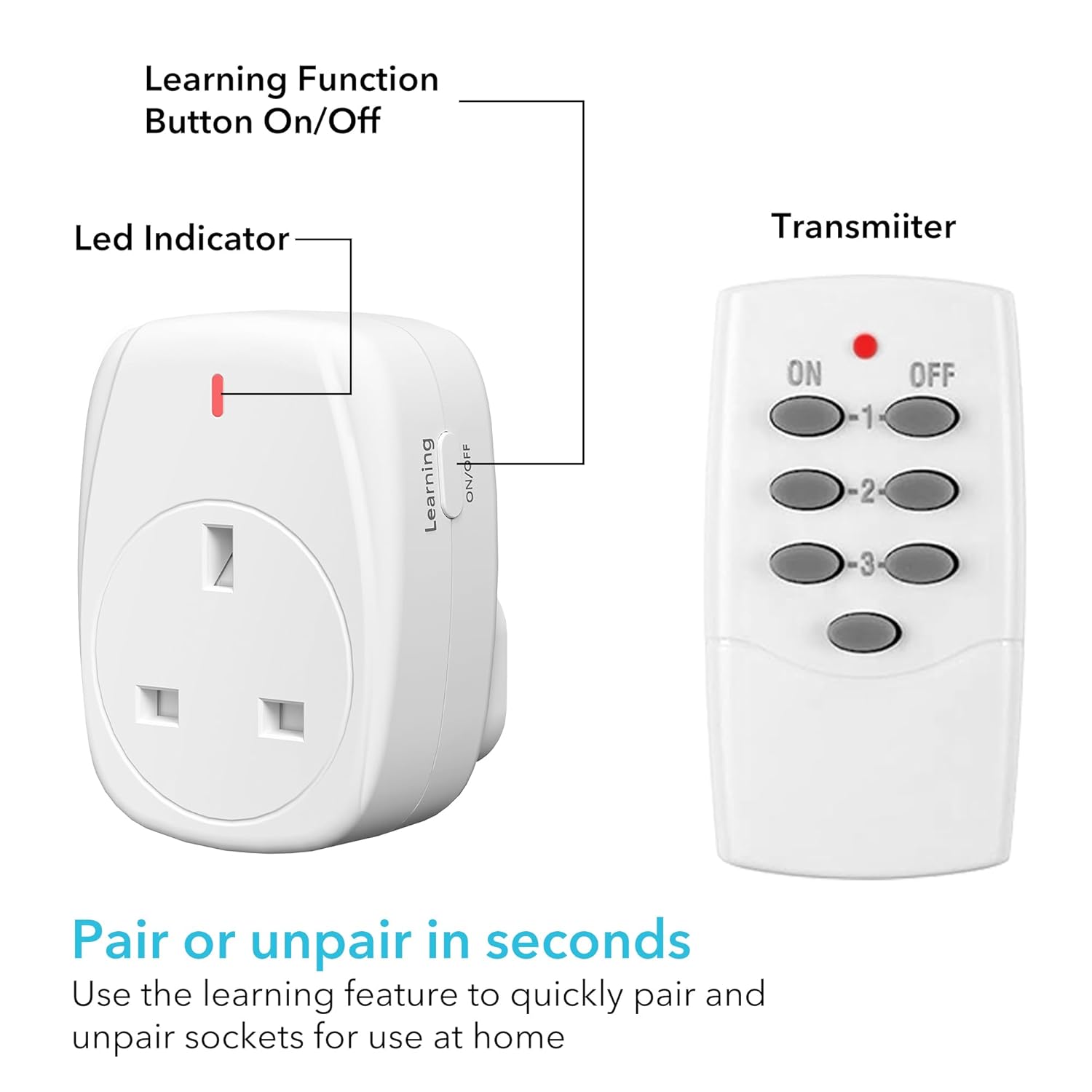
Image: A visual guide to the HBN socket and remote, highlighting the "Learning Function Button On/Off", "Led Indicator" on the socket, and the "Transmitter" (remote) for easy pairing and unpairing.
Operating Instructions
Once paired, operating your HBN Wireless Remote Control Plug Sockets is straightforward.
- Turning On/Off: Press the corresponding "ON" button on the remote to turn on the connected appliance, and the "OFF" button to turn it off.
- Manual Control: Each socket also has a manual ON/OFF button (the "Learning" button) on its side, allowing you to control the connected appliance directly at the socket.
- Range: The remote control has an effective range of up to 100 feet (approximately 30 meters) in open areas, and can transmit through walls and doors.
- Power Outage: In case of a power outage, the sockets will remain in the OFF state when power is restored, protecting your appliances and saving energy.

Image: An illustration demonstrating the 30-meter operating range of the HBN remote control system, showing how one remote can control multiple plugs throughout a house.

Image: A kitchen setting showcasing the convenience of controlling multiple outlets with one click, ideal for individuals with restricted mobility.
Maintenance
Proper maintenance ensures the longevity and optimal performance of your HBN Wireless Remote Control Plug Sockets.
- Cleaning: Disconnect the socket from the power outlet before cleaning. Wipe with a dry, soft cloth. Do not use liquid cleaners or aerosols.
- Battery Replacement: If the remote control's indicator light dims or its range decreases, it's time to replace the 12V battery.
- Storage: Store the sockets and remote in a cool, dry place when not in use.
Troubleshooting
| Problem | Possible Cause | Solution |
|---|---|---|
| Socket does not respond to remote. |
|
|
| Socket LED indicator does not light up. |
|
|
| Appliance connected to socket does not turn on. |
|
|
Specifications
| Attribute | Value |
|---|---|
| Model Number | BNC-50/E88R |
| Voltage | 240V |
| Frequency | 50Hz |
| Max Current | 13 Amps |
| Max Power | 3120W Resistive |
| Remote Control Range | Up to 100 ft (approx. 30m) in open area |
| Remote Battery Type | 1 x 12V (included) |
| Plug Type | Type G (UK Standard) |
| Certifications | CE, LVD, IEC |
| Item Weight | 240 g |
| Package Dimensions | 12.8 x 8.7 x 6.4 cm |

Image: A diagram illustrating the physical dimensions of both the HBN plug socket and its remote control.

Image: Close-up of the HBN plug socket, emphasizing its 13 Amp / 3120 Watt heavy-duty high power rating.
Warranty and Support
Specific warranty information and detailed support contact details are not provided within this manual. For warranty claims or technical assistance, please refer to the product packaging or contact the retailer where the product was purchased. You may also visit the official HBN website for further information.
Ask a question about this manual
Ask about setup, troubleshooting, compatibility, parts, safety, or missing instructions. Manuals+ will review the question and use this page’s manual context to help answer it.