
Good Housekeeping 72033
Good Housekeeping 30" Oscillating Ceramic Tower Space Heater User Manual
Model: 72033
Important Safety Instructions
Read all instructions before using this heater. Failure to follow these instructions may result in fire, electric shock, or injury to persons.
- Do not use outdoors.
- This heater is hot when in use. To avoid burns, do not let bare skin touch hot surfaces.
- Keep combustible materials, such as furniture, pillows, bedding, papers, clothes, and curtains at least 3 feet (0.9 m) from the front of the heater and keep them away from the sides and rear.
- Extreme caution is necessary when any heater is used by or near children or invalids and whenever the heater is left operating and unattended.
- Always unplug heater when not in use.
- Do not operate any heater with a damaged cord or plug or after the heater malfunctions, has been dropped or damaged in any manner.
- Do not run cord under carpeting. Do not cover cord with throw rugs, runners, or similar coverings. Arrange cord away from traffic area and where it will not be tripped over.
- To disconnect heater, turn controls to off, then remove plug from outlet.
- Do not insert or allow foreign objects to enter any ventilation or exhaust opening as this may cause an electric shock or fire, or damage the heater.
- To prevent a possible fire, do not block air intakes or exhaust in any manner. Do not use on soft surfaces, like a bed, where openings may become blocked.
- A heater has hot and arcing or sparking parts inside. Do not use it in areas where gasoline, paint, or flammable liquids are used or stored.
- Use this heater only as described in this manual. Any other use not recommended by the manufacturer may cause fire, electric shock, or injury to persons.
- Always plug heaters directly into a wall outlet/receptacle. Never use with an extension cord or relocatable power tap (outlet/power strip).
- This heater is for use on 120 Volts. The cord has a plug as shown in Figure A. An adapter as shown in Figure C is available for connecting three-blade grounding-type plugs to two-slot receptacles. The grounding lug extending from the adapter must be connected to a permanent ground such as a properly grounded outlet box. The adapter should not be used if a three-slot grounded receptacle is available.
Product Overview
The Good Housekeeping 30" Oscillating Ceramic Tower Space Heater (Model 72033) is designed to provide efficient and comfortable heating for indoor spaces. It features a digital display, adjustable thermostat, oscillation function, and multiple safety features.
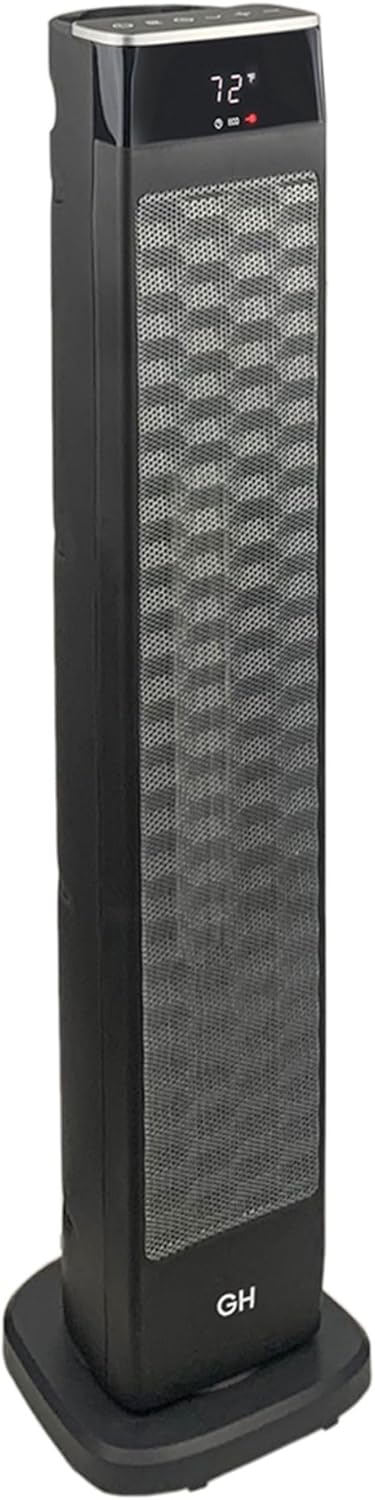
Front view of the Good Housekeeping 30-inch Oscillating Ceramic Tower Space Heater.

Key features of the Ceramic Tower Space Heater: Digital Display, On/Off Timer, Adjustable Thermostat, Oscillating Function, Overheating Protection, and Dual Heat Settings.

Dimensions and specifications: 30 inches tall, 7.8 inches deep/wide. Features include remote control, plug-in AC power, ceramic heating, 4.56 lbs weight, and 1500-Watt heating power.
Setup
Unpacking
Carefully remove the heater from its packaging. Ensure all components are present: the heater unit, remote control, and owner's manual. Inspect the heater for any signs of damage during shipping. If any damage is found, do not operate the heater and contact customer support.
Placement
Place the heater on a firm, level surface. Ensure it is at least 3 feet (0.9 meters) away from walls, furniture, curtains, and other combustible materials. Do not place the heater in areas where it could be easily tipped over or where the power cord could be a tripping hazard.
Power Connection
Plug the heater directly into a 120V AC wall outlet. Do not use extension cords, power strips, or surge protectors with this heater.
Operating Instructions
Control Panel and Remote Control
The heater can be operated using the control panel on top of the unit or the included remote control.
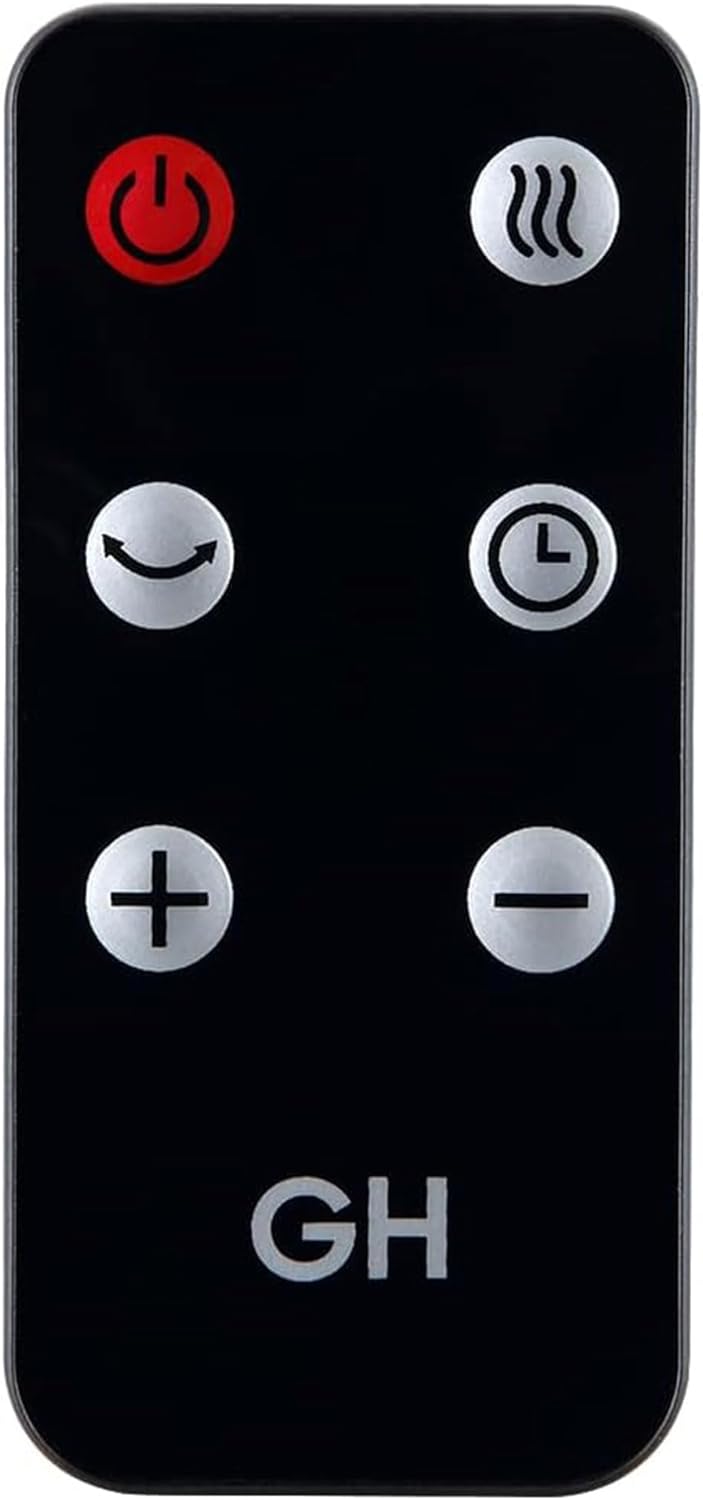
The remote control for the heater, featuring buttons for power, heat settings, oscillation, timer, and temperature adjustment.
Power On/Off
- Press the Power button () on the control panel or remote to turn the heater on or off.
Heat Settings
The heater has two heat settings:
- Press the Heat Setting button () to cycle between Low (I) and High (II) heat modes.
Adjusting Temperature
- Use the "+" and "-" buttons on the control panel or remote to set your desired temperature. The digital display will show the set temperature.
Oscillation Function
- Press the Oscillation button () to activate or deactivate the oscillating function, which distributes heat evenly across the room.

The heater in operation, demonstrating its oscillation feature to spread warmth.
Timer Function
- Press the Timer button () to set the auto-off timer for up to 12 hours. Each press increases the timer by one hour.
Remote Storage
The remote control can be conveniently stored in a slot on top of the heater unit when not in use.

Storing the remote control in its designated slot on the heater.
Maintenance
Cleaning
- Always unplug the heater from the wall outlet and allow it to cool completely before cleaning.
- To clean the exterior, wipe with a soft, damp cloth. Do not use abrasive cleaners or solvents.
- Do not immerse the heater in water or allow water to drip into the interior of the heater.
- For dust accumulation, use a vacuum cleaner with a brush attachment to gently clean the air intake and exhaust grilles.
Storage
When storing the heater, keep it in a cool, dry place. It is recommended to store it in its original packaging to protect it from dust and damage.
Troubleshooting
| Problem | Possible Cause | Solution |
|---|---|---|
| Heater does not turn on. | No power to the unit; Power switch is off; Tip-over switch activated; Overheat protection activated. | Ensure the heater is plugged into a working 120V outlet. Check if the power switch is in the ON position. Ensure the heater is on a flat, stable surface. Unplug the heater, wait 10 minutes for it to cool down, then plug it back in. |
| Heater stops working unexpectedly. | Overheat protection activated; Tip-over switch activated. | Unplug the heater, wait 10 minutes for it to cool down, then plug it back in. Ensure the heater is on a flat, stable surface. Check for blocked air vents. |
| Remote control not working. | Batteries are dead or incorrectly inserted; Obstruction between remote and heater. | Replace the remote control batteries (1 Lithium Metal battery, included). Ensure there is a clear line of sight between the remote and the heater's sensor. |
| Heater is not heating effectively. | Room size too large; Air vents blocked; Temperature setting too low. | This heater is recommended for spaces up to 200 sq ft. Ensure air vents are clear of obstructions. Increase the temperature setting. |
Specifications
| Feature | Detail |
|---|---|
| Model Number | 72033 |
| Brand | Good Housekeeping |
| Type | Oscillating Ceramic Tower Space Heater |
| Color | Black |
| Dimensions (D x W x H) | 8"D x 8"W x 31"H |
| Item Weight | 4.56 pounds |
| Power Output | 1500 Watts |
| Voltage | 120 Volts |
| Amperage | 12.5 Amps |
| Heat Settings | 2 (Low, High) |
| Timer | Up to 12 hours |
| Heating Coverage | Up to 200 square feet |
| Safety Features | Cool-touch housing, Automatic shut-off, Tip-over protection |
| Included Components | Heater unit, Remote Control, Owner's Manual |
| Batteries for Remote | 1 Lithium Metal battery (included) |
| UPC | 877697004570 |
Warranty and Support
This product is backed by the Good Housekeeping Seal, which includes a Limited Warranty. For details regarding the warranty, please refer to the official Good Housekeeping website or the warranty information provided with your purchase.
For technical support, troubleshooting assistance, or warranty claims, please contact OceanAire HomeGoods Company, the manufacturer of this product.
Please note: Specific contact information for support may be found on the product packaging or the official Good Housekeeping website.
Related documents72033


Ask a question about this manual
Ask about setup, troubleshooting, compatibility, parts, safety, or missing instructions. Manuals+ will review the question and use this page’s manual context to help answer it.