
1. Introduction
Thank you for choosing the Duronic BX48 Portable Bluetooth Speaker. This powerful boombox is designed to deliver high-quality audio with dynamic RGB lighting, making it suitable for various environments including outdoor events, home use, or sports activities. Its robust, water-resistant design (IPX5) ensures durability, while multiple connectivity options provide versatile audio playback. Please read this manual carefully to ensure proper use and maintenance of your device.

Image: The Duronic BX48 speaker, showcasing its design with active RGB lighting and an attached carrying strap.
2. Safety Information
To ensure safe operation and prevent damage, please observe the following precautions:
- Do not expose the speaker to extreme temperatures, direct sunlight, or open flames.
- While the speaker is IPX5 water-resistant, it is not designed for submersion. Avoid prolonged exposure to heavy rain or splashing.
- Do not disassemble, repair, or modify the device yourself. Refer all servicing to qualified personnel.
- Use only the provided charging cable or a certified equivalent.
- Keep the speaker away from children and pets.
- Avoid listening at excessively high volumes for extended periods to prevent hearing damage.
3. Package Contents
Verify that all items are present in the package:
- Duronic BX48 Portable Bluetooth Speaker
- USB Charging Cable
- Carrying Strap
- AUX Cable (3.5mm)
- User Manual (this document)
4. Product Overview
Familiarize yourself with the various parts and controls of your Duronic BX48 speaker.

Image: Rear panel connections including USB-A output, DC 5V input, AUX input, and Micro SD card slot.
Controls and Ports:
- Power Button: Press and hold to turn on/off.
- Mode Button: Cycle through Bluetooth, AUX, USB, and Micro SD modes.
- Play/Pause Button: Play or pause audio. Answer/end calls.
- Volume Up/Next Track: Short press for volume up, long press for next track.
- Volume Down/Previous Track: Short press for volume down, long press for previous track.
- RGB Light Button: Change or turn off LED light modes.
- TWS Button: Initiate True Wireless Stereo pairing.
- DC 5V Input: For charging the speaker.
- USB-A Output: For USB playback or charging external devices (power bank function).
- AUX Input: For connecting external audio devices via 3.5mm cable.
- Micro SD Card Slot: For playing audio from a Micro SD card (up to 32GB).
5. Setup
5.1 Charging the Speaker
- Connect the USB charging cable to the DC 5V input port on the speaker.
- Connect the other end of the USB cable to a compatible USB power adapter (not included) or a computer USB port.
- The charging indicator light will illuminate. A full charge takes approximately 4 hours.
- Once fully charged, the indicator light may change or turn off. Disconnect the charging cable.

Image: The USB-C charging port, illustrating how to connect the charging cable.
5.2 Attaching the Carrying Strap
- Locate the two attachment points on the top sides of the speaker.
- Attach each carabiner clip of the carrying strap to these points.
- Adjust the strap length for comfortable carrying.

Image: A hand demonstrating how to attach the carrying strap to the speaker's designated loop.
6. Operating Instructions
6.1 Power On/Off
- To power on, press and hold the Power button until the indicator light illuminates and you hear an audible prompt.
- To power off, press and hold the Power button again until the indicator light turns off.
6.2 Bluetooth Pairing
- Turn on the speaker. It will automatically enter Bluetooth pairing mode, indicated by a flashing blue light.
- Enable Bluetooth on your device (smartphone, tablet, computer).
- Search for "Duronic BX48" in your device's Bluetooth list and select it to connect.
- Once connected, the blue light will stop flashing, and you will hear a confirmation sound.

Image: A smartphone screen showing a successful Bluetooth connection to the speaker.
6.3 True Wireless Stereo (TWS) Pairing
TWS allows you to connect two Duronic BX48 speakers for a stereo sound experience.
- Ensure both BX48 speakers are powered on and not connected to any other Bluetooth device.
- On one speaker (this will be the primary speaker), press the TWS button. It will emit a pairing tone.
- The primary speaker will automatically search for and connect to the second speaker.
- Once connected, you will hear a confirmation sound, and the TWS indicator light will be solid on both speakers.
- Now, connect your device to the primary speaker via Bluetooth as described in section 6.2.

Image: Two Duronic BX48 speakers paired together, illustrating the True Wireless Stereo (TWS) function for enhanced sound.
6.4 AUX Input
- Connect one end of the 3.5mm AUX cable to the AUX input port on the speaker.
- Connect the other end to the audio output jack of your external device (e.g., MP3 player, laptop).
- The speaker will automatically switch to AUX mode, or you can press the Mode button to select AUX.
- Control playback and volume from your external device.

Image: The speaker connected to a laptop using an AUX cable, demonstrating wired audio input.
6.5 USB Playback
- Insert a USB flash drive containing audio files into the USB-A output port.
- The speaker will automatically switch to USB mode, or you can press the Mode button to select USB.
- Use the speaker's controls to play, pause, and skip tracks.
6.6 Micro SD Card Playback
- Insert a Micro SD card (up to 32GB) with audio files into the Micro SD card slot.
- The speaker will automatically switch to Micro SD mode, or you can press the Mode button to select Micro SD.
- Use the speaker's controls to play, pause, and skip tracks.

Image: A hand inserting a Micro SD card into the dedicated slot on the speaker.
6.7 RGB Light Control
Press the RGB Light button to cycle through different light modes or to turn the lights off.

Image: The speaker showcasing its dynamic RGB lighting effects.
6.8 Answering Calls (Hands-free)
When connected via Bluetooth, the speaker can be used for hands-free calls.
- To answer a call: Press the Play/Pause button.
- To end a call: Press the Play/Pause button again.
- To reject a call: Press and hold the Play/Pause button.

Image: The speaker with visual cues representing its hands-free calling capability.
6.9 Equalizer Settings
The speaker may feature an equalizer function to adjust sound profiles. Refer to the specific controls on the device or any associated app for details on how to access and modify these settings.

Image: The speaker with an icon representing equalizer settings, indicating customizable sound profiles.
7. Maintenance
- Cleaning: Wipe the speaker with a soft, damp cloth. Do not use abrasive cleaners or solvents.
- Storage: Store the speaker in a cool, dry place away from direct sunlight and extreme temperatures when not in use for extended periods.
- Battery Care: To prolong battery life, fully charge the speaker before first use and recharge it at least once every three months if not used regularly.
8. Troubleshooting
| Problem | Possible Cause | Solution |
|---|---|---|
| Speaker does not turn on. | Low battery. | Charge the speaker fully. |
| Cannot pair via Bluetooth. | Speaker not in pairing mode; device Bluetooth off; too far from speaker. | Ensure speaker is in pairing mode. Turn device Bluetooth off and on. Move device closer to speaker (within 10m). |
| No sound. | Volume too low; incorrect input mode; cable not connected properly. | Increase volume on speaker and connected device. Press Mode button to select correct input. Check cable connections. |
| TWS pairing fails. | Speakers too far apart; one speaker already connected to another device. | Ensure speakers are close to each other. Disconnect any Bluetooth devices from both speakers before TWS pairing. |
| USB/Micro SD not playing. | Unsupported file format; card/drive not inserted correctly; corrupted files. | Ensure audio files are in a supported format. Reinsert the USB drive or Micro SD card. Try with different files or storage device. |
9. Specifications
| Feature | Detail |
|---|---|
| Model Number | BX48 |
| Brand | Duronic |
| Speaker Type | Portable Bluetooth Speaker, Stereo |
| Output Power | 40W RMS / 80W Peak |
| Frequency Response | 80Hz - 12KHz |
| Connectivity Technology | Bluetooth, Auxiliary (3.5mm), USB, Micro SD |
| Bluetooth Range | Up to 10 meters (33 feet) |
| Water Resistance | IPX5 (splash-proof) |
| Battery Capacity | 3600mAh |
| Playback Time | Up to 4.5 hours (at 50% volume) |
| Charging Time | Approximately 4 hours (with SC5V 2A charger) |
| Dimensions (L x W x H) | 39 cm x 13.7 cm x 17.5 cm (15.4 in x 5.4 in x 6.9 in) |
| Weight | 2.7 Kilograms |
| Special Features | RGB LED Lights, TWS Function, Hands-free Calling, USB Power Bank Function |
| Compatible Devices | Smartphone, Tablet, Laptop, MP3 Player |

Image: Visual representation of the speaker's 80W Peak and 40W RMS audio output.

Image: The speaker highlighting its frequency response range of 80Hz to 12000Hz.

Image: Detailed dimensions of the Duronic BX48 speaker.
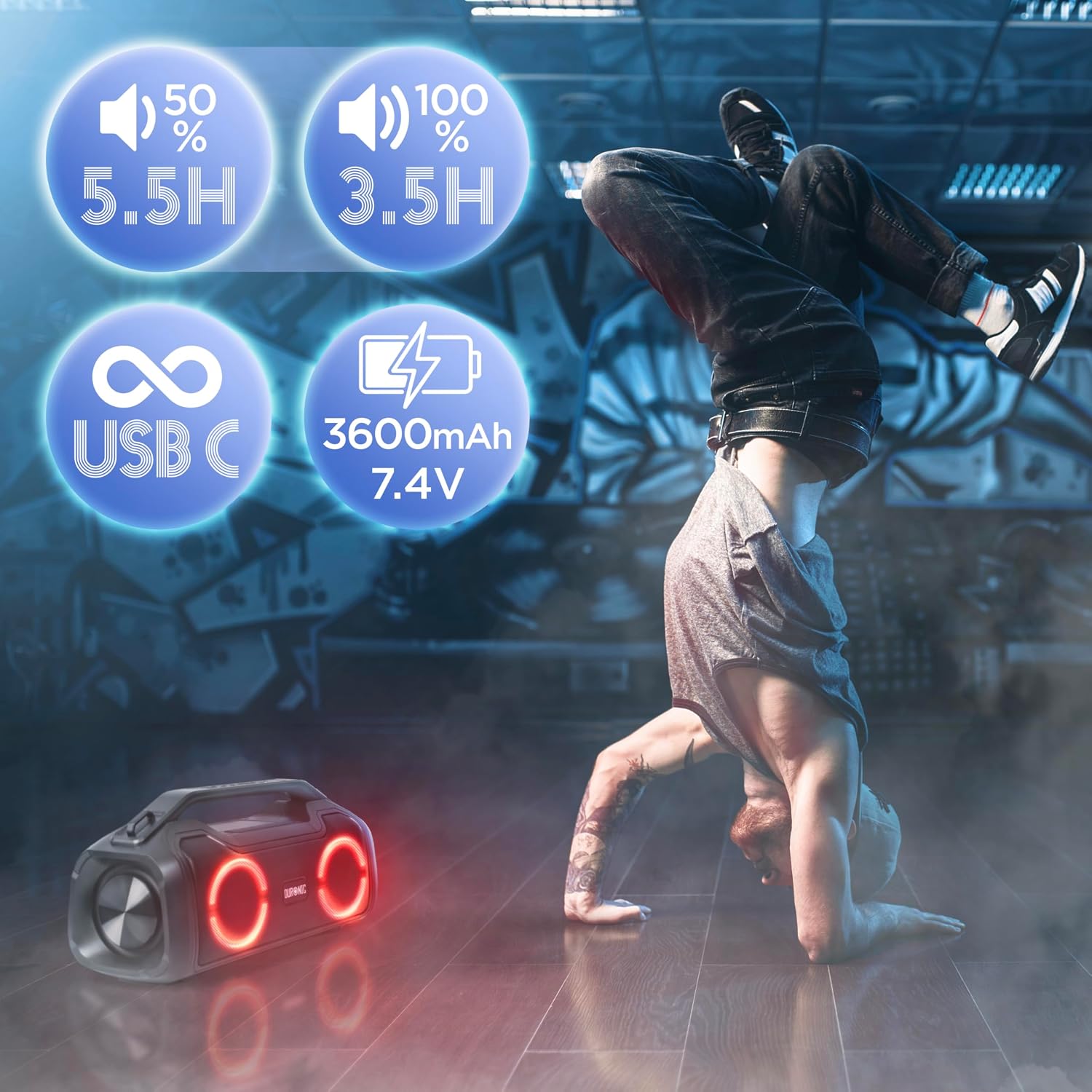
Image: Information on battery capacity (3600mAh) and playback times at different volume levels.
10. Warranty and Support
The Duronic BX48 Portable Bluetooth Speaker comes with a limited warranty. For detailed warranty information, product support, or to register your product, please visit the official Duronic website or contact their customer service.
Website: www.duronic.com (Please note: This is a placeholder URL. Refer to your product packaging or official documentation for the correct support website.)