
Introduction
Thank you for purchasing the CHiQ U55QG7L QLED TV. This manual provides essential information for setting up, operating, and maintaining your new television. Please read these instructions carefully before using the product and retain them for future reference.

The CHiQ U55QG7L QLED TV features Android 11, 4K HDR, and a frameless design, offering an immersive viewing experience.
Safety Information
To ensure safe operation and prevent damage, observe the following safety precautions:
- Do not expose the TV to rain or moisture.
- Ensure proper ventilation; do not block ventilation openings.
- Do not place the TV on an unstable cart, stand, tripod, bracket, or table.
- Protect the power cord from being walked on or pinched.
- Unplug the TV during lightning storms or when unused for long periods.
- Refer all servicing to qualified service personnel.
Package Contents
Verify that all items are present in the package:
- CHiQ U55QG7L QLED TV
- Remote Control
- TV Stand (2 pieces)
- Screws for Stand Assembly
- Power Cable
- User Manual (this document)
Setup
Attaching the Stand
- Carefully place the TV face-down on a soft, flat surface to prevent screen damage.
- Align each stand piece with the corresponding slots on the bottom of the TV.
- Secure the stands using the provided screws.
Wall Mounting (Optional)
The TV is compatible with VESA standard wall mounts. For wall mounting, remove the stands and use appropriate VESA-compliant hardware (not included). Consult a professional for installation.
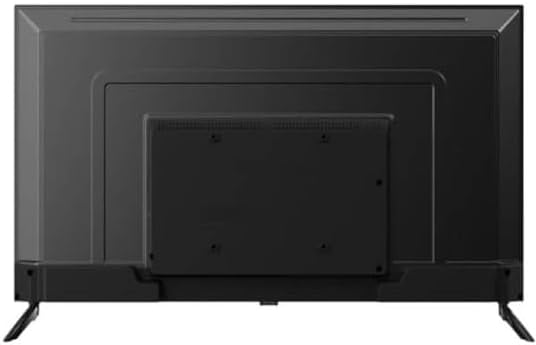
Rear view of the CHiQ U55QG7L QLED TV, showing mounting points for the stand or wall bracket.
Connecting Peripherals
Connect external devices such as set-top boxes, gaming consoles, or Blu-ray players to the HDMI ports. Use the USB ports for media playback or connecting USB devices. Connect your antenna cable to the RF input for terrestrial TV channels.
Initial Power On and Setup Wizard
After connecting the power cable, press the power button on the remote control. The TV will guide you through the initial setup process, including language selection, network connection (Wi-Fi), and Google account sign-in for Android TV features.
Operating
Remote Control Overview
The remote control allows you to navigate the TV's functions. Key buttons typically include:
- Power: Turns the TV on/off.
- Input: Selects the input source (HDMI, TV, USB).
- Volume +/-: Adjusts the volume level.
- Channel +/-: Changes TV channels.
- Home: Accesses the Android TV home screen.
- Navigation (Up/Down/Left/Right) & OK: For menu navigation and selection.
- Back: Returns to the previous screen.
- Google Assistant: Activates voice control.
Smart TV Features
The CHiQ U55QG7L runs on Android TV, providing access to a wide range of streaming services and applications via the Google Play Store. Use the Google Assistant for voice commands and smart home integration.
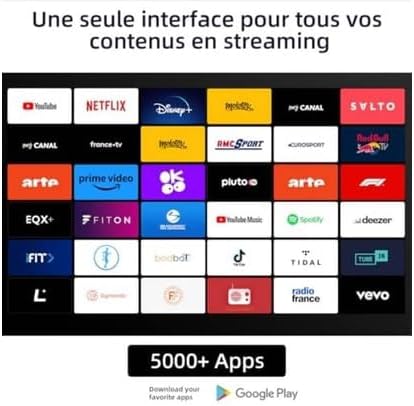
A display of various streaming applications available on the CHiQ U55QG7L QLED TV, including YouTube, Netflix, Disney+, and Prime Video.
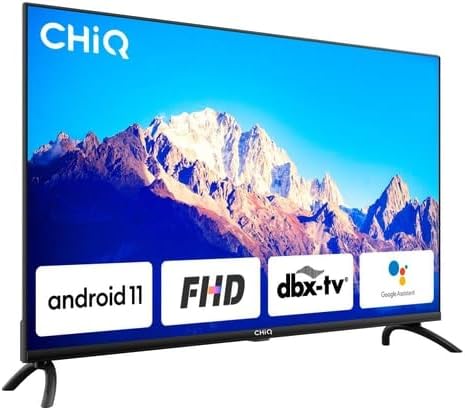
The CHiQ U55QG7L QLED TV showcasing key features like Android 11, FHD compatibility, dbx-tv audio, and integrated Google Assistant.
Picture and Sound Settings
Access the TV's settings menu to customize picture and sound. Adjust brightness, contrast, color, and sharpness. Select from various sound modes (e.g., Standard, Movie, Music) or customize equalizer settings. The TV supports HDR and Dolby Vision for enhanced visual quality and Dolby Audio and dbx-tv for superior sound.

A vibrant image demonstrating the enhanced picture quality of the CHiQ U55QG7L QLED TV with 4K, HDR, and Dolby Vision technologies.
Maintenance
Cleaning the Screen
Gently wipe the screen with a soft, dry, lint-free cloth. For stubborn marks, slightly dampen the cloth with water or a specialized screen cleaner. Never spray liquid directly onto the screen.
General Care
Avoid placing the TV in direct sunlight or near heat sources. Ensure adequate air circulation around the TV. Do not place heavy objects on top of the TV.
Troubleshooting
If you encounter issues with your TV, refer to the following common solutions:
- No Power: Check if the power cable is securely connected and the power outlet is functional.
- No Picture/Sound: Verify the correct input source is selected. Check external device connections.
- Remote Control Not Working: Replace batteries. Ensure there are no obstructions between the remote and the TV's IR sensor.
- Poor Picture Quality: Check antenna connection or internet speed for streaming content. Adjust picture settings.
- No Internet Connection: Restart your router. Check Wi-Fi settings on the TV.
Specifications
| Model Number | 100015647 |
| Display Type | QLED |
| Screen Size | 55 inches (139 cm) |
| Resolution | 4K UHD (3840 x 2160) |
| HDR Support | HDR, Dolby Vision |
| Colors | 1.07 Billion Colors |
| Operating System | Android 11 |
| Memory | 2GB RAM, 16GB ROM |
| Connectivity | 2.4/5GHz Wi-Fi |
| Audio Technology | Dolby Audio, dbx-tv |
| Weight | 15.5 Kilograms |
| Energy Efficiency Class | G (84 kWh/1000h) |

The energy efficiency label for the CHiQ U55QG7L QLED TV, indicating an energy class G rating and 84 kWh/1000h consumption.

A collage highlighting key specifications of the CHiQ U55QG7L QLED TV, including QLED, 4K HDR, 1.07 Billion Colors, Android TV OS, 2.4/5GHz Wi-Fi, 2GB RAM + 16GB ROM, frameless design, dbx-tv, and Dolby Audio.
Warranty and Support
For warranty information and technical support, please refer to the warranty card included with your product or visit the official CHiQ website. Do not attempt to repair the TV yourself, as this may void your warranty.


