
Introduction
Thank you for purchasing the Lapcare Go Beat VI LBS315 Portable Bluetooth Speaker. This manual provides important information regarding the setup, operation, and maintenance of your speaker. Please read this manual carefully before using the product to ensure optimal performance and longevity.
Important Safety Information
- Do not expose the speaker to extreme temperatures, direct sunlight, or high humidity.
- Do not disassemble, repair, or modify the speaker. This may void the warranty and pose a safety risk.
- Keep the speaker away from water and other liquids. While it is waterproof, prolonged submersion or exposure to harsh chemicals should be avoided.
- Use only the provided charging cable or a certified equivalent.
- Avoid listening at high volume levels for extended periods to prevent hearing damage.
Package Contents
Verify that all items are present in your package:
- 1 x Lapcare Go Beat VI LBS315 Speaker
- 1 x Charging Cable (Micro USB)
Product Overview
Familiarize yourself with the speaker's components and controls.
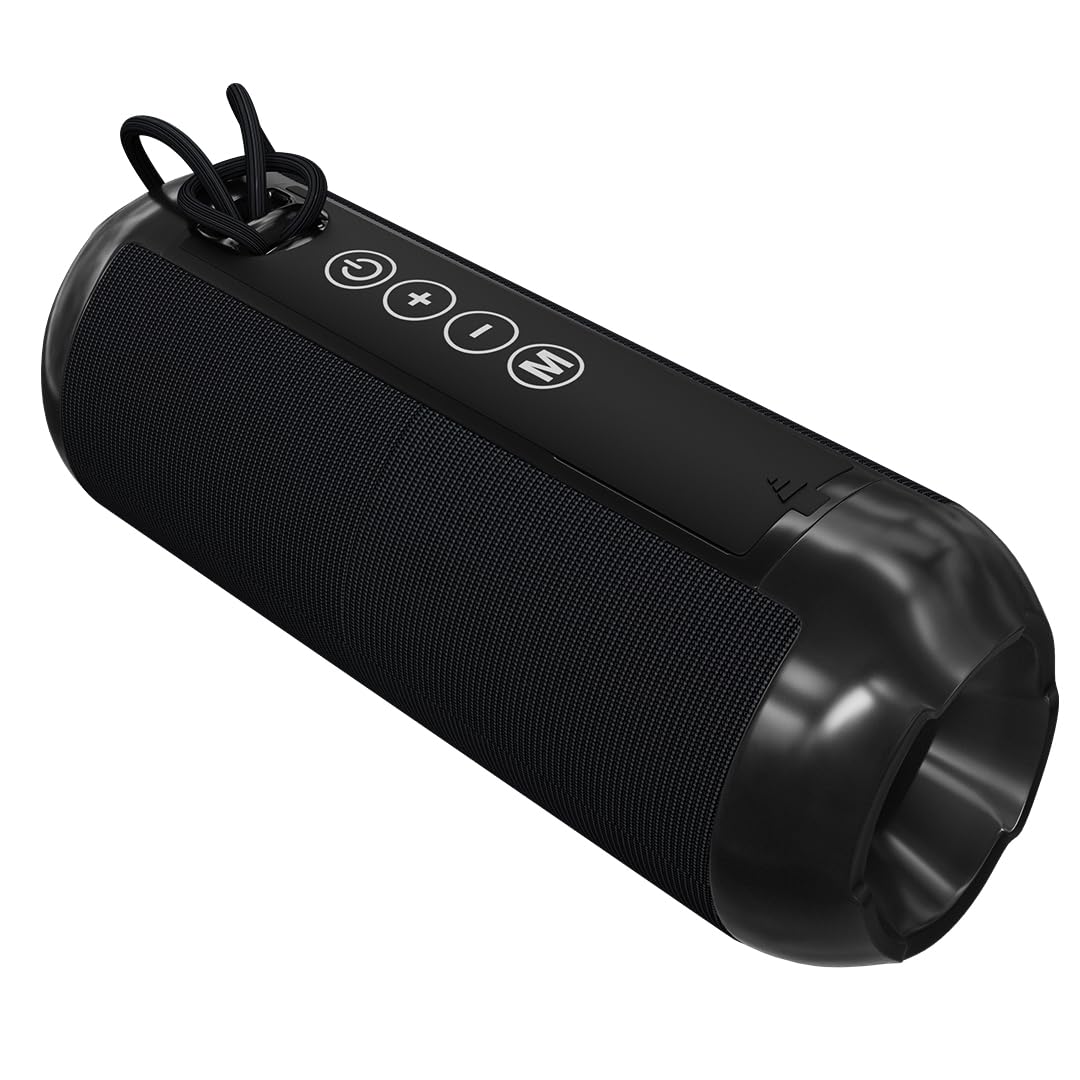
Figure 1: Front view of the Lapcare Go Beat VI LBS315 speaker with control buttons.

Figure 2: Rear view of the Lapcare Go Beat VI LBS315 speaker detailing control buttons and input ports.
Control Buttons:
- Power Button (⑂): Press and hold to power on/off.
- Volume Up (+): Short press to increase volume. Long press for next track.
- Volume Down (-): Short press to decrease volume. Long press for previous track.
- Mode Button (M): Press to switch between Bluetooth, AUX, and TF Card modes.
Input Ports:
- Micro USB Port: For charging the speaker.
- TF Card Slot: Insert a TF (MicroSD) card for direct music playback.
- AUX Port: Connect external audio devices using a 3.5mm audio cable.
- USB A Port: For USB drive playback.
Setup
1. Charging the Speaker
Before first use, fully charge the speaker.
- Connect the Micro USB charging cable to the speaker's Micro USB port.
- Connect the other end of the cable to a USB power adapter (DC 5V/1A, not included) or a computer's USB port.
- The charging indicator light will illuminate. It will turn off or change color once fully charged.
2. Powering On/Off
Press and hold the Power Button (⑂) for approximately 3 seconds to turn the speaker on or off.
3. Bluetooth Pairing
- Ensure the speaker is powered on and in Bluetooth mode (indicated by a flashing LED). If not, press the Mode Button (M) to switch to Bluetooth mode.
- Enable Bluetooth on your smartphone, tablet, or other Bluetooth-enabled device.
- Search for available Bluetooth devices and select "LAPCARE Go Beat VI" from the list.
- Once paired, the speaker will emit a confirmation sound, and the LED indicator will stop flashing.
- The speaker will automatically reconnect to the last paired device when powered on, if the device's Bluetooth is active and within range.
Operating Instructions
Music Playback
- Play/Pause: In Bluetooth mode, a short press of the Power Button (⑂) will play or pause music.
- Next Track: Long press the Volume Up (+) button.
- Previous Track: Long press the Volume Down (-) button.
- Volume Adjustment: Short press the Volume Up (+) or Volume Down (-) buttons.
Switching Modes
Press the Mode Button (M) to cycle through available playback modes: Bluetooth, AUX, TF Card, and USB.
True Wireless Stereo (TWS) Function
The TWS function allows you to connect two Lapcare Go Beat VI LBS315 speakers for a stereo sound experience.

Figure 3: Two speakers connected via TWS for enhanced stereo sound.
- Ensure both speakers are powered on and not connected to any Bluetooth device.
- On one speaker (this will be the primary speaker), double-press the Mode Button (M). The speaker will enter TWS pairing mode.
- The two speakers will automatically search for and connect to each other. A confirmation tone will sound once connected.
- Once TWS is established, connect your device to the primary speaker via Bluetooth as described in the "Bluetooth Pairing" section.
- To disconnect TWS, double-press the Mode Button (M) on either speaker.
Maintenance
- Cleaning: Use a soft, dry cloth to clean the speaker. Do not use abrasive cleaners or solvents.
- Storage: Store the speaker in a cool, dry place when not in use for extended periods.
- Battery Care: To prolong battery life, charge the speaker regularly, even if not used frequently. Avoid fully discharging the battery for long periods.
Troubleshooting
| Problem | Possible Cause | Solution |
|---|---|---|
| Speaker does not power on. | Low battery. | Charge the speaker fully. |
| Cannot pair via Bluetooth. | Speaker is not in pairing mode; device Bluetooth is off; speaker is already connected to another device; too far from device. | Ensure speaker is in Bluetooth pairing mode. Turn on device Bluetooth. Disconnect from other devices. Move speaker closer to device (within 15 meters). |
| No sound or low volume. | Volume too low on speaker or device; incorrect mode selected; speaker not properly connected. | Increase volume on both speaker and connected device. Ensure correct mode (Bluetooth, AUX, TF Card, USB) is selected. Re-pair Bluetooth or re-connect AUX cable. |
| TWS pairing fails. | Speakers are already connected to a device; incorrect TWS pairing procedure. | Ensure both speakers are disconnected from any Bluetooth devices before initiating TWS pairing. Follow TWS pairing steps carefully. |
Specifications
| Feature | Detail |
|---|---|
| Model Name | LBS315 (also referred to as LBS-312) |
| Brand | Lapcare |
| Speaker Maximum Output Power | 10 Watts RMS |
| Connectivity Technology | Bluetooth V5.3 |
| Wireless Range | Up to 15 meters |
| Audio Output Mode | Stereo |
| Input Voltage | DC 5V/1A |
| Speaker Type | Portable Bluetooth Speaker |
| Driver Size | 45mm |
| Product Features | TWS Function, Easy Access Controls, Stereo Sound |
| Water Resistance Level | Waterproof |
| Control Method | Button |
| Battery Average Life | Up to 10 Hours |
| Dimensions (D x W x H) | 6D x 14W x 6H Centimeters |
| Weight | 400 Grams |
| Compatible Devices | Smartphone, Tablet |
Warranty Information
The Lapcare Go Beat VI LBS315 speaker comes with a 1-year manufacturer warranty from the date of purchase. This warranty covers manufacturing defects. It does not cover damage caused by misuse, accidents, unauthorized modifications, or normal wear and tear. Please retain your purchase receipt for warranty claims.
Support
For technical support or warranty inquiries, please contact Lapcare customer service:
- Manufacturer Contact: Rx Infotech Private Ltd
- Phone: 8587812000
You can also visit the official Lapcare website for more information and support resources.