
1. Introduction
This instruction manual provides comprehensive information for the INJORA CNC Aluminum Rear Bumper with Light, specifically designed for 1/18 RC Crawler TRX4M Defender models. This high-quality upgrade part is engineered to enhance both the durability and aesthetic appeal of your RC vehicle.
Please read this manual thoroughly before installation and use to ensure proper fitment and optimal performance.
2. Product Overview and Features
The INJORA Rear Bumper is crafted from durable CNC-machined aluminum, providing superior protection and a robust upgrade for your RC crawler. Key features include:
- High-Quality Material: CNC-machined aluminum construction ensures durability and a premium finish.
- Enhanced Protection: Designed to effectively protect the RC car body from impacts.
- Integrated LED Lights: Equipped with LED lights for improved visibility and realistic appearance.
- Removable Tow Hitch: Features a removable tow hitch, adding functionality and improving the RC car's performance.
- Direct Fit: No modifications required, compatible with the standard 1/18 TRX4M Defender body.

Figure 2.1: Overview of the INJORA CNC Aluminum Rear Bumper, showcasing its robust design, integrated D-rings, and removable tow hitch.
3. Package Contents
Upon opening the package, please verify that all components are present and undamaged. The package should contain:
- 1 x INJORA CNC Aluminum Rear Bumper with integrated LED lights
- 1 x Removable Tow Hitch
- Mounting Hardware (screws, nuts, etc. - specific quantities may vary, refer to installation steps)

Figure 3.1: Image showing both the front and rear bumper options. This manual specifically covers the rear bumper.
4. Safety Information
Please observe the following safety precautions during installation and use:
- Keep small parts out of reach of children to prevent choking hazards.
- Use appropriate tools for installation to avoid injury or damage to the product.
- Ensure all screws are tightened securely, but do not overtighten to prevent stripping threads.
- If connecting LED lights, ensure correct polarity and voltage to avoid damage to the lights or your RC vehicle's electronics.
5. Setup and Installation
The INJORA Rear Bumper is designed for straightforward installation on the 1/18 TRX4M Defender. No modifications to the standard body are required.
5.1 Tools Required
- Small Phillips head screwdriver
- Hex wrenches (if applicable for specific screws)
5.2 Installation Steps
- Prepare the Vehicle: Carefully remove the existing rear bumper from your 1/18 TRX4M Defender. Keep any original screws that may be reused.
- Position the New Bumper: Align the INJORA CNC Aluminum Rear Bumper with the mounting points on the chassis of your RC vehicle.
- Secure the Bumper: Use the provided mounting hardware (or original screws if compatible) to securely attach the new bumper to the chassis. Ensure all screws are snug.
- Connect LED Lights (if applicable): If your bumper includes LED lights, carefully route the wiring and connect them to an appropriate power source on your RC vehicle (e.g., receiver, dedicated light port). Ensure correct polarity.
- Attach Tow Hitch: The removable tow hitch can be installed by sliding it into the designated slot on the bumper and securing it with the provided pin or screw.

Figure 5.1: Detailed view of the INJORA Rear Bumper's mounting points and structure, aiding in correct installation.
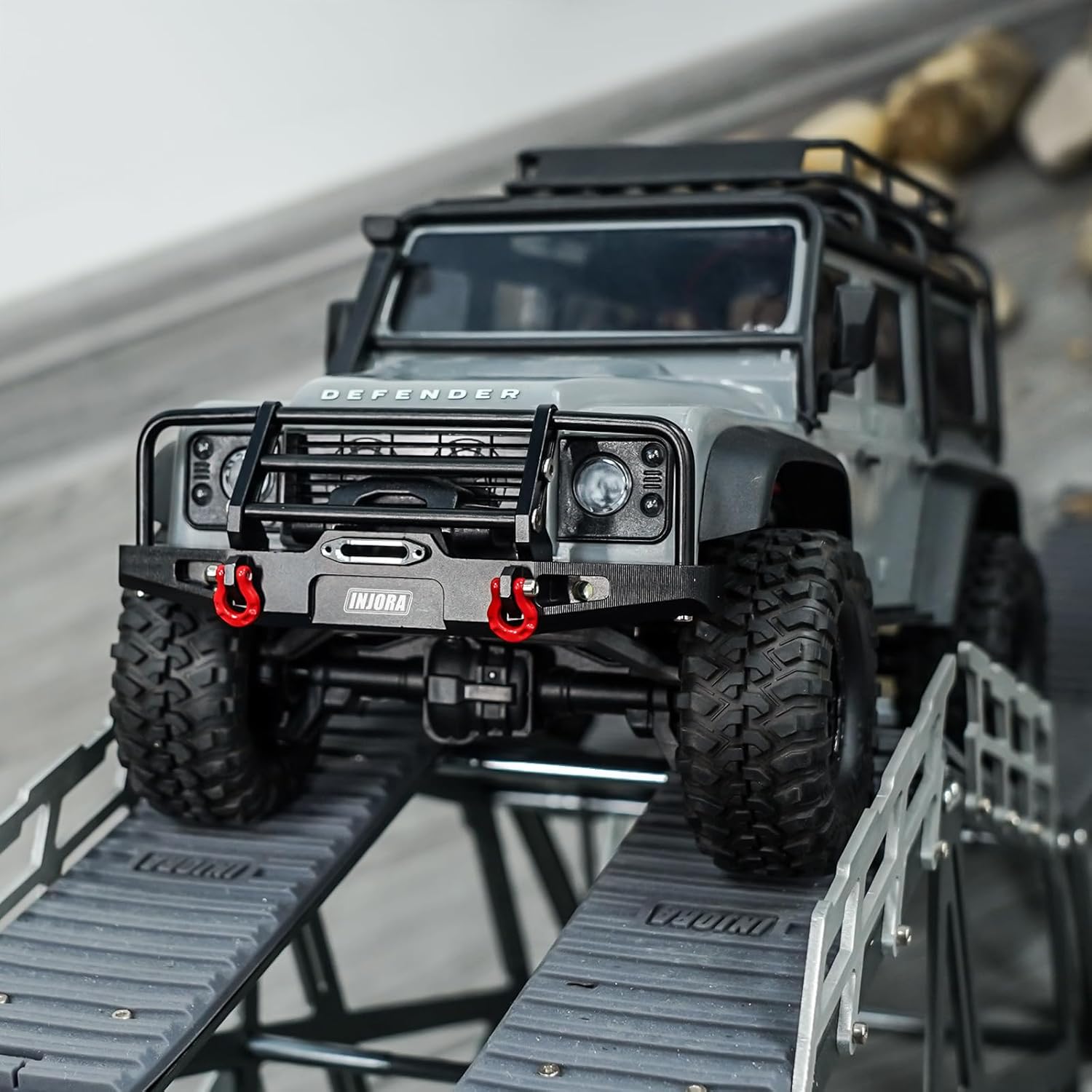
Figure 5.2: The INJORA Rear Bumper shown installed on a 1/18 TRX4M Defender RC crawler, demonstrating its fit and appearance.
6. Operating Instructions
Once installed, the INJORA Rear Bumper operates passively as a protective and aesthetic component. The integrated LED lights will function when connected to your RC vehicle's power system and activated (if your RC system has a switch for lights).
- LED Lights: Ensure proper connection to your RC car's lighting circuit. Turn on your RC car's power to activate the lights.
- Tow Hitch: The removable tow hitch can be used for scale towing applications. Ensure any towed load is within the safe limits of your RC vehicle.
7. Maintenance
To ensure the longevity and optimal appearance of your INJORA Rear Bumper, follow these simple maintenance guidelines:
- Cleaning: Wipe the bumper clean with a soft, damp cloth after use, especially if exposed to dirt, mud, or water. Avoid abrasive cleaners.
- Inspection: Periodically inspect all screws and mounting points to ensure they remain tight. Retighten if necessary.
- LED Lights: Check LED lights for proper function. If any lights fail, inspect wiring connections.
- Damage: In case of significant impact, inspect the bumper for any bends, cracks, or damage. Replace if structural integrity is compromised.
8. Troubleshooting
This section addresses common issues you might encounter:
| Problem | Possible Cause | Solution |
|---|---|---|
| Bumper is loose after installation. | Screws are not fully tightened. | Retighten all mounting screws. |
| LED lights are not working. | Incorrect wiring connection, reversed polarity, or no power from RC car. | Check wiring connections and polarity. Ensure your RC car's power system is on and providing power to the light circuit. |
| Bumper does not fit correctly. | Incorrect model application or misaligned during installation. | Ensure your RC car is a 1/18 TRX4M Defender. Re-align the bumper carefully during installation. |
9. Specifications
| Attribute | Detail |
|---|---|
| Part Number | 4M-88R |
| Material | CNC Aluminum |
| Color | Black |
| Rear Bumper Weight | 26 g (0.92 ounces) |
| Packaging Dimensions | 10 x 7 x 1.8 cm |
| Assembly Required | No |
| Batteries Required | No (for bumper operation) |
| Compatibility | 1/18 TRX4M Defender |

Figure 9.1: Dimensional drawing of the INJORA Rear Bumper, showing a width of 91mm (3.58 inches).
10. Warranty and Support
For warranty information or technical support, please contact INJORA directly through their official website or the retailer from whom you purchased the product. Keep your proof of purchase for any warranty claims.
For more products and information, visit the INJORA Store on Amazon.